Discord counting bot
Saves, checkpoints, and a record for every counting channel.
Pick a channel and your members count up together, one number each. Your bot reacts to every right number and keeps each channel's record, and you decide what a wrong number does. It's all set up on one page in BotGhost, the no-code Discord bot maker.
Counting is free on every bot, and nothing on its page needs Premium.

What the counting bot does with a wrong number
The bot puts a red cross on a wrong number, and you choose what happens next. Press a choice to see it play out in #counting.
Start again
The count goes back to 1, or to the start number you picked. If that run was the channel's best yet, it becomes the new record.
You can also give whoever broke it a role like Ruined it. The bot takes the role back an hour later, or after the number of minutes you set.
Record: 1,288
Back to a checkpoint
Say you're at 1,288 with a checkpoint every 100. Someone messes up, the count drops to 1,200, and the next number is 1,201 instead of 1.
On the way back up to 1,288, nobody earns saves or milestones again, since the server already got those.
Keep going
Tom's wrong number gets a cross and disappears a few seconds later. Nothing resets, so the next person types the number that was due.
Tom's mistake still counts against him in /count me.
Use a save
Switch on saves and the server earns one every 500 counts, holding 2 at most. You can change both numbers. A mistake then uses up a save and the count carries on.
Saves work with Start again and Back to a checkpoint. Once they run out, the next mistake ends the run.
What counts in a Discord counting channel
The bot checks every message in a counting channel, using the settings Counting starts with until you change them.
- 67Counts, when 67 is the next numberRight numbers get a reaction and a point on the leaderboard.
- 6*7Counts as 42Maths is on to start with. Only numbers and + - * / ^ ( ) work.
- 1,000Counts as 1000Commas in big numbers are fine.
- 67 nearly thereDeleted, but it isn't a mistakeSet A count is to The number, then anything and this counts as 67.
- gg everyoneDeletedSwitch on Let people talk in the channel and chat stays put.
- Tom counts twice in a rowDeleted with a note, but it isn't a mistakeMembers take turns unless you let someone count twice in a row.
- A number before the wait is upDeleted with a note, but it isn't a mistakeOnly if you set a wait between counts. There's no wait to start with.
- Two people type 68 at onceThe second one is deleted, but it isn't a mistakeWhoever got there first keeps the count.
You can change every one of these on the Channels and rules tab, and set the number counting starts from.
Every Counting setting in the dashboard
Counting has one page in your dashboard: four tabs, then its commands and events. To give one server its own settings, pick it in the server menu at the top.
Pick the channels and the rules
Pick the channels people count in. Each one is its own game with its own number and record. Then decide what counts as a number.

Where people count
- Counting channels
- The bot checks each message in these channels. Add one in each server you want a game in.
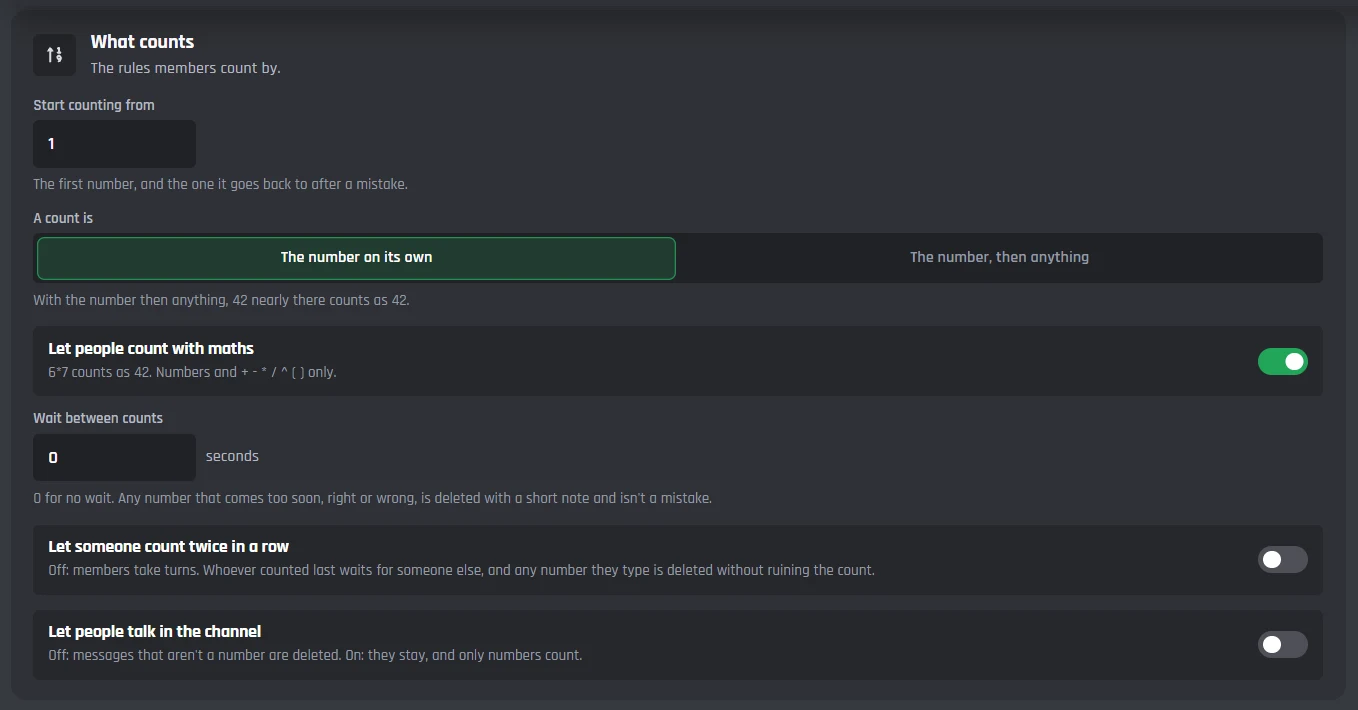
What counts
- Start counting from
- The first number, and where Start again goes back to. 1 to start with.
- A count is
- The number on its own, or the number then anything.
- Let people count with maths
- 6*7 counts as 42. On to start with.
- Wait between counts
- In seconds. 0 means no wait.
- Let someone count twice in a row
- Off to start with, so members take turns.
- Let people talk in the channel
- Off to start with, so anything that isn't a number gets deleted.
Mistakes and saves
Choose what a wrong number does, give whoever ruined the count a role for a while, and switch on saves.
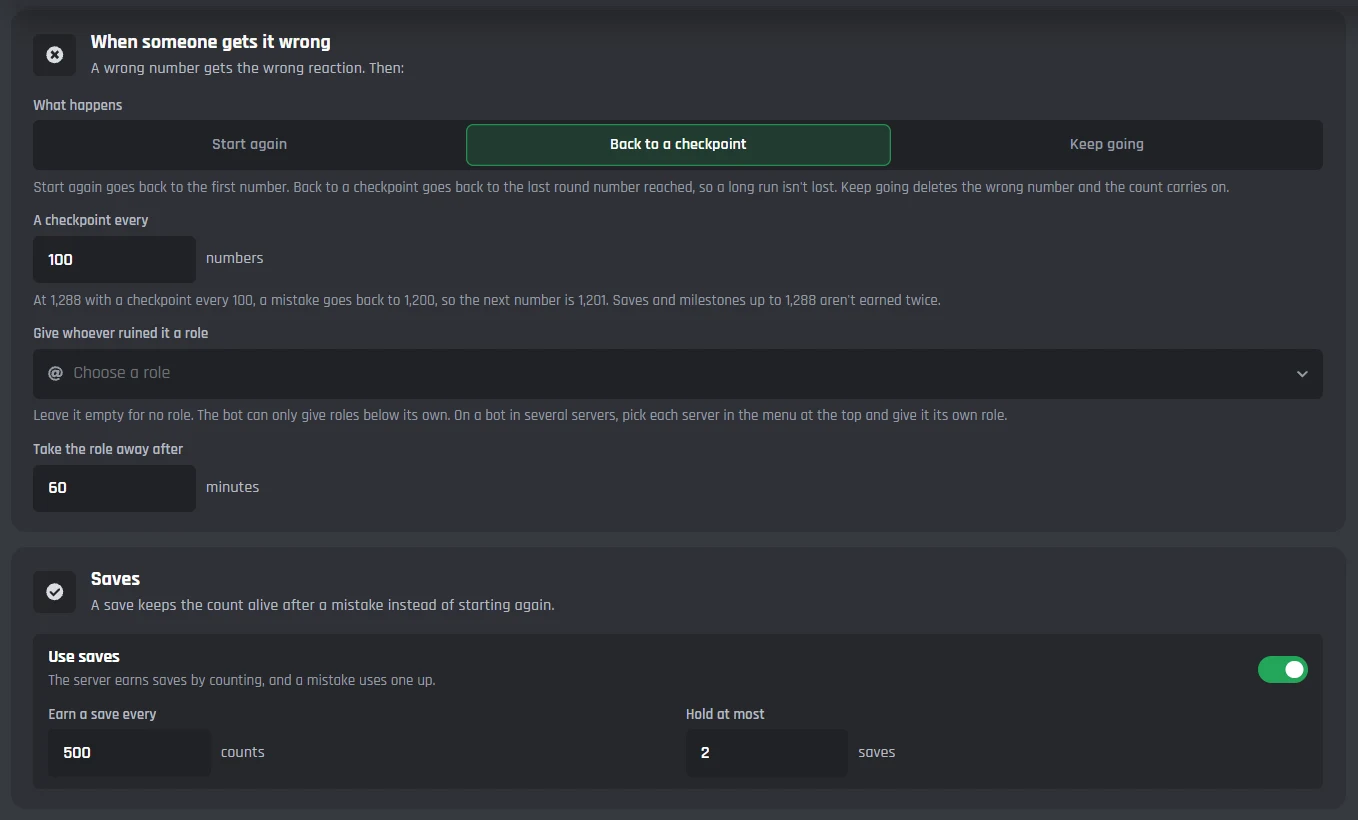
When someone gets it wrong
- What happens
- Start again, Back to a checkpoint, or Keep going.
- A checkpoint every
- 100 numbers to start with.
- Give whoever ruined it a role
- Leave it empty for no role. The bot can only give roles below its own.
- Take the role away after
- 60 minutes to start with.
Saves
- Use saves
- Off to start with.
- Earn a save every
- 500 counts to start with.
- Hold at most
- 2 saves to start with.
Milestones and new records
Every round number, the bot can post a message, give a role, or both. It also tells the channel, once a run, when the count beats its record.
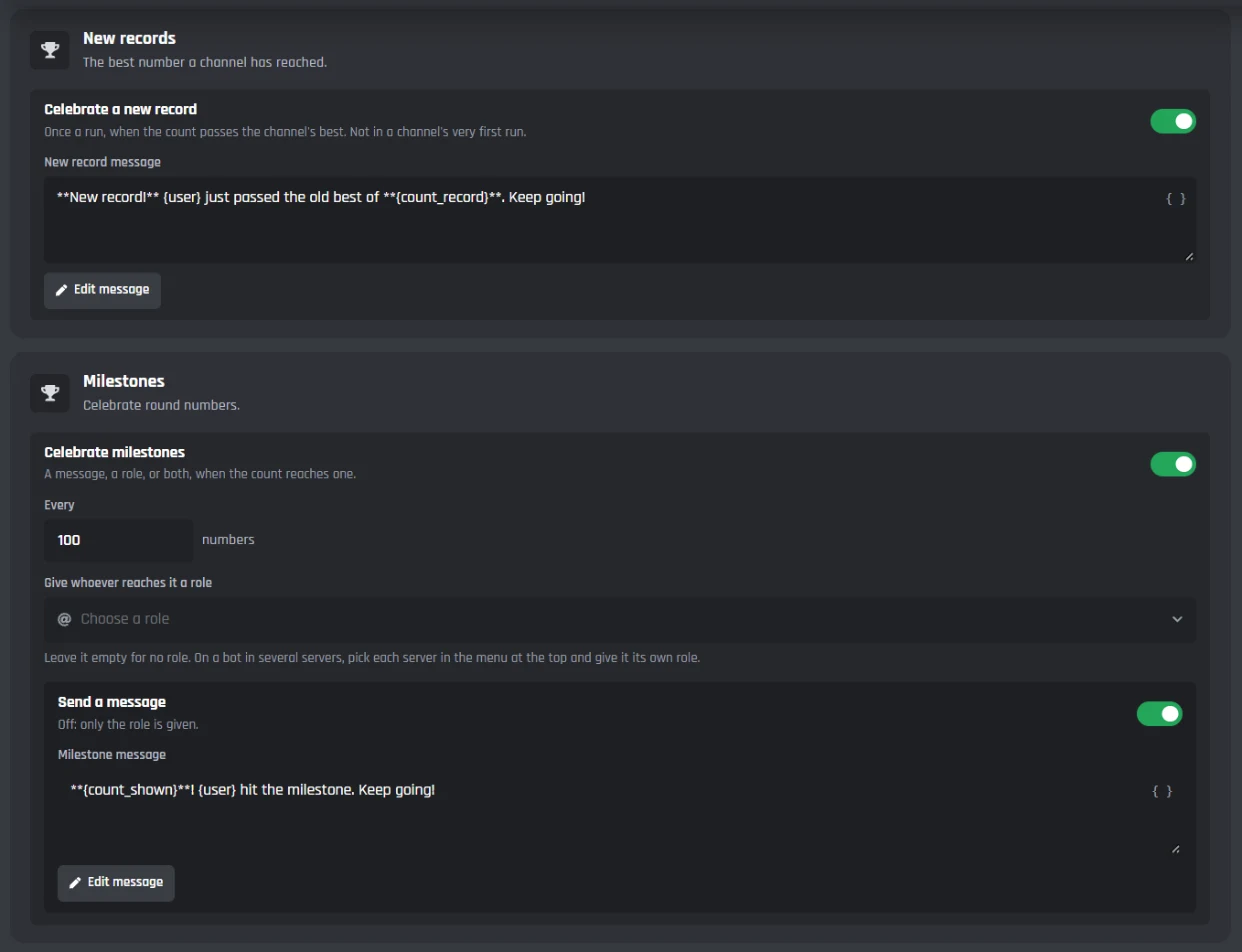
New records
- Celebrate a new record
- On to start with. Never in a channel's first run, since there's no record to beat yet.
Milestones
- Celebrate milestones
- On to start with.
- Every
- 100 numbers to start with.
- Give whoever reaches it a role
- Leave it empty for no role.
- Send a message
- Turn it off and the bot only gives the role.
Reactions and the bot's messages
Pick the reactions for right numbers, wrong numbers, and saves. You can post counts as the member, and change or switch off each message the bot sends.
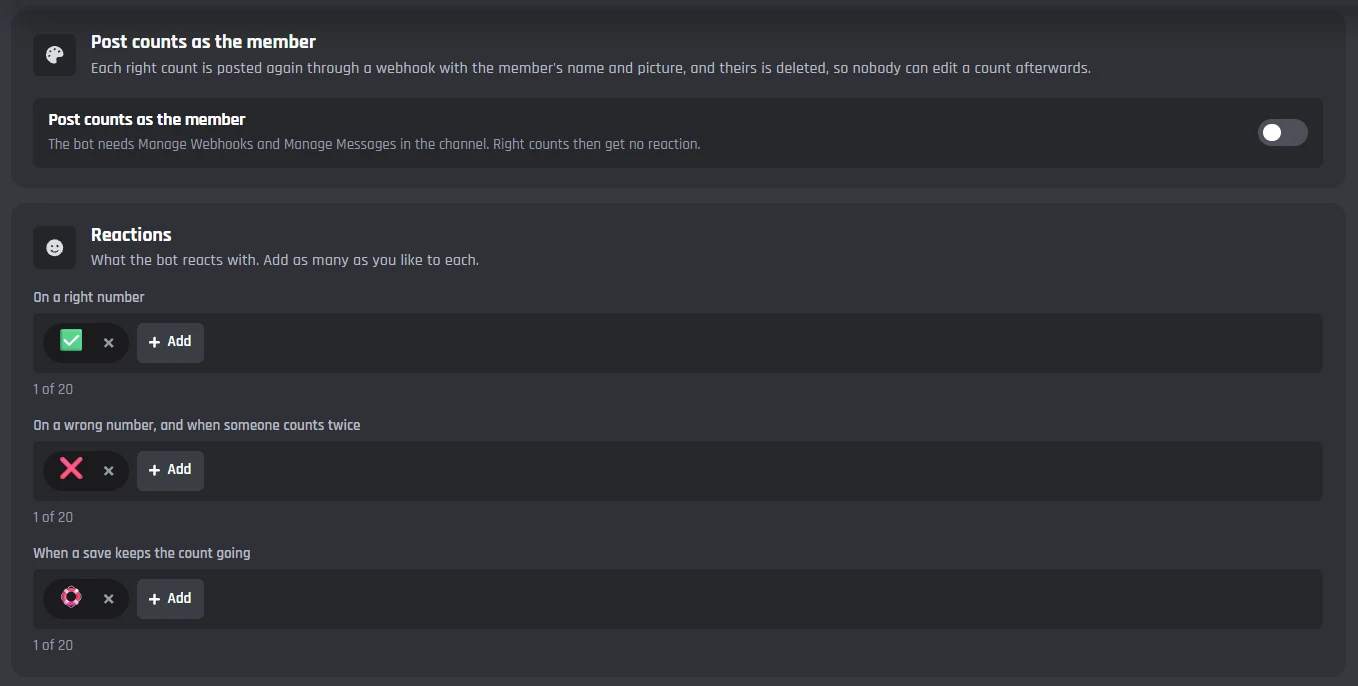
Reactions
- On a right number
- Up to 20. Server emoji work too.
- On a wrong number, and when someone counts twice
- Up to 20.
- When a save keeps the count going
- Up to 20.
- Post counts as the member
- The bot deletes each right count and posts it again with the member's name and picture, so nobody can edit it later. It needs Manage Webhooks.
The bot's messages
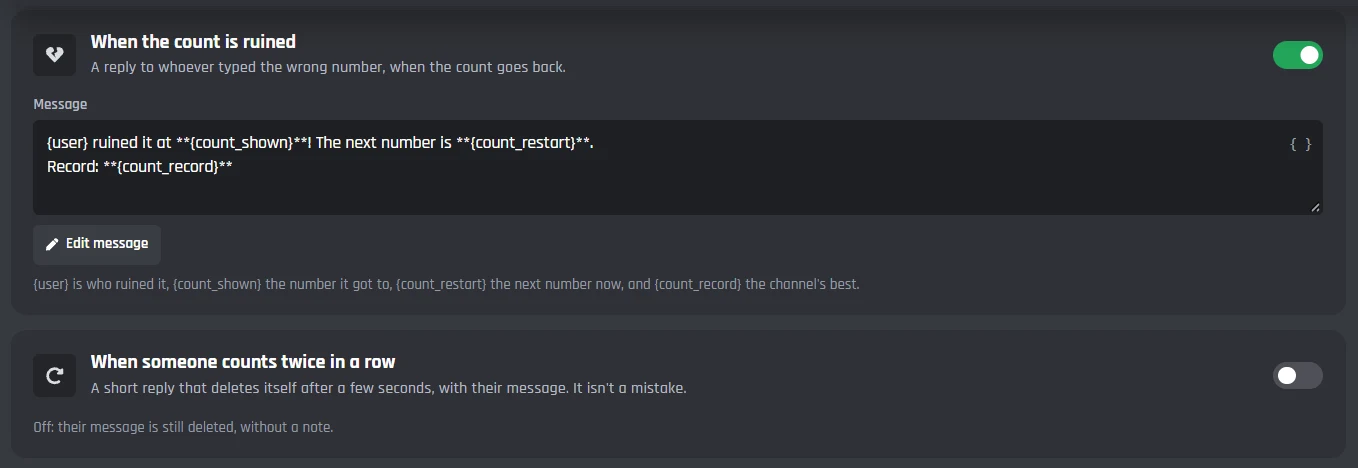
Each one has its own on/off switch and an Edit message button.
- When the count is ruined
- When someone counts twice in a row
- When someone counts too soon
- When a save is used
- When a save is earned
- When the last count is deleted
/count, /count-staff, and the two events
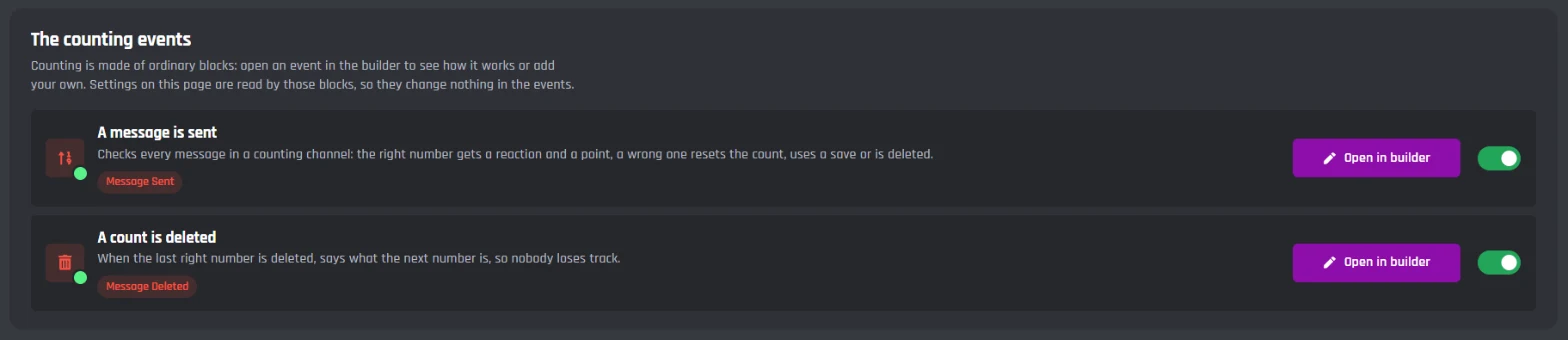
Counting adds /count for everyone and /count-staff for staff. Its two events are made of ordinary builder blocks, so you can open them and add your own.
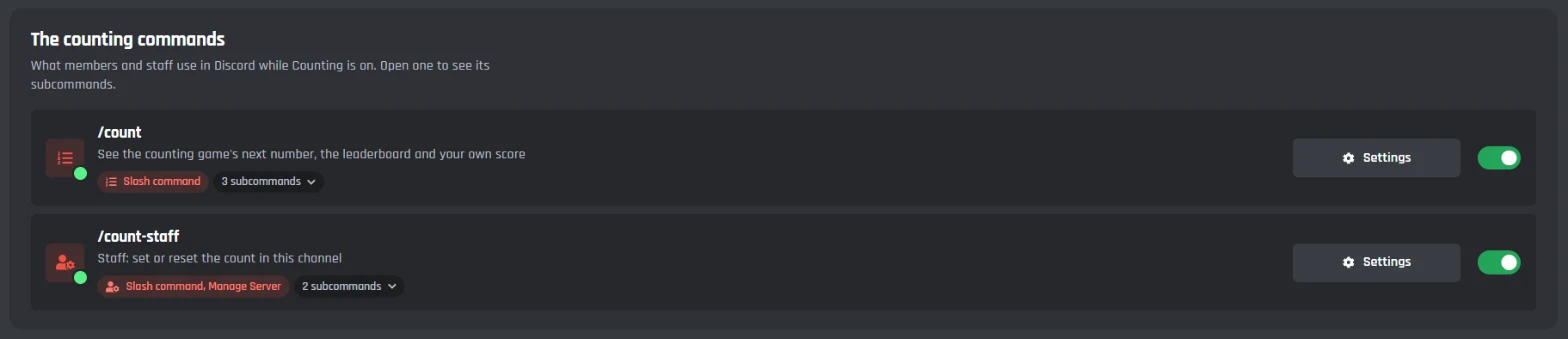
/count
Replies only show for whoever used the command.
- /count next
- The next number in this channel, the record, and the saves.
- /count top
- The 10 members with the most right counts.
- /count me
- Your right counts, your mistakes, and your place.
/count-staff
Only for members with Manage Server.
- /count-staff set
- Sets the next number in this channel.
- /count-staff reset
- Starts this channel again from the first number. The record stays.
Events
- A message is sent
- Checks every message in a counting channel.
- A count is deleted
- Posts the next number when someone deletes the last right count.
Both events are ordinary Discord bot events made of builder blocks, so you can add your own blocks to them.
Set up a counting channel
Haven't got a bot in your server yet? Start with how to make a Discord bot, then come back here.
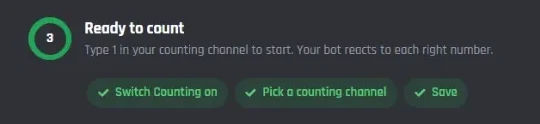
- 1Open Counting from Modules in your dashboard and turn it on. This adds the /count commands, the two events, and the variables that store the game.
- 2Go to Channels and rules and pick your counting channel. Make sure the bot can view it, send messages, add reactions, and manage messages there.
- 3Press Save.
- 4Type 1 in the channel. The bot reacts to it and the game starts.
A free Discord counting bot
Every setting on the Counting page works on the free plan. Premium only changes things outside Counting, like how many commands and servers your bot can have.
Free
$0- All of Counting: maths, saves, checkpoints, milestones, records, and posting counts as the member
- /count, /count-staff, and both events, which don't use up your 3 free commands and 3 free events
- Up to 5 servers
Premium
$12.50 a month for one bot- Unlimited commands, events, and servers
- Your own status line, with no BotGhost branding
- Premium modules like Music and AI
Free bots go offline after 2 days with no activity. Read about free hosting
The counting leaderboard and records
Every right number is a point for whoever typed it. Members check the board with /count top and their own score with /count me, and only they see the reply.
- /count top lists the 10 members with the most right counts in your server.
- /count me shows your right counts, your place, and how many mistakes you've made.
- When a run passes the channel's record, the bot says so once, in the channel.
- @Fabian: 1,204
- @Tom: 986
- @Jayce: 731
- @Dax: 512
- @allmy2: 233
- @Vez: 4
Discord counting bot questions
Didn't find your question? Ask us in the BotGhost Discord, or read the Counting docs.
Yes. Counting on BotGhost is free on every bot, and nothing on its page needs Premium: maths, saves, checkpoints, milestones, records, the leaderboard, and posting counts as the member. Its commands and events don't use up the free plan's 3 commands and 3 events.
Counting on the free planInvite your BotGhost bot to your server. In the dashboard, open Counting and switch it on, pick your counting channel on the Channels and rules tab, and press Save. Then type 1 in the channel and the bot reacts to every right number from there.
See the setup stepsIn the counting channel it needs View Channel, Send Messages, Add Reactions, and Manage Messages. That last one lets it delete wrong numbers and chat. If you post counts as the member, add Manage Webhooks too.
Read the Counting docsYes. Add as many as you want, in one server or spread over several, and each one runs its own count and record. To give one server different rules, pick it in the server menu at the top of the Counting page.
See every settingThe bot only watches the last right number. If someone deletes it, the bot posts the next number so the channel doesn't lose its place. Older counts can go without anything happening. The message is on the Look tab if you'd like to change it or turn it off.
Read the Counting docs/count top shows the 10 members with the most right counts, and /count me shows your own right counts, mistakes, and place. Replies only show for whoever used the command, so they don't get in the way of the count.
See the commandsUse /count-staff set to pick the next number in that channel, or /count-staff reset to go back to the start. Only members with Manage Server can use them, and neither one wipes the record.
Read the Counting docsYes. It keeps running and shows in your modules as Counting (old). Switch to the new Counting whenever you're ready.
What changed in the new CountingStart a counting game in your server
Switch on Counting, pick a channel, and type 1. The free plan doesn't need a card.
Set up Counting for free