Invite tracker Discord bot
See who invited whom, and which invites are real.
Your bot logs every join with the person who invited them, skips alt accounts and quick leavers, and keeps a board for the week, the month and all time. Members get a personal invite link, and you get campaign links to see what your ads bring in. It's all set up on one page in BotGhost, the no-code Discord bot maker.
Every setting is free on every bot, from the fake checks to campaign links.

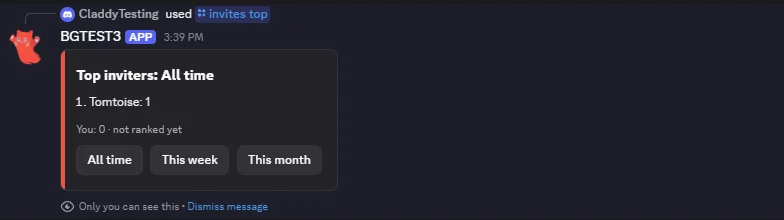
2. @Fabian 9
3. @Vez 6
4. @Jayce 4
5. @Dax 3You: 9 · #2 all timeAll timeThis weekThis month
How the invite tracker counts a join
From a member's own link to the invite log your staff read. Press a step to see it in Discord.
Tom gets a link
Tom runs /invites link and gets an invite link of their own. It stays the same every time they ask, so they can put it in a bio or a post and leave it there.
Anyone who joins through it counts for Tom, even though the bot made the link. Ordinary invites made in Discord count for whoever made them too.
Jayce joins
Jayce joins through Tom's link. The bot works out which invite they used, checks it's a real invite, and adds it to Tom's count.
The invite log says who joined, who invited them, Tom's new total, how old Jayce's account is and the link they came through.
An alt account joins
dax_alt_7 joins through Vez's invite, but the account was made 2 days ago. Accounts younger than 7 days count as fake to start with.
The join is kept with its reason, so staff can see what happened, and Vez's total stays the same.
Someone leaves early
allmy2 leaves 2 hours after joining. Anyone who leaves within a day counts as fake, so Tom's invite for them turns into a fake one and Tom drops to 41.
If allmy2 comes back later through someone else's link, the invite goes back to Tom and the new link's owner gets nothing. Bringing the same alt in and out again earns nobody anything.
An ad brings people in
Staff make a campaign link with /invites campaign and put it in an ad. Joins through it count for nobody, and they're logged with the campaign's name.
/invites code then shows how many people the ad brought in, how many are still here, and how many left or were fake.
Real and fake invites, with the reason
A fake join adds nothing to the inviter's total. It's still kept with its reason, so you can see who tried to farm invites and how. Switch each check on or off on the Counting tab.
- Young accountsNot counted:
the account is 2 days old
On: Accounts younger than 7 days. Pick any number up to 3,650. - Leaving within a dayCounted as fake:
they left after 2 hours
On: Count it as fake if they leave within 1 day, up to 30 days. - Inviting yourselfNot counted:
they used their own invite
Always on. - Farm burstsNot counted:
the inviter brought in 12 people in 10 minutes
Off: One person brings in more than 10 people within 10 minutes. - No profile pictureNot counted:
they have no avatar
Off, since some real people never set one. - Alts inviting altsNot counted:
the inviter's account is 3 days old
Off: The inviter's own account is younger than 7 days. - Names AutoMod blocksNot counted:
AutoMod flagged their name
Off: Name flagged by AutoMod uses the words your Discord AutoMod blocks. - Roles that never countNot counted:
the inviter has a role that never counts
Empty: Roles whose invites never count.
When someone comes back
Discord tells the bot when someone has been in the server before, even before the bot joined. Pick what a rejoin does.
Back to the first inviter
DefaultThe invite goes back to whoever first invited them. The new link's owner gets nothing, so nobody can farm an alt in and out.
Count for the new inviter
A rejoin counts as a fresh join for whoever's link they used this time.
Never count
The rejoin is recorded, but nobody's count changes.
You can also wait to count a join until the member gets a role, like the one your verification gives, or until they've stayed a while. Leaving before then counts nothing.
Personal invite links and campaign links
Personal links give members something to share. Campaign links show which ad or partner server brings people in.
- /invites link gives each member one link that never changes. Joins through it count for them.
- Pick the channel the links open in, and up to 5 roles for the person who joins, like Guest.
- /invites campaign makes a named link for an ad, a partner server or a video. Joins through it count for nobody.
- /invites code shows any link's numbers: who joined, who's still here, who left and who was fake. Ending a campaign keeps them.
Invite leaderboards for the week, the month and a season
/invites top shows the top inviters, with buttons for each board. Only the member who asked sees it, unless you set command replies to show for everyone.
- All time, this week and this month are always there, and the week starts on the day you pick.
- Seasons: a board for dates you pick, with the final board posted the day after it ends. Counts never reset.
- A leaderboard card from the Card Studio under the board, if you'd like a picture.
- Members who left are hidden from the boards to start with.
Boards and seasons have no prizes or roles. Discord's rules don't allow rewards for invites.
Join and leave logs that name the inviter
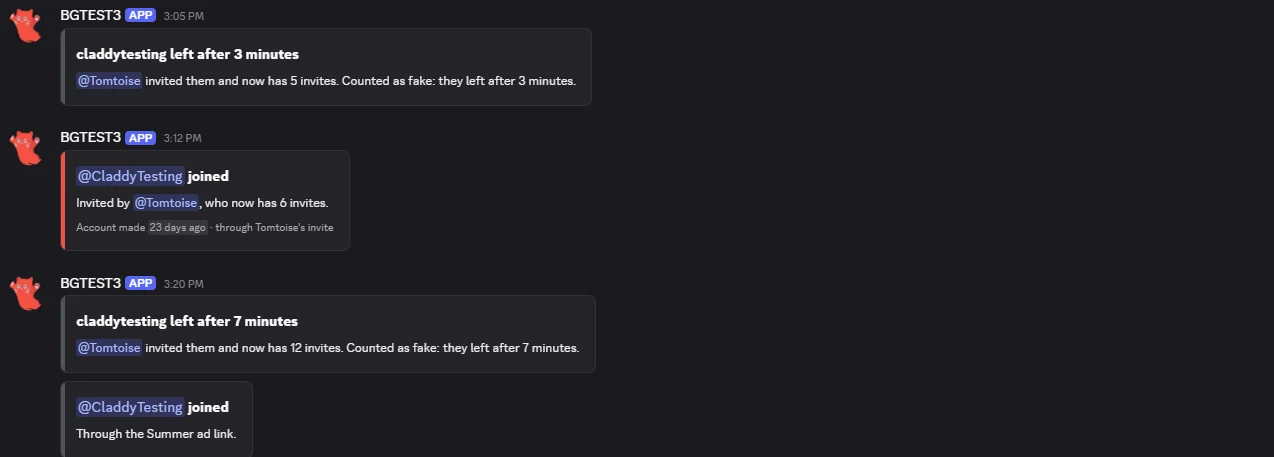
Pick a log channel and every join and leave is posted there. Logs never ping anyone.
- Counted joins with the inviter's new total, the account's age and the link they used.
- Fake joins and leaves with the reason, and how long someone stayed.
- Other joins: the vanity link, a campaign, or a link with no inviter. When the bot can't tell which invite was used, the log says why.
- One summary for a raid when more than 20 people join in 30 seconds.
- A thank you DM to the inviter, off to start with.
Invite commands for members and staff
Switching the Invite Tracker on adds /invites with 11 subcommands. Each one can be switched off on its own.
- For members: /invites show, top, who, list and link.
- /invites give and take add or remove bonus invites for a member, or everyone with a role. Staff need Manage Server or a staff role you pick.
- /invites set sets a member's total, and /invites reset asks first, then clears them. Who invited whom stays.
- The Members tab in your dashboard: find anyone, change their numbers, or reset the server with a backup kept for 30 days.
- Count invites made before tracking adds each person's current invite uses from Discord, once.
Every Invite Tracker setting in the dashboard
The Invite Tracker has one page in your dashboard: seven tabs, then its commands and events. A live preview beside the tabs shows the messages as you change them. You set it up server by server, from the server menu at the top.
This week, at a glance
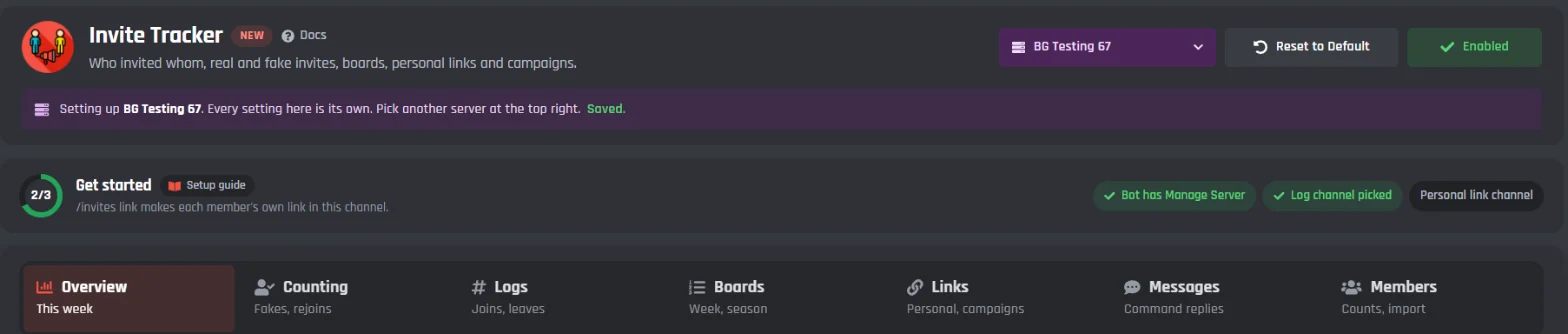
The page opens on how people joined your server in the last 7 days, who brought in the most, and which links they used. Get started at the top ticks off the three things the bot needs.
Get started
- Bot has Manage Server
- Discord only shows a bot who made each invite when it has Manage Server. Without it, joins can't be matched to an invite.
- Log channel picked
- Where the join and leave logs go, on the Logs tab.
- Personal link channel
- Where /invites link points people, on the Links tab. Ticked by itself when personal links are off.
This week
- How people joined
- Joins in the last 7 days by kind: invites, personal links, campaigns, the vanity link, no inviter, bots, guests and couldn't tell. If the bot couldn't tell, it says why.
- Top inviters this week
- The members who brought in the most people this week.
- Top links this week
- The links people joined through this week, campaigns included.
Real invites, fake invites and rejoins
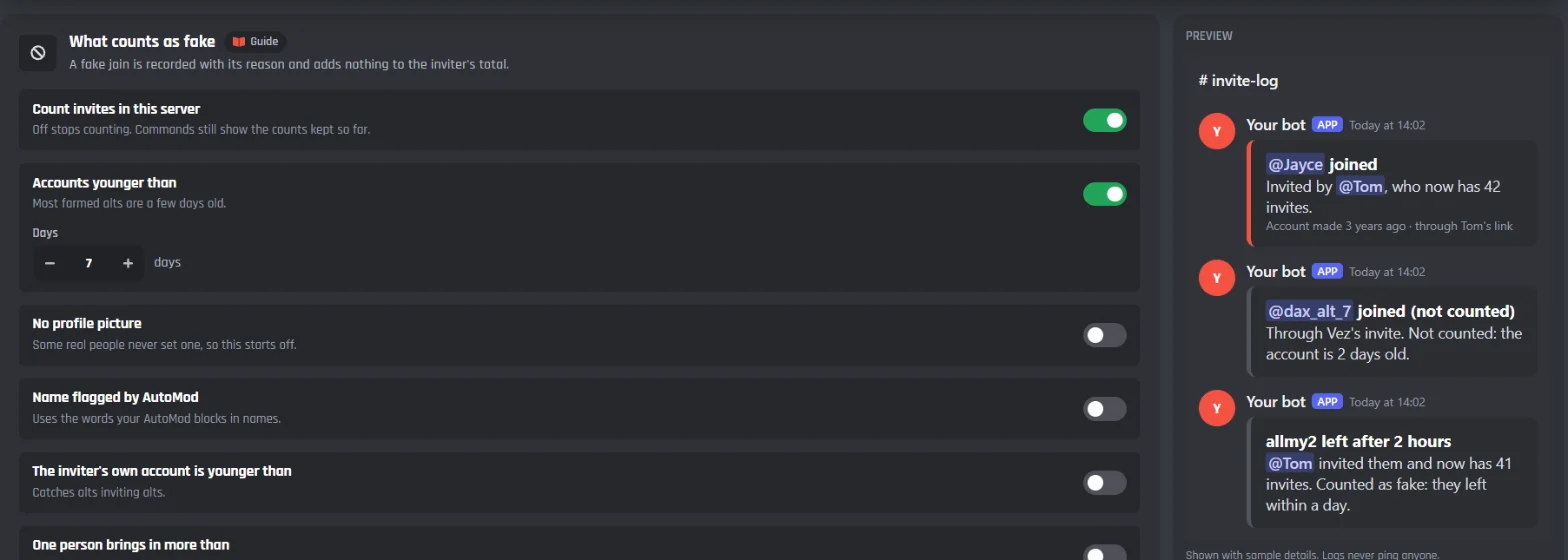
Pick what makes a join fake. A fake join is kept with its reason and adds nothing to the inviter's total. Leaves, early leaves and rejoins have their own rules, so nobody can farm invites with alt accounts.
What counts as fake
Inviting yourself is always fake. Invites made by bots never count.
- Count invites in this server
- On to start with. Off stops counting, and the commands still show the counts kept so far.
- Accounts younger than
- On, at 7 days, to start with. Most farmed alts are a few days old. Up to 3,650 days.
- No profile picture
- Off to start with, since some real people never set one.
- Name flagged by AutoMod
- Uses the words your Discord AutoMod blocks in names. Off to start with.
- The inviter's own account is younger than
- Catches alts inviting alts. Off to start with.
- One person brings in more than
- A burst of people in a short time, usually a farm. 10 people within 10 minutes when you switch it on, from 2 to 500 people and up to 1,440 minutes.
- Roles whose invites never count
- Invites made by members with these roles count as fake. Empty to start with.
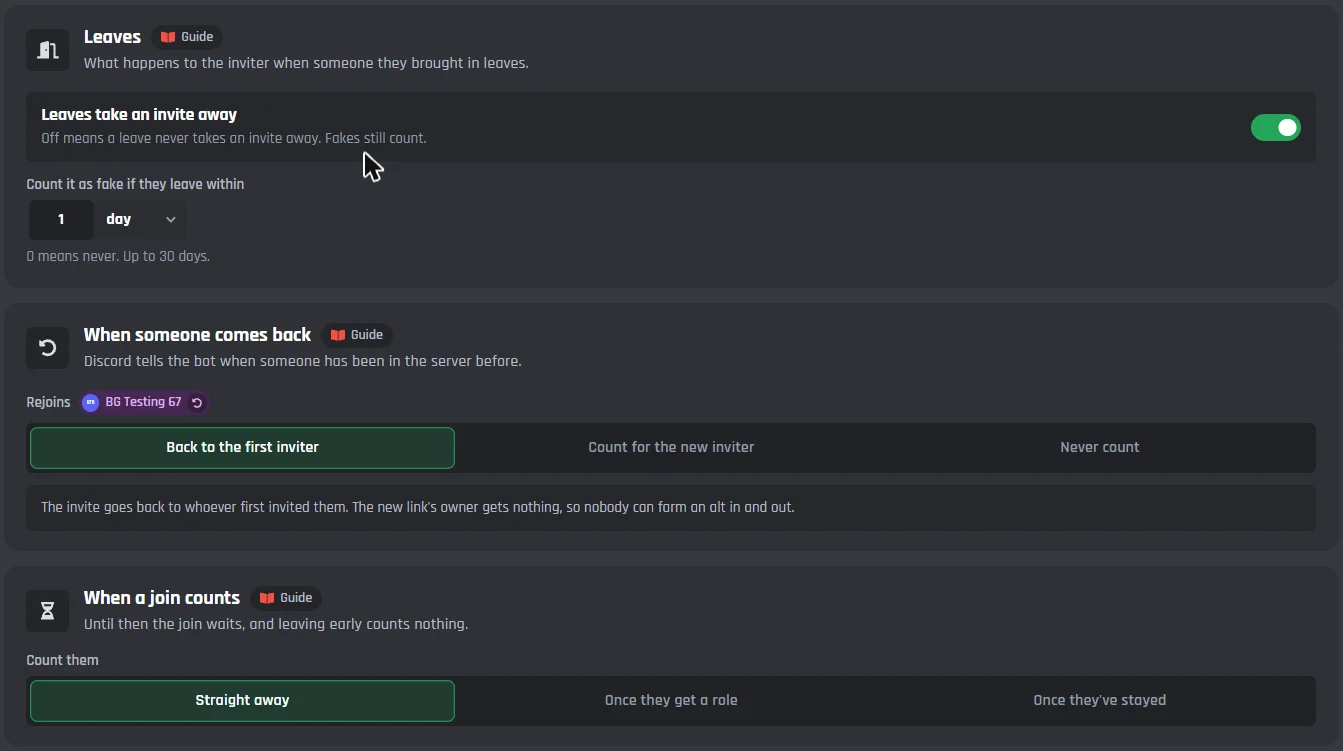
Leaves
- Leaves take an invite away
- On to start with. Off means a leave never takes an invite away. Fakes still count.
- Count it as fake if they leave within
- 1 day to start with, up to 30 days. 0 means never.
When someone comes back
Discord tells the bot when someone has been in the server before.
- Back to the first inviter
- The default. The invite goes back to whoever first invited them, and the new link's owner gets nothing, so nobody can farm an alt in and out.
- Count for the new inviter
- A rejoin counts as a fresh join for whoever's link they used this time.
- Never count
- The rejoin is recorded, but nobody's count changes.
When a join counts
Until then the join waits, and leaving early counts nothing.
- Straight away
- The default.
- Once they get a role
- The role your verification or onboarding gives.
- Once they've stayed
- For a time you pick, up to 30 days.
Forget members who left after
- Days
- 30 to start with, from 0 to 90. Their record goes and their inviter's numbers stay. It's kept long enough to catch someone rejoining.
The invite log
Pick a channel for the logs. Each kind of join and the leave log has its own switch and its own message, and logs never ping anyone.
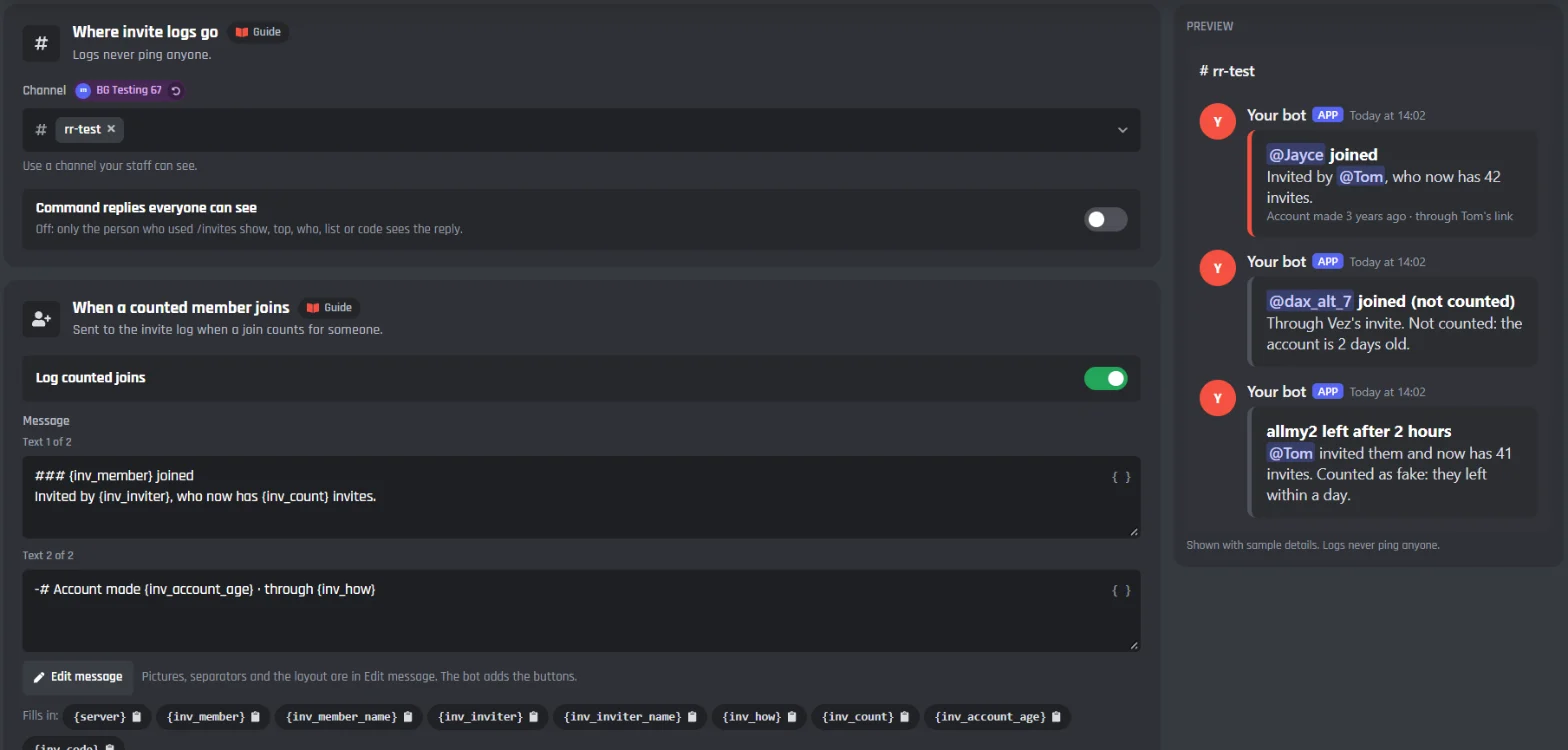
Where invite logs go
- Channel
- Use a channel your staff can see.
- Command replies everyone can see
- Off to start with: only the person who used /invites show, top, who, list or code sees the reply.
The log messages
Each one is a whole message you can change with Edit message, and each has its own switch.
- When a counted member joins
- Who joined, who invited them, the inviter's new total, how old the account is and the link they used.
- When a join is counted as fake
- The reason in plain words, like the account is 2 days old.
- When someone joins through the vanity link, a campaign or a link with no inviter
- Nobody's count changes. Also sent for joins still waiting to count.
- When the bot can't tell which invite was used
- With the reason: Discovery or an app, two joins in the same second through different links, or no Manage Server.
- When lots of people join at once
- One summary when more than 20 join in 30 seconds.
- When a member leaves
- How long they stayed and what it did to the inviter.
- When the bot thanks the inviter
- A DM to the inviter after a counted join. Off to start with.
Boards and seasons
/invites top has All time, This week and This month buttons. A season adds a board for dates you pick. Counts never reset, and the next season is just new dates.
2. @Fabian 9
3. @Vez 6
4. @Jayce 4
5. @Dax 3You: 9 · #2 all timeAll timeThis weekThis month
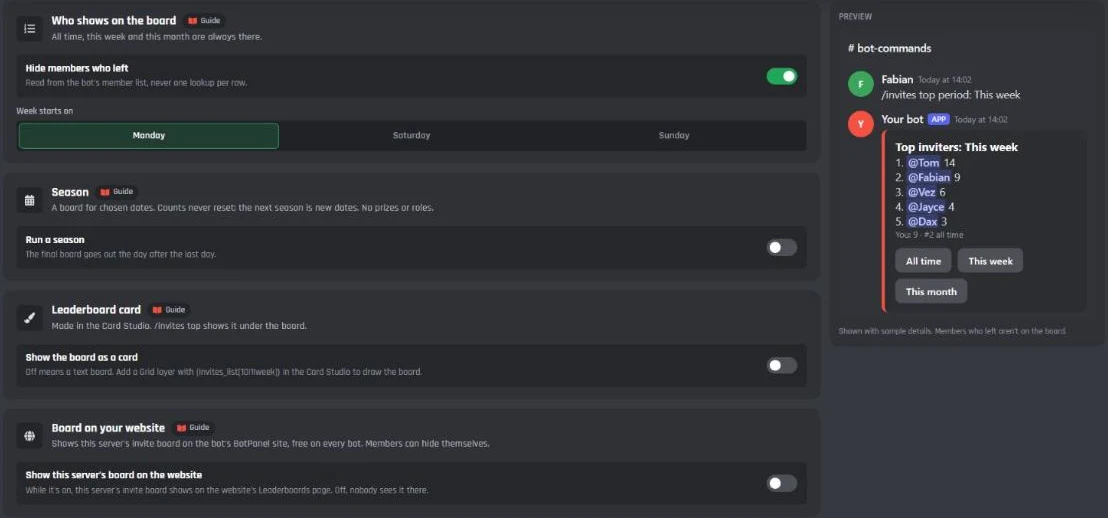
Who shows on the board
All time, this week and this month are always there.
- Hide members who left
- On to start with.
- Week starts on
- Monday, Saturday or Sunday.
Season
Seasons have no prizes or roles: Discord's rules don't allow rewards for invites.
- Run a season
- Give it a name and the dates it runs, like December push from the 1st to the 31st.
- Post the final board in
- The final board goes out the day after the last day.
Leaderboard card and the website
- Show the board as a card
- Off means a text board. Pick a design, or press Edit in Card Studio to draw your own.
- Show this server's board on the website
- The invite board on your bot's BotPanel website, on the Leaderboards page that comes with BotPanel Plus. Members can hide themselves.
Personal links and campaigns
/invites link gives each member one link that stays the same. Campaign links are named links for an ad, a partner server or a video, so you can see how many people each one brought in.
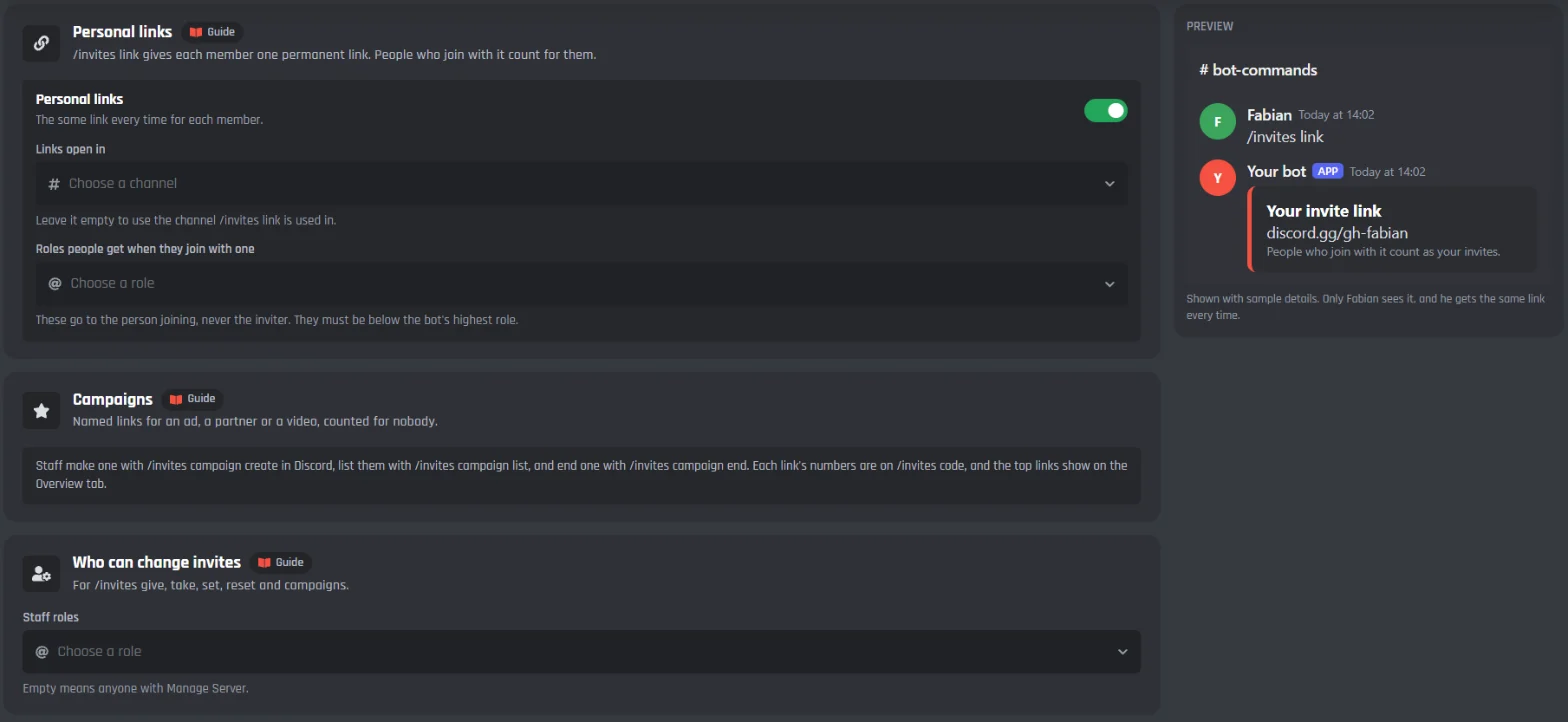
Personal links
- Personal links
- On to start with. The same link every time for each member.
- Links open in
- Leave it empty to use the channel /invites link is used in.
- Roles people get when they join with one
- Up to 5. These go to the person joining, never the inviter.
Campaigns
- /invites campaign
- Staff create, list and end campaign links in Discord. They count for nobody.
- Each link's numbers
- /invites code shows who joined through a link, who's still here, who left and who was fake. Ending a campaign keeps its numbers.
Who can change invites
- Staff roles
- For /invites give, take, set, reset and campaigns. Empty means anyone with Manage Server.
Every command reply
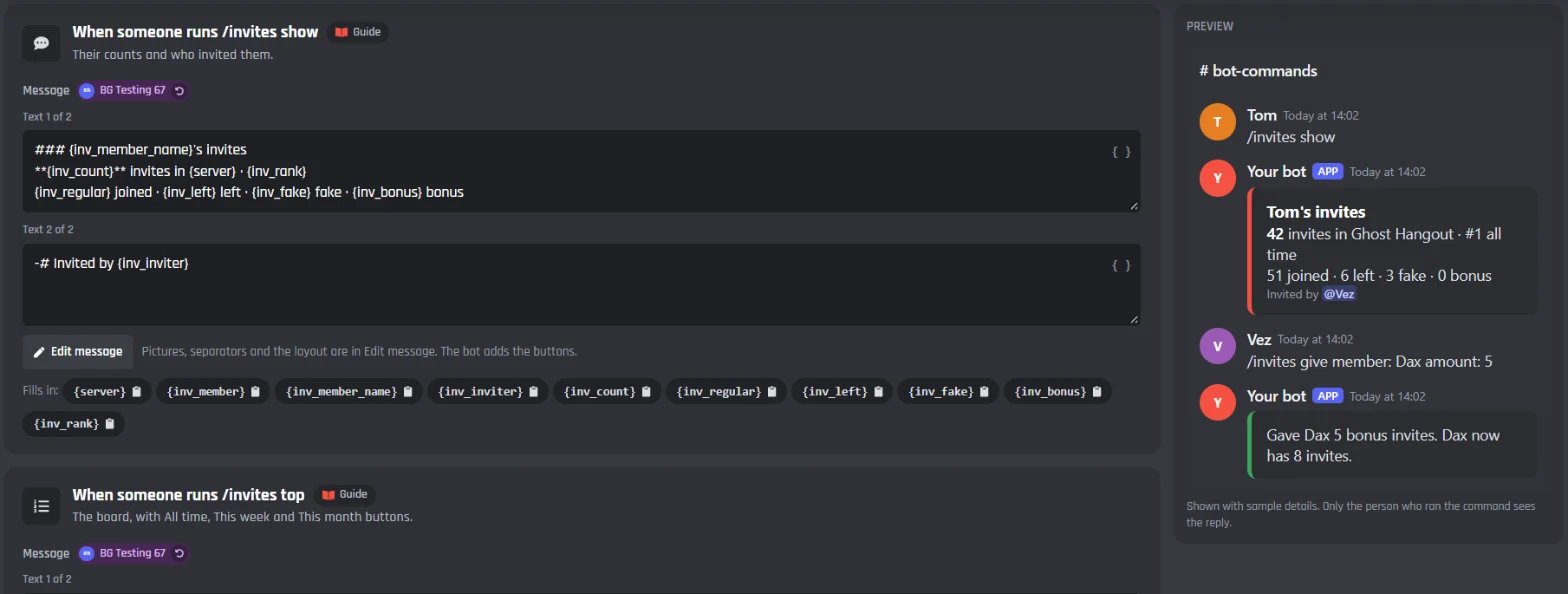
Each reply is a whole message you can change, with the details it fills in listed under it.
51 joined · 6 left · 3 fake · 0 bonusInvited by @Vez
Replies to members
- When someone runs /invites show
- Their counts and who invited them.
- When someone runs /invites top
- The board, with All time, This week and This month buttons.
- When someone runs /invites who
- Who invited a member, and how.
- When someone runs /invites list
- The last 10 people they invited, with who's still here.
- When someone runs /invites link
- Only they see it. The same link every time.
Replies to staff
- When someone runs /invites code
- A link's uses, who it counts for, and how its joins are doing.
- When staff change someone's invites
- Only the staff member sees it. A change made on the website goes to the invite log.
- When staff reset someone
- Asks first, with Reset and Cancel buttons.
- When a campaign is made
- Only the staff member sees it.
- When a season ends
- The final board, posted the day after the season's last day.
Members, fixes and backups
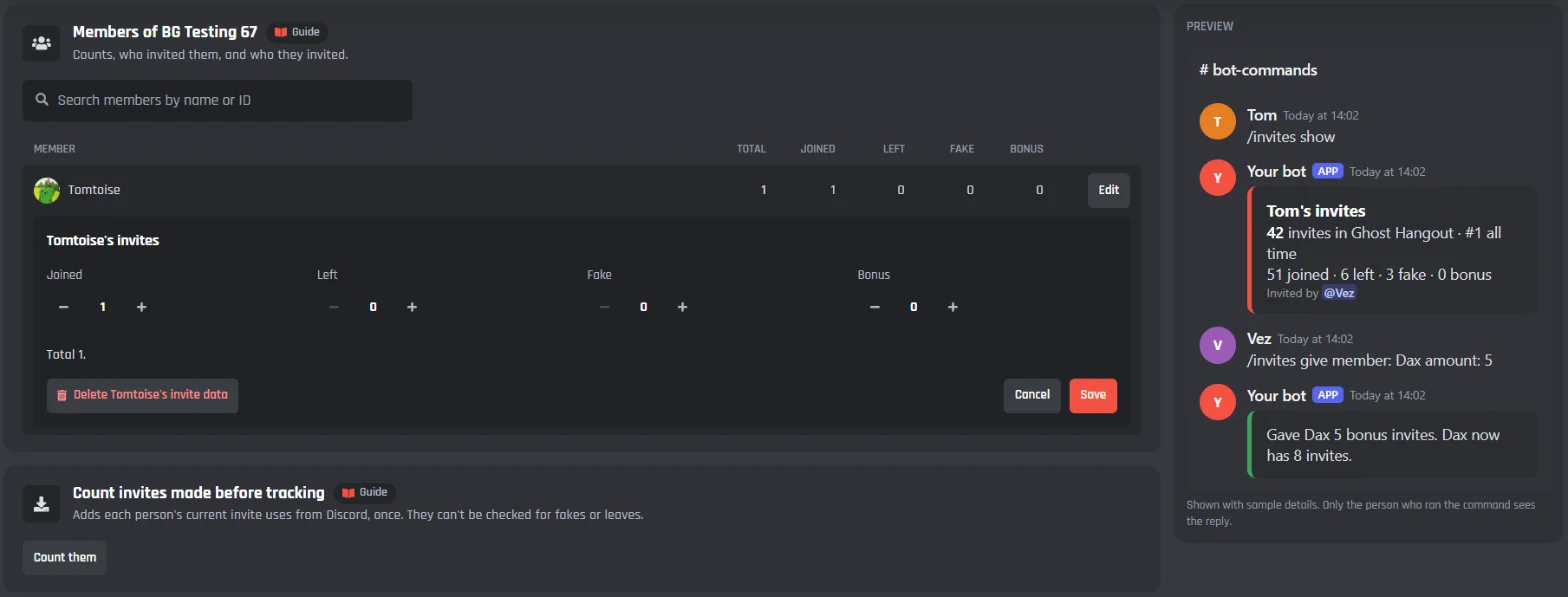
Look anyone up to see their counts, who invited them and who they invited, and fix their numbers by hand. Count the invites people made before you switched tracking on, once.
Members
- Search members by name or ID
- Each row shows the total, joined, left, fake and bonus.
- Edit
- Change joined, left, fake and bonus, or delete someone's invite data.
Count invites made before tracking
- Count them
- Adds each person's current invite uses from Discord, once. They can't be checked for fakes or leaves.
Reset this server
- Reset
- Everyone's counts, after you type the server's name. Who invited whom stays.
- Restore
- A backup is kept for 30 days, so a reset can be undone.
Under the tabs: the commands and events
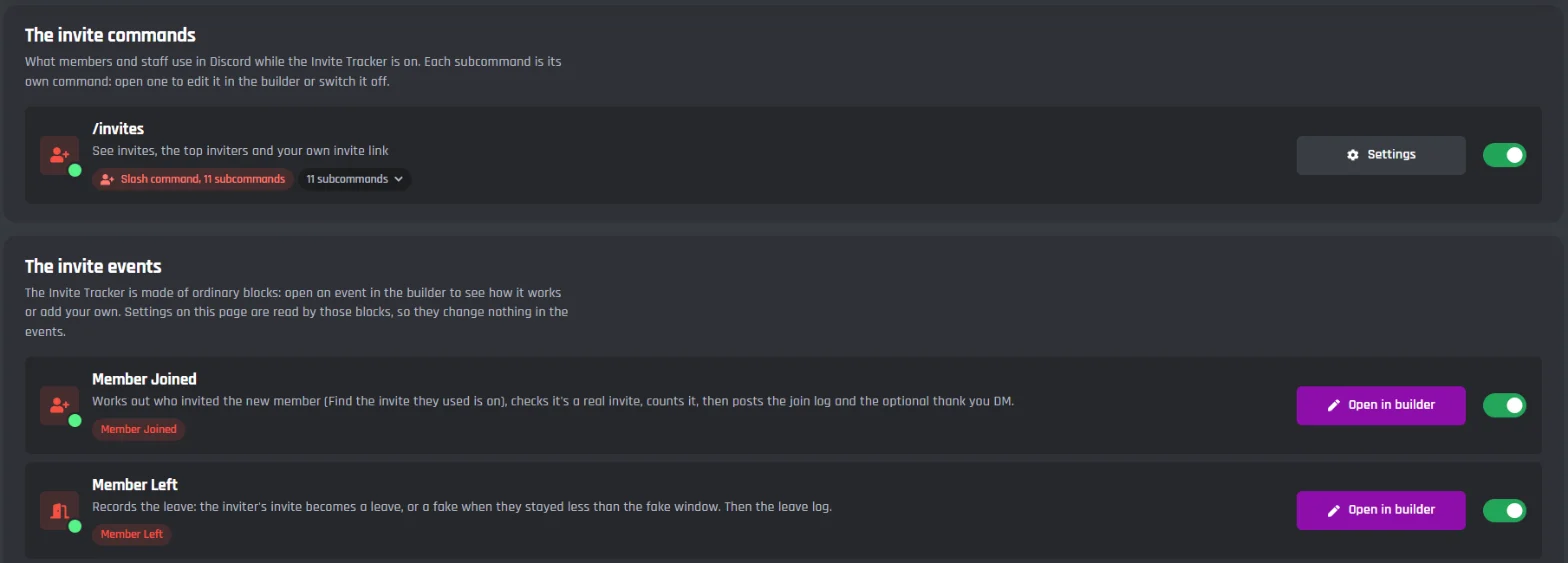
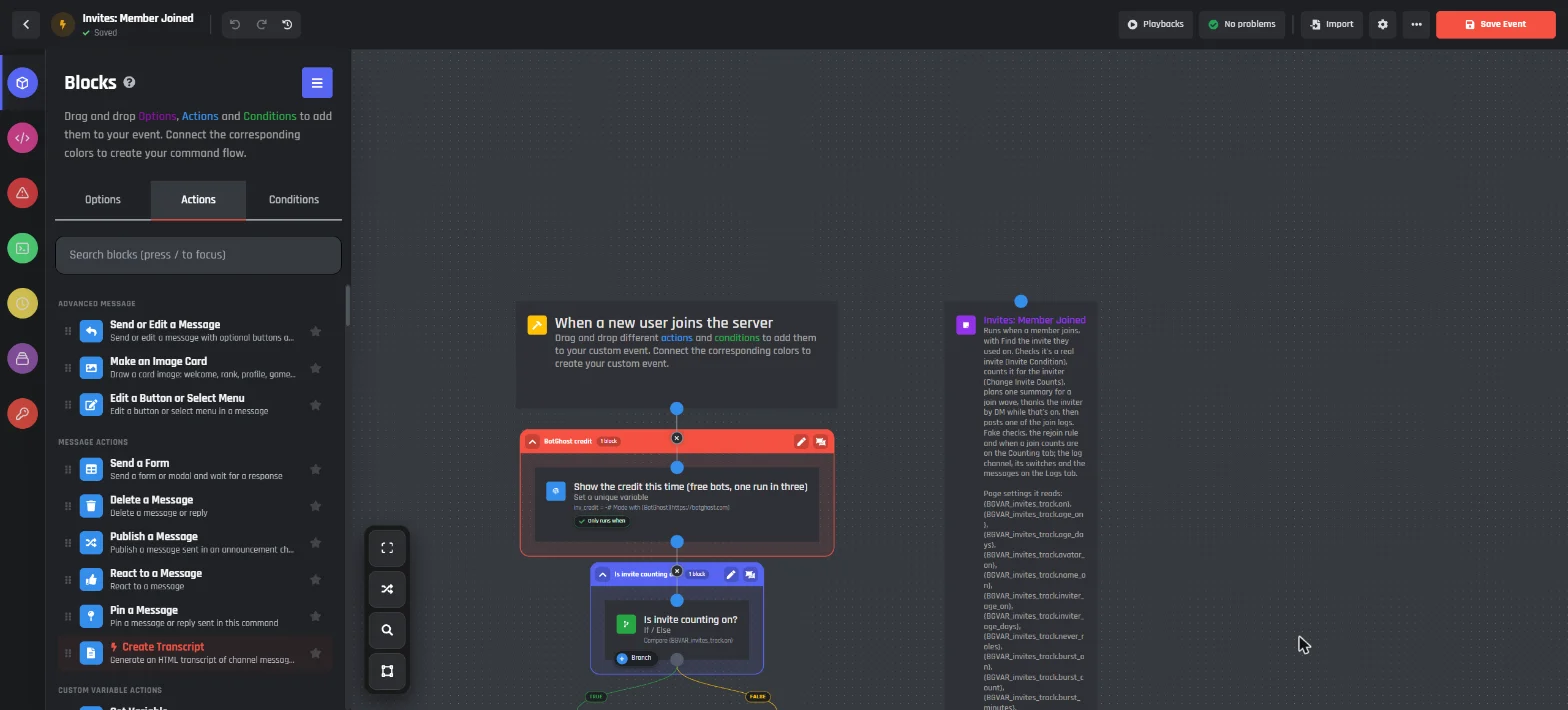
The Invite Tracker adds /invites with 11 subcommands, and its events. They are made of ordinary builder blocks, so you can open any of them in the builder, see how it works and add your own blocks.
For members
- /invites show
- Your invites, or a member's.
- /invites top
- The top inviters, all time, this week, this month or the season.
- /invites who and list
- Who invited a member, and who they invited.
- /invites link
- Your own invite link, the same one every time.
For staff
Manage Server, or a staff role from the Links tab.
- /invites give and take
- Bonus invites for a member, or for everyone with a role, with a reason.
- /invites set and reset
- Set a member's total, or reset them after a confirm button.
- /invites campaign and code
- Make, list or end a campaign link, and see how any link is doing.
Events
- Member Joined
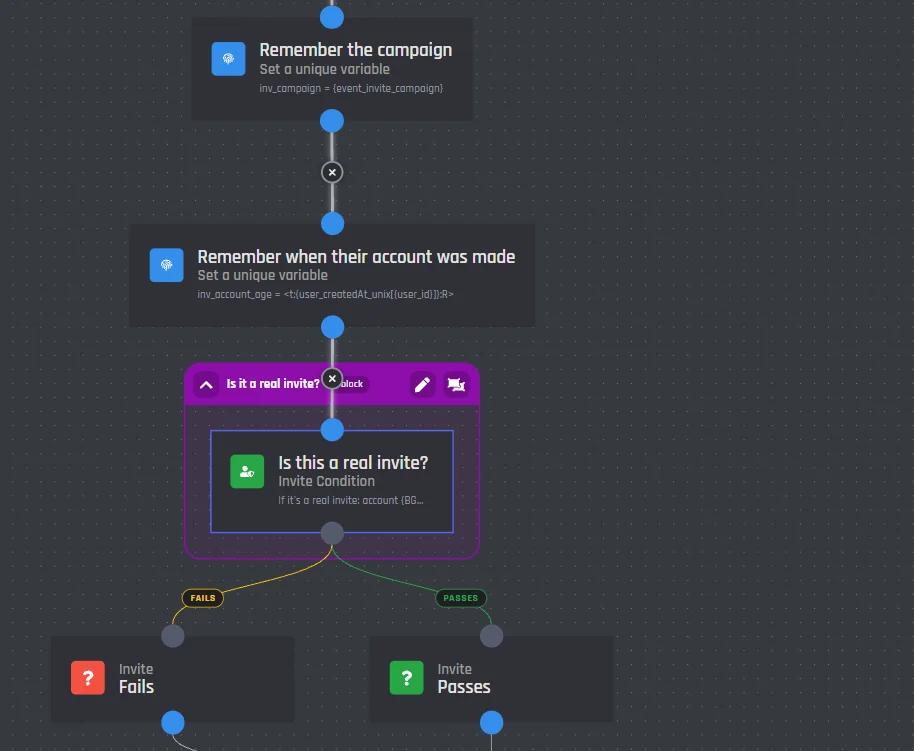
- Works out who invited the new member, checks it's a real invite, counts it, then posts the join log and the thank you DM.
- Member Left
- Records the leave: the inviter's invite becomes a leave, or a fake when they stayed less than the fake window.
- Count Pending, Count Changed and Hourly
- Count a waiting join when the role arrives, keep each member's total for the website, and post a season's final board.
Build your own invite systems
The Invite Tracker is made of ordinary blocks, so you can open its events in the builder and change them. The blocks it needed are in the builder for your own commands and events too, with the module on or off.
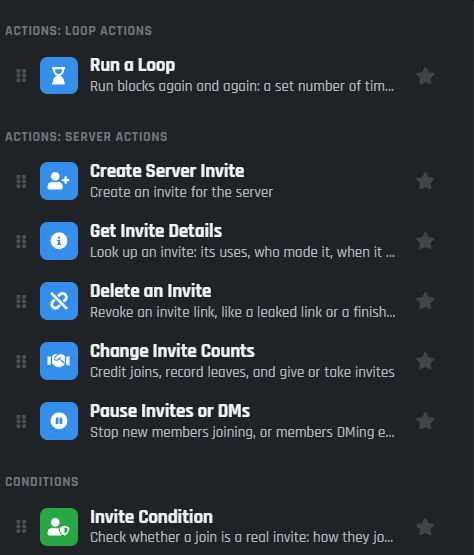
- New block
Change Invite Counts
Count a join, record a leave, give or take bonus invites, set a total, or reset someone.
- New condition
Invite Condition
Is this join a real invite? Checks account age, the profile picture, self invites, bursts and more, and says which check failed.
- New block
Get Invite Details
Look up an invite: its uses, who made it, when it runs out, and how its joins are doing.
- New block
Delete an Invite
Remove an invite link, like one that leaked or a campaign that's over.
- New event
When someone's invite count changes
Runs after any change to a member's invites, with the numbers before and after.
- New option
Find the invite they used
On When a new user joins: who invited them, the code and how they joined, ready for your own welcome message.
- New option
Counts for
In Create Server Invite: make a member's own link or a campaign link.
- New option
Every invite in the server
In Run a Loop: go through the server's invites one at a time.
Invite variables work anywhere too: a member's total, who invited them, and a board for any period, ready for a welcome message or a Card Studio card.
An invite board on your bot's website
With a BotPanel website for your bot, the Invite Tracker works there as well as in Discord.
A public invite board, free
Switch on Show this server's board on the website on the Boards tab, and the server's invite board shows on the website's Leaderboards page, which comes with BotPanel Plus. Members can hide themselves.
Server admins manage it there
They sign in on the website's server dashboard to change what counts as fake, the logs, boards, links and every message for their own server, and to give or take a member's invites.
Set up an invite tracker on Discord
Haven't got a bot in your server yet? Start with how to make a Discord bot, then come back here.
- 1Open Invite Tracker from Modules in your dashboard and switch it on, then pick your server in the menu at the top right.
- 2In Discord, give your bot the Manage Server permission, so it can see who made each invite.
- 3On the Logs tab, pick a log channel. On the Links tab, pick where personal links open.
- 4Press Save Changes.
- 5Try it: run /invites link, and join from another account with your link.
Using the old Invite Tracker? The new page offers Move my settings and invites, and everyone keeps their total.
A free Discord invite tracker
Every Invite Tracker feature works on the free plan. There's nothing to unlock, only the limits below, which are the same on every bot.
Free
$0- Who invited whom, with every fake check and the rejoin rules
- Join and leave logs, raid summaries and the thank you DM
- Personal links, campaign links and each link's numbers
- All time, week, month and season boards in Discord
- Staff commands, the Members tab and 30 day backups
- Its commands, events and saved counts never count toward your free limits
On free bots, a small Made with BotGhost line shows under the messages about one time in three.
The limits
in each server- Young account check
- Up to 3,650 days
- Burst check
- 2 to 500 people
- Fake if they leave within
- Up to 30 days
- Wait before counting
- Up to 30 days
- Forget members who left
- 0 to 90 days
- Roles on a personal link
- Up to 5
- Backups kept
- 30 days
Premium ($12.50 a month for one bot) takes the Made with BotGhost line off and adds unlimited commands, events, and servers. Free bots go offline after 2 days with no activity. Read about free hosting
Discord invite tracker questions
Didn't find your question? Ask us in the BotGhost Discord, or read the Invite Tracker docs.
Yes. Every Invite Tracker feature is free on BotGhost: who invited whom, the fake invite checks, the logs, personal and campaign links, the week, month and season boards, and the staff commands. The invite board on your bot's website is on its Leaderboards page, which comes with BotPanel Plus. Its commands, events and saved counts don't count toward your free limits.
The Invite Tracker on the free planSwitch on the Invite Tracker and pick a log channel. Every join after that is logged with who invited them and the link they used. In Discord, /invites who shows who invited any member, and /invites list shows who a member invited. The Members tab in your dashboard shows both.
See a join step by stepEach join goes through the checks on the Counting tab. To start with, an account younger than 7 days, someone using their own invite, or someone who leaves within a day counts as fake. You can add checks for no profile picture, a name AutoMod blocks, a young inviter account, and one person bringing in lots of people at once. The log says which check failed.
See every checkNo. A rejoin goes back to whoever first invited them, and the new link's owner gets nothing. Discord tells the bot when someone has been in the server before, so this works even for members who joined before the bot did. You can also count rejoins for the new inviter, or never count them.
See the rejoin choicesManage Server. Discord only shows a bot who made each invite and how often it was used when the bot has it. Without it, joins are logged, but the bot can't tell which invite they used. Get started at the top of the page checks it for you.
See the setup stepsYes. Staff make a campaign link with /invites campaign and give it a name. Joins through it count for nobody and are logged with the campaign's name. /invites code shows how many joined, how many are still here, and how many left or were fake.
See campaign linksNo. Discord's rules don't allow rewards for invites, so the Invite Tracker never gives roles, prizes or perks to inviters, and seasons have nothing to win. A personal link can give the person who joins a role, like Guest, because that's for the new member.
See boards and seasonsYes. /invites give and /invites take add or remove bonus invites for a member or everyone with a role, /invites set sets a total, and /invites reset asks before it clears someone. On the Members tab you can change anyone's numbers, and resetting a whole server keeps a backup for 30 days.
See the staff commandsOn the Members tab, press Count them under Count invites made before tracking. It adds each person's current invite uses from Discord, once. Those can't be checked for fakes or leaves, since the bot wasn't watching when they happened.
See the Members tabThe new page shows Move my settings and invites. It checks what moves first, keeps every member's total, and the old module turns off when the totals match. Its data stays for 30 days, so you can undo the move.
Read the Invite Tracker docsFind out who's growing your server
Switch on the Invite Tracker, pick a log channel, and give your bot Manage Server. The free plan doesn't need a card.
Set up Invite Tracker for free