Make a custom Discord bot
Your own name, avatar, banner, and status.
Your bot gets its own Discord application, and it only joins servers you invite it to. Call it whatever you like (up to 32 characters), upload an avatar and a banner, and set it to Online, Idle, Do Not Disturb, or Invisible. You build it in BotGhost, the no-code Discord bot maker, and we host it.
All of that is free on any bot. Writing your own status line needs Premium.

Change your Discord bot's name, avatar, and banner
You'll find all three on the Settings page, and they're free to change on every bot. Change one and BotGhost sends it straight to Discord, so it updates in every server your bot's in at once.
- Hit the pencil next to the name and type a new one (32 characters max).
- Click the current avatar to pick an image. You get to crop it before it uploads.
- The banner has its own Change Banner button at the top of the page. People see it when they open your bot's profile.
New pictures can take a moment to show up in Discord. If you haven't made a bot yet, follow How to make a Discord bot from its first step.
The Settings page in the docs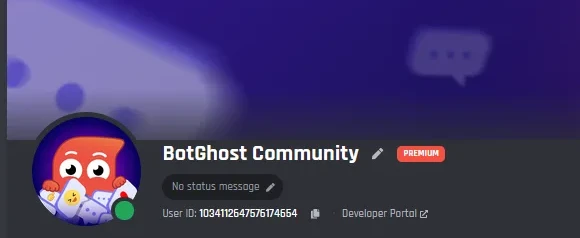
Set your bot's status and presence
The status line is the little bit of text under your bot's name in the member list. On a free bot it says Listening to Made with BotGhost.com. Get Premium and it can say whatever you want.
- Pick how it starts (Playing, Listening, Watching, Streaming, or Competing) or write a custom line.
- Stick with one, or give it a list of up to 100 to rotate through. Each line stays up for anywhere from 30 seconds to 24 hours.
- Presence doesn't cost anything: Online, Idle, Do Not Disturb, or Invisible. Invisible makes the bot look offline, but its commands still work.
Commands and events can change it too, using the Change the Bot's Status block in the Discord bot command builder.
 BotGhost CommunityAPPListening to Made with BotGhost.comBotGhost CommunityAPPWatching #help for new tickets
- Online
- Idle
- Do Not Disturb
- Invisible
What a free custom bot shows, and what Premium removes
Changing the name, avatar, banner, or presence is free. On the free plan your bot mentions BotGhost in three places, and Premium removes all three.
Free
$0- The name, avatar, and banner you picked
- Any presence: Online, Idle, Do Not Disturb, or Invisible
- Up to 5 servers
- Listening to Made with BotGhost.com as the status line
- A short "made with BotGhost" message when it joins a new server
- A small BotGhost line on Tickets closing messages and transcripts
A free bot switches off if nothing happens for 2 days, and you can start it again from the dashboard.
Premium
$12.50 a month for one bot- Your own status line, fixed or rotating
- No BotGhost status, join message, or Tickets line
- Unlimited commands, events, and servers
- Premium modules like Music and AI
Or pay $75 a year. Premium on every bot you own is $25 a month.
Custom Discord bot questions
Didn't find your question? Ask us in the BotGhost Discord, or have a look at the Settings page docs.
One that runs as your own Discord application, so it shows up with the name, avatar, and banner you picked and only sits in servers you've invited it to. A shared bot is a single bot that loads of servers add, and it keeps whatever name and picture its maker gave it.
Compare a custom bot with a shared botYes, on any bot. Go to Settings and hit the pencil next to the name, or click the avatar to upload a new one. The banner's got its own Change Banner button. Names max out at 32 characters, and new pictures can take a moment to show up in Discord.
Read about the Settings pageWith Premium, yes. Start it with Playing, Listening, Watching, Streaming, or Competing, or write a custom line. You can keep one or rotate through up to 100. Free bots show "Listening to Made with BotGhost.com" instead. Presence (Online, Idle, Do Not Disturb, Invisible) is free either way.
See status and presenceA bit, yes. The status line reads "Made with BotGhost.com", the bot posts a short "made with BotGhost" message when it joins a new server, and Tickets closing messages and transcripts get a small BotGhost line. Premium takes all of that off.
See PremiumWhen you add MEE6 or Dyno, you're adding the same bot loads of other servers use, and you tweak its settings for yours. A BotGhost bot is a Discord application of your own. It has the name and avatar you picked and runs only what you've set up: your commands and the modules you switched on.
BotGhost or MEE6No. The guided setup takes you through creating it. Once it's got a name and an avatar, you decide what it does: join blocks into commands, or switch on modules like Tickets and Welcomer. We host it for you.
See the no-code Discord bot makerYou do. The Discord application sits in your own Developer Portal, and BotGhost runs it with the token you give us. Delete the bot on BotGhost and the application's still yours.
How BotGhost hosts your botYes, with the Change the Bot's Status block. Drop it into any command or event. Switching the presence is free, but changing the status text needs Premium.
Read about Change the Bot's StatusRelated pages
If you're new to Discord bots, start with How to make a Discord bot.
- No-code Discord bot makerBuild commands from blocks or switch on modules, and BotGhost hosts the bot.
- Discord bot command builderMaking slash commands and events by joining blocks together.
- Discord bot hostingWhat you get with free and Premium hosting, and when a free bot goes offline.
- How to make a Discord botEvery step, starting in the Developer Portal and ending with your bot in your server.
Make your own custom Discord bot
Pick a name, invite it to your server, and it's live. The free plan doesn't need a card.
Create your bot for free