Discord starboard bot
Your server's best messages, picked by the stars members give them.
Members react to a message with a star. Once it has enough, your bot posts a card of it on your board channel and keeps the count up to date as stars come and go. It's all set up on one page in BotGhost, the no-code Discord bot maker.
One complete board is free on every bot. Premium adds more boards, star rewards, and autostar channels.

How a message gets on the starboard
The bot keeps a card in step with its message, from the first star to the last. Press a step to see it play out in Discord.
Not enough stars yet
Jayce posts a clip and two members star it. A message needs 3 stars to start with, so nothing happens yet.
A star from Jayce himself wouldn't count, and stars from bots never do.
It reaches the board
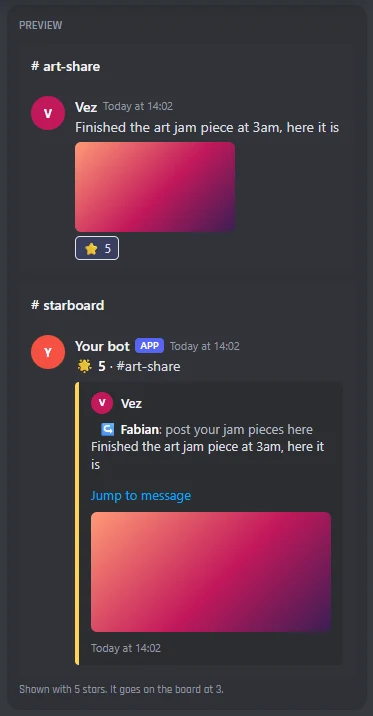
Dax adds the third star. Your bot posts a card on #starboard with the message, who wrote it, where, and the picture, and a link back to it.
A message with several pictures shows up to four of them on the card, as one gallery.
More stars come in
The card's count goes up with every star, so the board always shows the real number.
Turn on display tiers and a card that passes 5, 10, or 25 stars gets a new emoji and its own colour.
Stars are taken away
If the count drops under the stars needed, the card comes off the board. It goes back on if the message gets enough stars again. You can also keep it up with the new count.
Set Only take it off under to a lower number, and a card won't go on and off when one star comes and goes.
Edited or deleted
Jayce adds a few words to his message and the card shows the new text. You can switch that off to keep what it said when it reached the board.
If he deletes the clip, its card comes off the board too.
What counts as a star
The bot only counts stars from other members, and you decide which messages can reach the board. This is how it works on the settings Starboard starts with.
- Tom stars Fabian's messageCountsEach member's star counts once, with the board's emoji.
- Fabian stars his own messageDoesn't countSwitch on Count self-stars and it does.
- A bot reacts with a starNever countsNot even the star your own bot adds in an autostar channel.
- A message in #staff-chatStays off the boardWhen you add the channel to Channels left out. Threads follow their channel.
- A message by someone with a role left outStays off the boardPick the roles in Roles left out. Nobody is left out to start with.
- A message from last yearStays off, with an age limitSet Only messages from the last, like 1 week. There's no limit to start with.
- A bot's or a webhook's messageStays off the boardSwitch on Let bots' messages on the board to let them on.
- A message in an age-restricted channelNever goes on a boardThreads in it neither, so nothing age-restricted ends up where everyone can see it.
- A member who used /starboard hideTheir new messages stay offCards already up stay up. They can use /starboard hide again to let new ones on.
- Staff use Remove from StarboardStays off every boardEven with enough stars, until staff use Send to Starboard on it.
You can change every one of these on the What counts tab, board by board.
Every Starboard setting in the dashboard
Starboard has one page in your dashboard: five tabs, then its commands and events. A live preview beside the tabs shows a starred message and its card as you change things. You set it up server by server, from the server menu at the top.
Where each board posts
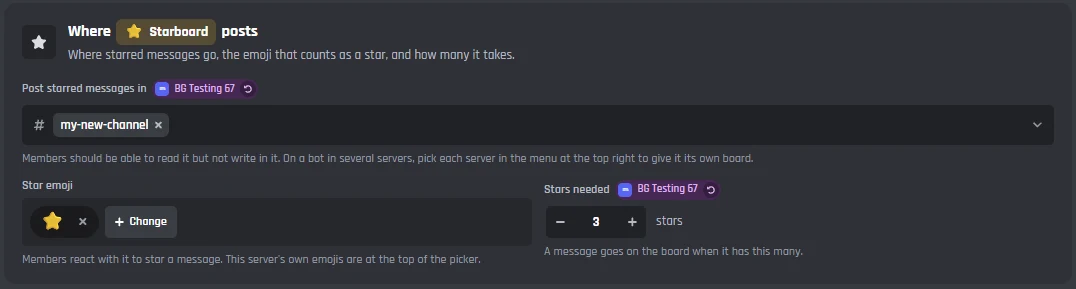
Pick the board channel, the emoji that counts as a star, and how many stars a message needs. One complete board is free. Premium gives you up to five, each with its own channel, emoji, rules, and card.


Your boards
- Boards
- One is free. With Premium, add up to five, like a hall of fame, a meme board, and an art board. Each board needs its own emoji.
- The switch
- Turns your first board on or off. With another board open, Remove is here instead.
Where the board posts
- Post starred messages in
- The board channel. Members should be able to read it but not write in it.
- Star emoji
- The reaction that counts as a star. A star to start with, and it can be one of your server's own emojis.
- Stars needed
- A message goes on the board when it has this many. 3 to start with.
Autostar channels (Premium)
- Autostar in
- The bot adds the board's emoji to every new message in these channels, so members only have to click it. Art, clips, and meme channels work well.
Decide what can reach the board
Leave out channels and roles, set an age limit, choose whose stars count, and pick what happens to a card when stars are taken away.
Channels and roles left out
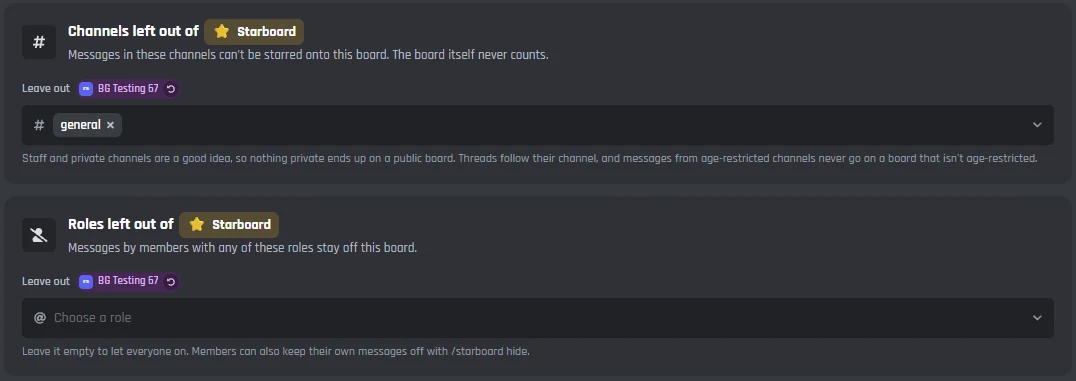
- Channels left out
- Messages in these channels can't be starred onto this board. Staff and private channels are a good idea. Threads follow their channel, and the board channel never counts.
- Roles left out
- Messages by members with any of these roles stay off this board. Leave it empty to let everyone on.
Age limit and whose stars count
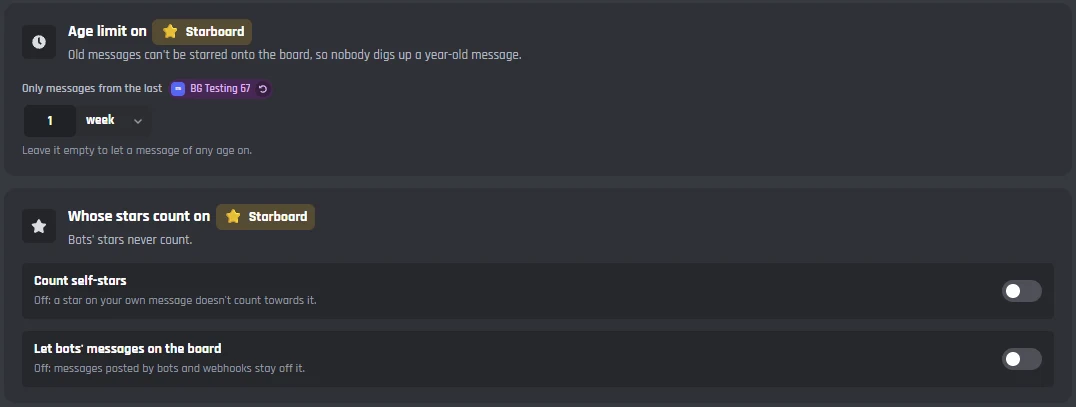
- Only messages from the last
- An age limit, like 1 week, so nobody digs up a year-old message. Leave it empty to let a message of any age on.
- Count self-stars
- Off to start with, so a star on your own message doesn't count towards it.
- Let bots' messages on the board
- Off to start with, so messages posted by bots and webhooks stay off. Stars from bots never count.
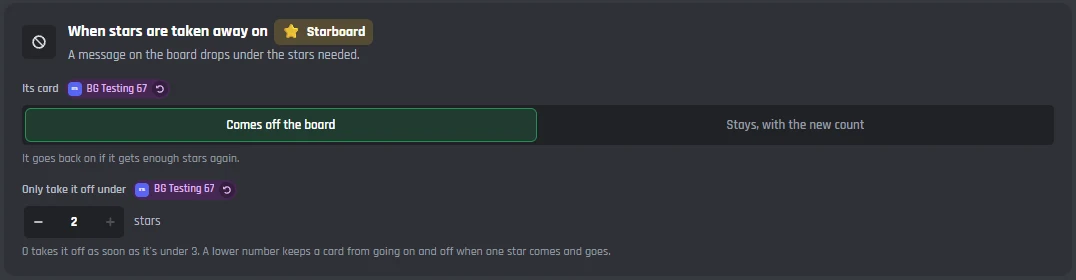
When stars are taken away
- Its card
- Comes off the board, or Stays, with the new count. A card that came off goes back on if the message gets enough stars again.
- Only take it off under
- With Comes off the board, the card only comes off under this many stars, so it doesn't go on and off when one star comes and goes. 0 takes it off as soon as it's under the stars needed.
The card your bot posts
Change the whole message the bot posts on the board, pick its colour, and let cards with lots of stars stand out with display tiers.
The card
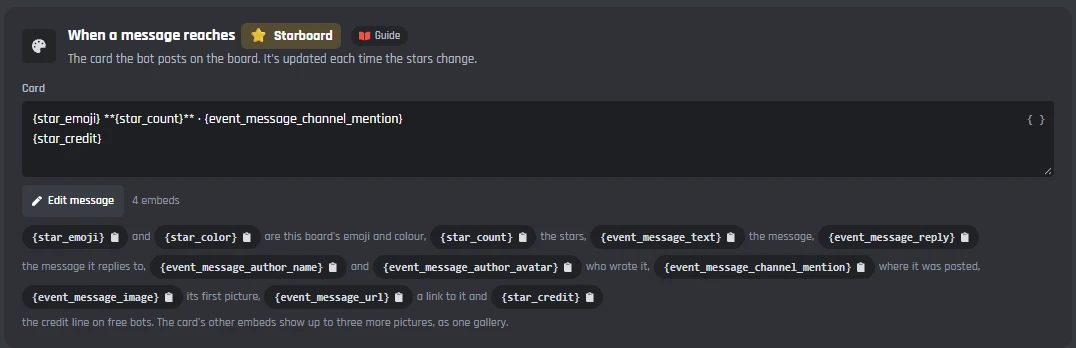
- Card
- The message your bot posts on the board, updated each time the stars change. Edit message opens the full message builder, for the embed, its colour, and its picture.
- Variables
- The star emoji and colour, the stars, the message, the message it replies to, who wrote it and their avatar, the channel, its first picture, a link to it, and the credit line on free bots. Press one to copy it.
- More pictures
- The card's other embeds show up to three more pictures, as one gallery. Each one hides when there's no picture for it.
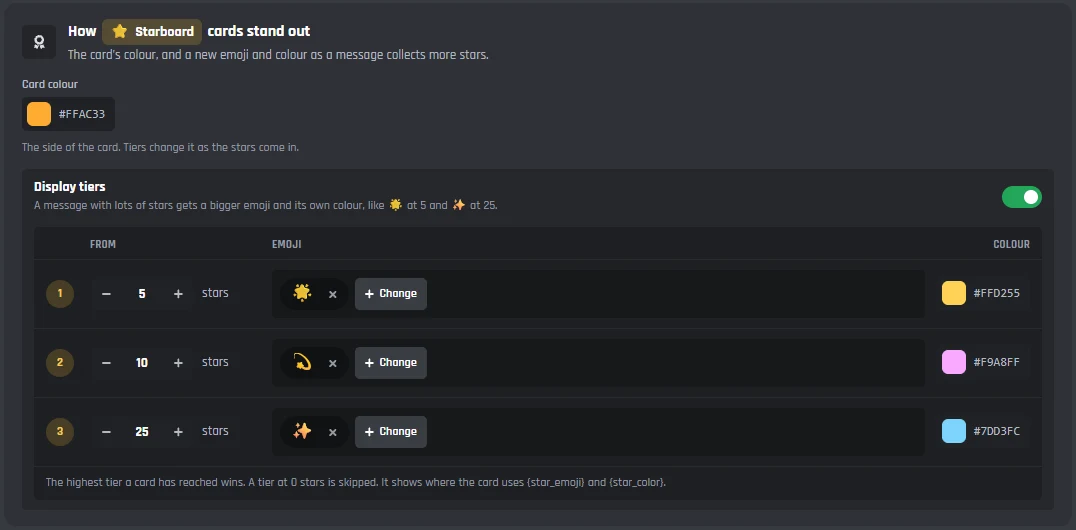
How cards stand out
- Card colour
- The side of the card. Orange to start with.
- Display tiers
- Off to start with. Turn it on and a message with lots of stars gets a bigger emoji and its own colour.
- The three tiers
- They start at 5, 10, and 25 stars, each with its own emoji and colour. The highest tier a card has reached wins, and a tier at 0 stars is skipped.
Edits
For every board.
- Update cards when a message is edited
- On to start with, so a card shows the new text. Turn it off to keep what the message said when it reached the board.
- Deleted messages
- When a starred message is deleted, its card comes off the board too.
The leaderboard and star rewards
Every star on a member's messages that are on a board adds to their stars. Give roles as the stars come in, and change what members see when they use /starboard.
Stars: 148 (1st place)
On the board: 23 times
Star rewards (Premium)
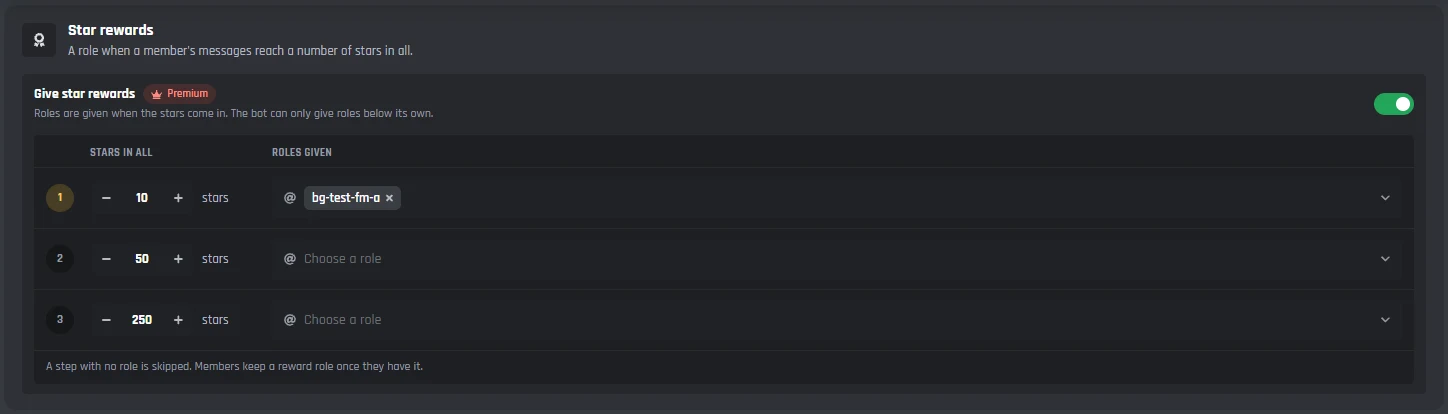
- Give star rewards
- Roles when a member's messages reach a number of stars in all. The bot can only give roles below its own.
- Three steps
- 10, 50, and 250 stars to start with, each with the roles it gives. A step with no role is skipped, and members keep a reward role once they have it.
What members see
Each reply only shows for whoever used the command, and lists the variables it can use.
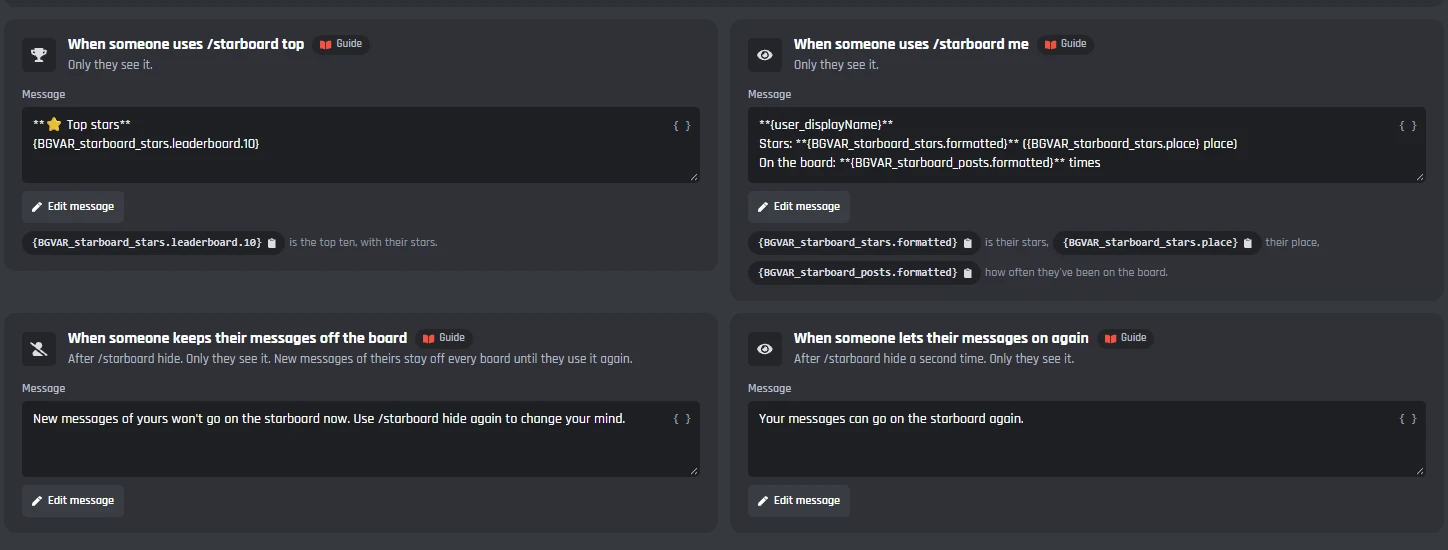
- /starboard top
- The members whose messages got the most stars.
- /starboard me
- Their stars, their place, and how often they've been on the board.
- /starboard hide
- A member keeps their new messages off the board. Cards already up stay up.
- /starboard hide again
- They let their messages on again.
What staff see
Staff with Manage Messages right click a message, then Apps, to put it on the board or to take it off and keep it off. Remove from Starboard works on the card on the board too.

Replies staff see
Only the staff member sees them.
- Send to Starboard
- Puts a message on board 1 now, whatever its stars. Its card shows the stars the next time they change. A message staff took off goes back on.
- Remove from Starboard
- Takes a message off every board and keeps it off, even with enough stars. Use it on the message or on its card.
Under the tabs: the commands and events
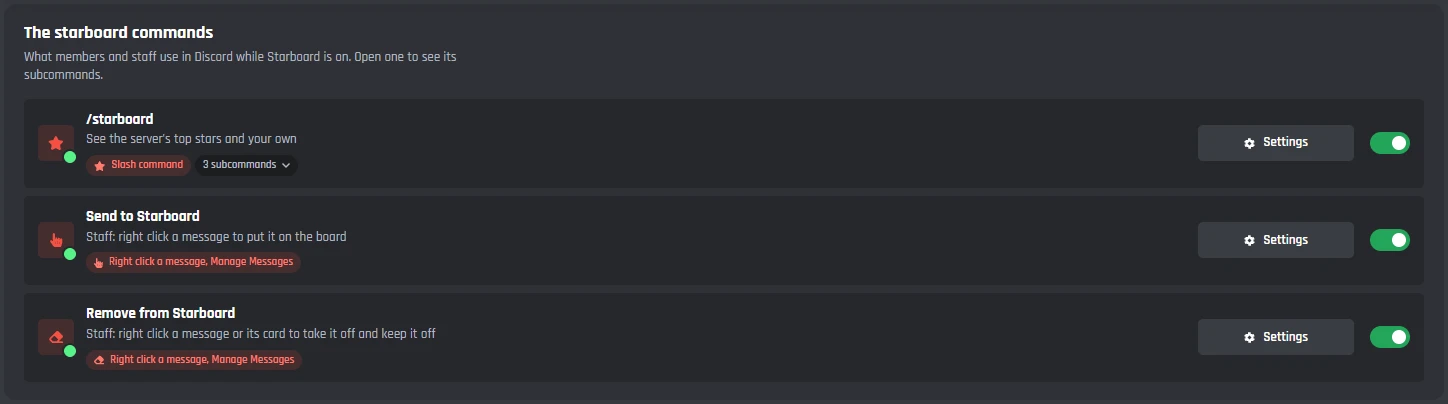
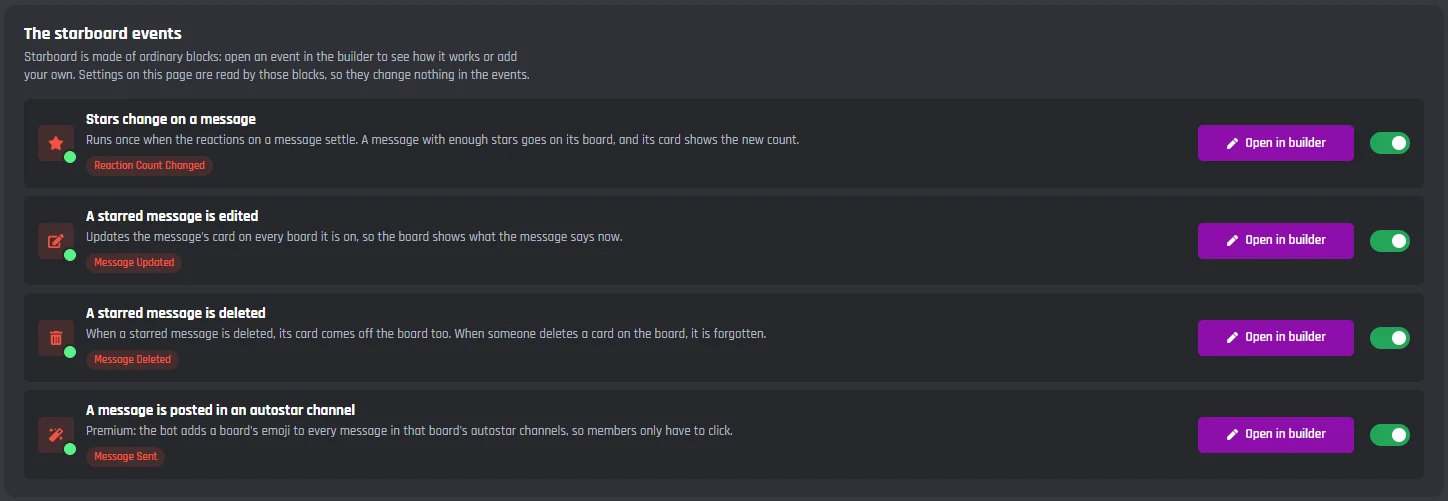
Starboard adds /starboard for everyone, two right click commands for staff, and four events. They are made of ordinary builder blocks, so you can open them and add your own.
Commands
- /starboard
- For everyone: top, me, and hide.
- Send to Starboard
- Right click a message, then Apps, then Send to Starboard. For staff with Manage Messages; members without it don't see it.
- Remove from Starboard
- Right click a message or its card, then Apps, then Remove from Starboard. Also for staff.
Events
- Stars change on a message
- Runs once when the reactions on a message settle. A message with enough stars goes on its board, and its card shows the new count.
- A starred message is edited
- Updates the message's card on every board it's on.
- A starred message is deleted
- Takes its cards down. A card someone deletes on the board is forgotten.
- A message is posted in an autostar channel
- Premium: adds a board's emoji to new messages in its autostar channels.
Starboard is made of ordinary builder blocks, and its cards are posted with Send or Edit a Message. Its new Reaction Count Changed event, and the message's text, author, and pictures it gives you, work in your own Discord bot events and commands too.
Set up a Discord starboard
Haven't got a bot in your server yet? Start with how to make a Discord bot, then come back here.
- 1Open Starboard from Modules in your dashboard and press Enable. This adds /starboard, the right click Send to Starboard and Remove from Starboard, and the events Starboard needs.
- 2On the Boards tab, pick the channel under Post starred messages in. Make sure the bot can view it, send messages, and embed links there.
- 3Press Save Changes.
- 4Ask members to star a message. Once it has 3 stars, its card appears on the board.
A free Discord starboard bot
One complete board works on the free plan, with every rule, the card, display tiers, the leaderboard, and the staff tools. Premium adds more boards and two extras.
Free
$0- One complete board, with every rule, the card, display tiers, and edits
- The leaderboard, /starboard, and Send to Starboard and Remove from Starboard for staff
- Starboard's commands and events don't use up your 3 free commands and 3 free events
- Up to 5 servers
Cards on free bots end with a small Starboard by BotGhost line.
Premium
$12.50 a month for one bot- Up to 5 boards, each with its own channel, emoji, rules, and card
- Star rewards: roles at three star totals you pick
- Autostar channels, where the bot adds the star for members to click
- No Starboard by BotGhost line on cards
- Unlimited commands, events, and servers
Free bots go offline after 2 days with no activity. Read about free hosting
The starboard leaderboard
Every star on a member's messages that are on a board adds to their stars. Members check the top ten with /starboard top and their own stars with /starboard me, and only they see the reply.
- /starboard top lists the members whose messages got the most stars.
- /starboard hide lets a member keep their new messages off the board.
- With Premium, star rewards give roles as members reach the star totals you pick.
- @Vez: 148
- @Fabian: 96
- @Jayce: 71
- @Tom: 52
- @allmy2: 38
- @Dax: 17
Stars: 17 (6th place)
On the board: 3 times
Discord starboard bot questions
Didn't find your question? Ask us in the BotGhost Discord, or read the Starboard docs.
Yes. Every BotGhost bot gets one complete starboard for free: every rule, the card, display tiers, the leaderboard, and the staff tools. Premium adds up to five boards, star rewards, and autostar channels, and takes the small Starboard by BotGhost line off the cards.
Starboard on the free planInvite your BotGhost bot to your server. In the dashboard, open Starboard and press Enable, pick your board channel on the Boards tab, and press Save Changes. Once a message gets 3 stars from members, its card appears on the board.
See the setup stepsIn the board channel it needs View Channel, Send Messages, and Embed Links. In the channels people star messages in, it needs View Channel and Read Message History, so it can count who starred a message.
Read the Starboard docsYes. Both are on the Boards tab. A message needs 3 stars to start with, and the emoji can be any emoji, including one of your server's own.
See every settingThey can react, but their own star doesn't count unless you turn on Count self-stars. Stars from bots never count, including the one your bot adds in autostar channels.
See what counts as a starWhen someone edits a message that is on the board, its card shows the new text. You can turn that off to keep what it said when it reached the board. When a starred message is deleted, its card comes off the board too.
Read the Starboard docsYes, with Premium: up to five boards, like a hall of fame for the very best, a meme board, and an art board. Each one has its own channel, emoji, stars needed, rules, and card. On a bot in several servers, pick each server in the menu at the top of the page to give it its own boards.
See the Boards tabYes. It keeps running and shows in your modules as Starboard (old) until you turn it off. Its settings don't move across, so set up the new Starboard from the start.
What changed in the new StarboardYes. Staff with Manage Messages right click the message, or its card on the board, then Apps, then Remove from Starboard. It comes off every board and stays off, even with enough stars. Send to Starboard puts a message on the board straight away, whatever its stars.
See what staff seeStart a starboard in your server
Switch on Starboard, pick a channel, and star a message. The free plan doesn't need a card.
Set up Starboard for free