A Kite alternative
Modules you switch on, and no credits for each action.
Both are no-code Discord bot makers where you build commands from blocks. BotGhost adds ready-made modules like Tickets and Giveaways, which never count toward the free plan's limits.
Kite facts checked on kite.onl on 10 November 2026.
Discord bot modules vs templates
A Kite template adds commands and event listeners to your bot. From then on they're yours: they count toward your 15 commands and 10 event listeners, and most blocks they run use credits.
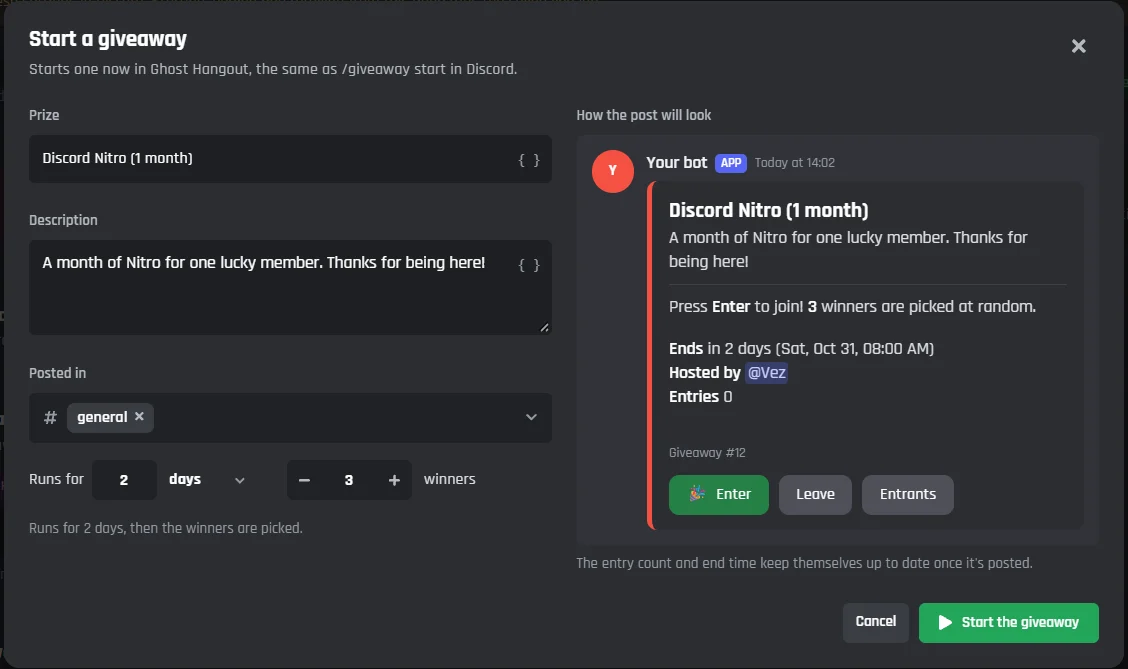
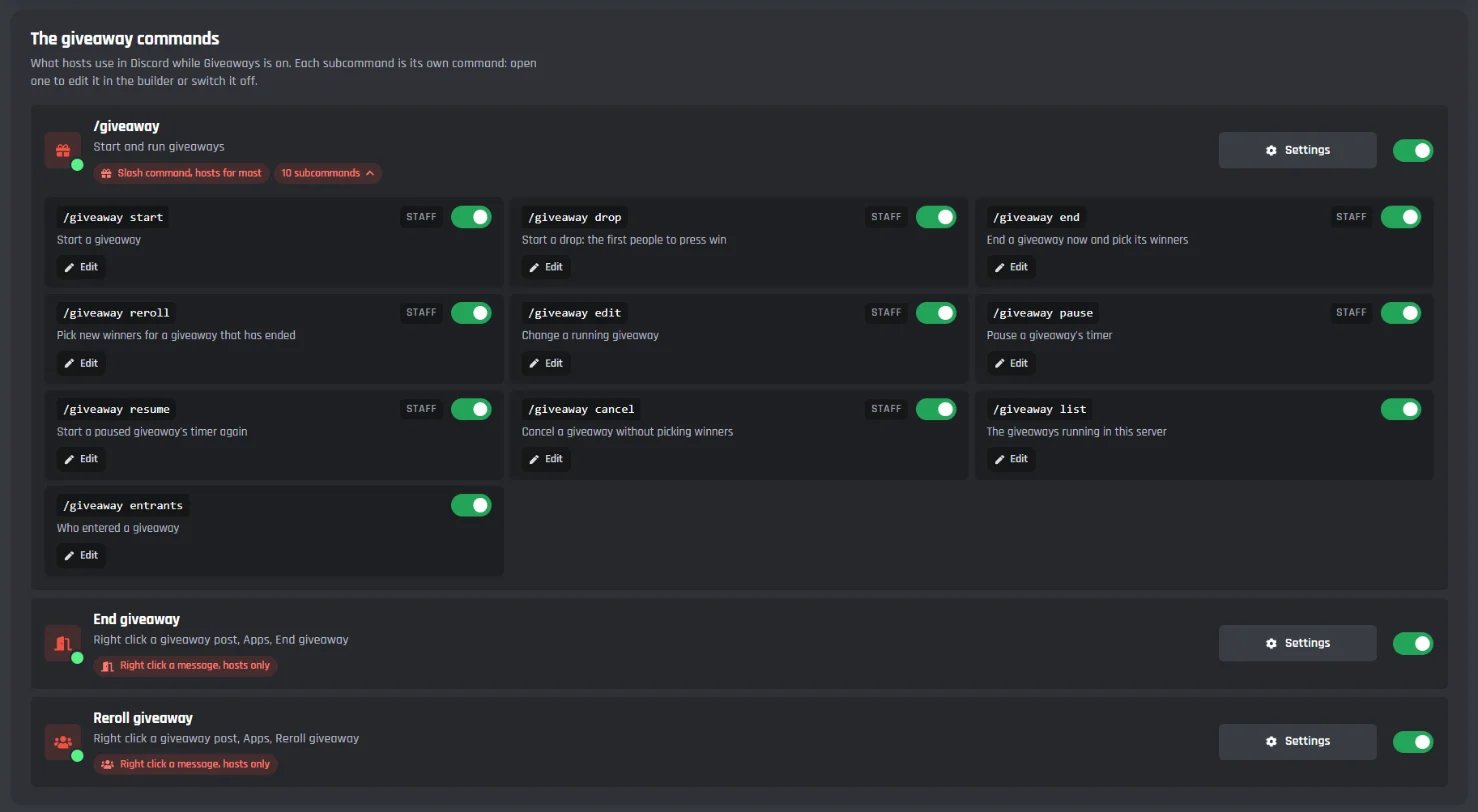
A BotGhost module is a whole feature with its own page in the dashboard. The Discord ticket bot module has panels, forms, staff tools, and transcripts. The giveaway bot module has entry rules, bonus entries, and winner roles. You set them up with pickers and switches, and you can still open their commands in the builder to change a step.
Their commands, events, buttons, saves, and transcripts sit outside every free limit, so your 3 commands and 3 events stay free for the ones you build yourself. The free modules are Tickets, Welcomer, Moderation, Leveling, Economy, Counting, Giveaways, Reaction Roles, Starboard, Birthdays, and Verification.
Kite's free plan vs BotGhost's free plan
Kite's side comes from kite.onl/pricing. BotGhost's limits are the ones the bot enforces today.
- Your own commands
- BotGhost3 slash commands
- Kite15 commands
- Your own events
- BotGhost3 events
- Kite10 event listeners
- Ready-made features
- BotGhost11 free modulesEach has its own settings page and never counts toward a limit
- Kite100+ templatesThey add commands and event listeners to your bot
- Usage limits
- BotGhostNo creditsFree caps each month: 500 buttons and menus made, 500 saves to variables, and 100 ticket transcripts. Modules don't count toward them.
- Kite10,000 credits a monthMost actions cost 1, Send API Request 3, and Ask AI 5 to 100. When they run out, commands and events pause until next month.
- Servers per bot
- BotGhost5
- Kite100
- Bots online at once
- BotGhost1
- KiteUp to 10
- Your bot's status
- BotGhost"Made with BotGhost"Premium lets you set your own
- KiteYour own, free
- Quiet days
- BotGhostSwitches off after 2 daysWhen nobody uses its commands, buttons, or menus. Start it again from the dashboard.
- KiteStays online
- AI that builds commands
- BotGhostNone
- KiteFlow AI2 prompts a month on the free plan
- Source code
- BotGhostClosed
- KiteOpen sourceYou can host it yourself
Kite pricing vs BotGhost pricing
Kite's plans raise the limits of one bot a step at a time. BotGhost Premium removes the command, event, and server limits in one go.
- Cheapest paid plan
- BotGhost$12.50 a monthPremium for one bot, or $75 a year
- Kite$2.99 a monthPlus, for one bot
- What paying adds
- BotGhostUnlimited commands, events, and serversPlus your own status and Premium modules like Music
- KiteHigher limits at each stepPlus: 30,000 credits, 250 servers, 50 commands. Premium ($5.99): 100,000 credits, 1,000 servers, 100 commands.
- More than one bot
- BotGhost$25 a monthPremium on every bot you own, including ones you make later, or $150 a year
- KitePer botEach plan covers one bot
- Yearly
- BotGhostHalf price
- KiteSaves 16%
Where Kite is ahead
If you'll build everything yourself, Kite's free plan goes further, and its paid plans cost less ($2.99 or $5.99 a month against $12.50). Flow AI can also build a command from a description, which BotGhost can't.
Kite alternative questions
A free Discord bot maker at kite.onl. You build commands and event listeners by connecting blocks, and Kite hosts the bot. It's open source, and its Flow AI assistant can add the blocks for you from a description.
Compare the free plansYes. Kite's free Basic plan gives each bot 100 servers, 15 commands, 10 event listeners, and 10,000 credits a month. Most actions cost 1 credit, Send API Request costs 3, and Ask AI costs 5 to 100. When a bot runs out, its commands and events pause until the next month. Checked on kite.onl on 10 November 2026.
Kite and BotGhost free plans side by sideNo. The free plan's 3 commands and 3 events are for the ones you build yourself. A module's commands and events, and anything it saves, posts, or transcribes, never count toward a free limit. The free modules are Tickets, Welcomer, Moderation, Leveling, Economy, Counting, Giveaways, Reaction Roles, Starboard, Birthdays, and Verification.
How modules workKite, if you pay monthly for one bot. Kite Plus is $2.99 a month and Kite Premium $5.99 a month. BotGhost Premium is $12.50 a month or $75 a year for one bot, with unlimited commands, events, and servers, or $25 a month for every bot you own. Neither BotGhost plan uses credits.
Compare the pricesWhile people use it, yes. A free bot switches off after 2 days without anyone using one of its commands, buttons, or menus, and a Premium bot after 365 days. You start it again from the dashboard and nothing is lost.
How Discord bot hosting worksYes. On both, the bot is your own Discord application, so it keeps its name, avatar, and servers. Reset the bot's token in the Discord Developer Portal and paste the new one into BotGhost, so only BotGhost runs it. Kite's flows don't import, so rebuild them with modules and blocks.
How to set up a bot on BotGhostNo. You join the blocks yourself, or start from a module, a share code, or a Marketplace pack. A command can still use AI while it runs: the Send an API Request block has Ask ChatGPT, Ask Claude, and Ask Gemini templates, with your own key kept in Secrets.
Making an AI Discord botMake a Discord bot with free modules
No card to start, and no credits to run out of.
Start free, no card- 1Sign up on the BotGhost dashboard with Google, Apple, GitHub, X, or email.
- 2Make your bot in the Developer Portal and paste its token in. How we keep your token safe
- 3Invite it to your server and switch on a module.
