Discord Ticket Bot with panels, forms and transcripts
Give your members a private place to talk to your staff. They press a button, answer a few questions, and get their own ticket. Your staff claim it, the bot chases the replies, and every ticket ends with a rating and a transcript. Free, no coding, and your bot.
- Free for up to 3 ticket types
- 16 transcript looks
- No coding required
- Your bot, your branding
Pick what you need help with and we will open a private ticket for you.
Your ticket is ready: #support-0042
Only you can see this
The panel in its Card look. Tom pressed Support, and only he sees the reply.
One ticket, from button to transcript
Follow Tom's ticket from the moment he presses Support to the transcript in your staff channel, and see what the bot did at each step.
Pick what you need help with and we will open a private ticket for you.
Tom pressed Support.
- Checked Tom has no ticket open already
- Checked it is not too soon since his last one
- Checked he is not blocked
- All clear, so the questions open
Every step runs through one of five ticket events. Switch on only the parts your server needs.
Your panel, your ticket types
Start from a preset, pick one of four looks, and see the panel the bot posts. Every button opens its own kind of ticket.
Card: A box in your colour, with buttons or a dropdown.
Pick what you need help with and we will open a private ticket for you.
- A Support button with its questions
- Claim, notes and saved replies for staff
- Quiet tickets close by themselves
- Transcripts and a 5 star rating
When they can't open one
Before a ticket opens, the bot checks the member. Pick a reason to see the reply only they see. You can change every reply, or switch any check off.
Pick what you need help with and we will open a private ticket for you.
Tom pressed Support.
You already have a ticket open: #support-0042
Only you can see this
A limit per member sets how many tickets of a type one member can have open at once, 1 by default and up to 10. The reply links to the ticket they already have.
Members always hear why, so nobody presses the button again and again wondering what went wrong.
Staff tools inside every ticket
Members never see them. Pick a tool to see what it does in the ticket.
Hey @Tom, thanks for reaching out. Someone from @Support team will be with you soon.
Jayce is looking after this ticket now.
You choose what the other staff can do once it is claimed: still reply, only read, or not see it at all.
Staff find their tools as buttons on the first message, in a Staff tools menu, or both.
Everything you can set, tab by tab
All of it lives on one Tickets page in your dashboard, in the order a ticket happens. Pick a part to see every setting on it and what it does in Discord.
Post a panel in four looks
Pick the channel and how the panel looks: a Card, a List, a classic Embed, or a Custom message you write yourself. Post it, and later Update it changes the message that is already there.
PremiumMore than 1 panel in each server needs Premium.
Pick what you need help with and we will open a private ticket for you.
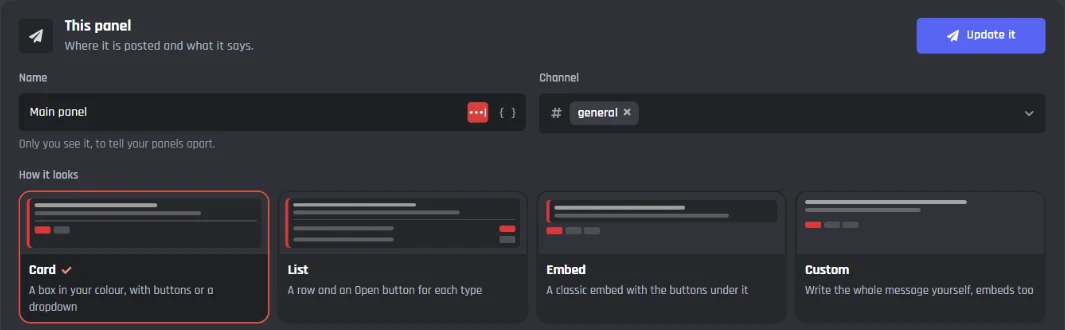
Every setting on the Panel tab, 20 in all
Your panels
Each panel is a message in a channel.
- Add a panel
- Put different ticket types on different panels, each in its own channel.
- More panelsPremium
- Free bots get 1 panel in each server.
This panel
Where it is posted and what it says.
- Name
- Only you see it, to tell your panels apart.
- Channel
- Where the bot posts it.
- How it looks
- Card, List, Embed, or Custom where you write the whole message.
- Title and text
- With the line above the choices, like How can we help?
- Colour
- The edge of the box or the embed.
- Picture in the corner
- Your server icon, the bot avatar, a picture or none.
- Banner
- A wide picture on the panel.
Panel buttons
One button for each ticket type.
- Which ticket types
- Pick the types this panel shows.
- Show them as
- Buttons, a dropdown, or both.
- Open or closed
- Shows if staff are around right now.
- The usual reply time
- Like Usually replies in 12 minutes.
- Their open ticket
- A link to it that only they see.
When they can't open one
Each reason has its own reply, and each can be switched off.
- Already has one
- They are at their limit of open tickets.
- Too soon
- They opened one less than the wait time ago.
- Blocked
- Staff blocked them, or they have a blocked role.
- New accounts
- Keep throwaway accounts out, or ones with no avatar.
- Outside support hours
- Still open it, open it without a ping, or refuse it.
- Server is full
- Every category is full, or too many tickets are open.
Each ticket type with its own staff and questions
Every button on the panel is a ticket type. Choose whether it opens as a private channel, a private thread or a forum post, who answers it, and the questions members fill in first.
PremiumMore than 3 ticket types needs Premium.
Hey @Tom, thanks for reaching out. Someone from @Support team will be with you soon.
You are number 3 in line. The usual wait is about 20 minutes.
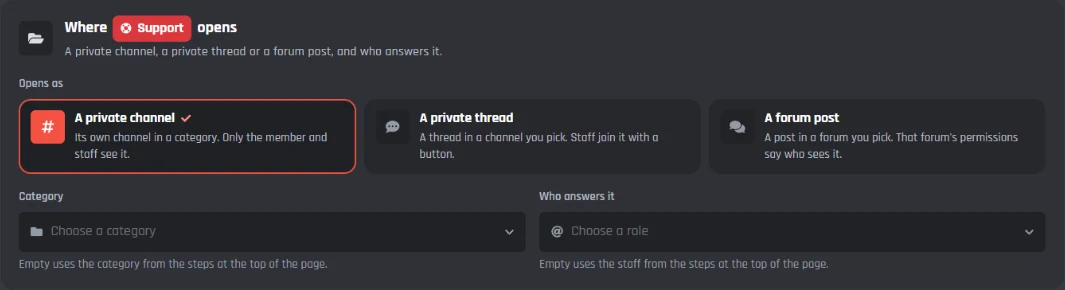
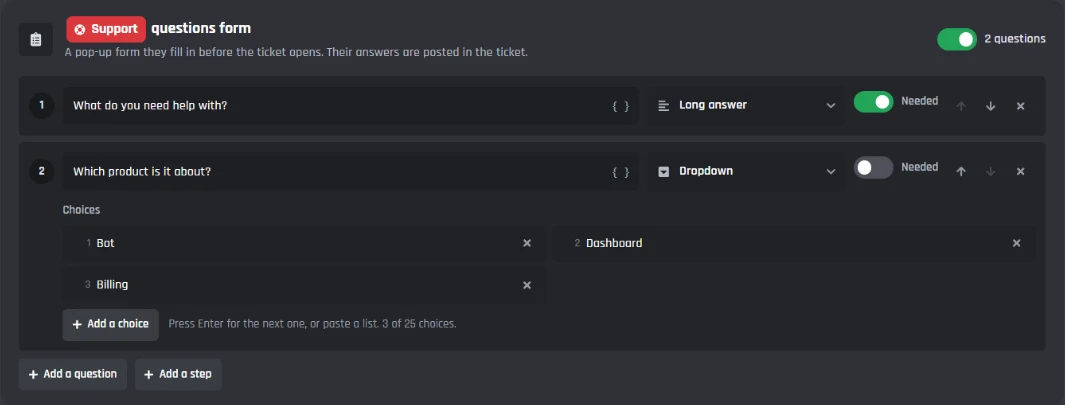
Every setting on the Opening tab, 25 in all
Your ticket types
Each button on the panel is a ticket type with its own settings.
- Add a type
- Start from Support, Billing, Report a member, Bug report, Order help and more.
- More ticket typesPremium
- Free bots get 3 ticket types.
Button
How the type shows on the panel.
- Name, colour and emoji
- On its button and in the dropdown.
- Short description
- Under its name in the dropdown and on the List look.
- Icon
- Only on the Tickets page, to tell your types apart.
Where it opens
And who answers it.
- Opens as
- A private channel, a private thread, or a forum post.
- Category
- Or the thread channel or forum it goes in.
- Who answers it
- The staff roles for this type.
Welcome and questions
What they fill in and what they see first.
- Welcome message
- Sent when the ticket opens, embeds and all.
- Ask questions first
- A pop-up form, with the answers posted in the ticket.
- 12 kinds of question
- Short or long answers, dropdowns, yes or no, pickers, file uploads and more.
- Needed questions
- Can't be skipped. Up to 5 questions a step, in up to 3 steps.
Who can open one
So nobody opens too many.
- A limit per member
- Up to 10 open at once, 1 by default.
- A wait between tickets
- Like 10 minutes, or 30 days for applications.
- A role they need
- Only members with the role see the button.
- Help articles first
- Up to 3 matching answers, with This fixed it and I still need help.
Ticket channel
Its name and what members can post.
- Its name
- Like support-0042, with the number, their name or the type.
- A second category
- Discord allows 50 channels in a category, so tickets go on here.
- Their place in line
- How many tickets are ahead and the usual wait.
- What they can post
- Files and pictures, voice messages, reactions, links, other bots' commands.
When it opens
Pings, priority and claiming.
- Ping your staff
- The staff roles, or only staff on duty.
- A starting priority
- And one level higher for boosters or supporters.
- Claim on the first reply
- The first staff member to write claims it.
- A member card for staff
- When they joined, their roles, past tickets and ratings.
- Kept from other staff
- Only this type's staff see it. Good for reports about staff.
Tools only your staff see
Staff find their tools as buttons on the first message, in a Staff tools menu, or both. Switch on the ones your team uses and press one to change how it works.
PremiumReply as the bot needs Premium.
Hey @Tom, thanks for reaching out. Someone from @Support team will be with you soon.
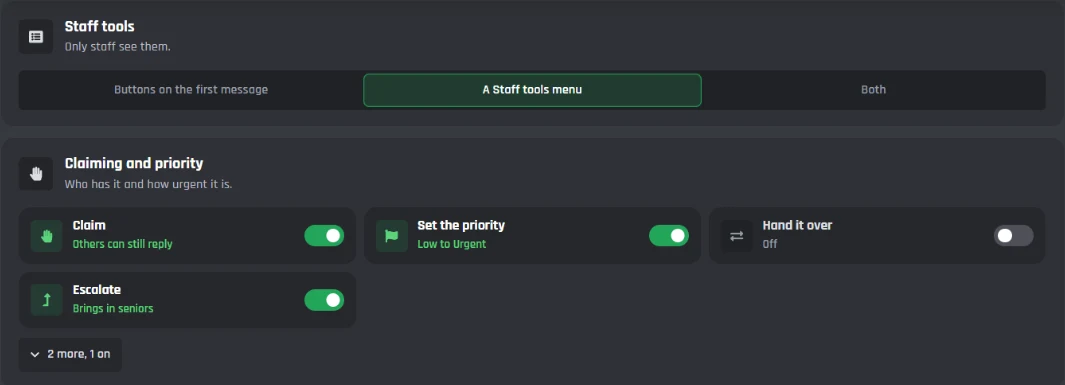
Every setting on the Staff tools tab, 21 in all
Where staff find them
Members never see them.
- Staff find their tools in
- Buttons on the first message, a Staff tools menu, or both.
Claiming and priority
Who has it and how urgent it is.
- Claim
- Other staff can still reply, only read, or not see it.
- Set the priority
- Low to Urgent, in the channel name, and Urgent can ping.
- Hand it over
- Whoever claims first, staff in turns, or whoever has the fewest.
- Escalate
- Adds your senior roles, raises the priority and pings them.
- Whose turn it is
- Waiting on the member or on staff, so the right side gets nudged.
- Make it private
- Only the claimer and the roles you pick.
Teamwork
People, notes and saved replies.
- Add or remove people
- Members and roles. The member can add people too.
- Staff notes
- Only staff see them, and they stay out of transcripts.
- Saved replies
- Your usual answers, also with /ticket reply.
- Labels
- Bug, Refund, Question and your own.
- Details staff fill in
- Like an order number, shown in the ticket and as a variable.
- Follow a ticket
- A ping when the member writes.
- Remind me
- The bot DMs a link to the ticket later.
- Move to another type
- Over to that type's staff and category.
- Merge two tickets
- Same question twice becomes one ticket.
More tools
For now and then.
- Lock, pin and rename
- And change the topic.
- Close it later
- Unless the member replies first.
- Pause the timers
- On one ticket that is waiting on something.
- A voice room
- A private voice channel, deleted once it is empty.
- Reply as the botPremium
- Hides which staff member wrote.
The bot chases replies for you
Reminders nudge the right people at the right time, and quiet tickets close by themselves. Set your support hours and the clocks stop while you are closed. With On duty, pings only reach staff who are on.
Can you send me the newest error from your Error Logs page?
@Tom This ticket closes soon if we don't hear back. Reply here to keep it open.
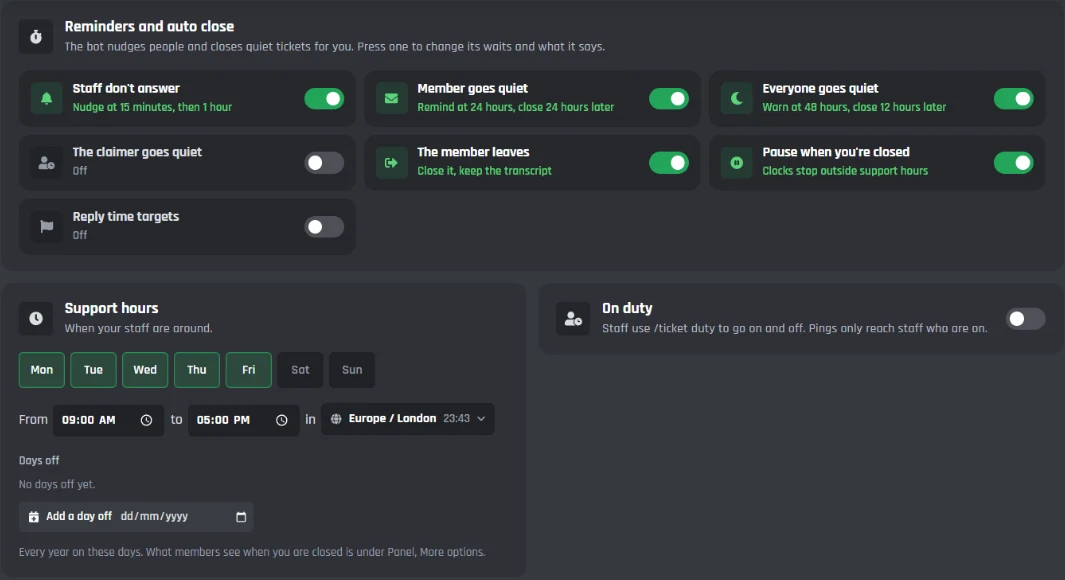
Every setting on the Automations tab, 11 in all
Reminders and auto close
Press one to change its waits and what it says.
- Staff don't answer
- A nudge at 15 minutes, then 1 hour, raising the priority.
- Member goes quiet
- A reminder at 24 hours, then it closes 24 hours later.
- Everyone goes quiet
- A warning at 48 hours, then it closes 12 hours later.
- The claimer goes quiet
- Unclaims it after 24 hours and pings the team.
- The member leaves
- Closes it and keeps the transcript.
- Reply time targets
- First reply within 1 hour, closed within 1 day, late ones flagged.
Support hours
When your staff are around.
- Days and times
- Like Monday to Friday, 09:00 to 17:00, in your time zone.
- Days off
- Every year on these days.
- Pause when you're closed
- The clocks stop outside support hours.
On duty
Staff go on and off with /ticket duty.
- Staff go on and off duty
- Pings only reach staff who are on.
- On duty role
- A role that only pings, given while staff are on.
Close it properly
Keep closed tickets so they can be reopened, or delete them. The member gets your closing message by DM, and the bot can save a transcript, ask for a rating and tell your log. A low rating reaches your seniors while it is fresh.
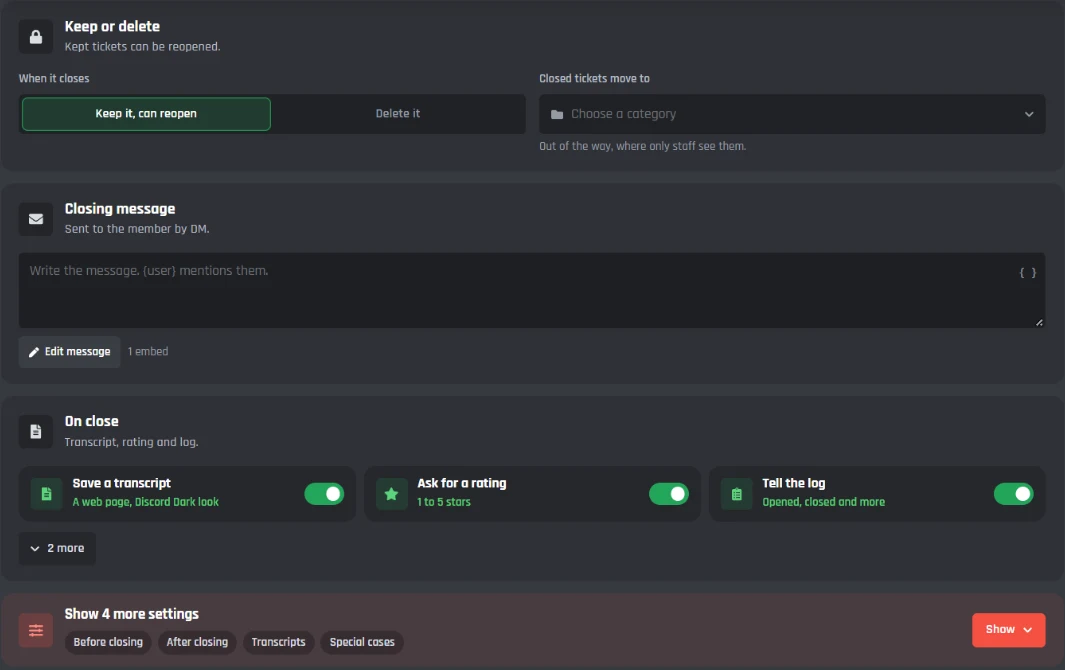
Every setting on the Closing tab, 20 in all
Keep or delete
Kept tickets can be reopened.
- When it closes
- Keep it so it can reopen, or delete it.
- Closed tickets move to
- A category only staff see.
- Closing message
- Sent to the member by DM, with the reason.
Before closing
Confirm, a reason, and who can close.
- Ask first
- Staff confirm, or the member agrees.
- A reason
- Optional or needed: Solved, No reply from the member, Duplicate, Other.
- Who can close
- The member can close, can ask, or only staff.
On close
Transcript, rating and log.
- Save a transcript
- Post it in a channel, DM the link, send it as a file too.
- Ask for a rating
- 1 to 5 stars or thumbs, with a comment if you like.
- Tell staff about low ratings
- A rating of 2 or lower goes to the channel you pick.
- A short survey
- Up to 5 questions with the rating.
- Tell the log
- Opened, claimed, closed, reopened and deleted, with who did it.
- Give or take roles
- When the ticket closes.
After closing
Reopening and clean up.
- Reopening
- Staff or the member, within 7 days.
- Follow ups
- A new ticket within 3 days is linked to the old one.
- Delete it later
- After 7 days. The transcript stays.
Special cases
For the endings that need something different.
- It closed by itself
- Its own message, and don't ask for a rating.
- The member left
- Still save the transcript.
- A bad rating
- Tell a senior while it is fresh.
- A good rating
- Share the good ones.
- A comment
- Collect what members wrote in one place.
Every past ticket, one search away
The Transcripts tab lists every ticket with what they asked and its transcript. Search and filter, press one to read it word for word, and see your stats under it.
PremiumExport your tickets as a spreadsheet with Premium.
- 5 of 5#0042 SupportBotGhost, Tom opened it, Jayce closed it: Solved
- 4 of 5#0041 BillingBotGhost, Dax opened it, Fabian closed it: Solved
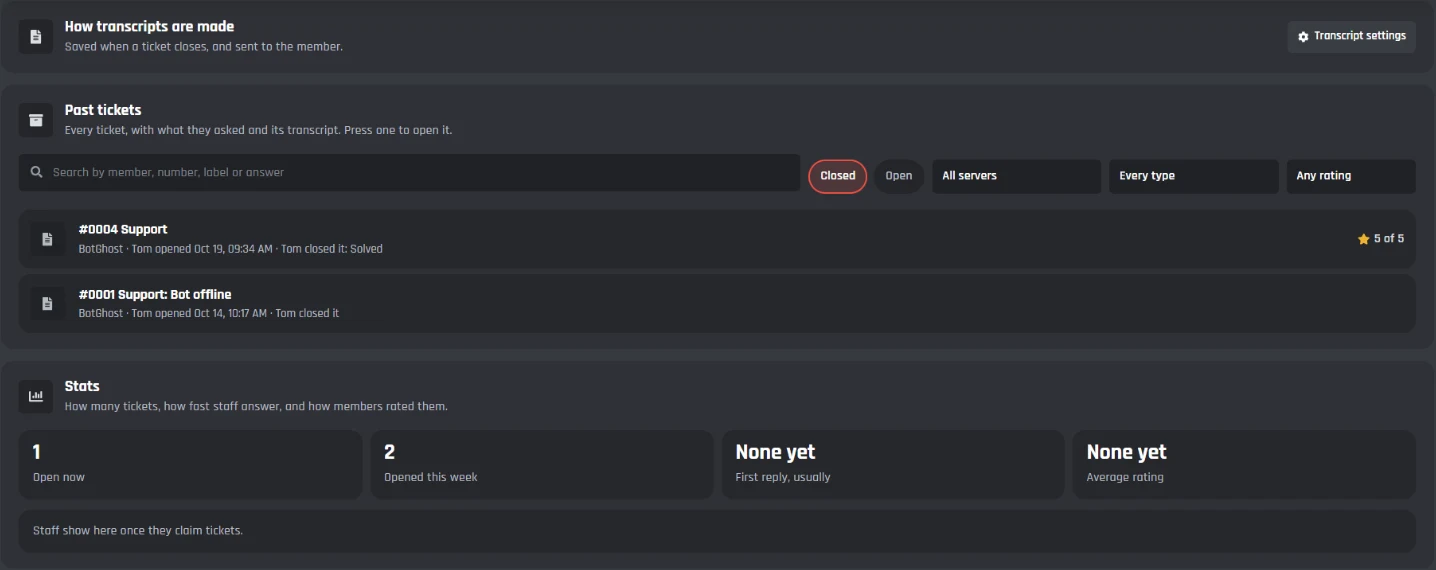
Every setting on the Transcripts tab, 11 in all
Past tickets
Every closed ticket, word for word.
- Search
- By member, number, label or answer.
- Filters
- Open or closed, server, ticket type and rating.
- Read one
- Its answers, transcript and every staff action.
- ExportPremium
- Tickets, ratings and answers as a spreadsheet.
Stats
How many tickets, how fast staff answer, and the ratings.
- Open now and opened this week
- How busy you are.
- First reply, usually
- How fast your staff answer.
- Average rating
- What members thought.
Transcript settings
Set on the Closing tab.
- How it looks
- 16 looks with your own accent colour and name.
- Who can read transcripts
- Only some roles, and staff only see their own types.
- A record of staff actions
- Every claim, change, close and reopen, with who and when.
- How long tickets are kept
- 1 year by default.
More ways to open a ticket
Besides the panel, members can type a command, right click a message, or mention the bot, and staff can open a ticket with a member.
PremiumDM the bot and Say a keyword need Premium.
i need help with my bot, it keeps going offline
Need a hand? Open a ticket and our staff will help.
Only you can see this
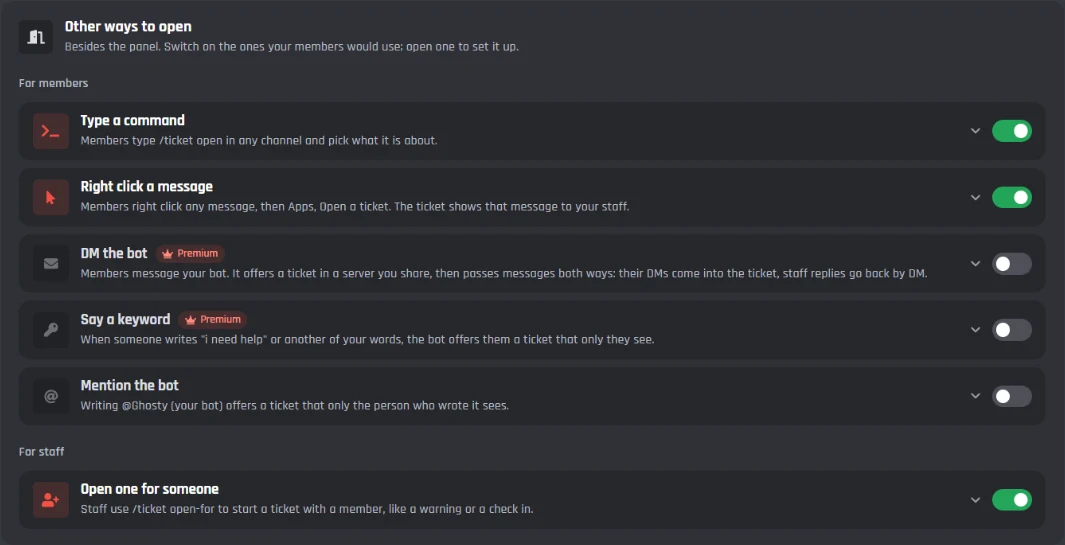
Every setting on the Other ways in tab, 8 in all
For members
Besides the panel.
- Type a command
- /ticket open, with close and mine too. Rename the command if you like.
- Right click a message
- Apps, Open a ticket: quotes it and links back to it.
- Mention the bot
- Opens the type you pick.
- DM the botPremium
- Staff replies come from the bot.
- Say a keywordPremium
- Words like i need help, in the channels you pick.
For staff
Open a ticket with a member.
- Open one for someone
- /ticket open-for, with who can do it.
- Skip the questions
- And tell the member by DM.
- Staff commands
- Claim, add, priority and reply.
Five ticket events under the page
Everything on the page runs through five events in the builder, with a path for each thing that can happen. A path you leave empty does what the page says, so you only add blocks where you want something different.
PremiumAdding your own blocks to the ticket events needs Premium.
- Good rating4 or 5 stars, or a thumbs up.
- Bad ratingYour block: give the claimer a Needs a review role
- Left a commentRuns as well as good or bad.
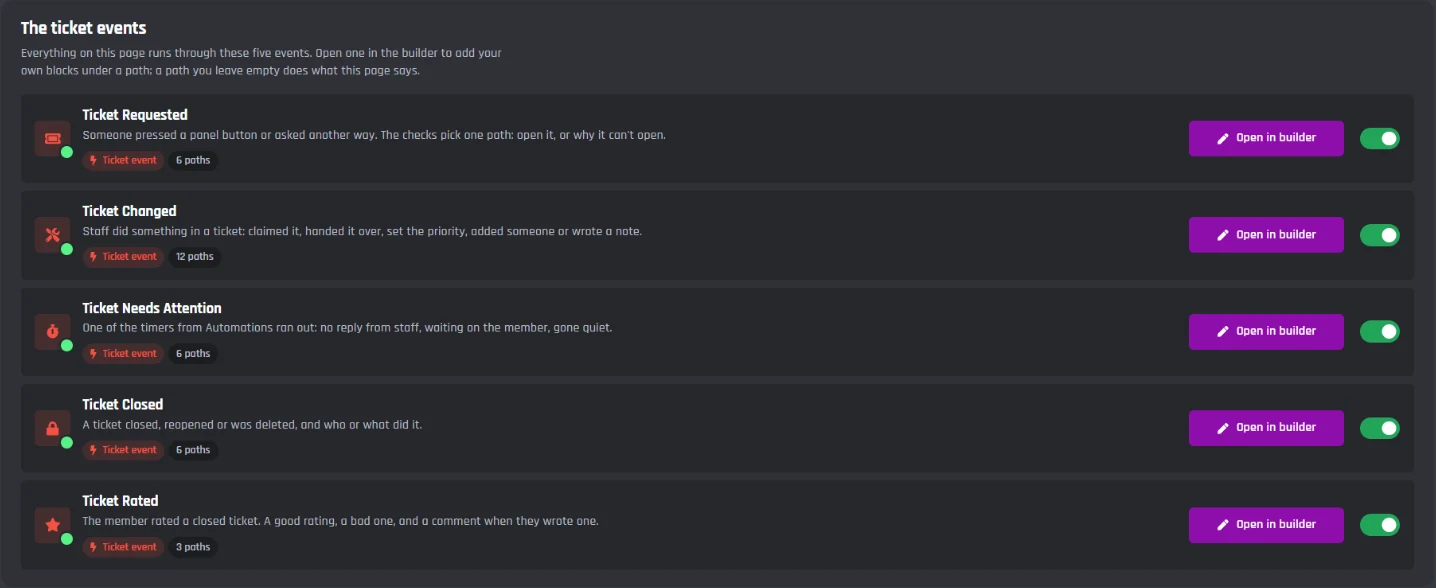
Every path in the five ticket events, 33 in all
Ticket Requested
Someone asked for a ticket.
- Open it
- Already has one
- Too soon
- Not allowed
- We're closed
- Server is full
Ticket Changed
Staff did something in a ticket.
- Claimed
- Let go
- Handed over
- Priority changed
- Label added or removed
- Escalated
- Person added or removed
- Note written
- Waiting on someone
- Renamed
- Locked or unlocked
- Made private
Ticket Needs Attention
A timer from Automations ran out.
- No staff reply yet
- Still no reply
- Waiting on the member
- Gone quiet
- Claimed but quiet
- Reply time target missed
Ticket Closed
It closed, reopened or was deleted.
- By staff
- By the member
- By itself
- Member left
- Reopened
- Deleted
Ticket Rated
The member rated a closed ticket.
- Good rating
- Bad rating
- Left a comment
Transcripts in 16 looks
Every ticket is saved when it closes. Pick a look to see Tom's ticket in it.
Looks just like the channel it came from
- Saved for every ticket when it closes
- Sent as a link, a file, or both
- Your own accent colour and name on top
- Staff notes stay out of the member's copy
Hey Tom! Does it go off at the same time each night?
Yeah, around 3am every night.
That is the nightly restart. It should stay online from now on.
That fixed it, thanks!
Every look is free. Find any past ticket later on the Transcripts tab.
How it compares to dedicated ticket bots
Ticket Tool, Tickets, Ticket King and the rest do tickets well. The difference is whose bot it is and what else it can do.
| Feature | Your BotGhost bot | Dedicated ticket bots | Coding your own |
|---|---|---|---|
| Runs under your own bot name and avatar | Yes | Paid plan | Yes |
| Panels with buttons or a dropdown | Yes | Yes | Code |
| Questions before the ticket opens | Yes | Varies | Code |
| Claim, priority, notes and saved replies | Yes | Varies | Code |
| Reminders and auto close | Yes | Varies | Code |
| Ratings after a ticket closes | Yes | Varies | Code |
| Transcripts | 16 looks | Varies | Code |
| Welcomes, moderation and custom commands in the same bot | Yes | No | Code |
| Cost | Free, Premium for more | Free tiers and paid tiers | Server bills and your time |
Dedicated ticket bots means Ticket Tool, Tickets, Ticket King and similar, whose features vary by bot and plan. White labelling is a paid tier on the major ones.
How to set it up
Live in six steps
From a fresh bot to a panel in your support channel
- 1
Create your bot and invite it
Sign in to BotGhost, create a bot and invite it. It needs View Channel, Send Messages and Embed Links, plus Manage Channels for channel tickets or Create Private Threads for thread tickets. - 2
Turn on Tickets
Open Tickets in your dashboard and press Enable. Not sure where to start? Press Start from a preset for a ready made setup. - 3
Follow the setup steps
The strip under the header walks you through it: who answers tickets, where tickets go, and the channel for the panel. - 4
Save
Press Save Changes on the bar at the bottom of the page. The bot always uses what is saved. - 5
Post the panel
Press Post the panel on the setup strip, or Post it on the Panel tab. - 6
Send a test ticket
Press Send a test ticket. The bot opens one for you, so you see it all work before your members do.
Read the Tickets guide
Every tab of the Tickets page, step by step with pictures, plus what to check when something isn't working.
How to set up a Discord ticket bot
What a ticket bot does, how the panel works, what makes a good ticket system, and what else tickets are good for.
What a Discord ticket bot does
A ticket bot turns "can someone DM me?" into a private room with a record. A member presses a button, answers a few questions, and gets a channel or thread that only they and your staff can see. Staff claim it, help, and close it, and the conversation is saved as a transcript.
Doing that by hand means making channels, fixing permissions and chasing people. A ticket bot does all of it, the same way every time, and a BotGhost bot does it under your own name.
A ticket panel that fits your server
The panel is the message members press to open a ticket. Make it a Card in your colour, a List with an Open button for each type, a classic Embed, or a Custom message you write yourself. Each button opens a different ticket type, so billing goes to one team and reports go to your moderators.
What makes a good ticket system
A good support desk answers fast and tidies up after itself. A few things that help:
- Ask the right questions first, so staff never open a blank ticket.
- One open ticket per member and a short wait between tickets, to stop spam.
- A nudge when nobody has answered, and support hours so members know when to expect a reply.
- Auto close for quiet tickets, with a reminder first.
- A transcript and a rating for every ticket, so you can look back and get better.
Not only for support
The same tickets work for reports, shop orders and staff applications. The Shop and orders preset asks for the order number on every ticket, and Staff applications gives members a form, keeps every application as a transcript, and lets them apply once every 30 days.
Built from ordinary events
Under the page, Tickets is five ordinary events: Ticket Requested, Ticket Changed, Ticket Needs Attention, Ticket Closed and Ticket Rated, with a path for each thing that can happen. You can open them in the builder at any time and see exactly what runs. With Premium you can add your own blocks under any path, so a ticket can also check a database, call an API, or give a role.
Discord Ticket Bot FAQ
Keep building
Tickets are one part of your bot. Here is the rest of it.

Ready to open your first ticket?
Create a bot, switch on Tickets, and have a panel in your support channel in minutes. Free, no code, nothing to install.
