Discord welcome card maker
Make a welcome image for your server from 21 templates. Change the words, fonts, colours, and background, then download it as a PNG. It's free, there's no sign in, and nothing gets uploaded.
Send this card to each new member
A PNG shows the same name to everyone. The Welcomer, BotGhost's welcome module, draws this card fresh each time someone joins, with their own name, avatar, and number. Pick Classic under Templates.
Template
Who joined
These fill the card's variables. A BotGhost bot fills them in for each member who joins.
The words
Click a variable to add it where your cursor is, or to the first line if you have not picked one.
Background
Send this card to each new member
A PNG shows the same name to everyone. The Welcomer, BotGhost's welcome module, draws this card fresh each time someone joins, with their own name, avatar, and number. Pick Classic under Templates.
What a Discord welcome card is
A welcome card is a picture your server posts when someone joins. It usually has their avatar, their name, your server's name, and their member number on a background in your server's colours. It does the same job as a welcome message, and in a busy channel a picture is easier to spot than a line of text.
The words use variables. {user_name}, {server}, and {member_number} fill in here from the Who joined fields, and in a bot they fill in for each member as they join.
The maker uses the same templates and drawing code as the cards BotGhost bots send, so the card in this post is what members would get. A PNG you download shows one name, which suits an announcement post. For a card with each new member's own name and avatar, your bot has to draw it.

Welcome to the server, @Tom!
How to send a welcome card automatically
A BotGhost bot draws a new card for every member who joins, with their own name and avatar. There are two ways to set it up.
With the Welcomer
Free- 1Make a free bot on BotGhost and switch on the Welcomer.
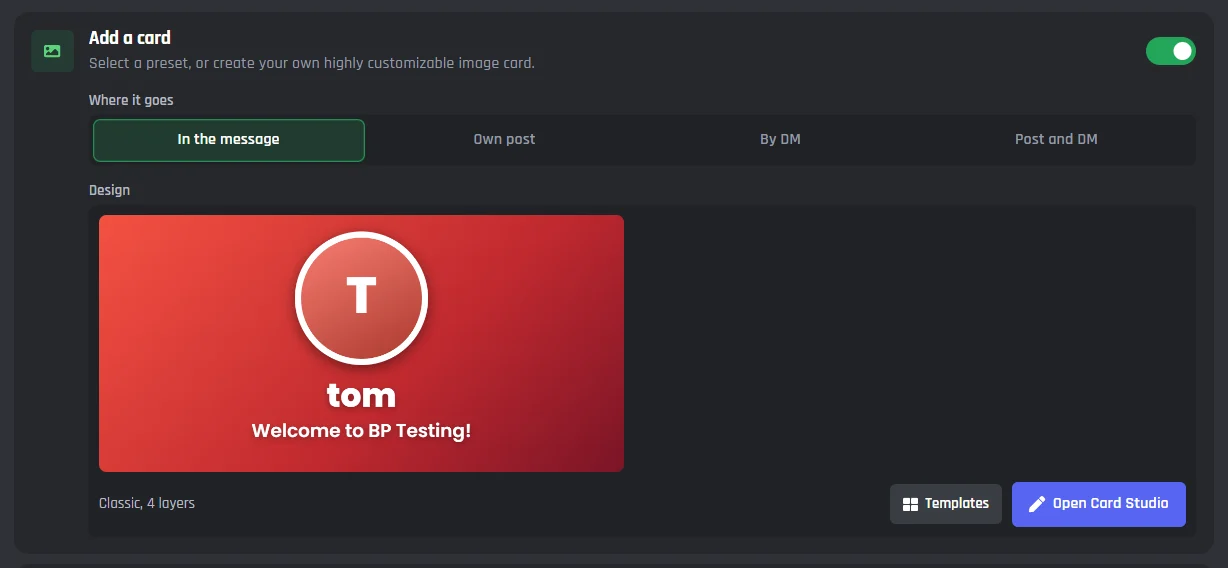
- 2Under Anything else?, turn on Add a card.
- 3Pick Where it goes: in the welcome message, as its own post, by DM, or a post and a DM.
- 4Press Templates and pick the one you used here, or Open Card Studio to change it.
The Discord welcome bot page covers the rest of the Welcomer: goodbye and boost messages, roles, and different welcomes for people who come back.
With the Make an Image Card block
PremiumFor a card outside the Welcomer, like a /welcome command your staff run or a card in your own Member Joined event, use the Make an Image Card block in the Discord bot command builder.
- 1Drag Make an Image Card into your command or event.
- 2Pick a template, or press Open Card Studio to design your own.
- 3Under Whose card, pick the member whose name and avatar go on it.
- 4Add a Send or Edit a Message block after it and put
{card}in the message.
The block needs Premium in your own commands and events. Card Studio in the docs
Welcome card maker questions
Is the Discord welcome card maker free?
Yes. Pick a template, change it as much as you like, and download the PNG. There is no sign in, no watermark, and no limit on downloads.
Are my pictures uploaded anywhere?
No. Your browser reads the avatar or background you pick and draws it on the card, so the picture stays on your device.
What size is the welcome card?
Most templates are 1024 by 500 pixels. The two banner templates are 1024 by 340, and Square is 800 by 800.
How do I make a bot send a welcome card to every new member?
Make a free bot on BotGhost and switch on the Welcomer. Under Anything else?, turn on Add a card, then press Templates and pick the same template. The bot draws the card for every member who joins, with their own name, avatar, and member number.
What do {user_name}, {server}, and {member_number} do?
They're variables. Here they fill in from the Who joined fields. In a BotGhost bot they fill in for each member: {user_name} is their username, {server} is your server's name, and {member_number} is their member number. {member_number_ordinal} writes the number as 1st, 2nd, or 3rd.
Can I use my own background picture in the Welcomer?
Yes. A picture from a link works on every plan. Uploading one from your computer needs Premium.
Can I use emoji on the card?
Yes. Type or paste an emoji into any text and it is drawn as a picture, so it looks the same on every device.
Your welcome card, drawn for every member
A BotGhost bot draws the card you made for everyone who joins, with each person's own name, avatar, and number.
