Discord giveaway bot
One press to enter, and winners picked at random.
Start a giveaway with /giveaway start or from your dashboard. Members press Enter, and when time is up your bot picks the winners and announces them. It's all set up on one page in BotGhost, the no-code Discord bot maker.
Every setting is free on every bot, from entry rules to rerolls, drops, and prize codes.

Hosted by @Vez
Entries 1,284Giveaway #12EnterLeaveEntrantsMade with BotGhost
How a giveaway runs
From the post to the last reroll, your bot keeps the giveaway up to date in Discord. Press a step to see it play out.
It's posted
Vez uses /giveaway start with the prize, how long it runs, and how many win. Or he starts it from the dashboard. Your bot posts it with Enter, Leave, and Entrants buttons.
Leave the prize out and a form asks for it.
Hosted by @Vez
Entries 0Giveaway #12EnterLeaveEntrantsMade with BotGhost
Members enter
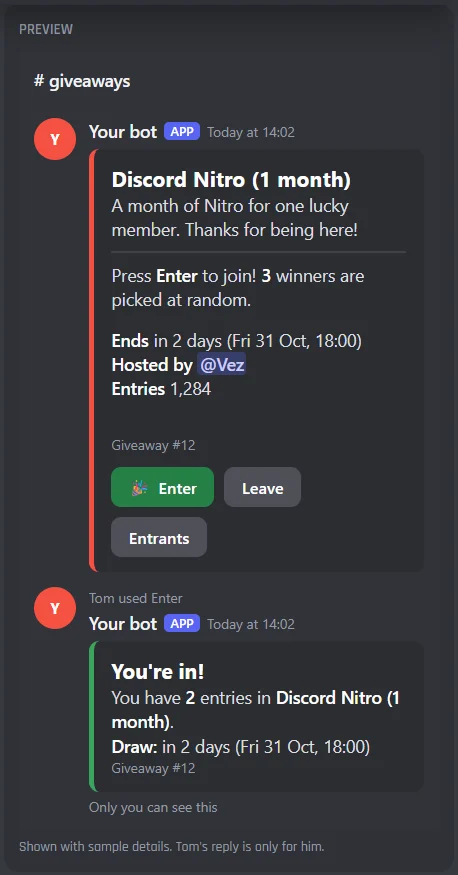
Tom presses Enter. Only he sees the reply, with his entries and when the draw is, and the count on the post goes up.
Pressing Leave takes him out again. Quick presses are bundled, so the post is edited at most once every 5 seconds.
Time is up
When the timer runs out, the bot picks 3 winners at random, checks they're still in the server, and replies to the post with a ping for each.
The post itself changes to show the winners and the final count.
Winners claim
Fabian presses Claim prize. Only the winners can, so you know who's still around to get their prize.
Give winners a time to claim, and with prize codes on, each one gets a code privately.
A reroll
Jayce never claims. When the time to claim runs out, the bot picks someone else from the same entries and pings them. A host can also use /giveaway reroll.
A reroll never picks an earlier winner, and works until the entries are deleted, 30 days after the draw to start with.
Who gets in, and how many times
Everyone can enter to start with, once each. Add the rules you want, and members who can't enter are told why, privately.
- Tom presses EnterHe's in, with 1 entryEveryone in the server can enter to start with. Only he sees the reply.
- Tom presses Enter againHe's already inPressing twice never adds a second entry.
- A Server Booster presses EnterIn, with 2 entriesWith Bonus entries giving the booster role +1. They can still only win once.
- Fabian doesn't have a role it needsCan't enterThe reply names the roles, from Needs one of these roles or Needs all of these roles.
- An account made yesterdayCan't enter yetWith Discord account at least set, the reply says when to try again.
- A member with a muted roleCan't enterWhen the role is in Can't enter with any of these roles.
- A member with a bypass roleGets inRoles in Skips every rule can always enter.
- Jayce presses LeaveHe's outHe can press Enter again to come back.
- Someone presses Enter while it is pausedNot while pausedA host paused it with /giveaway pause. The post says so too.
- Dax leaves the serverTaken outOf every running giveaway, so he can never be drawn.
- A winner lost a role before the drawSkipped at the drawWith Check the winners again at the draw on, someone else is picked.
You set every one of these on the Entering and Winners tabs, server by server.
Every Giveaways setting in the dashboard
Giveaways has one page in your dashboard: six tabs, then its commands and events. A live preview beside the tabs shows the post and the replies as you change them. You set it up server by server, from the server menu at the top.
The giveaway post
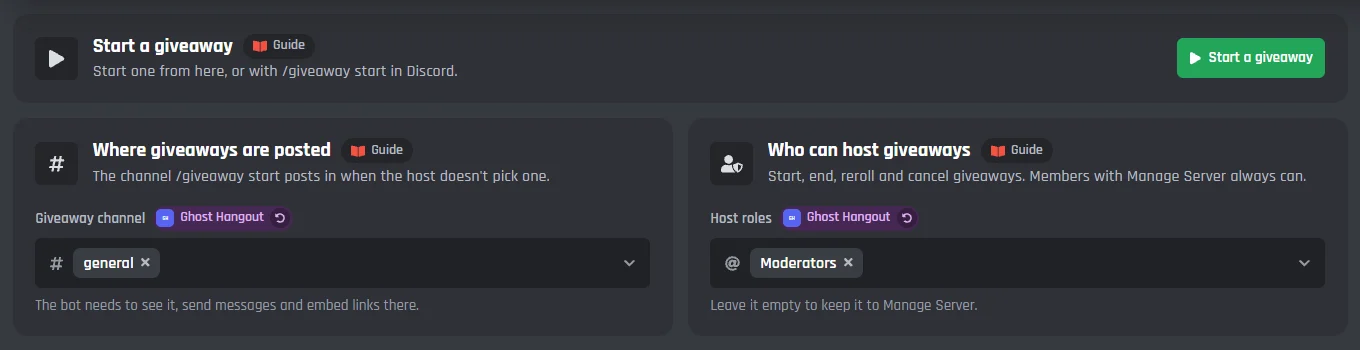
Pick where giveaways go and who can host them, start one from the page, and change the post members enter from. The bot keeps its entry count and end time up to date.
Hosted by @Vez
Entries 1,284Giveaway #12EnterLeaveEntrantsMade with BotGhost
Start a giveaway
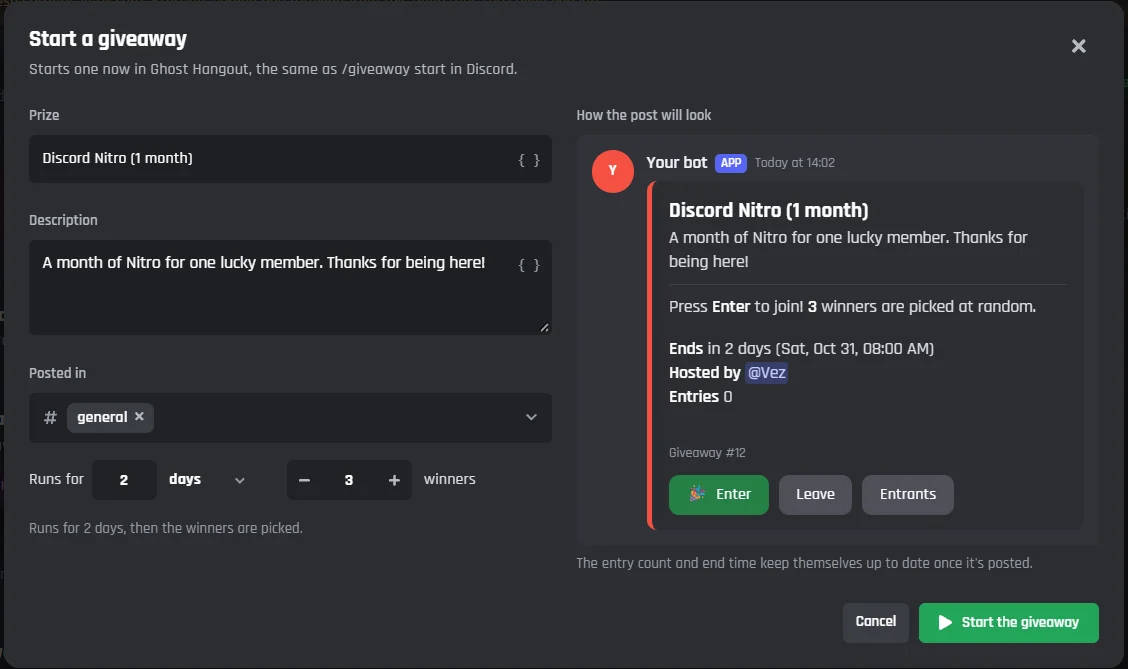
- Start a giveaway
- Starts one now in the server picked at the top, the same as /giveaway start in Discord.
- In the window
- The prize, a description, the channel it is posted in, how long it runs, and how many win, with a preview of the post as you type.
Where and who
- Giveaway channel
- Where /giveaway start posts when the host does not pick a channel. The bot needs to see it, send messages, and embed links there.
- Host roles
- Who can start, end, reroll, and cancel giveaways. Members with Manage Server always can. Leave it empty to keep it to them.
The post
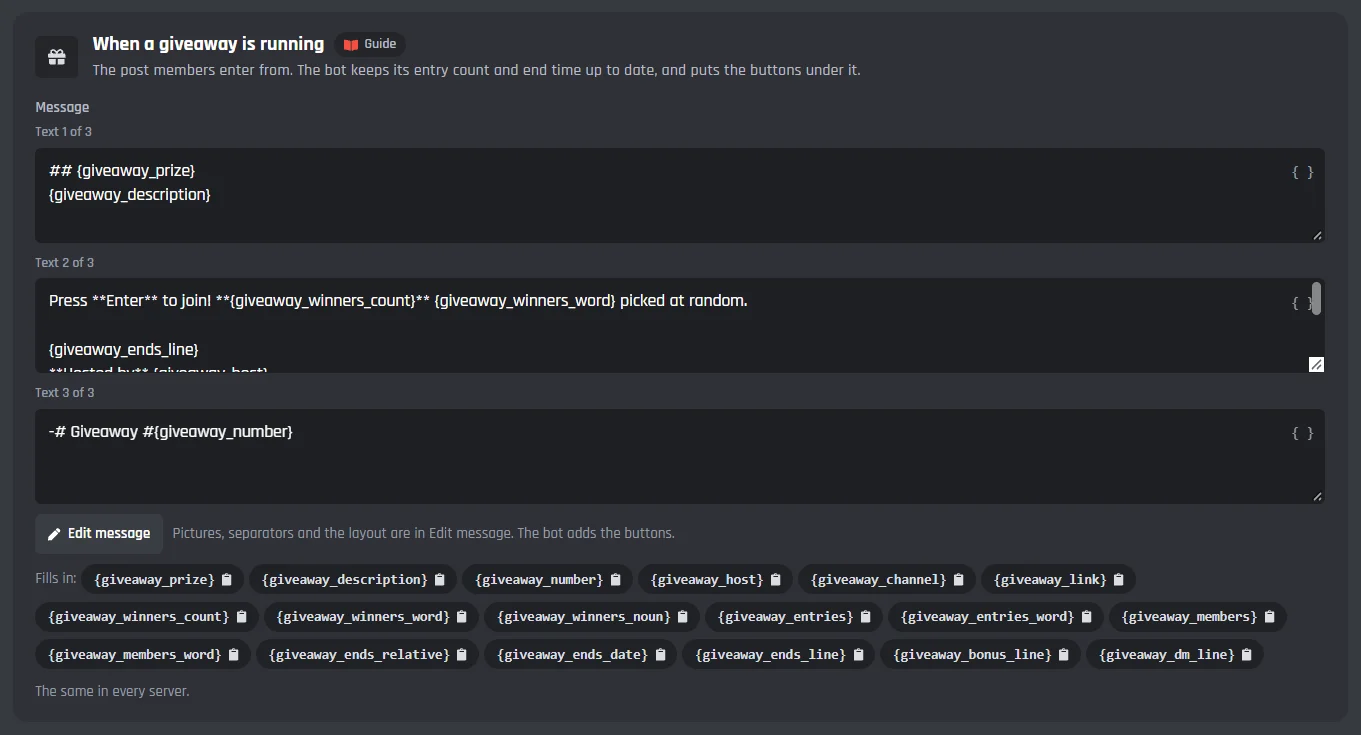
- When a giveaway is running
- The post members enter from. Edit message opens the full message builder.
- When a giveaway ends
- The same post once the winners are picked. Only the Entrants button stays under it.
- When a giveaway is cancelled
- The same post when a host cancels it. Nobody wins, and the buttons go.
- Fills in
- The prize, the description, its number, the host, the channel, how many win, the entries, the bonus line, and when it ends. Press one to copy it.
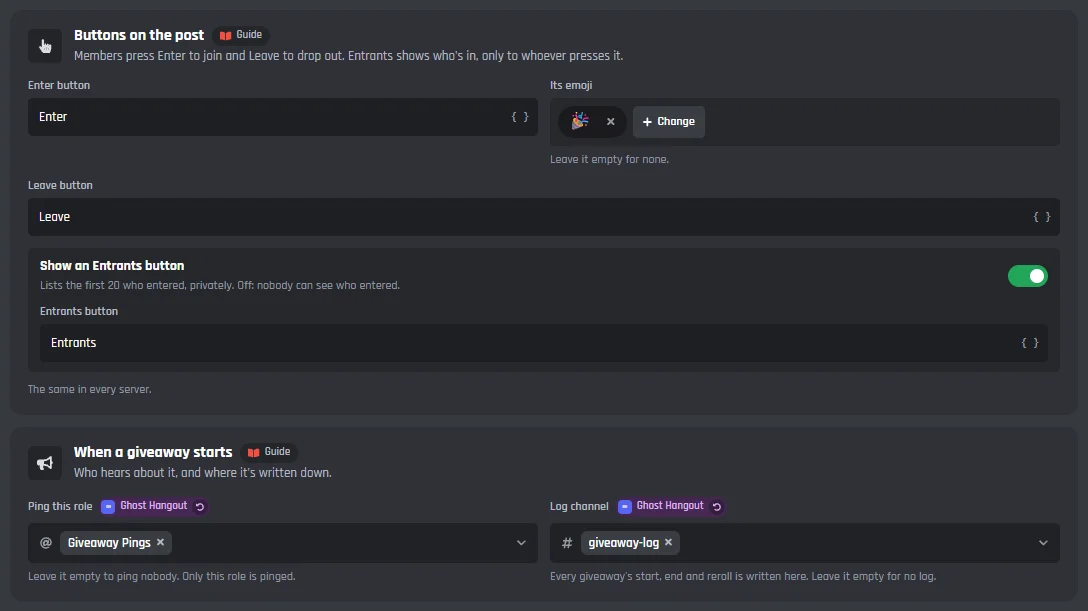
Buttons and the start
- Enter button and its emoji
- Enter with a party popper to start with. Leave the emoji empty for none.
- Leave button
- Members press it to drop out.
- Show an Entrants button
- Lists the first 20 who entered, only to whoever presses it. Off: nobody can see who entered.
- Ping this role
- Pinged when a giveaway starts. Leave it empty to ping nobody.
- Log channel
- Every giveaway's start, end, and reroll is written here, with a log line you can change.
What a new giveaway starts with
Used when a host leaves them out of /giveaway start.
- How long it runs
- 1 day to start with, from 1 minute to 90 days.
- How many win
- 1 to start with, up to 50.
Decide who can enter
Every rule can be left empty, and with all of them empty everyone in the server can enter. Each rule is checked when a member presses Enter, and the reply tells them why when they can't.
Draw: in 2 days (Fri 31 Oct, 18:00)Giveaway #12Made with BotGhost
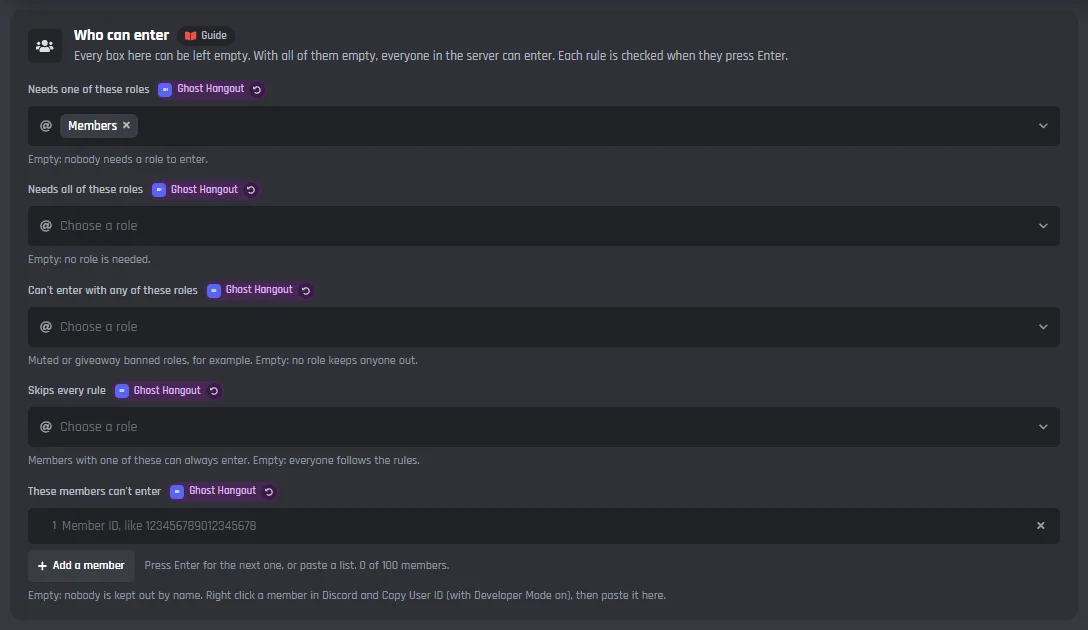
Who can enter
- Needs one of these roles
- Members need at least one of them.
- Needs all of these roles
- Members need every one of them.
- Can't enter with any of these roles
- Muted or giveaway banned roles, for example.
- Skips every rule
- Members with one of these roles can always enter.
- These members can't enter
- Members kept out by name, by their member ID.
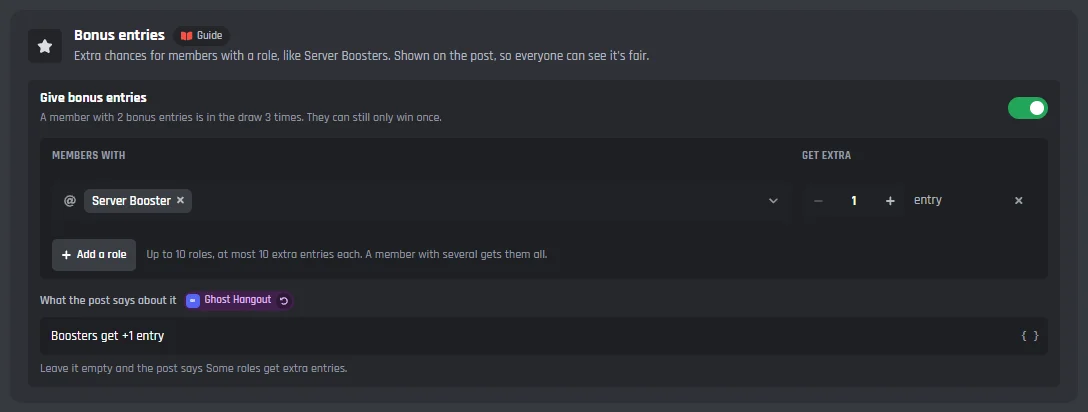
Bonus entries
- Give bonus entries
- Extra chances for members with a role, like Server Boosters. Up to 10 roles, each giving +1 to +10. A member with 2 bonus entries is in the draw 3 times, and can still only win once.
- What the post says about it
- Like Boosters get +1 entry. Leave it empty and the post says Some roles get extra entries.
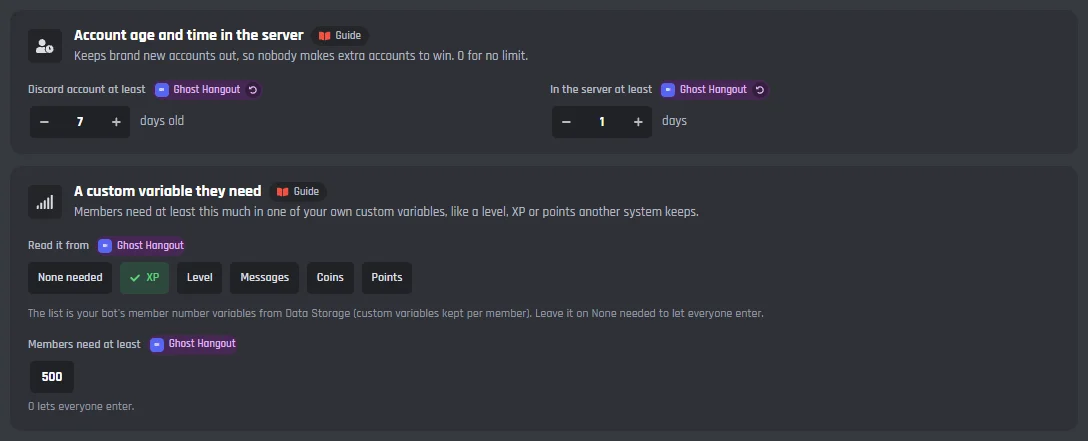
Account age and a custom variable
- Discord account at least
- Days old, so nobody makes extra accounts to win. 0 for no limit.
- In the server at least
- Days in your server. 0 for no limit.
- A custom variable they need
- A level, XP, or points from one of your member number variables, and how much they need.
Replies only the member sees
Each one is a message you can change.
- When someone enters
- Their entries and when the draw is.
- When they're already in
- When they press Enter again.
- When they can't enter
- The reason fills in, like the roles they need or when their account is old enough.
- When they leave
- After they press Leave.
- When the giveaway isn't open
- When it has ended or was cancelled.
- When the giveaway is paused
- When a host has paused it. Nobody can enter while it is paused.
How the winners are picked
Winners are picked at random from every entry. Someone can only win once per giveaway, and a reroll never picks an earlier winner. The announcement replies to the post and pings only the winners.
replying to Giveaway #12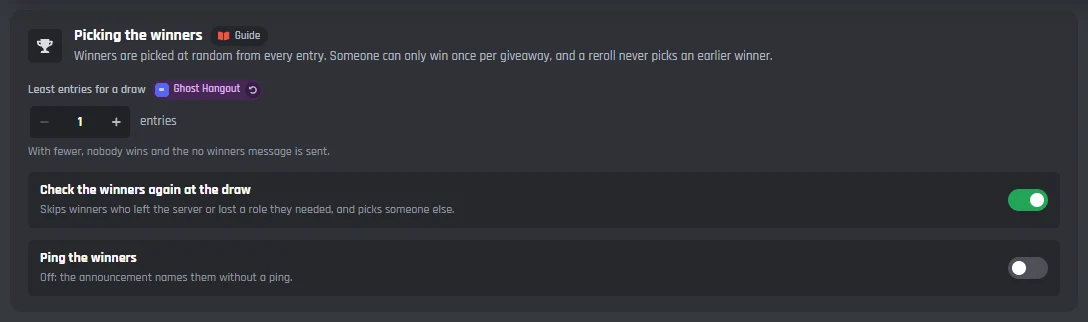

Picking the winners
- Least entries for a draw
- With fewer, nobody wins and the no winners message is sent.
- Check the winners again at the draw
- On to start with. Skips winners who left the server or lost a role they needed, and picks someone else.
- Ping the winners
- On to start with. Off: the announcement names them without a ping.
Winner role and DMs
- Give winners
- A role for the winners. The bot can only give roles below its own.
- Take it away after
- Empty: they keep it. Or pick a time, like 7 days.
- When a winner gets a DM
- Off to start with. When it is on, the post says Winners get a DM when they win, so everyone who enters knows.
Messages
Each one is a message you can change.
- When the winners are picked
- A reply to the post, in its channel when the post is gone.
- When nobody wins
- When too few entered, or nobody who entered can be picked.
- When winners are rerolled
- Only the new winners are pinged.
- Log line when a giveaway ends
- Sent in the log channel.
How long entries are kept
- Keep them for
- 30 days after the draw to start with, from 1 to 90. Rerolls and the Entrants button work until then, then who entered is deleted.
Claiming the prize
Add a Claim prize button under the announcement, so you know who's still around. Give winners a time to claim, and hand each one a prize code privately when they do.
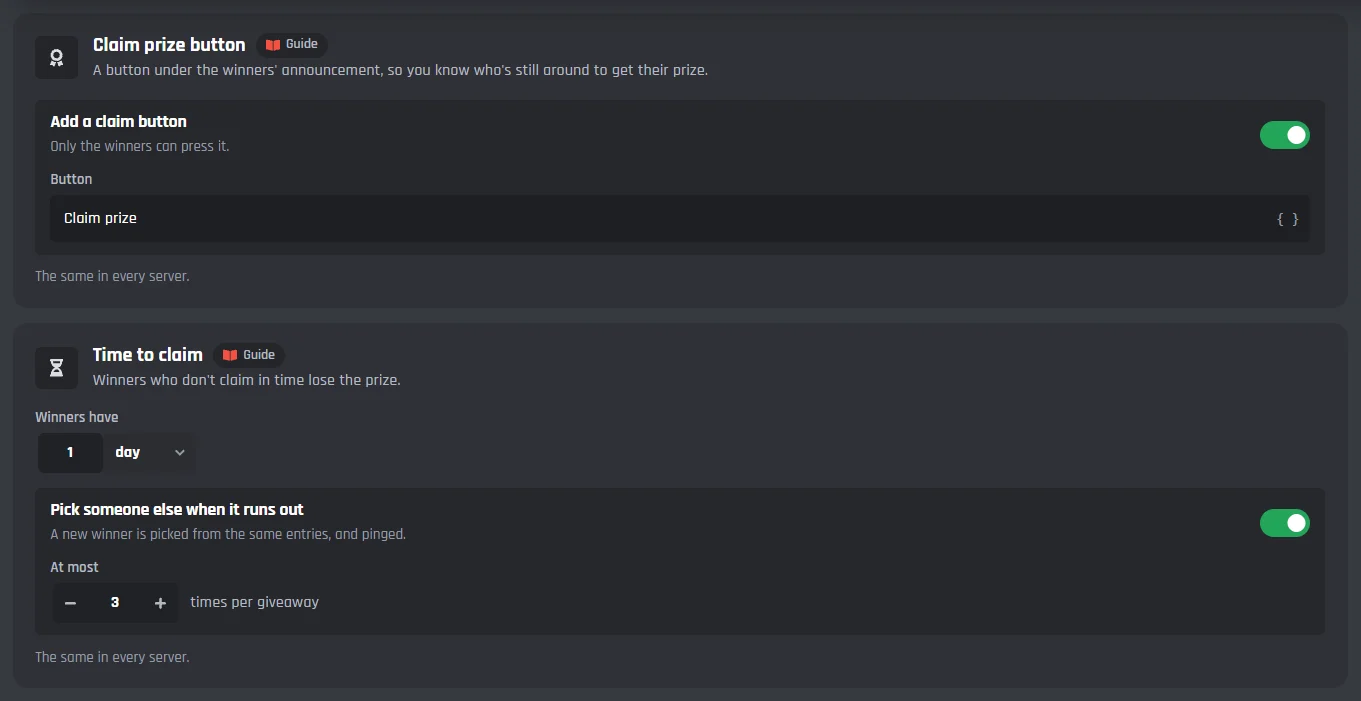
Claim prize button and time to claim
- Add a claim button
- Off to start with. Only the winners can press it, and you can change its words.
- Winners have
- A time to claim, like 24 hours. Empty: no time limit.
- Pick someone else when it runs out
- A new winner is picked from the same entries, and pinged. At most 3 times per giveaway to start with, up to 20.
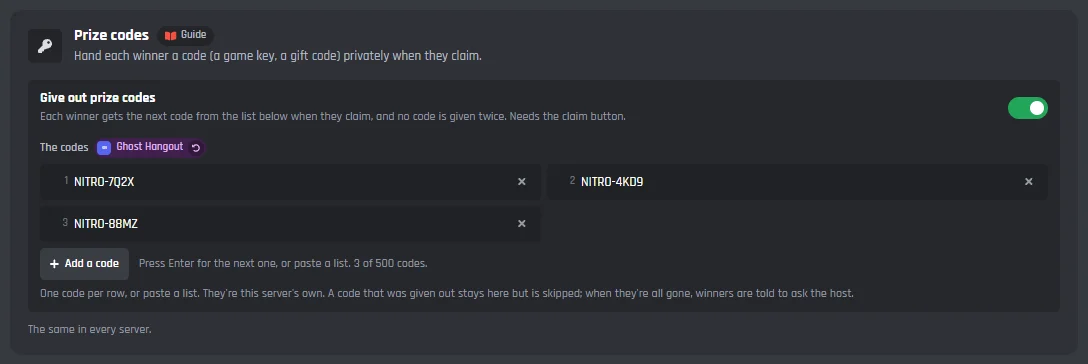
Prize codes
- Give out prize codes
- Each winner gets the next code from your list when they claim, and no code is given twice. Needs the claim button.
- The codes
- A game key or a gift code, one per row. They're the server's own, and when they're all gone, winners are told to ask the host.
Replies only the winner sees
Each one is a message you can change.
- When a winner claims their prize
- After they press the claim button.
- When a winner gets a prize code
- With the code hidden until they click it.
- When someone else presses claim
- When someone who didn't win presses it.
- When a winner claims too late
- When the time to claim has run out.
Saved and repeating giveaways
Save the giveaways you run often, ready to start in one press. Switch on Start it again and again, and a weekly or monthly one starts by itself.
Hosted by the server
Entries 86Giveaway #14EnterLeaveEntrantsMade with BotGhost
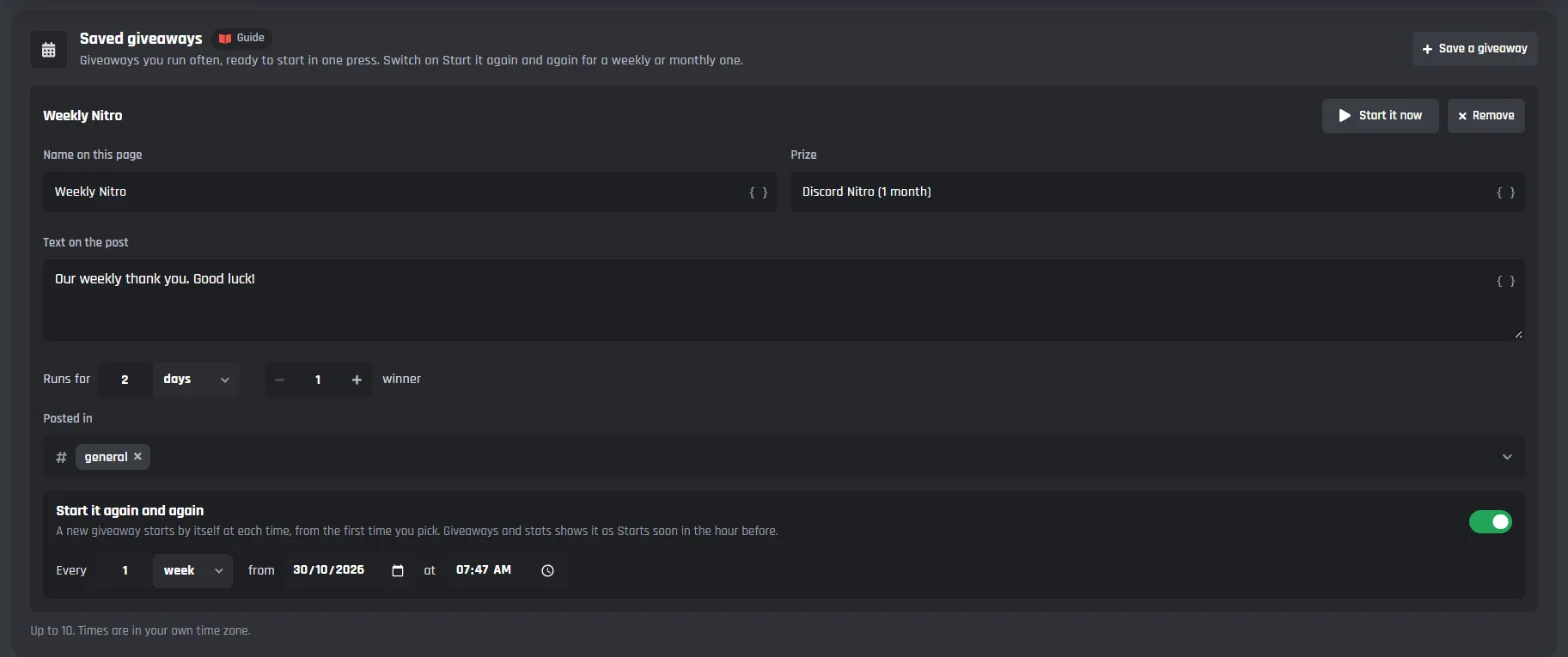
Saved giveaways
- Save a giveaway
- Up to 10, each with a name on the page, the prize, the text on the post, how long it runs, how many win, and where it is posted.
- Start it now
- Starts the saved giveaway straight away.
- Start it again and again
- A new giveaway starts by itself every time you pick, at least an hour apart, from the first date and time. Times are in your own time zone.
Your server's giveaways
See what is running and what has ended, open one to see who entered and who won, and end, cancel, or reroll it from the page.
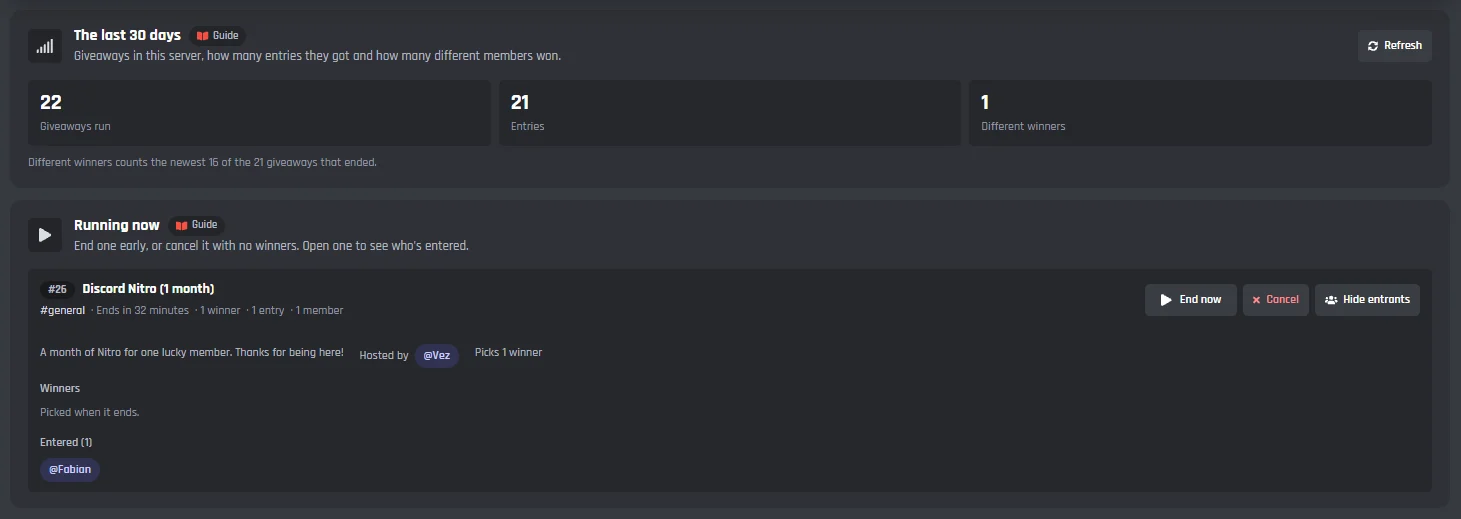
The last 30 days and Running now
- The last 30 days
- Giveaways run, entries, and different winners in this server.
- Running now
- Each giveaway with its channel, when it ends, its winners and entries. End now picks the winners straight away; Cancel stops it with no winners.
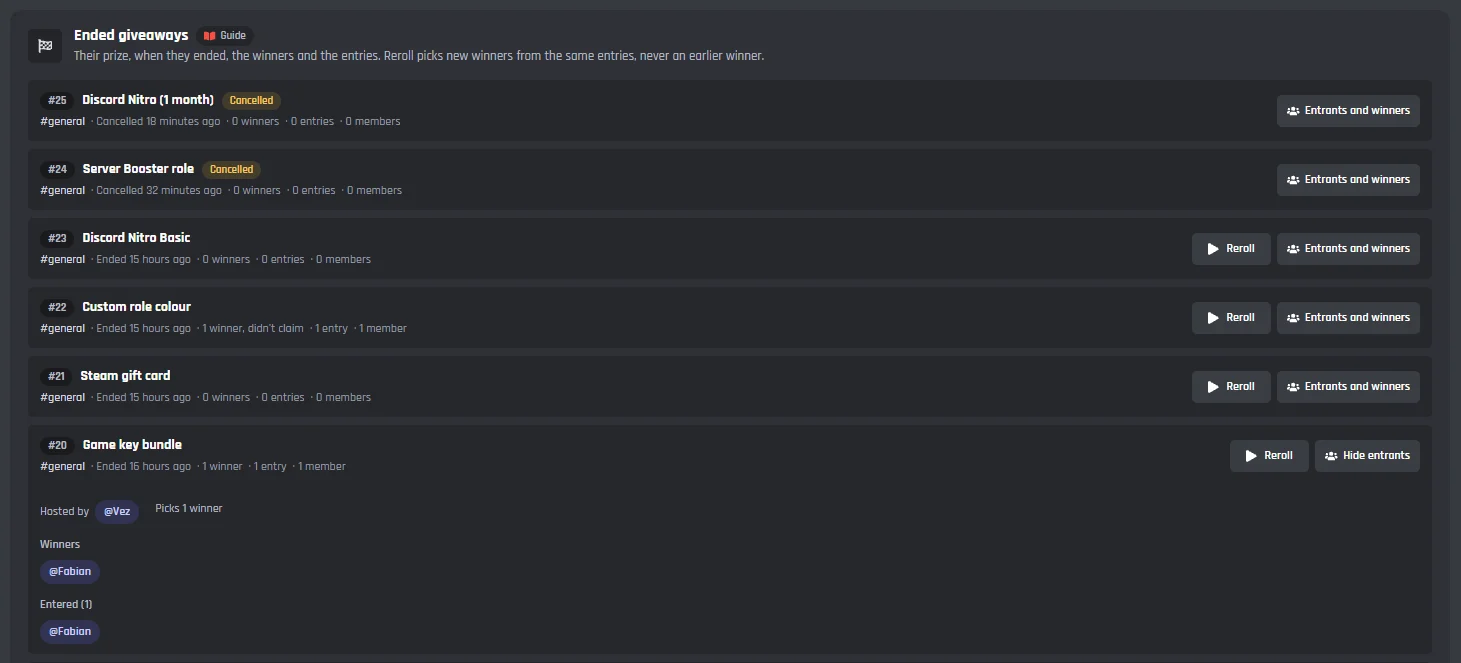
Ended giveaways
- Ended giveaways
- Their prize, when they ended, the winners, and the entries, for as long as entries are kept.
- Reroll
- Picks new winners from the same entries, never an earlier winner.
- Entrants and winners
- Opens a giveaway to show who entered and who won. Click a name to copy their mention.
Under the tabs: the commands and events
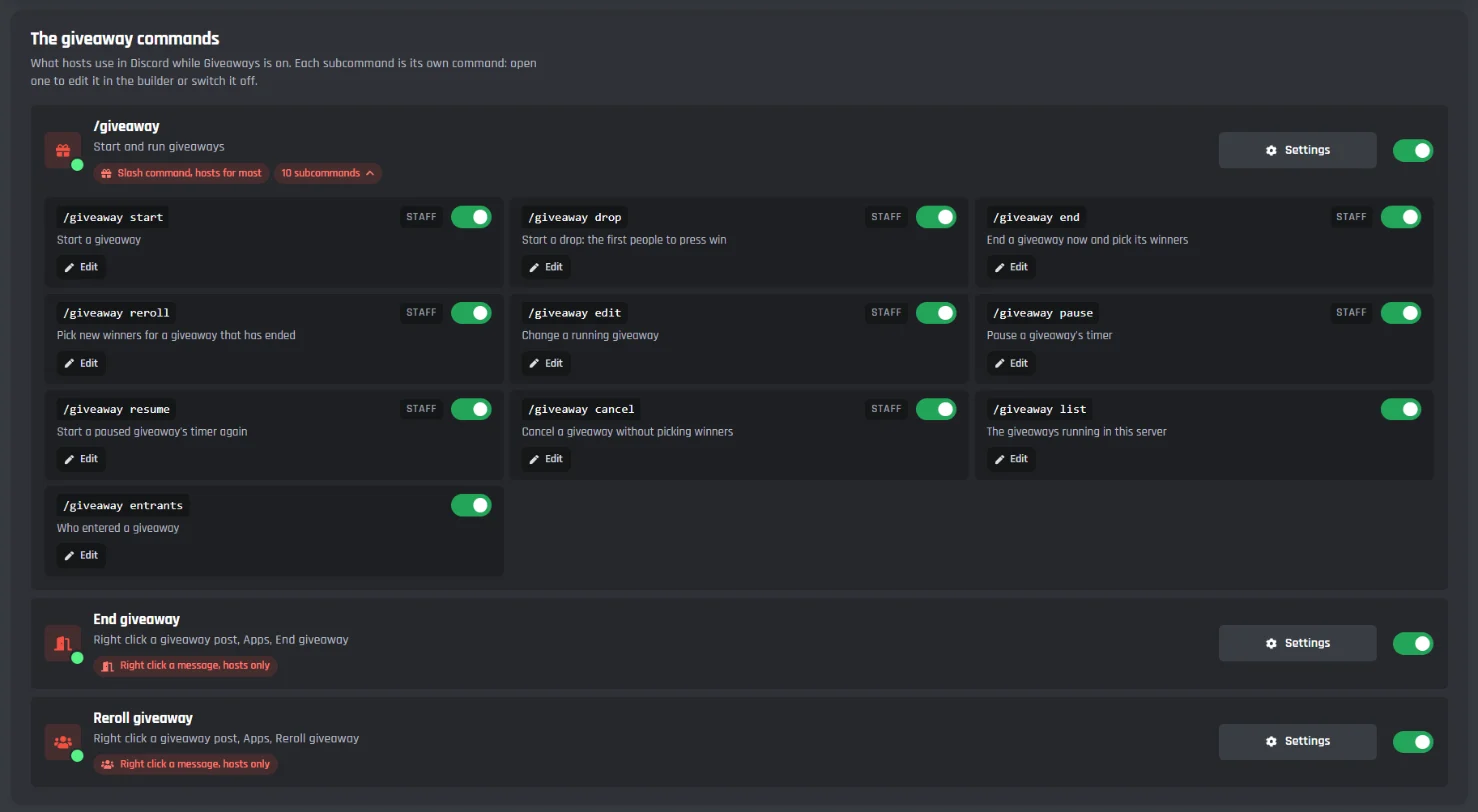
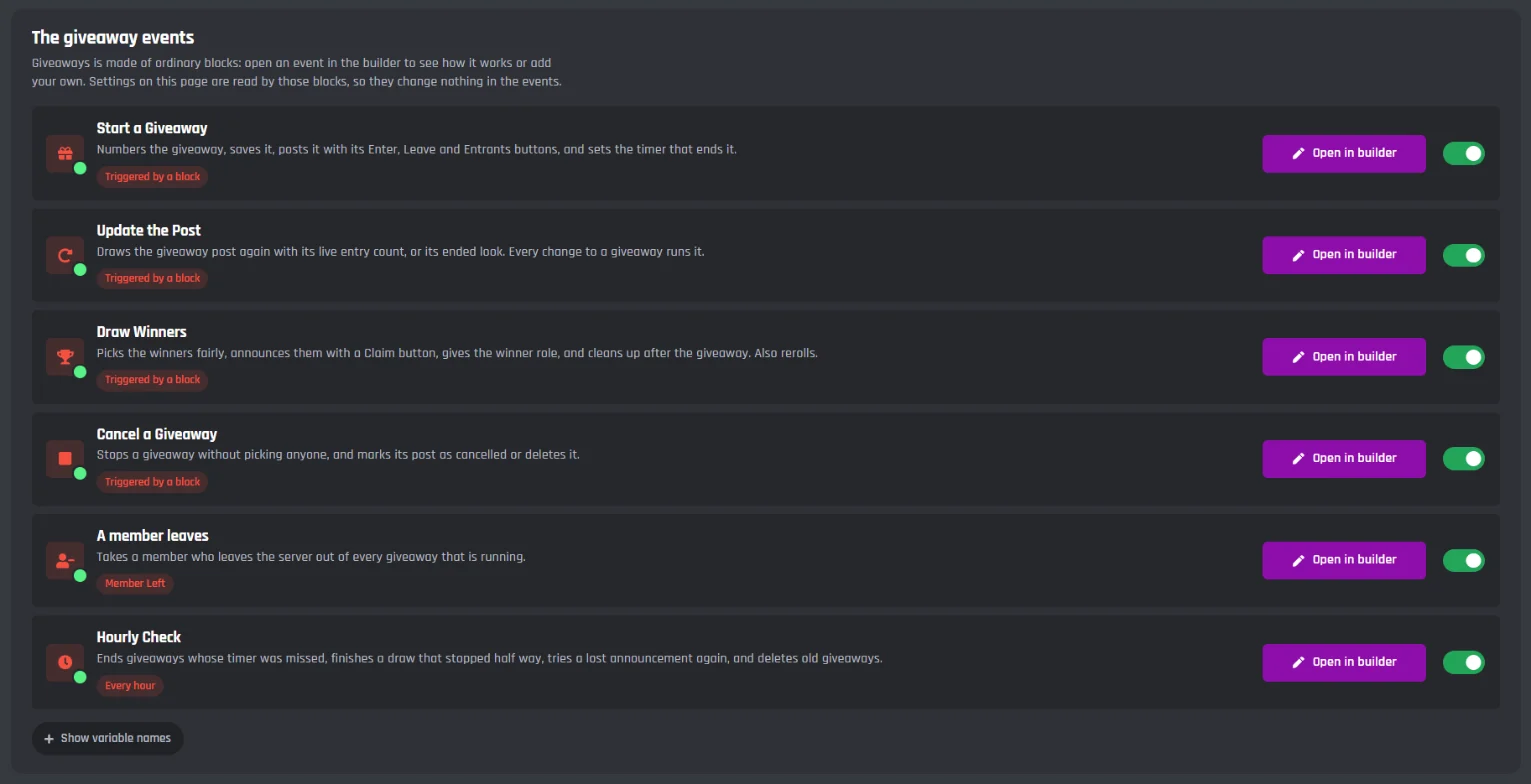
Giveaways adds /giveaway with ten subcommands, two right click commands for hosts, and its events. They are made of ordinary builder blocks, so you can open them in the builder and add your own.
Commands
- /giveaway start and drop
- For hosts. Start a giveaway, or a drop where the first people to press Grab it win. Leave the prize out and a form asks for it.
- /giveaway end, reroll, edit, pause, resume, cancel
- For hosts. Reroll picks all new winners, a number of them, or replaces one member. Edit changes the prize, description, winners, or time left.
- /giveaway list and entrants
- For everyone, and only they see the reply: the running giveaways, and who entered, 20 to a page.
- End giveaway and Reroll giveaway
- Right click a giveaway post, then Apps. For hosts.
Events
- Start a Giveaway, Update the Post, Draw Winners, Cancel a Giveaway
- Run with the new Trigger a Custom Event block, from the commands, the buttons, the timers, and the page.
- A member leaves
- Takes a member who leaves the server out of every running giveaway.
- Hourly Check
- Ends giveaways whose timer was missed, finishes a draw that stopped half way, and starts the saved giveaways that repeat.
Giveaways is made of ordinary builder blocks, and its posts are sent with Send or Edit a Message. The new Trigger a Custom Event block it runs on works in your own Discord bot events and commands too.
Set up a Discord giveaway
Haven't got a bot in your server yet? Start with how to make a Discord bot, then come back here.
- 1Open Giveaways from Modules in your dashboard and press Enable. This adds /giveaway, the right click End giveaway and Reroll giveaway, and the events Giveaways needs.
- 2On the Post tab, pick the channel under Where giveaways are posted, and the roles under Who can host giveaways. Members with Manage Server can always host.
- 3Press Save Changes.
- 4Use /giveaway start in Discord, or press Start a giveaway on the Post tab.
A free Discord giveaway bot
Every Giveaways setting works on the free plan. There's nothing to unlock, only the limits below, which are the same on every bot.
Free
$0- Entry rules, bonus entries, account age, and custom variable rules
- Drops, rerolls, pause and resume, edits, and the right click End and Reroll
- Claim buttons, a time to claim, winner roles, and prize codes
- Saved and repeating giveaways, and stats for the last 30 days
- Giveaways' commands and events don't use up your 3 free commands and 3 free events
Messages on free bots end with a small Made with BotGhost line.
The limits
in each server- Running at once
- 25
- Winners per giveaway
- Up to 50
- How long one runs
- 1 minute to 90 days
- Bonus entry roles
- 10, from +1 to +10 each
- Saved giveaways
- 10
- Entries kept after the draw
- 1 to 90 days
Premium ($12.50 a month for one bot) takes the Made with BotGhost line off and adds unlimited commands, events, and servers. Free bots go offline after 2 days with no activity. Read about free hosting
The /giveaway commands
Hosts run giveaways from Discord with /giveaway, and everyone can see what's running and who entered. Each subcommand is its own command, so you can switch any of them off.
- /giveaway start and drop, end, reroll, edit, pause, resume, and cancel, for hosts.
- /giveaway list and entrants for everyone, with replies only they see.
- Right click a giveaway post, then Apps, for End giveaway and Reroll giveaway.
#12 Discord Nitro (1 month) · running · ends: in 2 days
#13 Steam key · running · ends: in 5 hours
Discord giveaway bot questions
Didn't find your question? Ask us in the BotGhost Discord, or read the Giveaways docs.
Yes. Every Giveaways setting is free on BotGhost: entry rules, bonus entries, drops, rerolls, claim buttons, prize codes, repeating giveaways, and stats. On free bots, each message the module sends ends with a small Made with BotGhost line; Premium takes it off.
Giveaways on the free planInvite your BotGhost bot to your server. In the dashboard, open Giveaways and press Enable, pick the giveaway channel on the Post tab, and press Save Changes. Then use /giveaway start in Discord, or press Start a giveaway on the Post tab.
See the setup stepsAt random from every entry, so a member with bonus entries has more chances. Each member can only win once per giveaway, and a reroll never picks an earlier winner. With Check the winners again at the draw on, winners who left the server or lost a role they needed are skipped.
See the Winners tabYes. Use /giveaway reroll to pick all new winners, a number of them, or to replace one member. Hosts can also right click the post and pick Reroll giveaway, or press Reroll on the Giveaways and stats tab. Rerolls work until the entries are deleted, 30 days after the draw to start with.
See the commandsThe end time is saved with the giveaway, and an hourly check ends any giveaway whose timer was missed and finishes a draw that stopped half way. Your giveaways aren't lost.
Read the Giveaways docsThe Entrants button on the post lists the first 20 who entered, only to whoever presses it, and /giveaway entrants pages through everyone, 20 at a time, without pinging them. Switch the Entrants button off and nobody can see who entered.
See the Post tabYes. On the Entering tab, pick roles members need one of or all of, roles that keep them out, members who can't enter, and roles that skip every rule. You can also set an account age, a time in the server, or a number from one of your own custom variables, like a level.
See who gets inYes. On the Schedule tab, save a giveaway and switch on Start it again and again. Pick how often, like every week, and the first date and time, and a new giveaway starts by itself each time. You can keep up to 10 saved giveaways.
See the Schedule tabNot unless you turn it on. Winners are told in the channel with a ping. Turn on When a winner gets a DM on the Winners tab, and the post says Winners get a DM when they win, so everyone who enters knows.
See the Winners tabIf your bot still has the old Giveaways on, it shows as Giveaways (old) in your modules. The new Giveaways is a separate module, and the old settings don't move across, so set it up from the start.
What changed in the new GiveawaysRun a giveaway in your server
Switch on Giveaways, pick a channel, and start one. The free plan doesn't need a card.
Set up Giveaways for free