Honeypot Discord bot
A trap channel for spam bots and hacked accounts.
Make a channel nobody real posts in. When a hacked account posts its scam there, your bot DMs them how to secure their account, softbans them to clear their messages from every channel, and tells your staff. It's all set up on one page in BotGhost, the no-code Discord bot maker.
Every setting is free on every bot, from the softban to the surge pause.

How a Discord honeypot catches a hacked account
From the warning post in your trap channel to the log your staff see. Press a step to see it play out.
The warning post
Your trap is a channel nobody real has a reason to use, like #do-not-post-here near the top of the list. The bot posts a warning in it, with a count of the accounts caught so far.
Hacked accounts and spam scripts post the same scam in every channel they can see, so they post here too. People read the warning and stay out.
A hacked account posts
Someone got into Dax's account, and it posts a fake Nitro link in every channel. The one in the trap is deleted straight away, and the catch starts.
If it keeps posting, it's still only caught once a minute. The extra messages are just deleted.
The DM
Before it acts, the bot DMs Dax. Once they're out of the server, the bot can't reach them any more.
The DM has four steps to make the account safe, a link to Discord's guide, and a one-use invite back that works for 7 days. If Dax's DMs are closed, the bot carries on.
The softban
Then the bot softbans Dax. It bans them, which deletes every message they sent in the last hour in every channel, then unbans them straight away.
The scam is gone from #general and everywhere else, and Dax can rejoin with the invite once the account is safe. Two minutes later, a second sweep deletes anything Discord missed.
The log
Your log channel gets the catch: who it was, where, how old the account is, when they joined, and the message itself.
Staff press Ban for good to keep them out, or Give back roles once Dax is safe. The log then says who pressed it.
What else the honeypot bot does
Honeypot looks after the real person behind a hacked account, and your server while a raid is on. Most of these are switches on the Honeypot page.
- Staff can test itTheir message is deleted and they get the sample DMStaff are never caught. When staff post there on the Safety tab adds a note that goes away after 15 seconds.
- Give roles backA button on the log, or by itself when they rejoinGive back roles on the Action tab. Their roles are kept for 30 days.
- A second sweepAnything the first ban missed is deleted 2 minutes laterSweep again after 2 minutes, on to start with.
- Pause on a surgeInvites and DMs are paused when a raid startsPause on a surge on the Safety tab: 3 catches in 10 minutes pauses them for 2 hours, with a role to ping and a Resume invites button.
- Go easy on regularsA long time member's harmless message is only deletedGo easy on regulars, off to start with. A message with a link, a picture or @everyone is still caught.
- Trap rolesCatch accounts that pick a role nobody should pickTrap roles on the Traps tab. Add one to Onboarding as an option no person would pick.
- One catch a minuteA script posting again and again is caught onceAlways on. The rest of its messages in the trap are just deleted.
- Your own blocksDo more on every catchOpen the Honeypot: Catch event in the builder and add blocks to it.
Every action: softban, ban, kick and more
Pick what happens to an account that posts in the trap. Softban is the default. Whatever you pick, the message in the trap is deleted and staff get the log.
Softban
DefaultRemoves them and deletes their messages, but they can rejoin once their account is safe.
- Messages deleted
- Every channel
- Invite back
- Yes
- Log buttons
- Ban for good, Give back roles
Ban
Removes them for good and deletes their messages. Staff can unban them from the log.
- Messages deleted
- Every channel
- Invite back
- No
- Log buttons
- Unban
Kick
Removes them. They can rejoin with the invite in the DM.
- Messages deleted
- The trap only
- Invite back
- Yes
- Log buttons
- Ban for good, Give back roles
Timeout
Keeps them in the server but stops them talking, for 1 minute to 28 days.
- Messages deleted
- The trap only
- Invite back
- No
- Log buttons
- Ban for good, Remove timeout
Give a role
Gives them a role you pick, like one that hides the rest of the server.
- Messages deleted
- The trap only
- Invite back
- No
- Log buttons
- Ban for good
Only log
Nothing happens to them. Staff see the log and decide.
- Messages deleted
- The trap only
- Invite back
- No
- Log buttons
- Ban for good
Only a ban or softban can delete their messages in other channels: it's the only way Discord lets a bot do it. Pick 1 hour, 6 hours, 12 hours, 24 hours, 3 days or 7 days.
Every Honeypot setting in the dashboard
Honeypot has one page in your dashboard: a tab for each part, then its events. A live preview beside the tabs shows the messages as you change them. You set it up server by server, from the server menu at the top.
Trap channels and the warning post
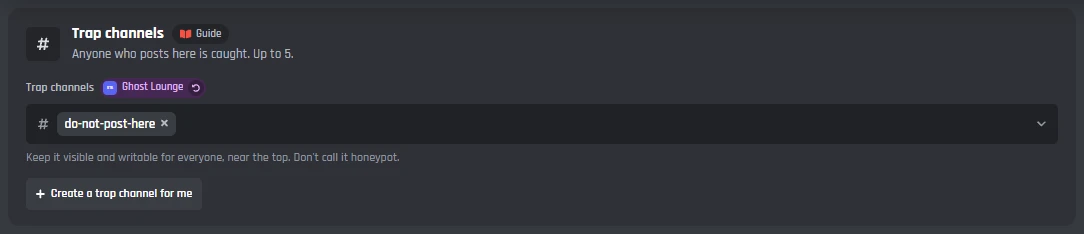
Pick up to 5 trap channels, or let the bot make one, and post a warning in each so real members stay out. Trap roles catch accounts that pick a role nobody should pick.
Trap channels
- Trap channels
- Anyone who posts in one is caught. Up to 5. Keep them visible and writable for everyone, near the top, and don't call them honeypot.
- Create a trap channel for me
- Makes #do-not-post-here at the top of the channel list, with a topic that says what it is, and adds it to the trap channels.
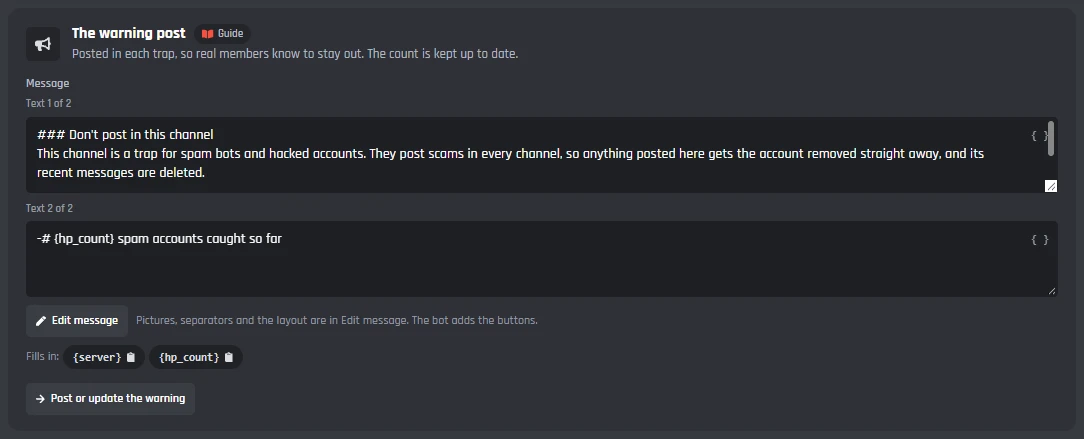
The warning post
- The warning post
- A whole message you can change with Edit message. It fills in the count of accounts caught so far.
- Post or update the warning
- Posts it in every trap channel, or edits the one that is there after you change it. The count on it is kept up to date, at most once a minute.
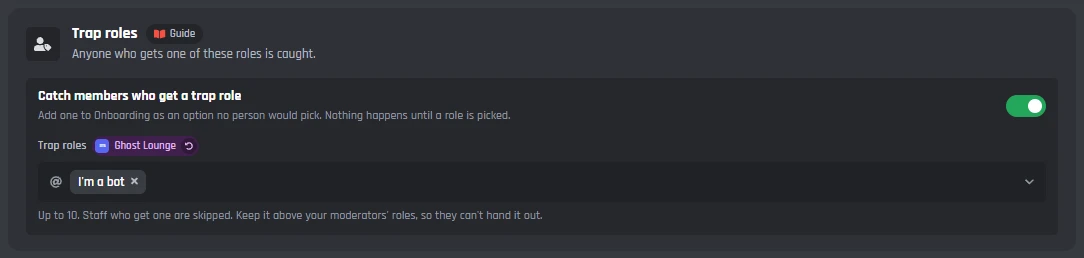
Trap roles
- Catch members who get a trap role
- On to start with. Nothing happens until a role is picked.
- Trap roles
- Up to 10. Add one to Onboarding as an option no person would pick. Staff who get one are skipped.
What happens to them
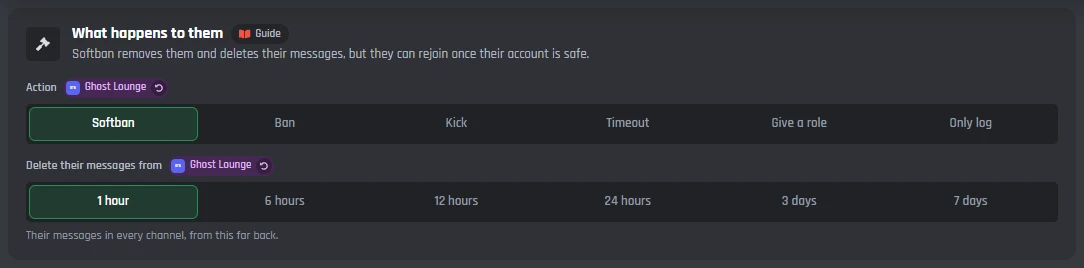
Softban is the default: a ban that deletes their recent messages in every channel, then an unban, so they can come back once their account is safe. Ban, Kick, Timeout, Give a role and Only log are there too.
What happens to them
- Action
- Softban, Ban, Kick, Timeout, Give a role or Only log. Softban to start with.
- Delete their messages from
- For Softban and Ban: their messages in every channel from the last 1 hour, 6 hours, 12 hours, 24 hours, 3 days or 7 days. 1 hour to start with.
- Timeout for
- For Timeout: from 1 minute to 28 days, Discord's longest. 24 hours to start with.
- Role to give
- For Give a role: a role you pick, like one that hides the rest of the server. The bot can only give roles below its own.
- The other actions
- Only Softban and Ban delete their messages in other channels (Discord's rule). The rest delete the message in the trap only.
Sweep again
- Sweep again after 2 minutes
- On to start with. Discord sometimes misses a message sent at the same moment as the ban, so two minutes later the bot bans them by ID again, deleting anything left, and unbans them after a softban. It's skipped if they've rejoined.
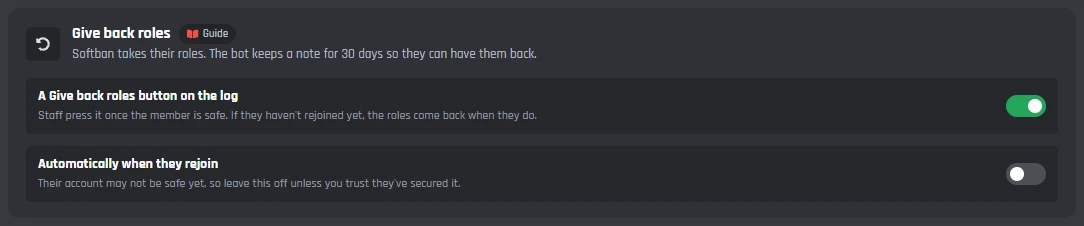
Give back roles
Softban, Ban and Kick take their roles. While either switch is on, the bot keeps a note of them for 30 days. After a ban, roles only come back if you unban them and they rejoin while Automatically when they rejoin is on.
- A Give back roles button on the log
- On to start with. Staff press it once the member is safe. If they haven't rejoined yet, the roles come back when they do.
- Automatically when they rejoin
- Off to start with. Their account may not be safe yet, so leave it off unless you trust they've secured it.
The DM and the invite back
The bot DMs them before it acts, while it can still reach them. The DM says how to make their account safe and, after a softban or kick, has a one-use invite back.
BotGhost CommunityRejoin Ghost Lounge. The invite works once.Replies to this bot aren't read.
Message them first
- Send them a DM first
- On to start with. If their DMs are closed, the bot carries on and the log says so.
- The DM
- A whole message you can change. Its heading says what happened: removed from, banned from, timed out in, your access was limited in, or your message was deleted in.
Invite back
- Add an invite back
- On to start with. One use, for Softban and Kick. A ban keeps them out, and the other actions leave them in the server. It goes in the DM, so it needs Send them a DM first on.
- Invite to
- The channel the invite opens. Leave it empty to use the first trap channel.
- Works for
- From 1 to 7 days, Discord's longest. 7 to start with.
The sample staff get
- The sample staff get
- DMed to staff who post in the trap, so they see what members get. It says it's a sample at the top.
Staff, regulars and surges
Staff are never caught, and posting in the trap is how they test it. Regulars can be let off, and a surge of catches pauses invites and DMs for the whole server.
Who's skipped
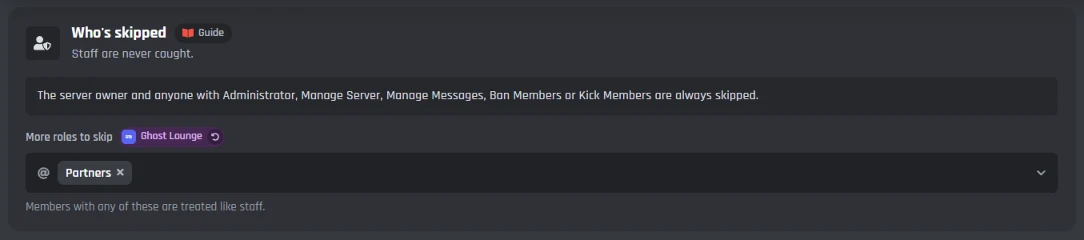
The server owner and anyone with Administrator, Manage Server, Manage Messages, Ban Members or Kick Members are always skipped.
- More roles to skip
- Members with any of these are treated like staff.
When staff post there
- What happens
- Their message is deleted, they get the sample DM, and the log says they tried it.
- Show a note
- On to start with. A note in the trap channel, deleted after 15 seconds. The note is a message you can change.
Go easy on regulars
Off to start with: a trap is a channel nobody should speak in.
- Go easy on regulars
- A member here this long whose message has no link, picture or @everyone only has it deleted, with a note that goes away after 30 seconds. A hacked regular posting a scam link is still caught.
- Here for at least
- 30 days to start with.
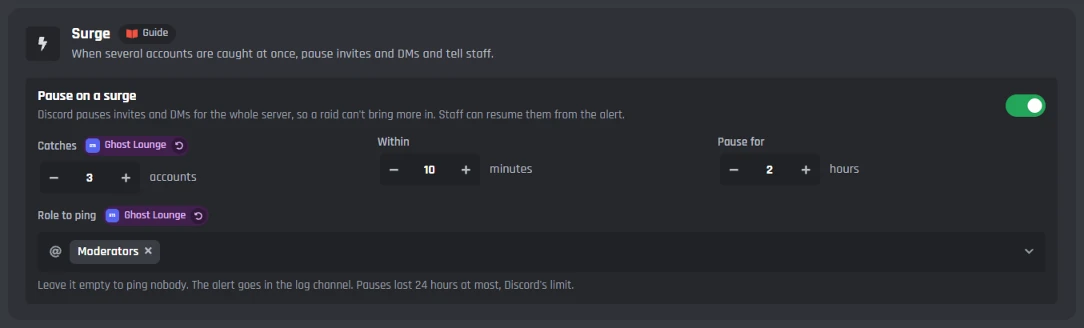
Surge
- Pause on a surge
- On to start with. When enough accounts are caught at once, Discord pauses invites and DMs for the whole server, so a raid can't bring more in.
- Catches, Within and Pause for
- 3 accounts within 10 minutes pauses for 2 hours, to start with. From 2 to 50 accounts, 1 to 60 minutes, and up to 24 hours, Discord's limit.
- Role to ping
- Pinged in the alert. Leave it empty to ping nobody.
- When a surge pauses invites
- The alert in the log channel, with a Resume invites button for staff.
The log channel
Every catch goes to your log channel with buttons for staff, and so do failures, staff tests and surge alerts. Each log message can be changed.
@ModeratorsPress Resume invites once it's over.Resume invites

Log channel
- Log channel
- A staff channel. The bot needs to see it, send messages and embed links there. Surge alerts go here too.
- The buttons
- Ban for good, Unban, Remove timeout and Give back roles, as fits the action. After a ban, there is only Unban. Staff with Administrator, Manage Server or Ban Members, or a skipped role, can press them. A press edits the log to say who pressed it, and the buttons go.
Log messages
Each is a whole message you can change.
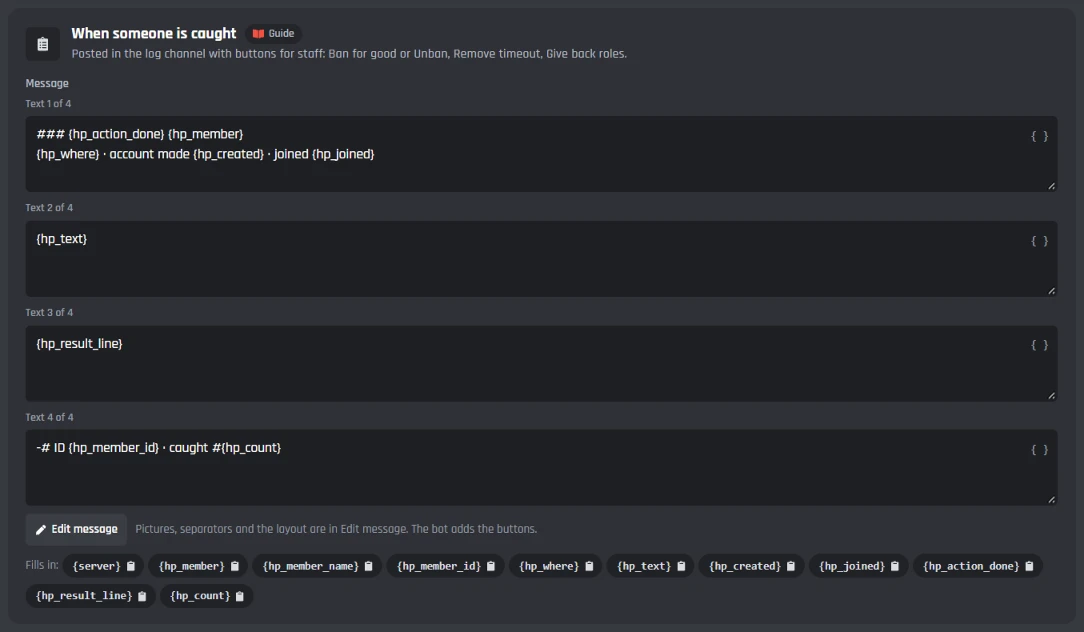
- When someone is caught
- What happened, where, when their account was made, when they joined, their message, and what else happened.
- When it fails
- When the bot couldn't act, with the reason and what to change.
- When a regular posts
- When Go easy on regulars only deleted the message.
- When staff post
- When staff try the trap.
- When roles come back
- When someone who was caught rejoins and gets their roles back.
Caught so far
- The count
- Every catch in the server counts, and it shows on the warning post.
- Reset count
- Puts it back to 0. Press it twice.
Under the tabs: the events
Honeypot has no slash commands. Members never use it, and staff work from the page and the log's buttons. Its six events are made of ordinary builder blocks, so you can open them in the builder and add your own.
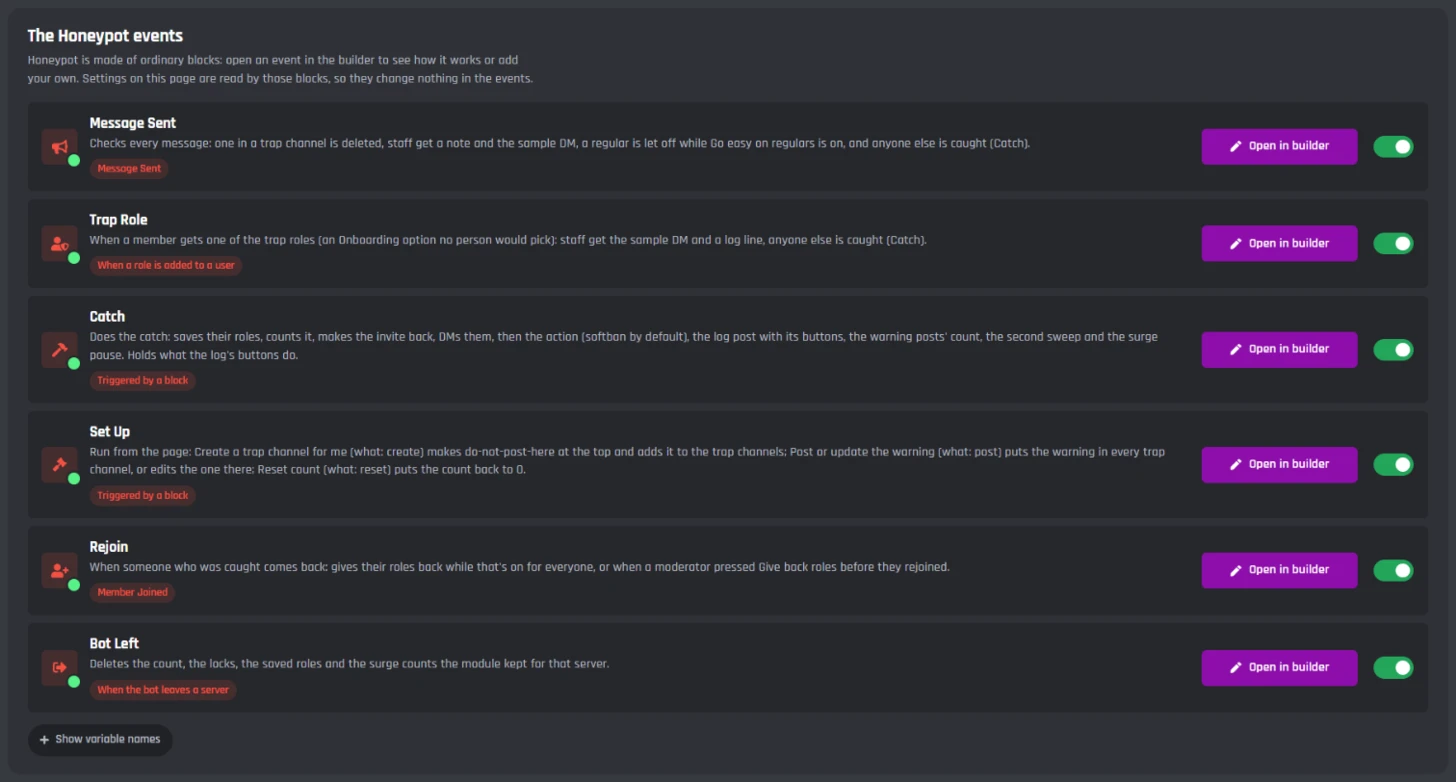
Catching
- Message Sent
- Checks every message. One in a trap channel is deleted; staff get a note and the sample DM, a regular is let off while Go easy on regulars is on, and anyone else is caught.
- Trap Role
- When a member gets a trap role: staff get the sample DM and a log line, and anyone else is caught.
- Catch
- Does the catch: saves their roles, counts it, makes the invite back, DMs them, then the action, the log post and its buttons, the count, the second sweep and the surge pause. Add your own blocks here to do more on every catch.
The rest
- Set Up
- Runs the page's Create a trap channel for me, Post or update the warning, and Reset count.
- Rejoin
- Gives a caught member their roles back when they come back, if staff pressed Give back roles or the automatic switch is on.
- Bot Left
- Deletes the count, the saved roles and the surge counts for a server the bot leaves.
Honeypot is made of ordinary builder blocks, and every message it sends can be changed with the Message Builder. The softban is the Ban a Member block's Unban straight away choice, which you can use in your own Discord bot events and commands too.
Set up a honeypot channel on Discord
Haven't got a bot in your server yet? Start with how to make a Discord bot, then come back here.
- 1Open Honeypot from Modules in your dashboard and switch it on, then pick your server in the menu at the top right.
- 2On the Traps tab, pick a trap channel, or press Create a trap channel for me.
- 3On the Log tab, pick a Log channel. Press Save Changes, then Post or update the warning on the Traps tab.
- 4In Discord, move your bot's role above your member roles, so it can act on them.
- 5Try it: post in the trap from an account that isn't staff. Posting from a staff account only gets you the sample DM.
BotGhost CommunityA free Discord honeypot bot
Every Honeypot setting works on the free plan. There's no Premium part, only the limits below, which are the same on every bot.
Free
$0- Trap channels, trap roles and the warning post with its count
- Every action, from softban to only log, and the second sweep
- The DM with recovery steps and a one-use invite back
- The log buttons, giving roles back, going easy on regulars and the surge pause
- Honeypot checks every message, and none of it counts toward your free limits
On free bots, a small Made with BotGhost line shows under the messages about one time in three. Never in the DM.
The limits
in each server- Trap channels
- Up to 5
- Trap roles
- Up to 10
- Messages deleted
- 1 hour to 7 days
- Timeout
- 1 minute to 28 days
- Invite back
- Up to 7 days
- Surge pause
- Up to 24 hours
- Catches per member
- 1 a minute
Premium ($12.50 a month for one bot) takes the Made with BotGhost line off and adds unlimited commands, events, and servers. Free bots go offline after 2 days with no activity. Read about free hosting
Discord honeypot bot questions
Didn't find your question? Ask us in the BotGhost Discord, or read the Honeypot docs.
Yes. Every Honeypot setting is free on BotGhost: trap channels and trap roles, every action, the DM with an invite back, the log buttons, giving roles back and the surge pause. Honeypot checks every message, and none of that counts toward your free limits.
Honeypot on the free planInvite your BotGhost bot to your server. In the dashboard, open Honeypot, switch it on and pick your server. On the Traps tab, press Create a trap channel for me, pick a log channel on the Log tab, save, then press Post or update the warning. Move your bot's role above your member roles in Discord.
See the setup stepsThey get the DM first, with a one-use invite back, and a softban only removes them for a moment, so they can rejoin straight away. Staff can press Give back roles on the log. If it keeps happening, switch on Go easy on regulars: members who have been in the server a while and post plain text only have the message deleted.
See Go easy on regularsSpam scripts post in every channel they can see. A hidden trap catches nothing. Keep it visible and writable for everyone, near the top of the list, with a plain name like do-not-post-here. Don't call it honeypot, since some scripts skip channels with that name.
See the Traps tabDiscord only lets a bot ban, kick or time out members whose highest role is below the bot's own. If it isn't, the catch fails and the log says why and what to change. In Server Settings, Roles, drag your bot's role above your member roles.
Read the Honeypot docsThe bot carries on with the catch, and the log says DMs closed instead of DM sent. They miss the recovery steps and the invite back, so staff can send an invite another way if they know the person.
See a catch step by stepIt depends on the action. After a softban or kick, they rejoin with the invite in their DM, and staff press Give back roles. After a ban, press Unban on the log; with Automatically when they rejoin on, their roles come back when they rejoin. After a timeout, press Remove timeout. Staff with Administrator, Manage Server or Ban Members, or a skipped role, can press the buttons.
See every actionA role no person would pick, added as an option in Onboarding or a role menu. An account that gets one is caught like anyone who posts in a trap channel. You can pick up to 10, and staff who get one are skipped.
See the Traps tabNo. The server owner and anyone with Administrator, Manage Server, Manage Messages, Ban Members or Kick Members are always skipped, and you can add roles to skip. When staff post in the trap, their message is deleted and they get the sample DM, so it's also how you test it.
See the Safety tabA ban followed straight away by an unban. The ban deletes their recent messages in every channel, which is the only way Discord lets a bot do that, and the unban means they can come back. Honeypot deletes the last hour to start with, and you can pick up to 7 days.
See every actionStop scam posts from hacked accounts
Switch on Honeypot, make a trap channel, and post the warning. The free plan doesn't need a card.
Set up Honeypot for free