Discord welcome bot
Welcome messages and cards for everyone who joins your server.
Your bot greets everyone who joins, says goodbye when they leave, and thanks people who boost. You set it up on the Welcomer page in BotGhost, the no-code Discord bot maker.
The Welcomer is free on every bot, with welcome cards, DMs, and roles included.

Welcome to BotGhost, @Tom! Grab your roles in #roles and say hi in #general.
 Wave to say hi
Welcome, goodbye, and boost messages
The Welcomer page has a tab for joins, one for leaves, and one for boosts. Each tab has its own channel, message, card, and roles.
- JoinsReturning member#welcomeBotGhost Community APP Today at 09:12
Welcome back, @Fabian! Good to see you again.
- LeavesLeft on their own#goodbyeBotGhost Community APP Today at 14:30
@Jayce left the server. They were here for 8 months.
- BoostsFirst boost#boostsBotGhost Community APP Today at 20:41
Thanks for the boost, @allmy2! You've got the Booster role.
The bot drew all three cards from Welcomer templates.
Special welcomes for returning members, raids, and new accounts
New members get your normal welcome, which the page calls Everyone else. If a special path fits someone first, they get that path instead or as well. You set up a special path the same way as the normal welcome, with its own message, card, DM, and roles.
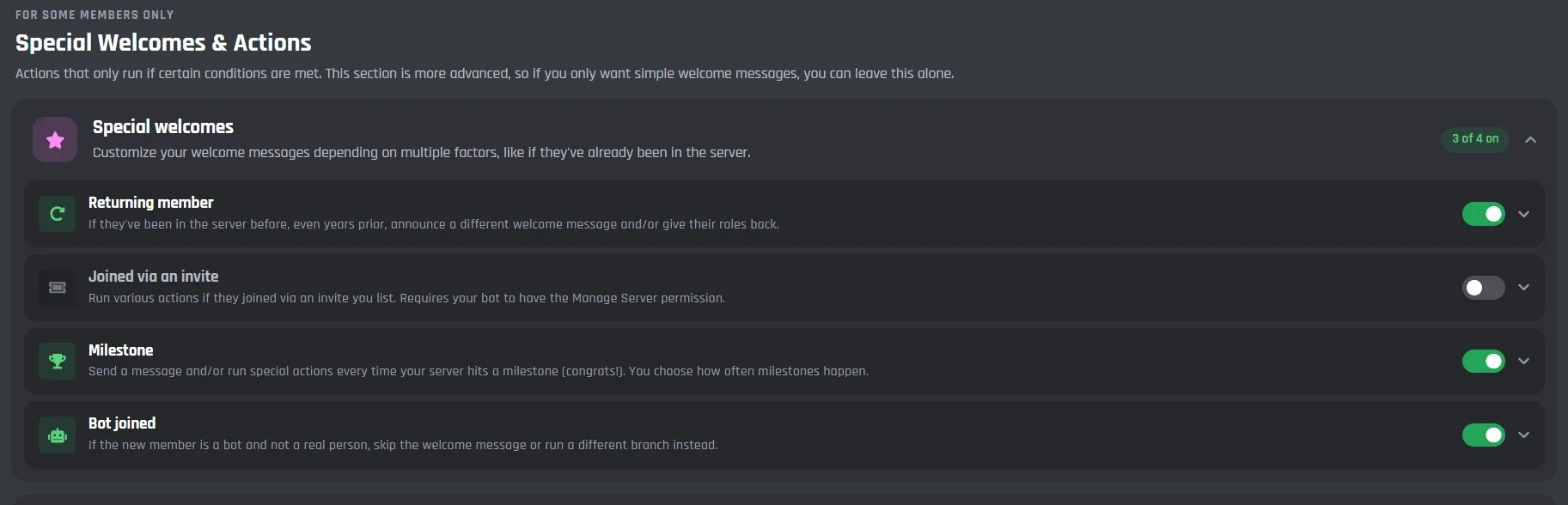
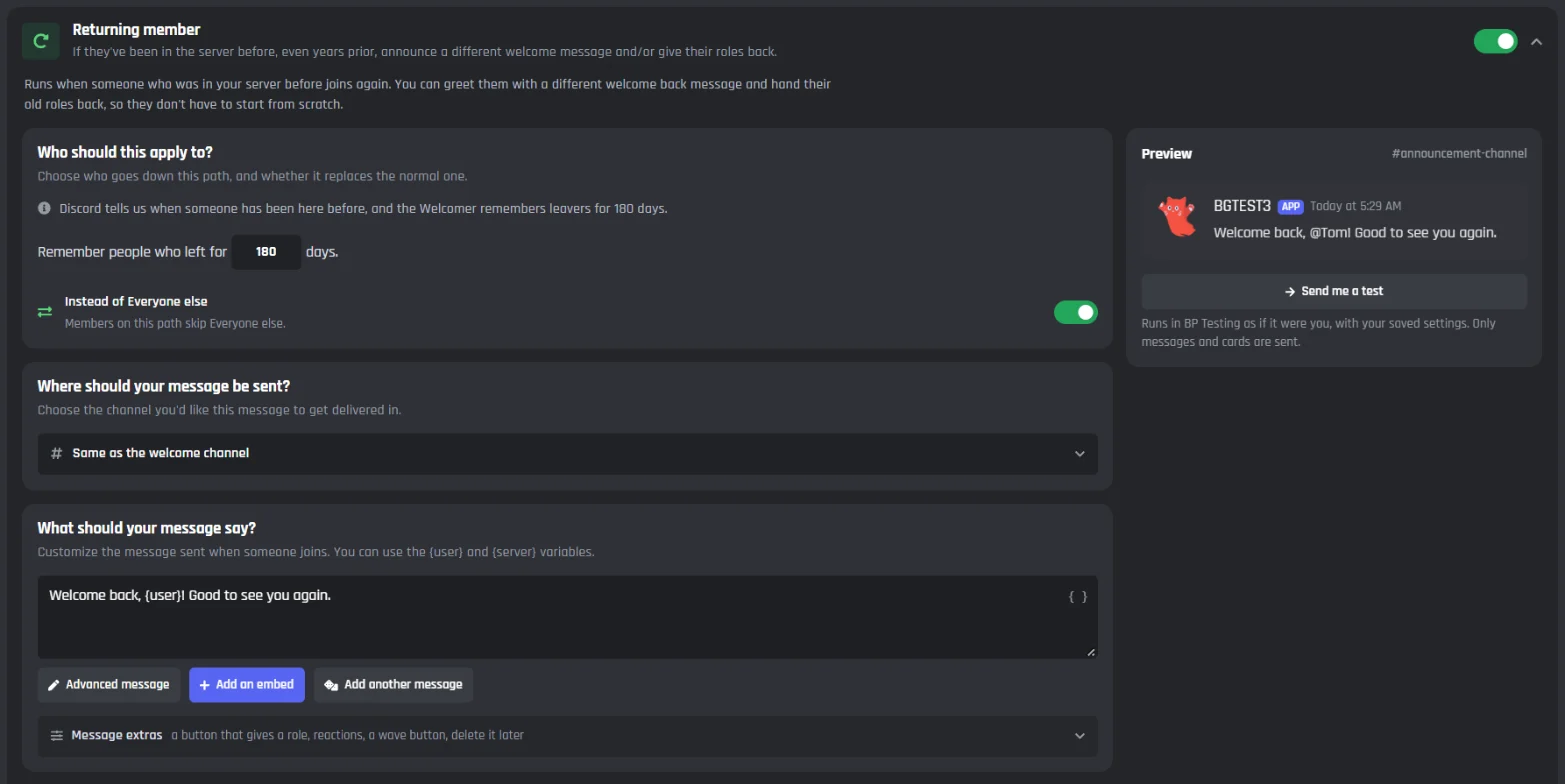
- Returning member, Lots at once, and Suspicious account replace the normal welcome. Joined via an invite and Milestone run as well. Flip a path's Instead of Everyone else switch to change which way it works.
- During a raid, Lots at once holds off until the joins stop, then posts a single message for the whole group.
- Kicked and Banned check your audit log, so the message can name the mod and give their reason.
Returning member keeps track of people who left for 180 days (you can change the number) and can hand their old roles back.
12 people just joined at once. Welcome, everyone! Say hi in #general.
@Dax was kicked by @Tom. Reason: spamming invites.
Joins 12 paths
- Everyone else
- Anyone joins. This is your normal welcome.
- Returning member
- They were a member before and came back.
- Joined via an invite
- They joined with one of the invite links you listed.
- Milestone
- Your server hits a member count you chose, like 1,000.
- Bot joined
- Someone adds a bot to the server.
- Lots at once
- A lot of people join within seconds, like in a raid.
- Suspicious account
- The account is brand new, or the name looks like spam.
- Join and leave spam
- They keep joining and leaving.
- Accepted the rules
- They accept your server rules.
- First message
- They send their first message.
- Stayed a while
- They're still here a few days later.
- Didn't accept the rules
- They still haven't accepted the rules after a few hours.
Leaves 8 paths
- Left on their own
- Anyone leaves. This is your normal goodbye.
- Kicked
- A moderator kicked them.
- Banned
- A moderator banned them.
- Pruned
- A server prune removed them.
- Bot removed
- A bot was taken out of your server.
- Left quickly
- They left soon after joining.
- Left while in trouble
- They were timed out, or had a role you picked.
- Long timer left
- They'd been in your server a long time.
Boosts 3 paths
- First boost
- They boost for the first time. This is your normal thank you.
- Boosted again
- They add another boost.
- Stopped boosting
- Their boost ends.
The free plan lets you switch on 2 special paths on each tab, on top of the normal welcome, goodbye, and first boost thank you. Premium switches on all 23.
The Welcomer page in the BotGhost dashboard
You set up Joins, Leaves, and Boosts the same way, and the Stats tab shows who came and went.

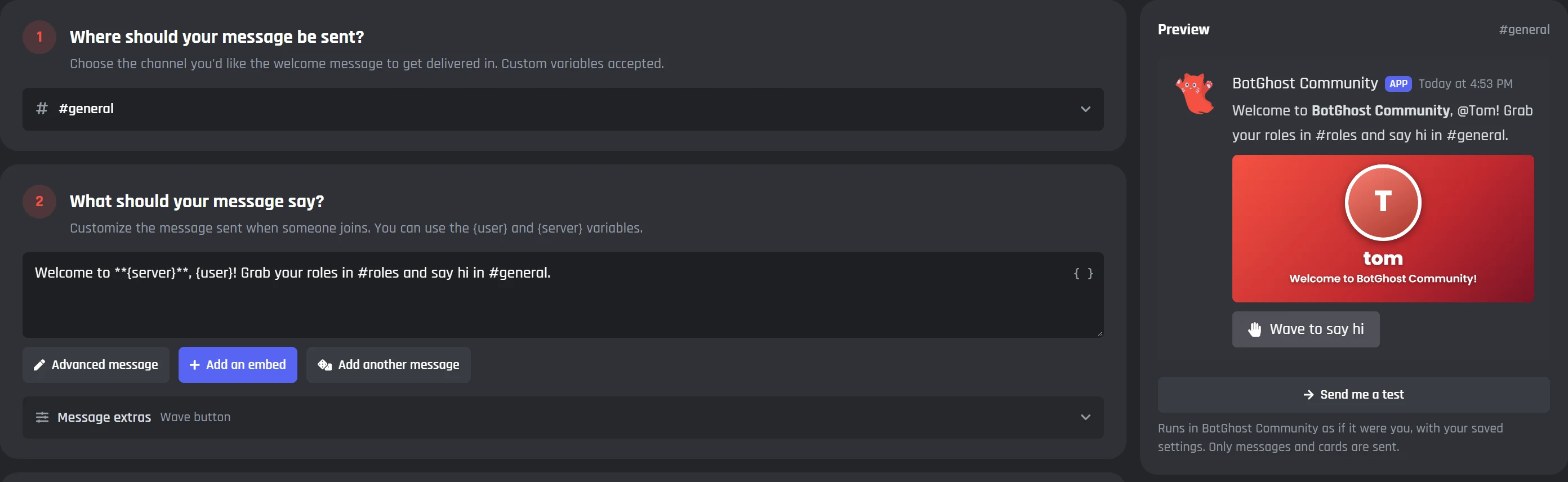
Pick a channel and write the welcome
Pick the channel under Where should your message be sent?, then type the welcome. {user} mentions the new member and {server} is your server name. Type { in the box to see every variable.
- The preview on the right changes as you type, and Send me a test posts the welcome in your server.
- Add an embed, or open Message extras for a role button, reactions, a Wave to say hi button, or deleting the message later.
- With Premium, Add another message lets you write up to 10 versions, and the bot picks one at random.
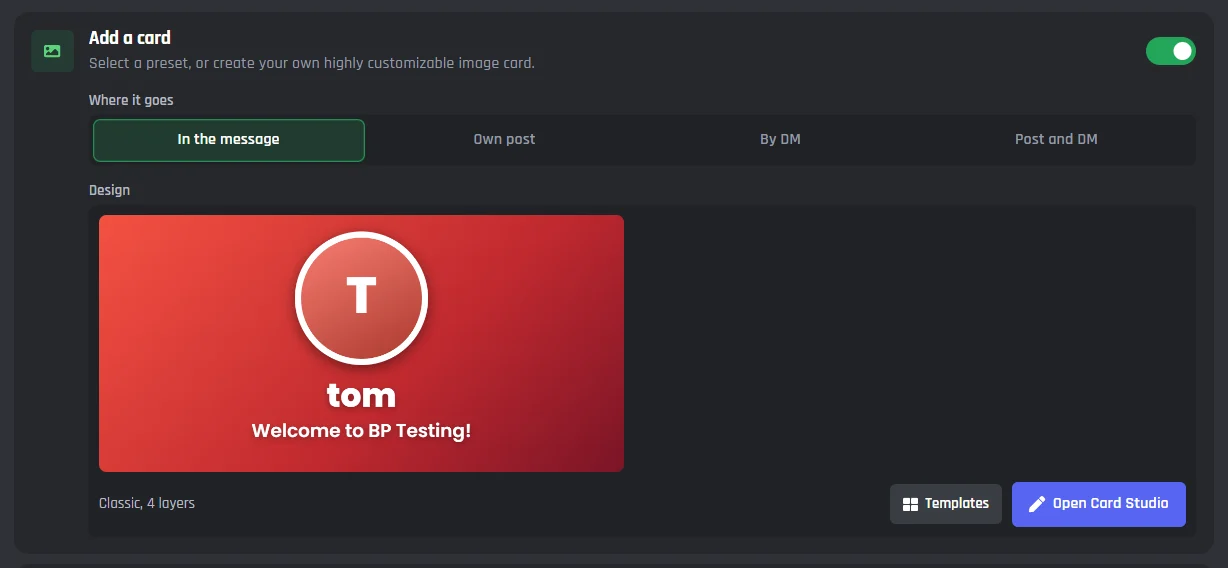
Add a welcome card
Switch on Add a card and the bot draws a picture for each member with their name and avatar on it.
- Choose where it goes: in the message, as its own post, by DM, or both a post and a DM.
- Templates gives you ready-made designs. Open Card Studio lets you change any part of the card.
- Cards are free in the Welcomer. Uploading your own pictures to a card needs Premium, but a picture from a link works on every plan.
Want to try designs before you set up the bot? Use the free welcome card maker.
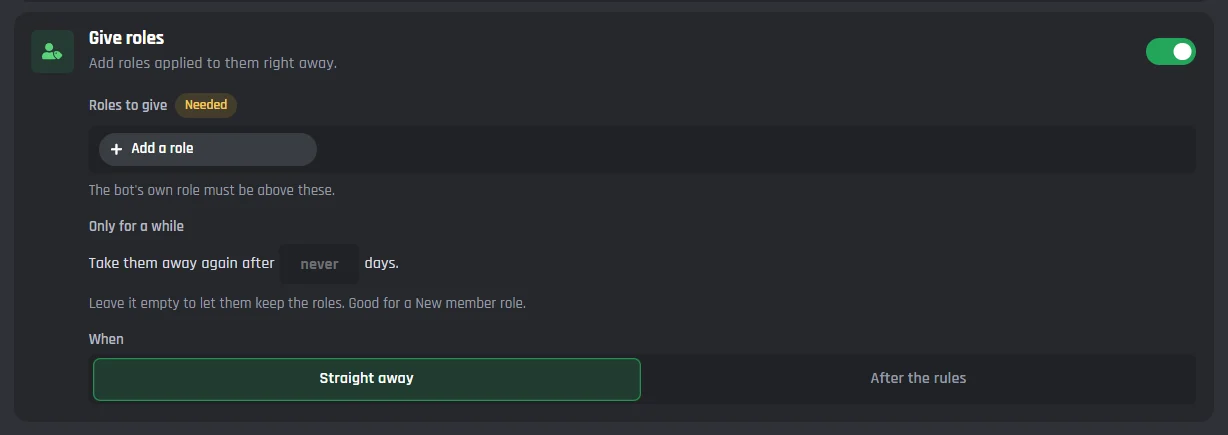
Give new members a role
Switch on Give roles, press Add a role, and pick when they get it: Straight away or After the rules.
- Only for a while takes the roles away again after the number of days you set. Leave it empty and they keep them.
- Your bot's own role has to sit above the roles it gives, because Discord checks the role order before any bot hands one out.
Reaction roles and role buttons are on the auto role Discord bot page.
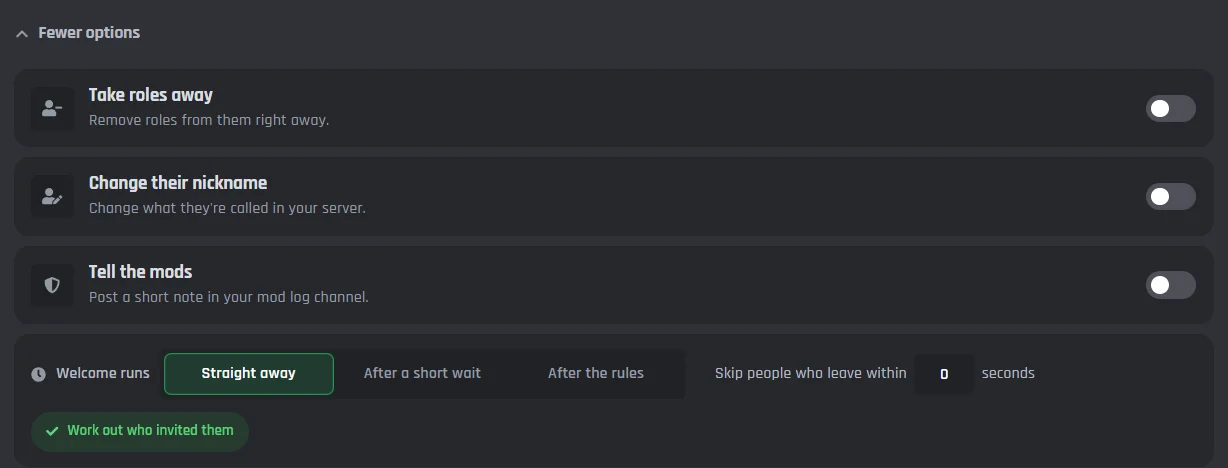
More options for new members
More options has the other things your bot can do when someone joins.
- Take roles away, change their nickname, or post a short note in your mod log channel.
- Welcome runs straight away, after a short wait, or after they accept the rules.
- Skip people who leave within a few seconds, so nobody gets welcomed after they have already gone.
Turn on special paths
Special Welcomes & Actions sorts the paths into groups. Switch a path on, then open it and set it up the same way as your normal welcome.
- The count next to each group shows how many of its paths are on.
- Suspicious account can put a quarantine role on new accounts. Both it and Join and leave spam can time someone out or ban them. For the rest of your moderation, see the Discord moderation bot page.
See the events behind it
The Welcomer runs on three events: Welcomer: Member Joined, Welcomer: Member Left, and Welcomer: Member Boosted. Press Open on one to see its paths and blocks in the builder.
- On the free plan you can look at them. With Premium you can add your own blocks under any path.
- They work like any other Discord bot event you build.

Swipe a screenshot sideways to see all of it.
How to set up a welcome bot on Discord
You need your bot in your server and a channel for the welcomes, like #welcome.
1Turn on the Welcomer
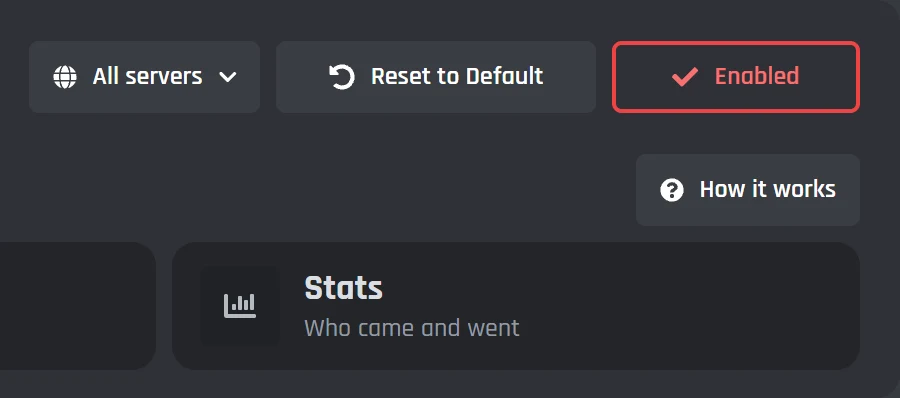
Open Welcomer in your bot's dashboard and press Enable at the top right. No bot yet? Make one first with our guide to making a Discord bot.
How to make a Discord bot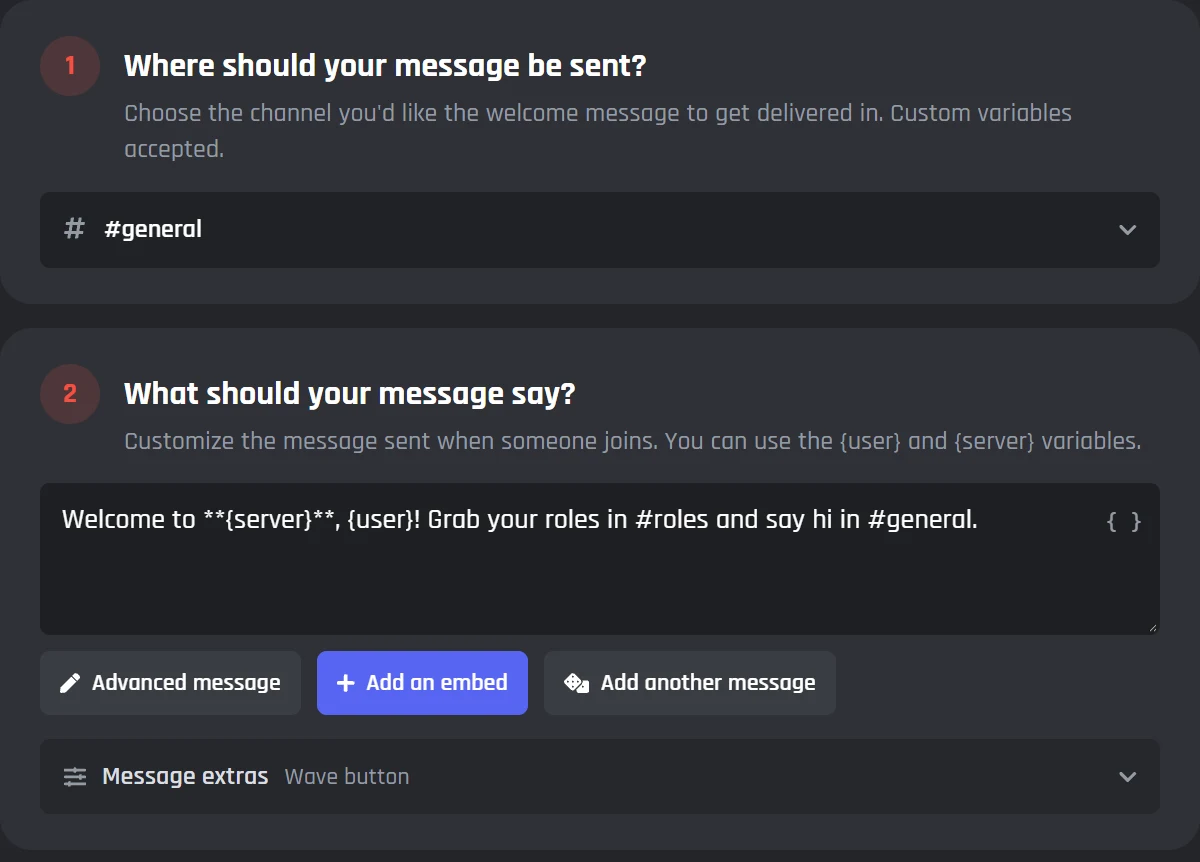
2Write your welcome
Pick the channel and type the message. Put {user} where the new member's mention goes and {server} for your server name.
The Welcomer docs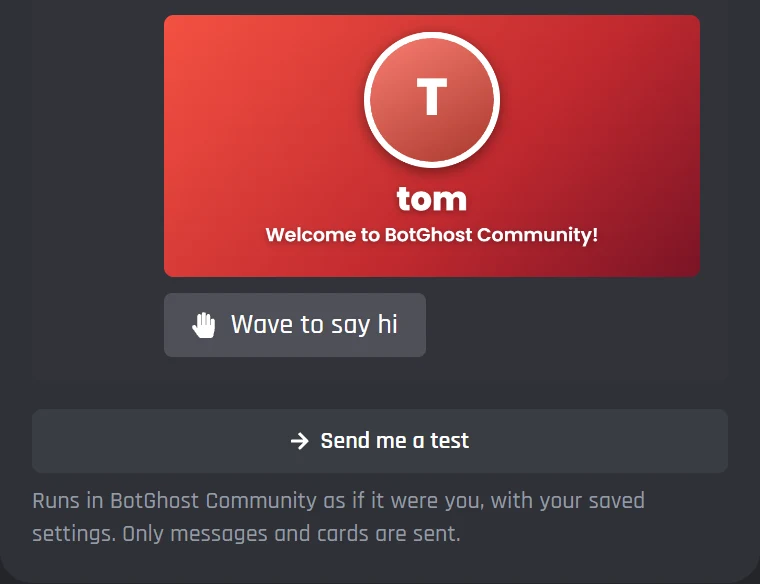
3Save and send a test
Press Save Changes, then Send me a test. The bot posts the welcome as if you'd just joined. Tests only send messages and cards, so nobody gets a role.
Every Welcomer setting
Welcome message variables and examples
Variables are tags the bot swaps for real details when it posts. A good welcome mentions the person and tells them one thing to do next.
| Variable | Becomes |
|---|---|
{user} | Mentions the new member |
{server} | Your server name |
{member_number_ordinal} | Their member number, like 1,204th |
{inviter_name} | Who invited them |
{times_joined} | How many times they've joined |
{account_age_days} | How old their Discord account is, in days |
{time_in_server} | How long they stayed (Leaves tab) |
{leave_reason} | Why they were kicked or banned (Leaves tab) |
Type { in any message box on the Welcomer page to see the full list.
- Everyone else
Hey {user}, welcome to {server}! You are our {member_number_ordinal} member. Grab your roles in #roles.Hey @Tom, welcome to BotGhost! You are our 1,204th member. Grab your roles in #roles.
- Joined via an invite
Welcome {user}! You came in on {inviter_name}'s invite, so say hi to them in #general.Welcome @Dax! You came in on Fabian's invite, so say hi to them in #general.
- Left on their own
{user} left the server. They were here for {time_in_server}.@Jayce left the server. They were here for 8 months.
What the free welcome bot includes
Welcomes, goodbyes, boost thank yous, cards, DMs, and roles are all free. Premium is for servers that want every special path, or more than one version of each message.
| Feature | Free | Premium |
|---|---|---|
| Welcome, goodbye, and boost messages | Yes | Yes |
| Welcome cards, DMs, and roles | Yes | Yes |
| Special paths | 2 more on each tab | All 23 |
| Versions of a message, picked at random | One message per path | Up to 10 |
| Different settings for each server | No | Yes |
| The Welcomer's events in the builder | Look only | Add your own blocks |
| Pictures on a card | From a link | Upload your own |
Premium is $12.50 a month for one bot. How free hosting works
A Wave to say hi button under the welcome
Switch on Wave to say hi in a welcome's Message extras and a button shows under it. When a member presses it, the bot posts that they waved at the new member.
- Each member can wave once on each welcome. Pressing it again tells them they already waved.
- Only the new member gets pinged. The people waving are named in the message without a ping.
- It's free, on your normal welcome and on paths like Returning member and Milestone.
Welcome to BotGhost, @Dax! Say hi in #general.
Wave to say hi@Tom waves hello to @Dax!
@Fabian waves hello to @Dax!
@Jayce waves hello to @Dax!
Discord welcome bot questions
Didn't find your question? Ask us in the BotGhost Discord, or read the Welcomer docs.
Yes. The Welcomer on BotGhost is free: welcome messages, goodbyes, boost thank yous, welcome cards, DMs, and roles all work on the free plan. You also get 2 special paths on each tab, like Returning member or Milestone. Premium adds the other paths, random messages, and different settings for each server.
Compare free and PremiumFirst you need a BotGhost bot in your server. Open Welcomer in the dashboard and press Enable. Pick the channel, write the message ({user} mentions the new member, {server} is your server name), and press Save Changes. Then press Send me a test to see it in your server. From then on the bot posts it for everyone who joins.
See the three stepsYes. Switch on Add a card, pick a template, or open the Card Studio to change it. The bot draws the card for each member with their own name and avatar, and posts it in the message, on its own, or by DM.
Try the welcome card makerYes. Switch on Give roles and pick the roles. They can get them straight away or after they accept your rules, and you can take them away again after a number of days. Your bot's own role has to be above the roles it gives.
More on auto rolesYes. Switch on the Returning member path. Instead of the normal welcome, they get a welcome back message, plus their old roles if you want. The bot remembers leavers for 180 days by default, and anyone who was kicked or banned doesn't get roles back.
See every pathSend Messages, Embed Links, and Attach Files in the welcome channel for messages and cards, and Manage Roles to give roles. The rest only matter for the paths that use them: View Audit Log to say who kicked or banned someone, and Manage Server to see which invite someone used.
Read the Welcomer docsDiscord can post its own join message in a channel you pick in Server Settings, with a random line and a wave sticker button. You can't change the words, add a card, give roles, or say goodbye with it. A welcome bot does all of that under your own bot's name.
Make your own bot with the Discord bot makerIt keeps working, listed as Welcomer (old). Open it and press Move my settings to bring your channels, messages, card, and roles across to the new Welcomer.
What's new in the WelcomerRelated pages
Other modules and tools that go with a welcome bot.
Set up your Discord welcome bot
Switch on the Welcomer, write your welcome, and send yourself a test. The free plan doesn't ask for payment details.
Set up your welcome bot