Discord Counting Bot with saves, checkpoints and records
Pick a channel and your members count up together, one number each. The bot reacts to every right number, catches the wrong ones and keeps the record. Free, set up in a minute from one page, and no code.
- Free for every bot
- Set up in a minute
- No coding required
- Your bot, your branding
98
99
100
100! @Vez hit the milestone. Keep going!
Vez got the Counting legend role.
101
Every right number gets a check mark. 100 was a milestone, so Vez got a message and a role.
Count along
Fabian just counted 66. Type the next number, try some maths, or get it wrong on purpose and see what the bot does.
63
64
65
66
Fabian just counted 66. Type the next number and press Enter, or pick one of the Try buttons under the box.
- Next number
- 67
- Record
- 70
- Your right counts
- 0
- Your mistakes
- 0
- A count isThe number on its own
- Count with mathsOn
- Twice in a rowNot allowed
- Talking in the channelOff
- A mistakeStart again
This channel runs on the settings Counting starts with. You can change every one of them on the Counting page.
When someone gets it wrong
A wrong number gets the wrong reaction. Then you choose what happens. Pick one to see it in #counting.
1,287
1,288
1,290
@Tom ruined it at 1,288! The next number is 1. Record: 1,288
Tom got the Ruined it role, taken away again in 60 minutes.
The count goes back to the first number. That is 1 unless you pick another number to start from, and it is also where a fresh game begins.
Whoever ruined it can get a role, like Ruined it, taken away again after the minutes you pick.
Your channel, your rules
Six rules decide what counts. Here is what the bot does with each kind of message.
The number, or the number then anything
Pick what a count is. The number on its own keeps the channel tidy. The number, then anything lets people add a few words after it.
- 67Counts
- 67 nearly thereCounts with then anything
Count with maths
Switch it on and 6*7 counts as 42. Numbers and + - * / ^ ( ) only, so nothing else sneaks in.
- 6*7Counts as 42
- (10-3)^2Counts as 49
- six times sevenNot a number
A wait between counts
Set a wait in seconds, or 0 for none. A number that comes too soon, right or wrong, is deleted with a short note and is not a mistake.
- 71Counts
- 72, a second laterDeleted, no harm done
Twice in a row
Off, members take turns. Whoever counted last waits for someone else, and a number they type is deleted without ruining the count. On, anyone can count at any time.
- Tom: 67Counts
- Tom: 68Deleted, count is safe
Talking in the channel
Off, messages that are not a number are deleted, so the channel is only the count. On, they stay, and only numbers count.
- gg everyoneDeleted when off
- gg everyoneStays when on
1,000 with commas counts
Big numbers are easier to read with commas, so people can write them either way.
- 1,000Counts
- 1000Counts
Start counting from 1 or any number you like. It is also the number a mistake goes back to.
Celebrate the big numbers
Milestones, new records and your own reactions give people a reason to keep counting.
Milestones
Every so many numbers, 100 or any number you pick, the bot posts a message, gives a role, or both.
1,300
1,300! @Vez hit the milestone. Keep going!
Vez got the Counting legend role.
A new record
When the count passes the channel's best, the bot says so, once a run.
1,288
1,289
New record! @Dax just passed the old best of 1,288. Keep going!
Reactions you pick
Choose what the bot reacts with on a right number, a wrong number and a save. Add as many as you like to each, server emoji too.
1,290
1,291
Every message, your words
Change any message the bot sends, with embeds and variables, or switch it off.
- EditOn, and can be switched offWhen the count is ruinedA reply to whoever typed the wrong number.
- EditOn, and can be switched offWhen someone counts twice in a rowA short note that deletes itself.
- EditOn, and can be switched offWhen someone counts too soonOnly with a wait between counts.
- EditOn, and can be switched offWhen a save is usedA reply when a save keeps the count going.
- EditOn, and can be switched offWhen a save is earnedSent each time the count earns one.
- EditOn, and can be switched offWhen the last count is deletedSays the next number, so nobody loses track.
- EditOn, and can be switched offMilestone messageOff sends the role only.
- EditOn, and can be switched offNew record messageOnce a run, when the best is beaten.
Post counts as the member
With webhook mode, the bot posts every right count again with the member's name and picture and deletes theirs, so nobody can edit a count afterwards.
65
lol(edited)
Fabian counted 66, then edited it. Now nobody can see what comes next.
- Anyone can edit their count afterwards
- An edited count leaves everyone guessing
65
66
Fabian's own message was deleted and posted again with his name and picture.
- Nobody can edit a count afterwards
- Every count still shows the member's name and picture
- Switch it on under Look on the Counting page
The bot needs Manage Webhooks and Manage Messages in the counting channel. Right counts get no reaction in this mode.
Commands for members and staff
Five commands come with Counting. Pick one to see the reply.
The next number here is 1,250. Record: 1,288 Saves: 2
Only you can see this
For anyone who has lost track. The reply only shows for them, so the channel stays clean.
Replies only show for whoever used the command, so the count is never interrupted.
One bot, a game for every server
Give each server its own counting, from the server menu or from BotPanel.
Different settings in each server
Pick a server in the menu at the top of the Counting page and give it its own rules, mistakes, saves and milestones. Every counting channel keeps its own number and record.
- Counting channel
- #counting
- A mistake
- Back to a checkpoint every 100
- Count with maths
- On
- Saves
- Every 500 counts, up to 2
- Milestones
- Every 100, with a role
BotPanel: server admins run their own game
When your bot is in other people's servers, BotPanel lets each server's admins change their own server's counting, and nothing else.
- Their counting channel
- The rules
- What a mistake does
- Saves and milestones
- The messages
- The reactions
- The Counting events
- Every other server's game
It's made of builder blocks
Counting is ordinary events and commands. Open them in the Command Builder, add your own blocks, and write numbers your way with the new Format a Number option.
Open the events in the Command Builder
Every check the bot makes is a block you can see. Pick an event to see what runs, then add your own blocks wherever you like.
- Is this a counting channel?Every message in your counting channels is checked.
- Is it a number?Reads 1,000 with commas, and maths like 6*7.
- Did they count last?With twice in a row off, a note, and it is deleted.
- Is it too soon after the last count?Only with a wait between counts.
- Is it the next number?Right: a reaction and a point. Wrong: a save, a checkpoint or a fresh start.
- Your block: Send a MessageTell #mod-log who ruined the count.
A message is sent, with one block of your own added at the end.
Format a Number
NewA new option in Manipulate some text. Show any number as 1,249, 1.2K, 1st, in words or in Roman numerals, in Counting's messages or in any command.
Style1,249! @Vez hit the milestone. Keep going!
Everything you can set, tab by tab
All of it lives on one Counting page in your dashboard. Pick a tab to see it, every setting on it, and what it does in Discord.
Pick a channel and the rules
Pick the channels people count in, then decide what counts: the number on its own or with words after it, maths, a wait between counts, taking turns and whether people can talk.
66
67
2*34
Maths is on, so 2*34 counts as 68.

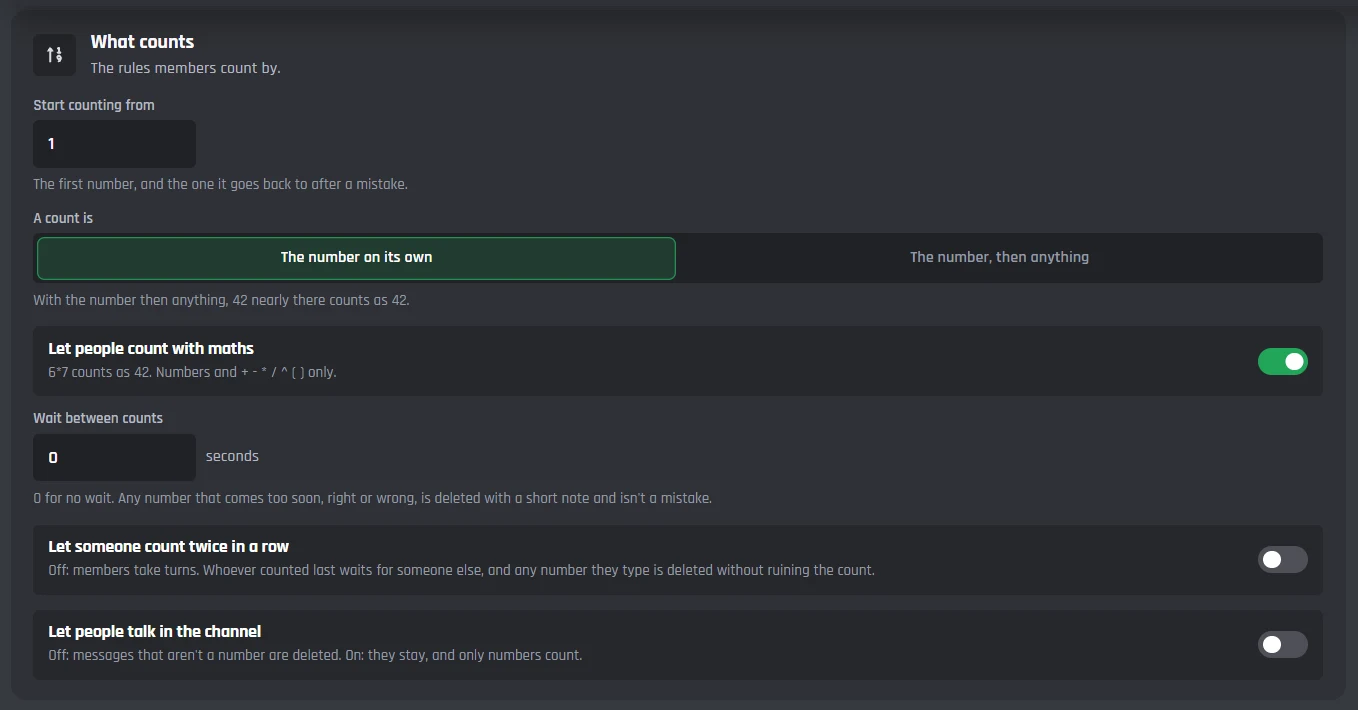
Every setting on the Channels and rules tab, 7 in all
Where people count
- Counting channels
- Every message in these channels is checked. Each channel has its own game.
What counts
- Start counting from
- The first number, and the one it goes back to after a mistake. 1 to start with.
- A count is
- The number on its own, or the number then anything.
- Let people count with maths
- 6*7 counts as 42. On to start with.
- Wait between counts
- Seconds before the next count. A number that comes too soon is deleted with a note, not a mistake.
- Let someone count twice in a row
- Off: members take turns.
- Let people talk in the channel
- Off: messages that are not a number are deleted.
What a wrong number does
Start again from the first number, go back to the last checkpoint, or keep going and delete the wrong number. Saves keep the count alive, and whoever ruined it can get a role for a while.
66
67
70
@Tom ruined it at 67! The next number is 1. Record: 250
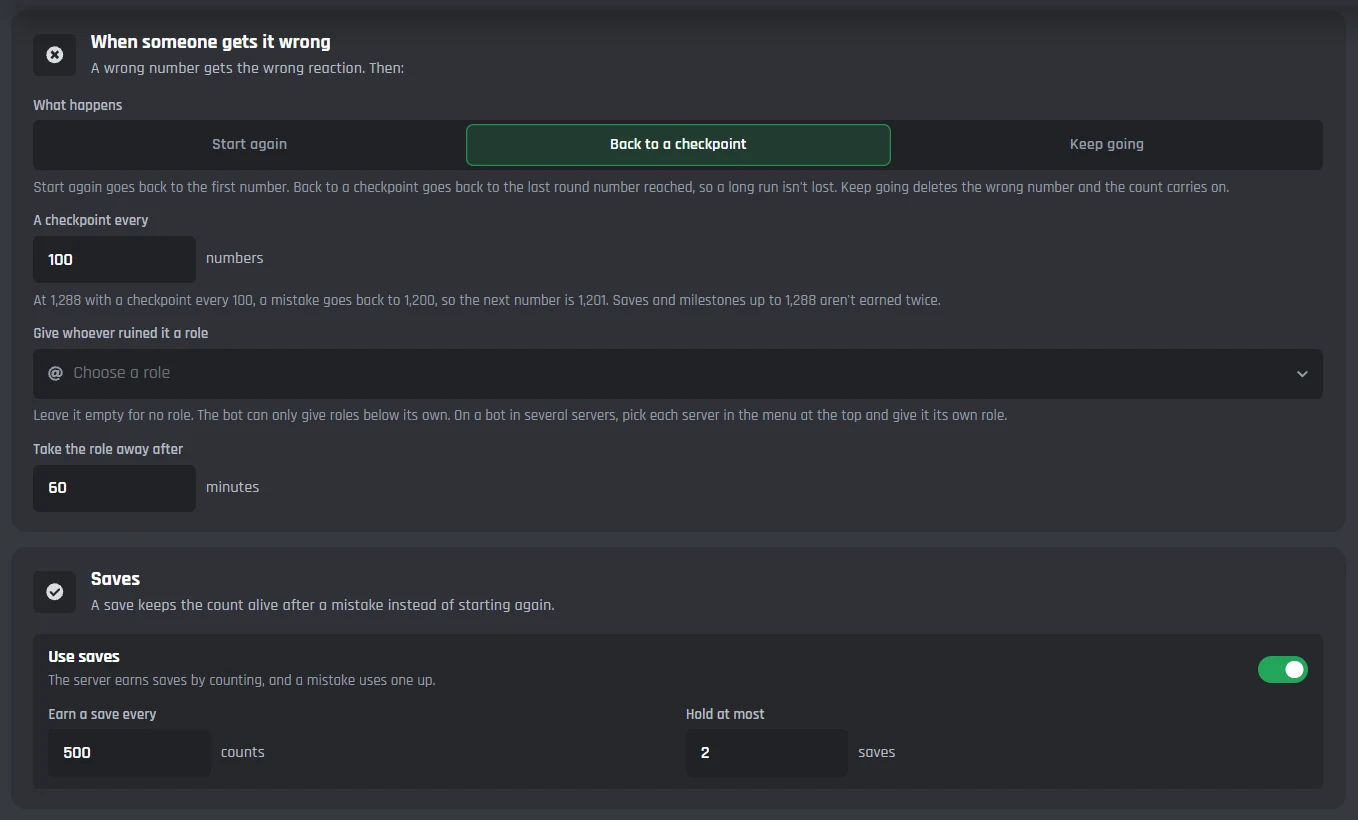
Every setting on the Mistakes tab, 7 in all
When someone gets it wrong
- What happens
- Start again, Back to a checkpoint, or Keep going.
- A checkpoint every
- At 1,288 with a checkpoint every 100, the next number is 1,201.
- Give whoever ruined it a role
- Leave it empty for no role.
- Take the role away after
- In minutes. 60 to start with.
Saves
- Use saves
- A mistake uses a save instead of ending the run.
- Earn a save every
- Counts between saves. 500 to start with.
- Hold at most
- The most saves the server can keep. 2 to start with.
Celebrate milestones and records
A message once a run when the count passes the channel's best, and a message, a role or both every round number.
99
100
100! @Vez hit the milestone. Keep going!
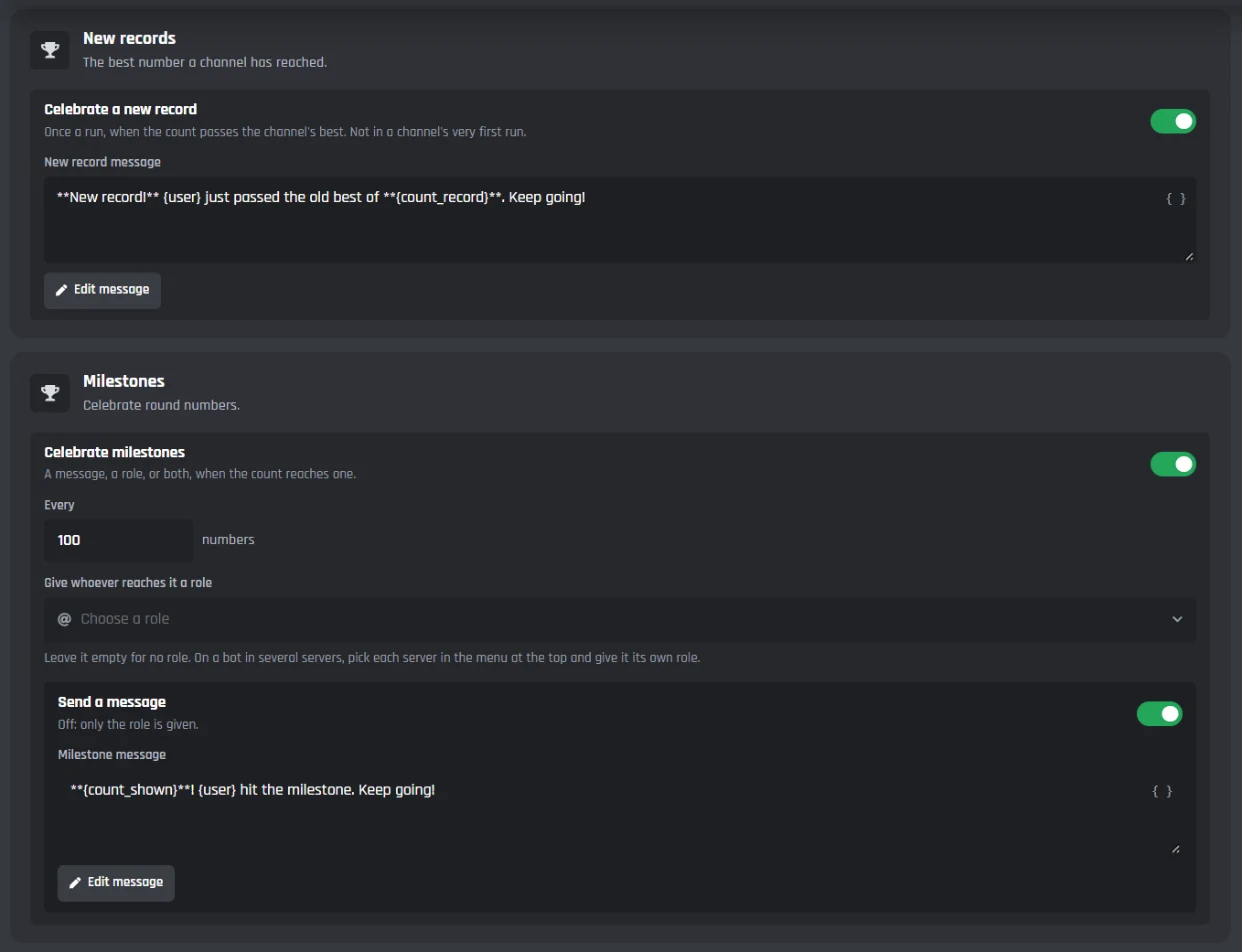
Every setting on the Milestones tab, 5 in all
New records
- Celebrate a new record
- Once a run, when the count passes the channel's best. On to start with.
Milestones
- Celebrate milestones
- On to start with.
- Every
- How often a milestone comes. 100 to start with.
- Give whoever reaches it a role
- Leave it empty for no role.
- Send a message
- Off: only the role is given.
Reactions and every message
Pick the reactions, post counts as the member so nobody can edit them, and change or switch off every message the bot sends.
67
68
@Jayce, you can't count twice in a row. Let someone else go next.
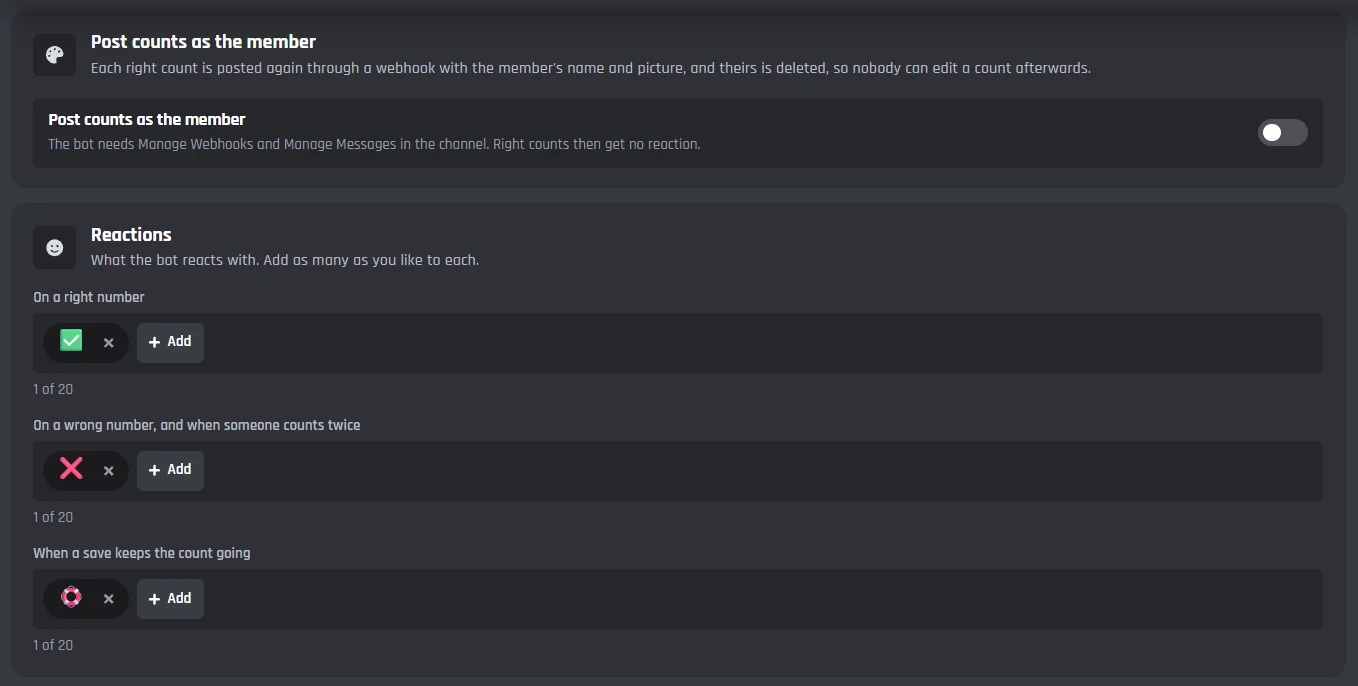
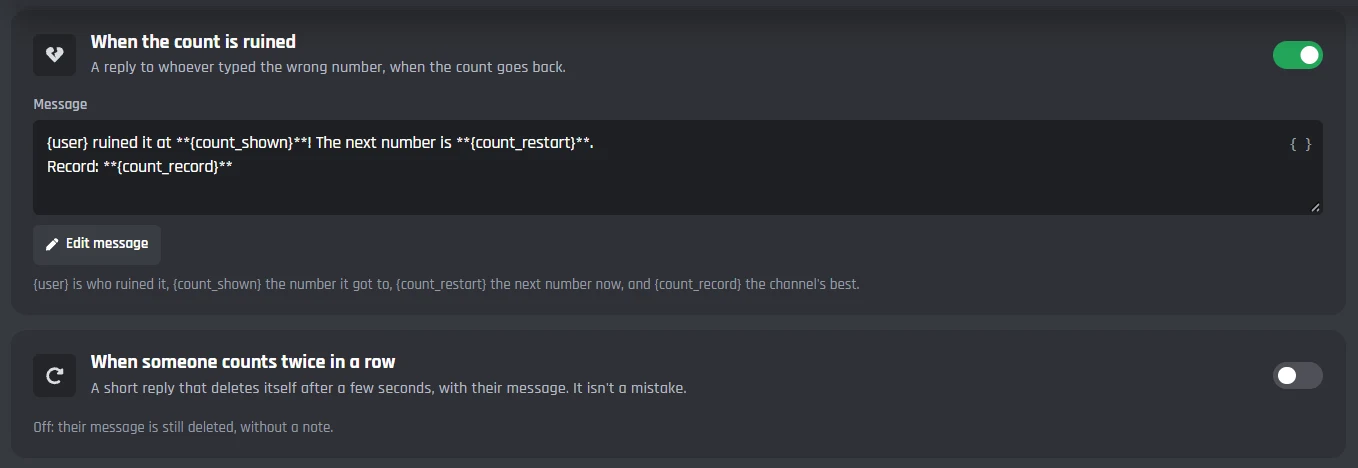
Every setting on the Look tab, 10 in all
Reactions
- On a right number
- Up to 20 reactions.
- On a wrong number, and when someone counts twice
- Up to 20 reactions.
- When a save keeps the count going
- Up to 20 reactions.
- Post counts as the member
- Each right count is posted again with the member's name and picture. Needs Manage Webhooks.
The bot's messages
- When the count is ruined
- When someone counts twice in a row
- When someone counts too soon
- When a save is used
- When a save is earned
- When the last count is deleted
Commands, and the events behind it
Members check the count with /count, staff set or reset it with /count-staff, and the two events are ordinary builder blocks you can open and add to.
/count next
The next number here is 68. Record: 250 Saves: 1
Only you can see this
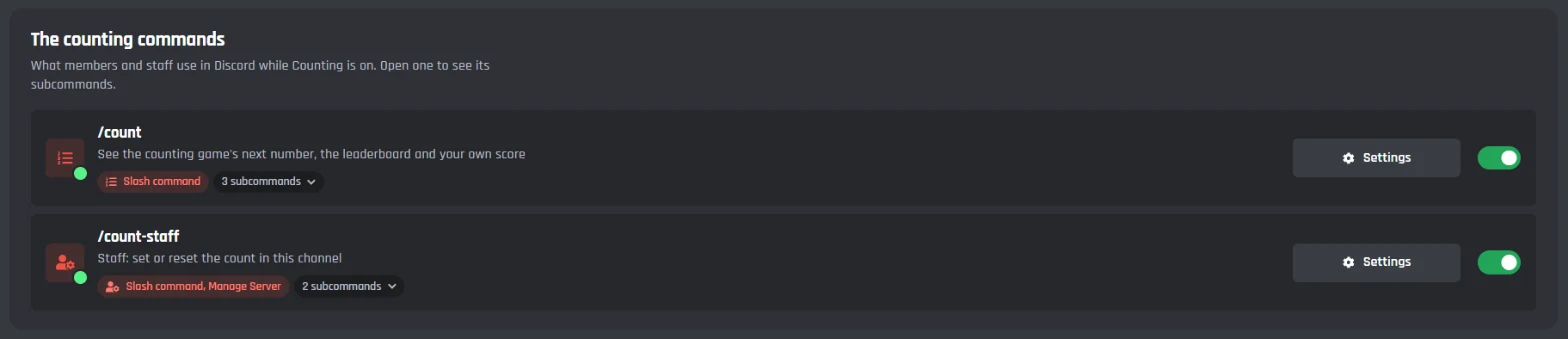
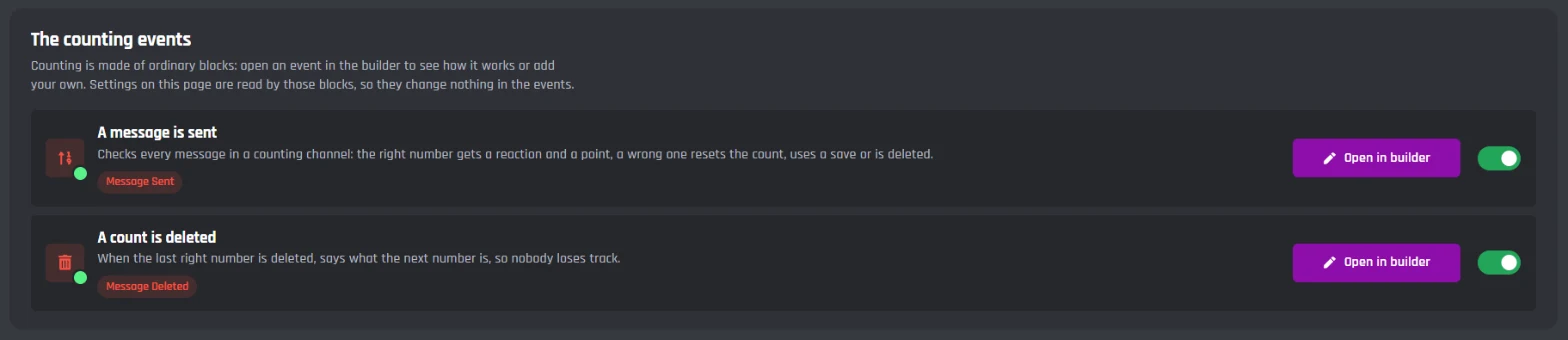
Every setting on the Commands and events tab, 5 in all
/count
- /count next
- The next number, the record and the saves.
- /count top
- The members with the most right counts.
- /count me
- Your right counts, mistakes and place.
/count-staff
For staff with Manage Server
- /count-staff set
- Set the next number to count in this channel.
- /count-staff reset
- Start the count in this channel again.
How to set it up
Live in five steps
From a fresh bot to a counting channel in about a minute
- 1
Create your bot and invite it
Sign in to BotGhost, create a bot and invite it. In the counting channel it needs View Channel, Send Messages, Add Reactions and Manage Messages. - 2
Switch Counting on
Open Counting in your dashboard and switch it on. That adds its events, the /count and /count-staff commands, and the variables the game is kept in. - 3
Pick a counting channel
Under Channels and rules, pick one or more counting channels. Change the rules now, or leave them as they are. - 4
Save
Press Save. The bot always uses what is saved. - 5
Type 1 in the channel
Type the first number in your counting channel. The bot reacts, and the game is on.
How to set up a Discord counting bot
What a counting bot does, why counting channels work, and what Counting is built from.
What a counting bot does
A counting bot runs a counting channel. Members count up together, one number per message, and the bot checks every one. A right number gets a reaction, a wrong one ruins the count, and the whole server tries to beat its record.
Doing that by hand means someone watching the channel all day. A counting bot never misses a number, and a BotGhost bot does it under your own name.
Why counting channels work
Counting is the simplest game a server can have. Anyone can join in with one message, it keeps a channel busy between bigger events, and a long run turns into something the whole server looks after.
Saves and checkpoints stop one slip from wiping out weeks of counting, and milestones give people a reason to come back for the next round number.
Built from ordinary blocks
Under the page, Counting is two events, A message is sent and A count is deleted, plus the /count and /count-staff commands, all made of the builder's own blocks. Open them any time to see exactly what runs, and add your own blocks wherever you like.
Discord Counting Bot FAQ
Keep building
Counting is one part of your bot. Here is the rest of it.

Ready to start counting?
Create a bot, switch on Counting, pick a channel and type 1. Free, no code, nothing to install.
