Free Discord tools / Embed builder
Discord embed builder
Build an embed and watch the preview change as you type. Copy the JSON, or paste a webhook URL and send it to your channel. You don't need an account.
Webhook name and avatar (optional)

What a Discord embed is
An embed is the box with a coloured strip down its left side that bots and webhooks post. Members can't make one by typing in chat, so you need a webhook or a bot to post it. You can leave out any part, as long as the embed keeps at least one.
- 1Author. A small line at the top, with an optional icon and link.
- 2Title. Bold text that can link to a web page.
- 3Description. The main text. Markdown works here.
- 4Fields. Name and value pairs. Inline ones sit up to three in a row.
- 5Thumbnail. A small picture in the top right corner.
- 6Image. A big picture across the bottom.
- 7Footer. Small text at the bottom, with an icon and a time.
Discord embed limits
Go over any of these and Discord refuses the whole message. The 6,000 total adds up the title, description, field names and values, footer, and author name of each embed in the message, and the counter above the preview keeps that sum as you type.
From Discord's developer docs.
| Part | Limit |
|---|---|
| Title | 256 characters |
| Description | 4,096 characters |
| Fields | 25 per embed |
| Field name | 256 characters |
| Field value | 1,024 characters |
| Footer text | 2,048 characters |
| Author name | 256 characters |
| Everything above, across all embeds in one message | 6,000 characters |
| Embeds in one message | 10 |
| Message text outside the embeds | 2,000 characters |
Send an embed with a Discord webhook
A webhook is a link that lets you post in one channel without a bot. You need the Manage Webhooks permission in that server to make one.
- 1Go to Server Settings in Discord. You'll find Webhooks under Integrations.
- 2Hit New Webhook, choose its channel, then Copy Webhook URL.
- 3Build your embed, paste the URL into Webhook URL under it, and press Send.
Anyone with the URL can post in that channel, so keep it to yourself.
Send embeds from your own Discord bot
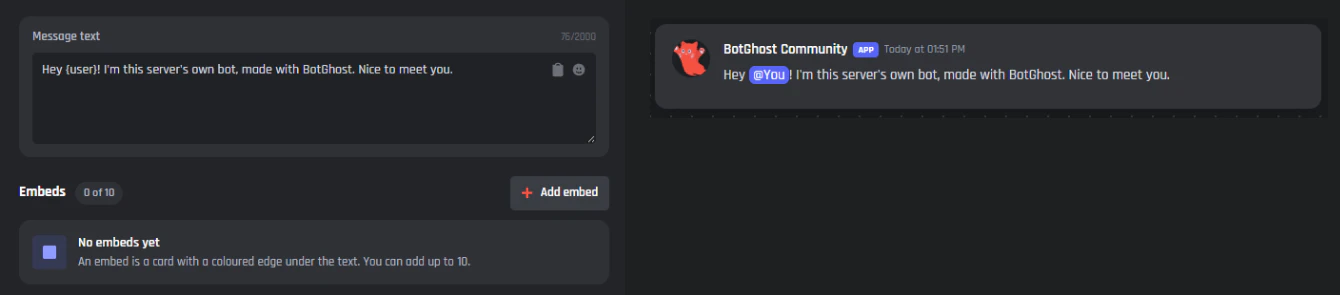
A webhook posts once, when you press Send. For an embed that goes out by itself, say when someone types /rules or joins your server, you need a bot. On BotGhost you use the Send or Edit a Message block in the Discord bot command builder.
Its message editor has the same embed fields as this builder and takes up to 10 embeds. Press Paste JSON there and paste the JSON you copied here to bring your embed across. Variables like {user_name} fill in for whoever used the command. The free plan gives you 3 commands and 3 events.
Discord embed builder questions
Yes, and you don't need an account. Your draft stays in this browser if you reload, and you can copy its JSON to use the embed somewhere else.
Most of the time, text went over a limit, an embed is empty, a field is missing its name or value, or a link doesn't start with https://. The builder marks each of these in red and keeps Send greyed out until you fix them.
Yes, up to 10. The 6,000 character cap counts all of them together, so ten long embeds won't fit in one message.
Use the Colour box: pick one, or type a hex code like #f45142. Discord saves colours as decimal numbers, and the JSON tab shows that number. The Discord embed color converter does the same sum for anywhere else you need it.
The builder only uses it to send your message, straight from your browser to Discord. BotGhost never receives it. Whoever has the URL can post in that channel, so if it gets out, delete the webhook in Discord and make another.
Not with this builder, which only sends new messages. A BotGhost bot can edit its own messages with the Send or Edit a Message block.
