Free auto role Discord bot
Give new members a role the moment they join, or once they accept your rules.
Pick a role like Member, and your bot gives it to everyone who joins your server. Give it straight away or once they've accepted the rules, and take a New member role off again after a few days. You set it up in the Welcomer on BotGhost, the no-code Discord bot maker, and we host the bot.
Giving roles is free on every bot. You don't need a card to start.

Give new members a role when they join
Auto roles live in the Welcomer, the same module that posts your welcome message. You can turn on roles and leave the welcome message off.
- 1Open Welcomer in your dashboard and press Enable.
- 2Under Anything else?, turn on Give roles and add the roles.
- 3Pick Straight away or After the rules, then press Save Changes.
- Only for a while takes the roles away again after the number of days you type. Leave it empty and they keep them.
- To make people press something first, add a button under the welcome message. It gives up to 3 roles, only the new member can press it, and it stops working after 7 days.
Your bot can only give roles below its own role in Server Settings, Roles. The welcome message, cards, and goodbyes are on the Discord welcome bot page.
Give new members a role, in the docs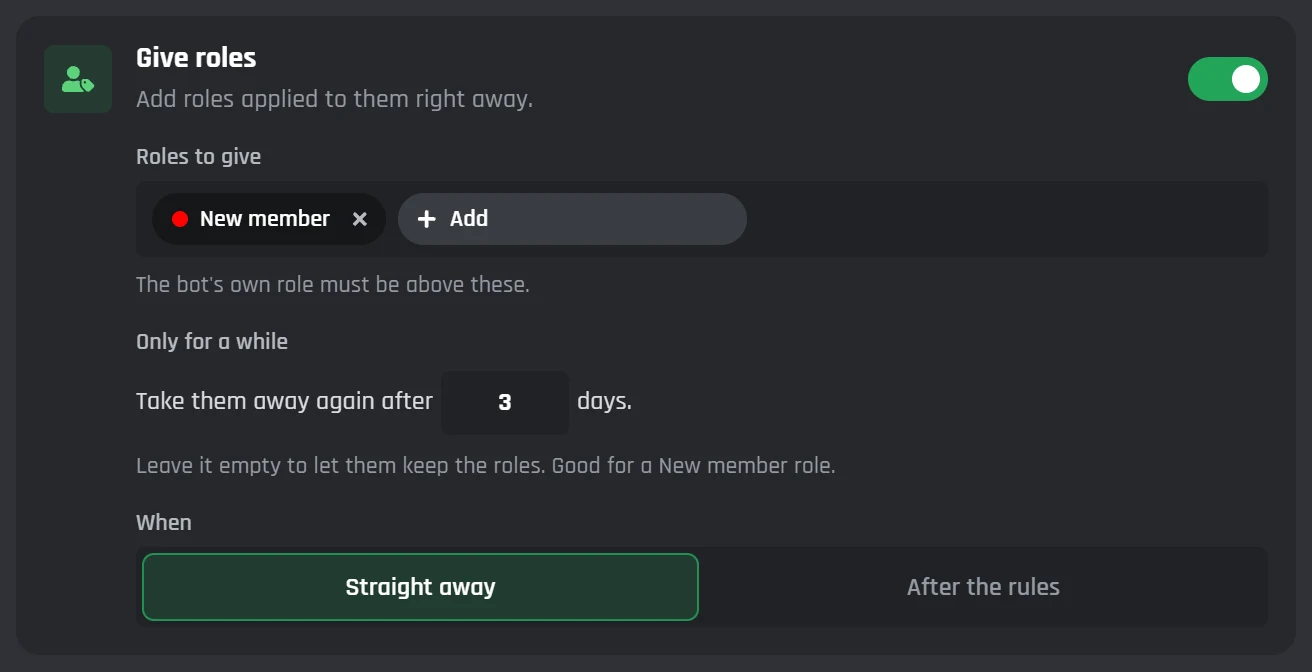
Different roles for bots, returning members, and new accounts
The Welcomer's Special Welcomes & Actions sort people into paths as they join, and each of these paths can give its own roles.
- Bot joinedBots get a role of their own, like Bots, and can skip the welcome message.
- Returning memberGives back the roles they had when they left. Members who were kicked or banned don't get them back.
- Suspicious accountA quarantine role for accounts younger than 7 days (you pick the number) or with no avatar.
- Accepted the rulesA role once they've accepted your server's rules screening or onboarding.
- Stayed a whileA role when they're still in your server a set number of days later.
- Joined via an inviteRoles for people who used an invite you list. Your bot needs the Manage Server permission for this one.
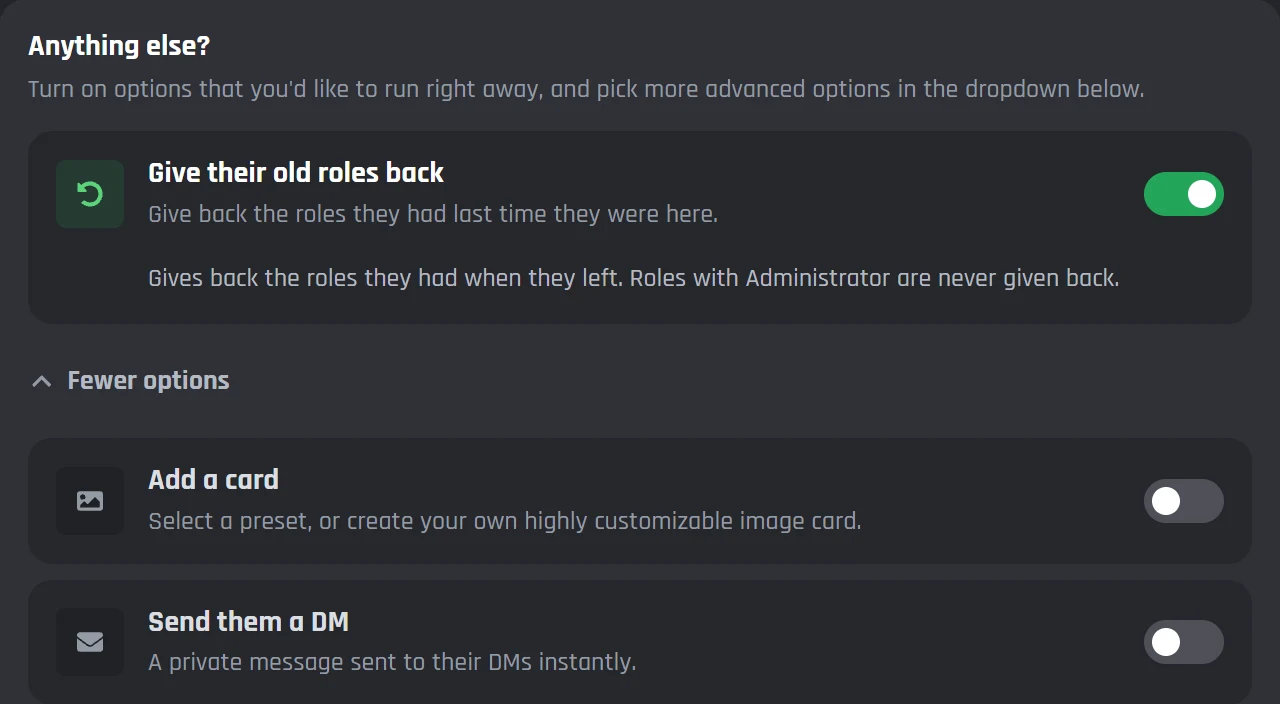
Returning members only get back safe roles: none with Administrator, Manage Server, Ban Members, or other moderator permissions. The Welcomer remembers people who left for 180 days unless you change it.
Every Welcomer path in the docsBuild your own auto role event
To build it yourself, make a custom event that starts with When a new user joins the server and add an Add Roles block under it. Put conditions in between to give different roles to different people. Free bots can have 3 custom events.
- Add Roles can take its roles away again after a set time, up to 90 days. Blocks under its After removal point run when that happens.
- For people who were already in your server, put Add Roles to All Users in a command and run it once.
You make events in the Discord bot command builder. Add Roles has its own docs page.
Auto roles on the free plan and on Premium
Giving roles to everyone who joins is free. Premium is for servers that want every special path, or different roles in each server.
| Feature | Free | Premium |
|---|---|---|
| Roles for everyone who joins, straight away or after the rules | Yes | Yes |
| Take the roles away after some days | Yes | Yes |
| A role button under the welcome message | Yes | Yes |
| Special paths (bots, returning members, new accounts, and more) | 2 per tab | All of them |
| Different roles for each server | No | Yes |
| Your own join events in the builder | 3 custom events | Unlimited |
| Servers | 5 | Unlimited |
A free bot switches off after 2 days without activity. How free bot hosting works
How a new member's roles change in their first week
Tom joins a server that uses Give roles and two special paths. All of it fits in the free plan.
- 1Tom joinsTTomRolesNew memberGive roles, set to Straight away
- 2He accepts the rulesTTomRolesNew memberMemberThe Accepted the rules path
- 33 days laterTTomRolesMemberNew memberOnly for a while, set to 3 days
- 47 days laterTTomRolesMemberRegularThe Stayed a while path
Auto role questions
Still stuck? Ask in the BotGhost Discord, or read the Welcomer docs.
It's a bot that gives people roles without a moderator doing it by hand. Most of the time that means a role like Member the moment someone joins your server, but it can also be a role for bots, a role after the rules, or old roles for someone who comes back.
Give new members a roleOpen the Welcomer in your bot's dashboard and press Enable. Under Anything else?, turn on Give roles, press Add, and pick the role. Choose Straight away or After the rules, then press Save Changes.
Read the steps in the docsA bot can only give roles that sit below its own role, and it needs the Manage Roles permission. In Discord, open Server Settings, then Roles, and drag your bot's role above the roles it hands out.
Welcomer roles in the docsYes. Set When to After the rules, and the role comes once they've accepted. Your server needs rules screening or onboarding turned on in Discord for this to happen.
See the Give roles settingsYes. In the Welcomer, fill in Only for a while with a number of days, and the bot takes the role away again after that. In the builder, the Add Roles block can remove its roles after up to 90 days.
Temporary roles in the builderYes. Turn on the Bot joined path in the Welcomer and pick the role bots should get. Bots go down that path, and its Instead of Everyone else switch decides whether they also get the normal welcome.
See the Welcomer pathsThey can. Turn on the Returning member path, then Give their old roles back. The Welcomer remembers people who left for 180 days by default. It won't give roles back to someone who was kicked or banned, and it never gives back roles with moderator permissions like Administrator.
See the Returning member pathYes. Giving roles in the Welcomer is free, and so is the role button. Free bots can turn on 2 special paths on each tab, like Bot joined and Returning member. Premium turns on all of them and lets each server have its own roles.
Compare Free and PremiumRelated pages
More pages about setting up your server's bot.
- Discord welcome botWelcome messages, welcome cards, and goodbyes from the same Welcomer.
- Discord moderation botHow to set up bans, warnings, and logs for your server.
- Discord bot command builderCommands and events made by joining blocks together.
- No-code Discord bot makerMake your own bot, switch on modules, and BotGhost hosts it.
Give your new members a role
Make a bot, invite it to your server, and turn on Give roles in the Welcomer. The free plan doesn't need a card.
Create your bot for free