Free Discord bot hosting, no code
BotGhost runs your bot on our servers, so it stays online while your PC is off for the night. Make it out of blocks or turn on a module, hit Start, and it shows up online in your server. You don't install anything, rent a server, or keep a terminal window open.
On the free plan, your bot switches off if nobody uses it for 2 days, and pressing Start brings it straight back. A Premium bot only switches off after a whole year with nobody using it.

Discord bot hosting with no server to set up
To host a bot yourself, you need a computer or rented server that's always on, and you have to keep the bot's code running on it. On BotGhost, we run it on our servers instead.
- Your bot runs on BotGhost's servers, so your computer can be off.
- Changes go live as soon as you save. You don't restart the bot.
- Data lives in Data Storage variables, so there's no database to set up.
- We update BotGhost often, and your bot restarts by itself each time.
$Rent a VPS, then keep patching itssh [email protected]$Get Node.js onto itsudo apt install nodejs$Pull in packages, then chase their updatesnpm install discord.js$Leave a terminal runningnode index.js$Restart it when it crashespm2 restart my-bot
Already have a bot you coded?
BotGhost doesn't run uploaded code. You can't send us a discord.js or discord.py project and have it hosted as it is. You can keep the bot itself and build its commands again from blocks.
See how commands are built from blocks- Your bot's Discord application stays the same: its name, its avatar, and the servers it's already in. You paste its token into BotGhost.
- Turn off your old host before you press Start, or two copies of the bot will answer every command.
- Commands like moderation, tickets, welcomes, and giveaways are ready-made modules you switch on, so you don't have to rebuild them.
Host your Discord bot in three steps
The bot itself is an application you create on Discord's side. BotGhost needs its token, which works like the bot's password, and from then on we run it for you.
After that, the only two buttons you'll touch are Start, which puts it online, and Stop, which takes it offline.
Give it your own name and avatar- 1
Make the bot in Discord
Over in the Discord Developer Portal, make a new application and copy the bot's token. If you get stuck, the setup guide shows each click.
- 2
Connect it to BotGhost
BotGhost asks for that token while you're creating your bot, so paste it in there. Then invite the bot to your server.
- 3
Press Start
It's in the dashboard's top bar. The dot turns green, the button changes to Stop, and your bot shows as online in your server.

How free Discord bot hosting works
A free bot stays online while people use it. If nobody does for 2 days, it switches off until you start it again.
- 1. Any time
Someone uses it
A member runs a command, presses a button, or picks from a menu. The 2 day clock starts again.
- 2. 48 hours later
Nobody uses it
No commands, buttons, or menus for 2 days. Chat messages in your server don't count.
- 3. Then
It switches off
Your bot sends you a DM to say so, and the dashboard tells you why the next time you open it.
- 4. When you want it
You press Start
Open the dashboard and hit Start. It's up in the top bar.
- 5. Straight away
It's back
Your commands, modules, and settings are all still there, exactly as you left them.
The 2 day rule doesn't apply to a new bot until its first 7 days are up.
Premium bots only switch off after a full year with nobody using them.See Premium
Free, Premium, or Priority Hosting
Premium adds features and keeps a bot on. Priority Hosting is a separate add-on that moves all your bots to faster servers. You can have either one, or both.
| What you get | Free$0No payment details | Premium$12.50a month for one bot, or $75 a year | Priority Hosting$15a month for all your bots, or $150 a year |
|---|---|---|---|
| Bots it covers | One bot online at a time | The bot you put it on | Every bot you own, and ones you make later |
| When nobody uses the bot | Switches off after 2 days | Stays on | Same as the bot’s plan |
| Servers per bot | Up to 5 | Unlimited | Same as the bot’s plan |
| Custom commands and events | 3 of each | Unlimited | Same as the bot’s plan |
| Premium modules like Music and AI | No | Yes | No, Premium is separate |
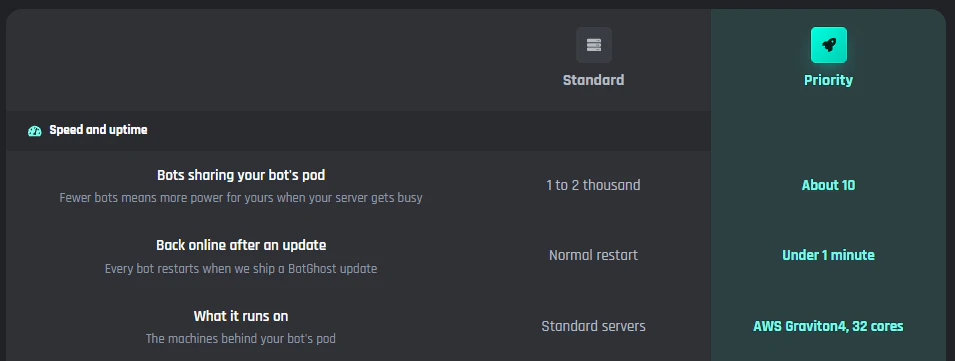
| Bots sharing its server pod | 1 to 2 thousand | 1 to 2 thousand | About 10 |
| Back online after a BotGhost update | Normal restart | Normal restart | Under 1 minute |
Premium on every bot you own is $25 a month. Prices are in US dollars.
Priority Hosting for bots in big servers
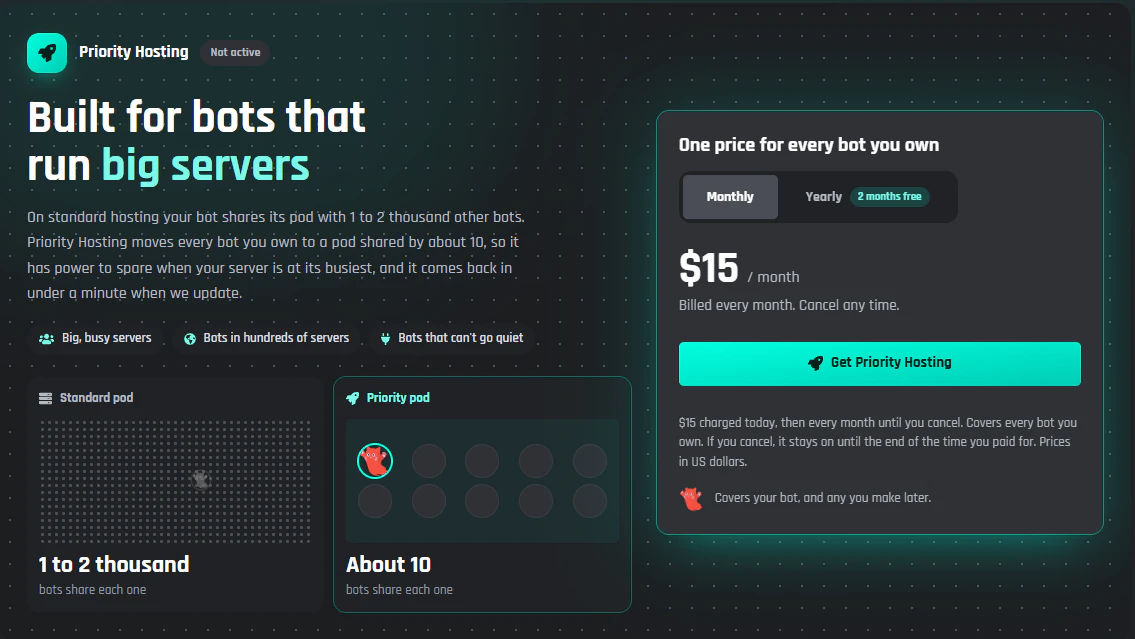
A bot on standard hosting runs in a pod (a group of servers) shared with 1 to 2 thousand other bots. With Priority Hosting, every bot you own moves to a pod shared by about 10, so your bots get far more of the machine's power when your server gets busy.
- Back online in under a minute when we update BotGhost.
- The servers are AWS m8g.8xlarge: a Graviton4 with 32 cores and 128 GB of memory.
- You pay once for every bot you own. Make a new one next month and it's covered too.
- $15 a month, or $150 a year if you pay yearly. It doesn't include Premium features, though.
Standard hosting or Priority Hosting
Your commands, events, and settings stay the same. They run on a much bigger machine, and you get four extras.
- Version historyWe keep every save of your commands and events for 30 days, so if you break one or delete it by accident, you can put it back.
- Alpha accessTry new features on alpha.botghost.com before everyone else.
- 100 Card Studio picturesRoom for 100 of your own pictures for welcome and image cards, where Premium holds 25.
- Priority role and alertsA role in the BotGhost Discord, with a heads up before we update the servers.
Discord bot hosting questions
For anything else, ask in the BotGhost Discord.
Yes. The free plan hosts one bot online at a time, in up to 5 servers, with 3 custom commands and 3 custom events. You don't enter any payment details to start.
Compare Free, Premium, and Priority HostingFree bots switch off after 2 days without anyone using a command, button, or menu. Chat messages don't count. Your bot DMs you when it happens, and the dashboard explains it the next time you open it.
How the 2 day rule worksHit Start in the dashboard's top bar. You'll see the dot go green and say Online, and everything (commands, modules, settings) is still where you left it. The free plan only lets one bot be online at a time.
Start and stop your botNot in their first 7 days. After that, the 2 day rule applies to bots on the free plan.
See the free plan ruleYes. We only switch a Premium bot off after a whole year with nobody using it, and Start brings it back the same way.
See PremiumA separate add-on, $15 a month or $150 a year, that moves every bot you own to faster, separate servers. Its pods are shared by about 10 bots instead of 1 to 2 thousand, and your bots are back in under a minute when we update BotGhost.
Priority Hosting in the docsNo. Premium adds features and raises the limits for a bot. Priority Hosting changes where your bots run and adds a few extras, but no Premium features. You can have either one, or both.
Premium and Priority Hosting plansNo. BotGhost hosts bots you build on BotGhost, and it doesn't run uploaded code. You can keep the same bot (its name, avatar, and servers) by pasting its token into BotGhost, then build its commands from blocks or switch on modules. Stop your old host first, so two copies don't both reply.
Moving a coded bot to BotGhostNo. Your bot runs on BotGhost's servers, so your computer can be off, and you don't rent a VPS or install and run any code yourself.
How to make a Discord botNo. Music runs on a separate audio service that every bot shares, so Priority Hosting doesn't change it.
About the Discord music botRelated pages
- No-code Discord bot makerBuild commands from blocks, or switch on ready-made modules.
- Custom Discord botChange your bot’s name, avatar, banner, and status so it looks like yours.
- Discord bot command builderSlash commands and events, made by snapping blocks together.
- How to make a Discord botA step by step guide for your first bot, from the Developer Portal all the way to your first command.
Host your Discord bot for free
Make your bot and press Start. It keeps answering in your server while your computer's off, and the free plan doesn't ask for a card.
Host your bot for free