Discord slash command builder
Make slash commands and events for your own bot by connecting blocks.
Choose what members type and drag in blocks for what the bot should do, all without writing code. When you save, BotGhost puts it in Discord as a real slash command (the kind that pops up when you type /) and hosts the bot for you. If you haven't made a bot yet, start with how to make a Discord bot without coding.
The free plan gives you 3 custom commands and 3 custom events without paying anything.
 /giveawayStart a giveaway, one entry each/dailyClaim your daily coins/banBan a member and log it/rankSee your level and XP
How the Discord bot command builder works
A command is a set of blocks joined by lines. It starts at the yellow block (that's where the name goes) and runs down the lines one block at a time. You've got over 100 blocks to pick from, and each one is one of three colours.

Options
The bits a member fills in after the command name, like a prize, someone to warn, or a picture. There are seven kinds: Text, Number, User, Channel, Role, Choice, and Attachment.
Actions
What your bot does, from the top of the command down. You'll use Send or Edit a Message and Add Roles the most, but there's Ban a Member, Set Variable, and loads more.
Conditions
Where a command splits. If / Else is the big one. Role Condition, Permissions Condition, and Chance Condition (a dice roll) handle most of the rest.
Slash command options, buttons, menus, and forms
Options are what members type after the command name. In /giveaway prize: Nitro Classic, the prize is an option, and whatever someone puts there can be used by any block further down.
- Send or Edit a Message can put buttons and select menus on a reply. Every button gets its own blocks, so Enter can do one thing and Leave another.
- Send a Form pops up a form (like the Report one here) and waits till they've filled it in.
- Subcommands: call a command economy daily and Discord shows it as /economy daily. You can fit 25 under one name.
- Right-click ones too: User and Message commands show up in Discord's Apps menu. And you can make commands that work in DMs.
Report a memberIf / Else logic, variables, and permissions with no code
A command can check who ran it and remember a number for next time, then pick what happens based on both. You set all of that up with blocks and settings.
If / Else and conditions
Check whether the member has the Mod role or compare two numbers, then send a yes down one path and a no down the other. Chance Condition rolls a random pick instead.
Every conditionVariables
Your bot remembers things in variables, like someone's coins or how many warnings they've had. Set Variable and Run Equation on Variable save it per member, per channel, or for the whole server, in Data Storage.
About Data StorageWho can use it
Lock a command to certain roles, or keep some roles and channels out of it. You can require a permission and add a cooldown (per member or per server). Replies can be hidden too, so only the person who ran it sees them.
Command settingsPlaybacks
Open a Playback to replay a run on the canvas one block at a time. If a block failed, the Playback gives the reason in plain words.
About PlaybacksDiscord bot events
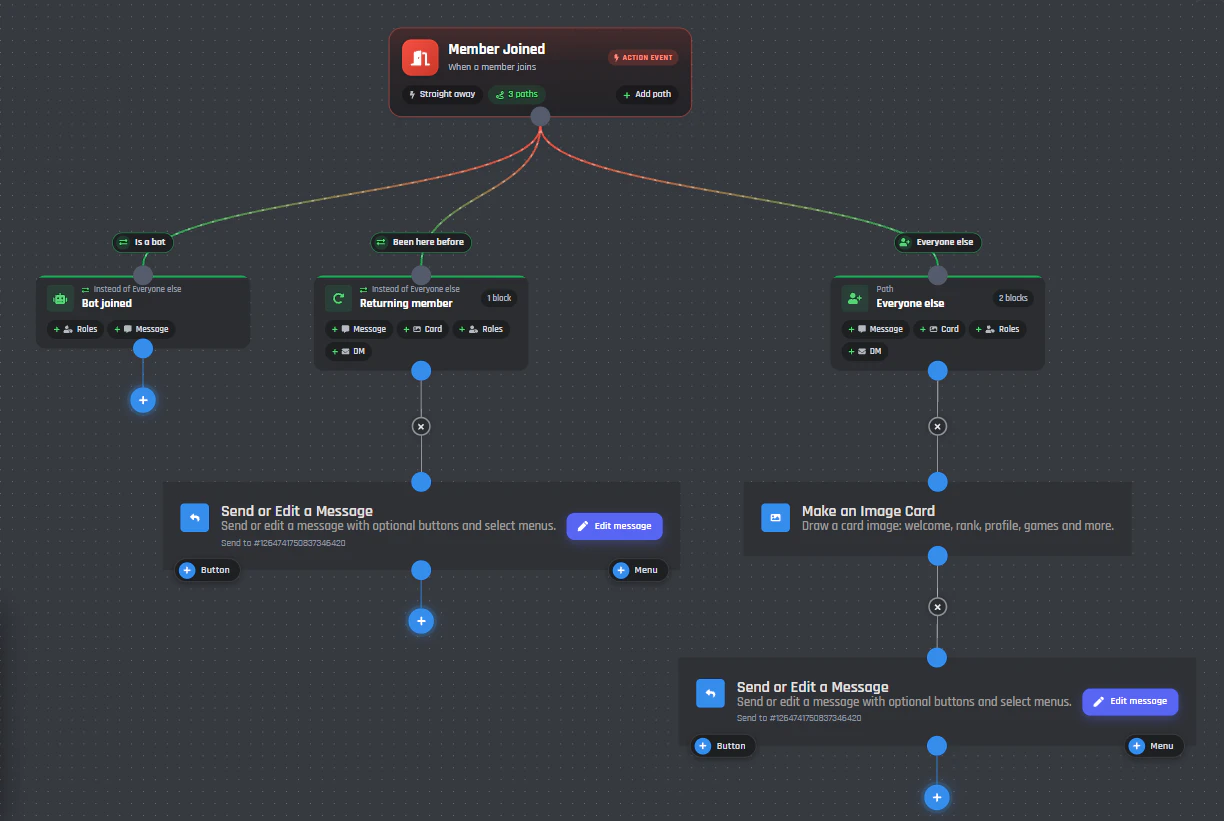
Events run without anyone typing them. When someone joins or boosts the server, the event fires and your blocks run. They use the same blocks as commands, and there are over 100 events to choose from.
Timed events run on a schedule (say, a reminder every Monday at noon) or every few minutes. Our own Tickets, Welcomer, and Counting modules are made of these exact events, so you can open one up and change any block you like.
Free slash commands and events, and what Premium adds
Free bots get 3 custom commands and 3 custom events, in up to 5 servers. Premium removes those limits.
You can also start from someone else's work: grab a pack from the BotGhost Marketplace, or paste a share code someone gave you to get a copy of their command or event, then change whatever you want.
Compare the plansCommand builder questions
The docs cover every block, option, and event. If you're still stuck, ask us in the BotGhost Discord.
It's a way to make slash commands (the ones members run by typing / in Discord) without writing code. In BotGhost you join up blocks for what members fill in, what the bot checks, and what it does, then hit save.
In the BotGhost dashboard, go to Custom Commands and press New command. Click the yellow block and give it a name and a description. Now drag in blocks from the left, join them up, and press Save Command. Type / in your server and it's there.
Nope. You set each block up with normal text boxes and pickers, and there's a preview of what Discord will show.
A command runs when someone types it, like /daily. An event runs on its own when something happens in your server, like a new member joining. They're built from the exact same blocks.
Over 100. There are events for members, messages, reactions, and voice, plus roles, channels, threads, boosts, invites, polls, scheduled events, and music. Timed events run on a schedule or an interval, and even the bot starting up counts as one.
You get 3 custom commands and 3 custom events on the free plan, in up to 5 servers, and you don't pay anything. Go Premium and there's no limit on commands, events, or servers.
Yes. Send or Edit a Message can put buttons and select menus on a reply, and every one of them gets its own blocks for when someone presses it. For forms there's Send a Form: it pops one up and waits for the answers to come back.
Yep. Put a space in the name, like economy daily, and Discord lists it under /economy. You can fit up to 25 subcommands under one name.
Open Playbacks in the builder. You'll see the run play back on the canvas, block by block, and if one failed it tells you why in plain words.
Related pages
Our modules are made from these same blocks.
Build your first slash command
Make your bot, press New command, and join up a few blocks. It's free, and there's no card to enter.
Build a command for free