Discord permissions calculator
Tick what your bot or role needs and copy the permissions integer. Add your bot's client ID to get an invite link that asks for only those permissions.
2FA Only works when the bot owner has 2FA on, in servers that require it for moderation.
All 52 permissions in Discord's developer docs as of October 2026, up to Pin Messages and Bypass Slowmode.
How the Discord permissions integer works
Discord gives every permission its own bit. Send Messages is bit 11, worth 2048. Embed Links is bit 14, worth 16384. The permissions integer is all the ticked values added together, and no two lists of permissions give the same number.
One number in an invite link can ask for a whole list of permissions this way. 8 on its own is Administrator, and 0 asks for none.
- Add Reactionsbit 6
64 - View Channelsbit 10
1024 - Send Messagesbit 11
2048 - Embed Linksbit 14
16384 - Attach Filesbit 15
32768 - Read Message Historybit 16
65536 - Use External Emojibit 18
262144 - Send Messages in Threadsbit 38
274877906944
274878286912Which permissions your bot needs
Give a bot the permissions for the things it does and leave the rest unticked, so a leaked token only lets someone do those same things.
| If your bot | It needs |
|---|---|
| Posts messages in a channel | View Channels, Send Messages, Read Message History |
| Sends embeds or images | Embed Links, Attach Files |
| Reacts to messages | Add Reactions, Use External Emoji |
| Gives or takes away roles | Manage Roles |
| Times out, kicks, or bans | Timeout Members, Kick Members, Ban Members |
| Deletes or pins messages | Manage Messages, Pin Messages |
| Makes ticket channels | Manage Channels, Manage Roles |
| Plays music in voice | Connect, Speak |
Role order
Your bot can only hand out, take, or edit roles sitting lower than its own top role. It also can't kick, ban, or time out someone whose top role matches or beats its own. Drag the bot's role up in Server Settings, Roles.
Channel overrides
A channel's own permission settings can take a permission away from the bot in that channel, even when its role has it. Administrator is the only permission they can't block.
2FA servers
If a server requires 2FA for moderation, the permissions marked 2FA above only work when the bot owner's Discord account has 2FA on.
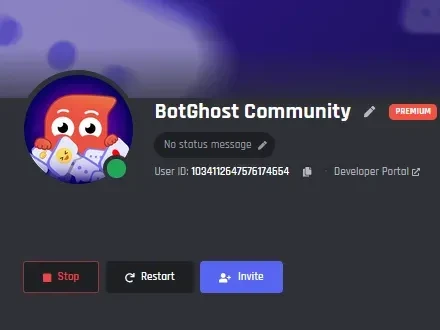
Permissions in a BotGhost bot
Your bot's Settings page has an Invite button, and its link asks for Administrator so your blocks work straight away. To hand out less, copy the User ID next to the bot's name, put it in the client ID box above, and use the link you get here.
Inside BotGhost you don't type this number. In the command builder you pick a command's Required permissions by name. Turn on Hide from members without the required permissions and your bot hands Discord the matching integer with that command. To check a member's permissions partway through a command, use the Permissions Condition block.
Discord permissions questions
It's one number holding a list of permissions. Each permission owns a bit, and you add up the bits you want. Send Messages is 2048 and Embed Links is 16384, so 18432 means those two and nothing more.
Mostly in a bot's invite link, after permissions=. When someone adds the bot with that link, Discord makes a role for the bot with those permissions. Paste a number into the permissions integer box in the calculator to see what an existing link asks for.
In the Discord Developer Portal, open your application and copy the Application ID from General Information. If you made your bot with BotGhost, the User ID on your bot's Settings page is the number BotGhost uses as the client ID in its own invite link.
Administrator turns on every permission and skips channel overrides, so the bot can do anything you build. Anyone who gets your bot's token can then do anything in your server too. Giving only the permissions the bot uses is safer.
Start with role order: the bot can't act on a member or role at or above its own highest role, so drag the bot's role higher in Server Settings, Roles. Next, look for a channel override that takes the permission away in that one channel. If the server requires 2FA for moderation, the permissions marked 2FA in the calculator only work when the bot owner's account has 2FA turned on.
Yes. The invite gives the bot a role with its name. Edit that role in Server Settings, Roles, or give the bot another role as well.
Both make the same kind of invite link. The calculator also explains each permission, reads a number you paste in, and has starting sets for chat, moderation, ticket, and music bots.
Make a Discord bot to invite with your link
Build its commands from blocks in BotGhost, the Discord bot maker. There's no code to write, and you can start on the free plan without a card.
Make your bot for freeOther free tools: Discord timestamp generator, embed builder, and all tools.
