Discord birthday bot
Celebrate every member's birthday.
Members add their birthday once. On the day, your bot posts in your channel, gives them a birthday role, and collects the server's wishes for them. It's all set up on one page in BotGhost, the no-code Discord bot maker.
Every setting is free on every bot, from the birthday card to the birthday book.

How a birthday goes
From the day a member adds their birthday to the DM full of wishes at the end of it. Press a step to see it play out.
They add it
Fabian presses Add my birthday on the ask panel, or uses /birthday set. A short form asks for the month, the day, and how they want to be celebrated.
Only the day and month are needed. The year is only asked for if you want ages shown, and it's still optional.
Their day comes
At the hour you pick, the bot posts in your birthday channel and gives Fabian the birthday role. It comes off by itself when Fabian's day ends.
Celebrate everyone in your server's time zone, or each member in their own.
Several on one day
When Fabian, Vez and Dax share a birthday, they get one post together instead of three. Vez chose to show their age, so their line says they turn 30.
One Send a wish button asks who the wish is for.
Members send wishes
Tom presses Send a wish and writes a few words, up to 200 characters. Each member sends one wish per birthday.
Fabian doesn't see them yet. They're saved for when the day ends.
The birthday book
When Fabian's day ends, every wish arrives in one DM. The role comes off, the post is unpinned and the thread is locked.
Then the wishes are deleted. Nothing about them is kept.
Everything that can happen on their day
The post and the role start on. Everything else is a switch, and whatever the bot changes for the day is put back by itself when the day ends.
- A post in your channelAt 9:00, or the hour you pickUnder What time, in your server's time zone, or each member's own.
- The birthday roleTaken off when their day endsUnder Birthday role, or keep it for 24 hours. It comes off even after a restart.
- A birthday cardTheir picture, at the top of the postBirthday card, made with the Card Studio. A group card when several share a day.
- A cake on their nameTheir name goes back when the day endsCake on their name, with the emoji you pick. Needs Manage Nicknames.
- A pin and a wishes threadUnpinned and locked when the day endsPin and thread. Name the thread yourself.
- Reactions on the postWith the emoji you pickUnder Reactions. Leave it empty for none.
- A pingThem, a role, @here, or nobodyUnder Who to ping.
- A DM on the dayAs well as the postAlso send them a DM. If their DMs are closed, nothing else happens.
- Coins or XPAdded once, to a custom variableA reward, for any of your member number variables.
- A different post for staff or VIPsTheir own messageA different message for some roles.
- A new message every timeOne of up to 10, at randomPress Add a version under the birthday message.
- A role for the whole monthFor everyone born this monthBirthday month role, given on the 1st and taken off when the month ends.
You set every one of these on the Celebrate tab, server by server.
Every Birthdays setting in the dashboard
Birthdays has one page in your dashboard: a tab for each part, then its commands and events. A live preview beside the tabs shows the messages as you change them. You set it up server by server, from the server menu at the top.
The birthday post
Pick where and when birthdays are posted, who gets celebrated, and everything that happens on the day. The post is a whole message you can change, with the Send a wish button under it.
Where, when and who
- Birthday channel
- Where the post goes. The bot needs to see it, send messages, add reactions and make threads there.
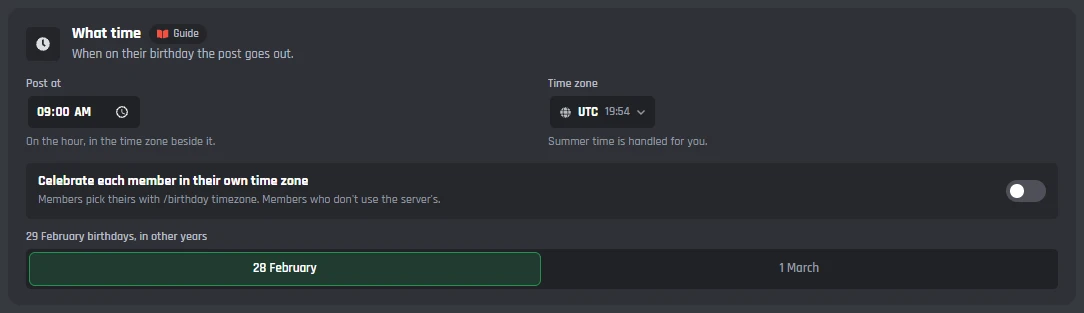
- Post at and Time zone
- On the hour, 9:00 UTC to start with. Summer time is handled for you.
- Celebrate each member in their own time zone
- Members pick theirs with /birthday timezone. Members who don't use the server's.
- 29 February birthdays, in other years
- Celebrated on 28 February or on 1 March.
- Only members with these roles
- Who gets celebrated. Leave it empty to celebrate everyone who added a birthday.
- Not if it was added fewer than
- A number of days before, up to 60. Stops people changing their birthday to today to get the role. 0 celebrates it whenever it was added.
The post
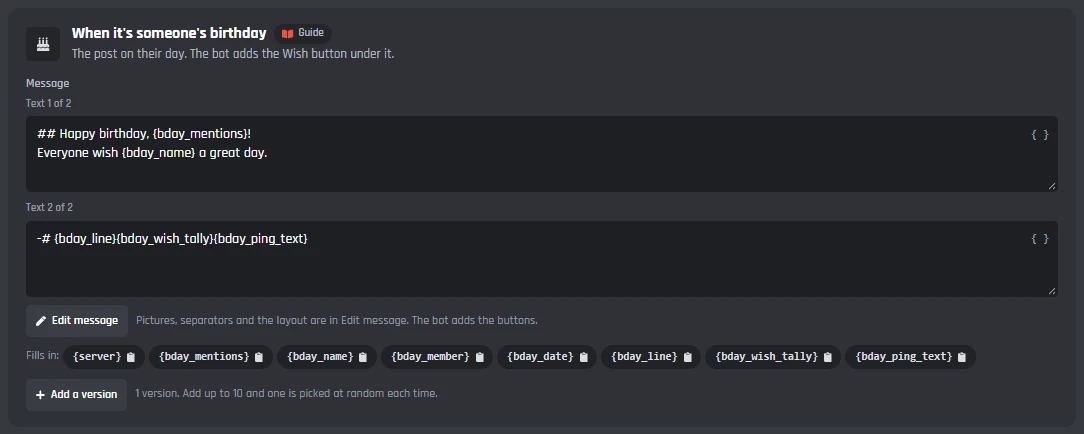
- When it's someone's birthday
- The post, with Edit message to open the Message Builder. Add a version, up to 10, and one is picked at random each time.
- When several people have a birthday the same day
- One post for everyone celebrated in the same hour, with one Send a wish button that asks who it is for.
- A different message for some roles
- Staff, boosters or VIPs can get their own post.
- Who to ping
- Them, a role, @here, or nobody.
On their day
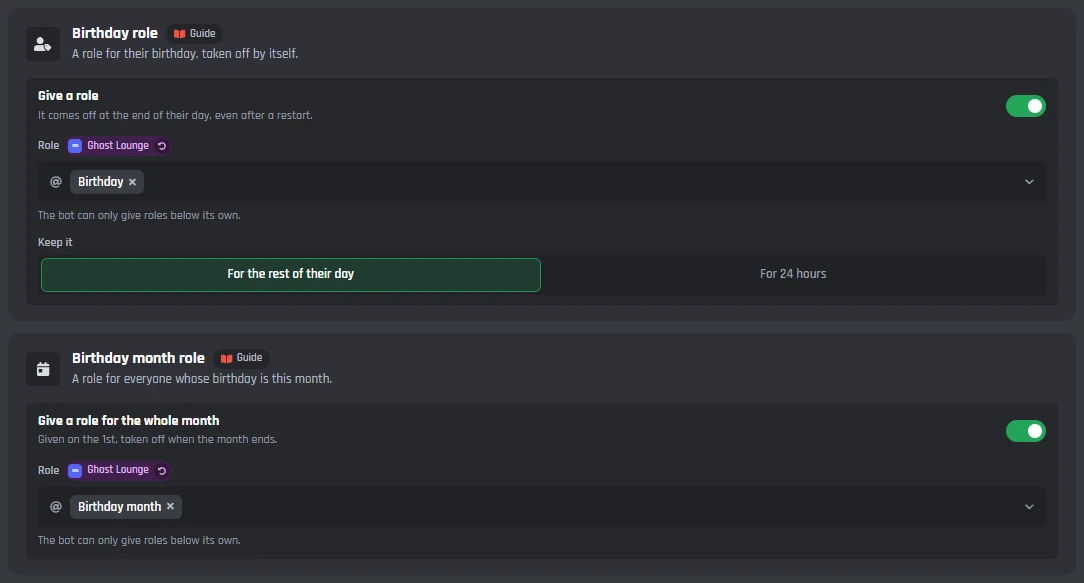
- Birthday role
- Given with the post and taken off at the end of their day, or after 24 hours. It comes off even after a restart.
- Birthday month role
- A role for everyone whose birthday is this month, given on the 1st and taken off when the month ends.
- Reactions
- The bot reacts to the post with the emoji you pick.
- Pin and thread
- Pin the post for the day, and a wishes thread under it, named Wishes for Fabian to start with. Unpinned and locked when the day ends.
- Also send them a DM
- A private message on their birthday, as well as the post.
- Cake on their name
- Adds an emoji to their nickname for the day. Needs Manage Nicknames, and a bot can't change the server owner's name.
- A reward
- Adds an amount, 100 to start with, to one of your custom variables, like coins. Added once, on their birthday.
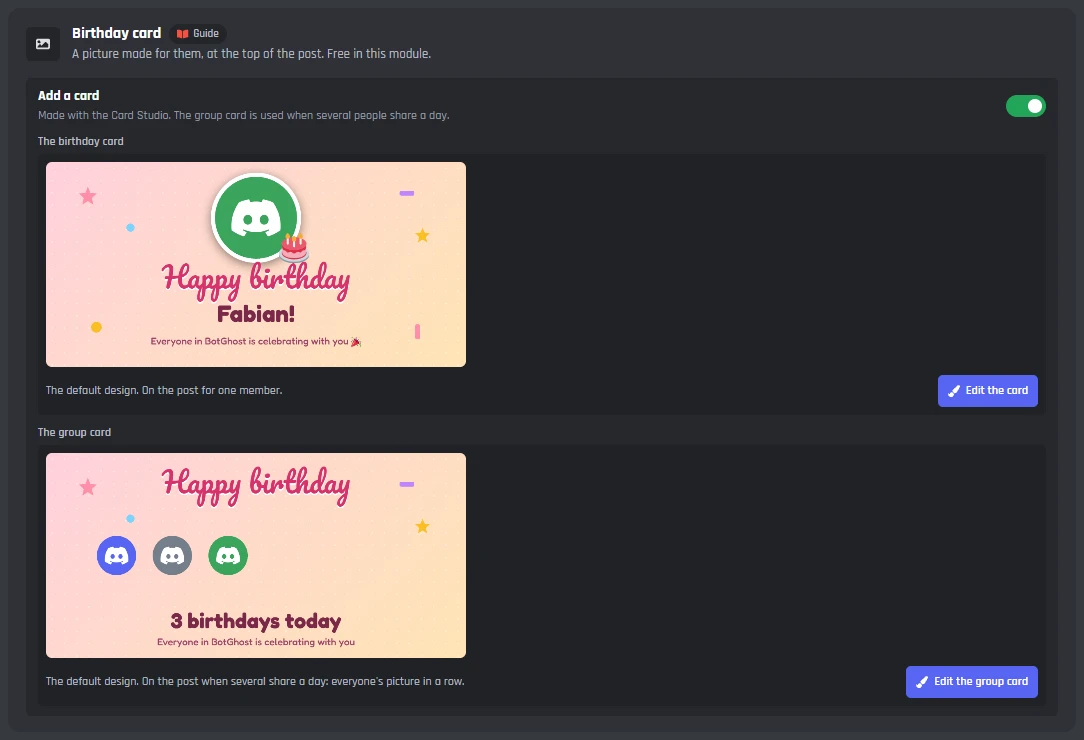
- Birthday card
- A picture made for them with the Card Studio, at the top of the post. A group card with everyone's picture is used when several share a day.
How members add their birthday
Post the ask panel, choose who can add a birthday and how often they can change it, and let your staff add birthdays for others.
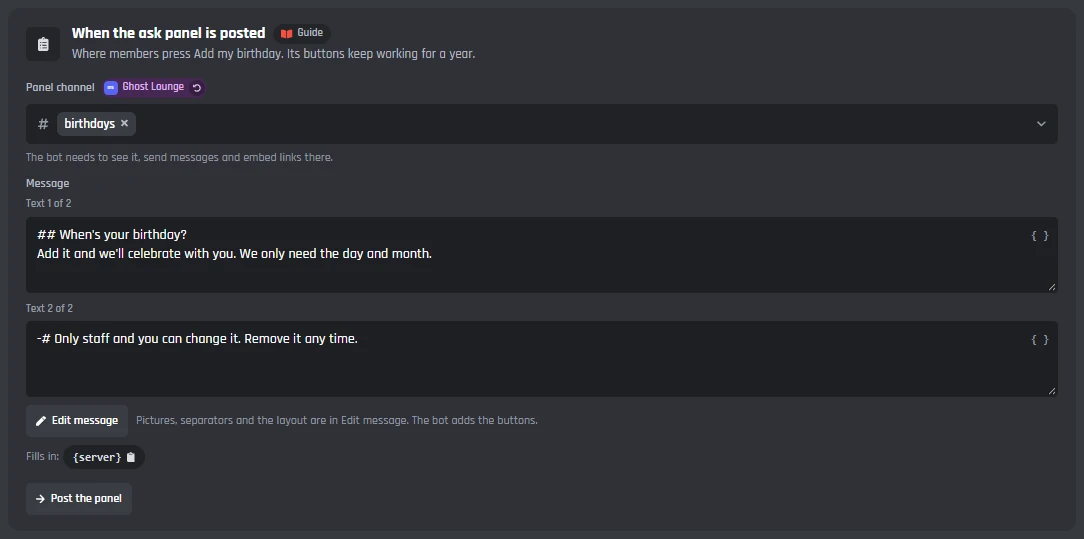
The ask panel
- Panel channel
- Where the panel goes. The bot needs to see it, send messages and embed links there.
- Post the panel
- Posts it, or updates the one that is there after you change it. Add my birthday opens a short form: the month, the day, and how they want to be celebrated.
- Who can add a birthday
- Members with these roles. Leave it empty so everyone can.
- Every reply
- When a birthday is saved, when it can't be saved, when it's removed, and when someone checks theirs or looks one up. Each is a message you can change.
The year and changes
- Birth year
- Don't ask, or ask. It's optional and only kept to show their age. Ages under 18 are never shown, and a year that makes someone under 13 is never kept.
- Members can change it
- From 1 to 10 times a year, 3 to start with. Adding it the first time doesn't count.
- Members can't change it once it's set
- Staff can still change it with /birthday add-for.
- Star sign roles
- A role for each of the 12 signs, given when they save their birthday. A sign with no role gets nothing.
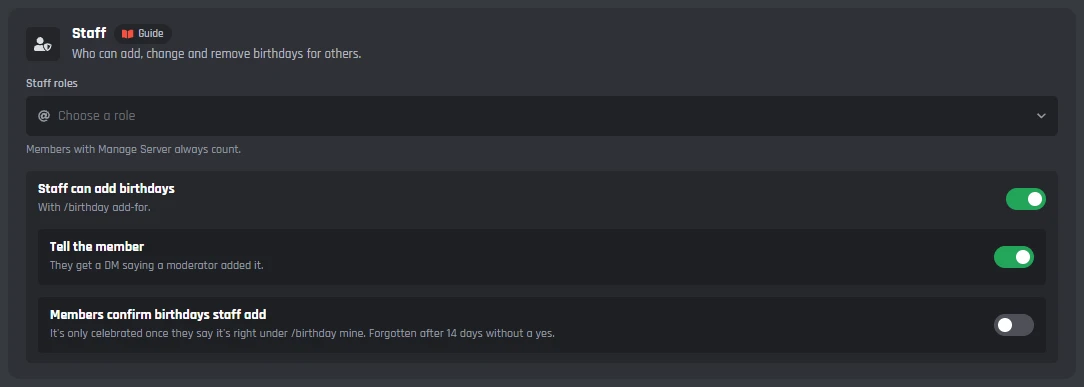
Staff
Members with Manage Server always count as staff.
- Staff roles
- Can add, change and remove birthdays for others.
- Staff can add birthdays
- With /birthday add-for. On to start with.
- Tell the member
- They get a DM saying a moderator added it. On to start with.
- Members confirm birthdays staff add
- It's only celebrated once they say it's right under /birthday mine. Forgotten after 14 days without a yes.
Wishes from the whole server
A Send a wish button under the post. Members write a short wish, once each, and the birthday member gets every wish in one DM when their day ends.
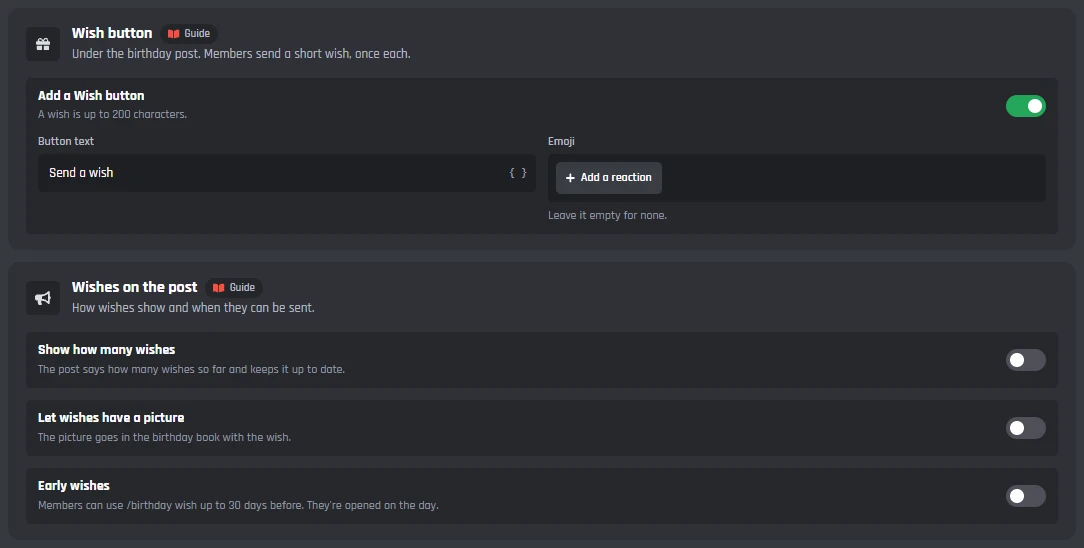
Wish button
- Add a Wish button
- Under the birthday post, on to start with. A wish is up to 200 characters, and each member sends one.
- Button text and emoji
- Send a wish to start with, and no emoji.
Wishes on the post
- Show how many wishes
- The post says how many wishes so far and keeps it up to date.
- Let wishes have a picture
- The picture goes in the birthday book with the wish.
- Early wishes
- Members can use /birthday wish up to 30 days before. They're opened on the day.
The birthday book
- Send the birthday book
- Every wish in one DM when their birthday ends. If their DMs are closed, nothing else happens. The wishes are deleted once it's sent.
Who's next
A list of the next birthdays the bot keeps up to date, a post when each month starts, and a heads-up before a birthday so people can plan something.
21 Oct · Jayce · in 10 days
2 Nov · allmy2 · in 22 daysGhost Lounge
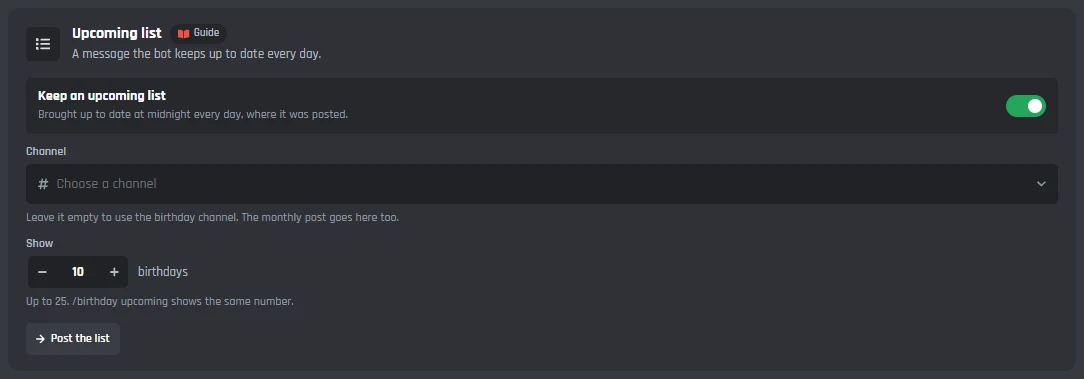
Upcoming list
- Keep an upcoming list
- Posted with Post the list, then brought up to date at midnight every day where it was posted.
- Channel
- Leave it empty to use the birthday channel. The monthly post goes here too.
- Show
- Up to 25 birthdays, 10 to start with. /birthday upcoming shows the same number.
Monthly post
- Post each month
- That month's birthdays, on the day of the month you pick (1 to 28) and at the hour you pick.
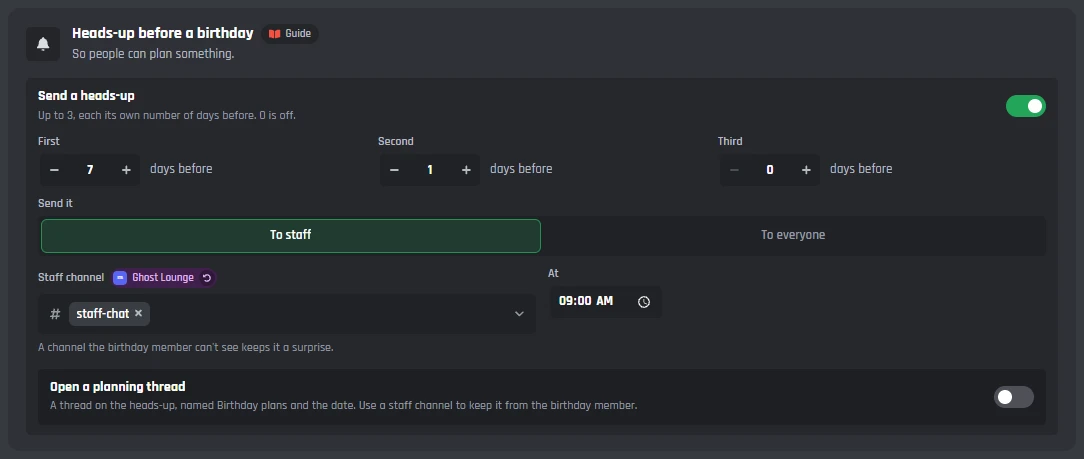
Heads-up before a birthday
- Send a heads-up
- Up to 3, each its own number of days before, up to 30. 0 is off.
- Send it
- To staff, or to everyone, at the hour you pick.
- Open a planning thread
- A thread on the heads-up, named Birthday plans and the date. Use a staff channel to keep it from the birthday member.
Anniversaries and your own days
A post each year on the day a member joined, roles for long time members, and up to 25 days of your server's own, each with a message of its own.
Where they go
- Channel
- One channel for anniversaries and special days. Leave it empty to use the birthday channel.
- Post at
- One hour for both, in the server's time zone.
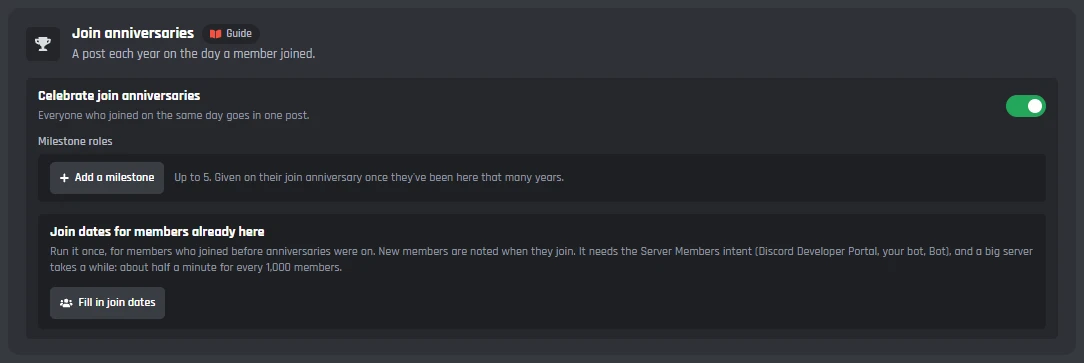
Join anniversaries
- Celebrate join anniversaries
- Everyone who joined on the same day goes in one post.
- Milestone roles
- Up to 5, each a number of years and the role it gives.
- Fill in join dates
- Run it once, for members who joined before anniversaries were on. It needs the Server Members intent, and takes about half a minute for every 1,000 members.
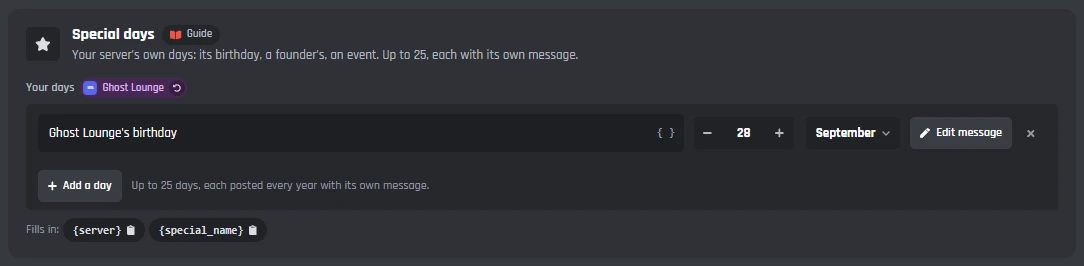
Special days
- Your server's own days
- Its birthday, a founder's, an event. Up to 25, each with a name, a day and its own message, posted every year.
- /birthday special
- Staff can add and remove special days from Discord too.
Everyone's birthdays, and privacy
See every birthday in a server, remove one, bring a list in from a CSV file, and choose what happens to a birthday when a member leaves.
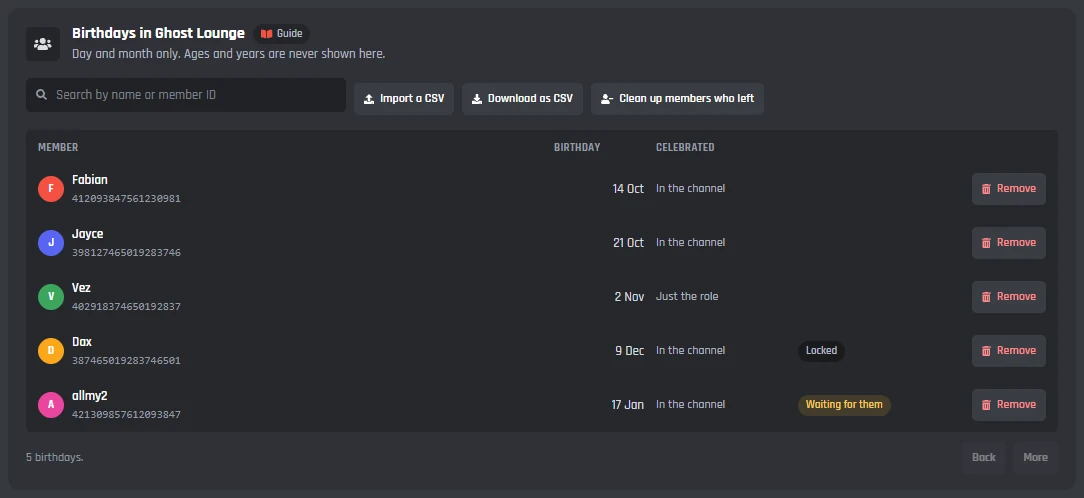
Birthdays in your server
- The list
- Day and month only, with how each member wants to be celebrated. Ages and years are never shown here. Search by name or member ID.
- Remove
- Takes a member's birthday out of everything, their wishes too.
- Import a CSV and Download as CSV
- Bring birthdays in from a file with a member ID, a day and a month on each line, or take them all out.
- Clean up members who left
- Finds the birthdays of members who are no longer in the server and removes them, on servers of up to 1,000 members. Members who leave are forgotten by themselves anyway.
Privacy
- What is kept
- The day and month, the year only when they choose to show their age, their time zone only when members can pick their own, and wishes until their birthday ends. Nothing else.
- When a member leaves
- Their birthday is forgotten straight away, or kept for up to 90 days in case they come back (30 to start with).
- Delete all birthdays
- Every birthday in the server, for good. Press it twice.
Under the tabs: the commands and events
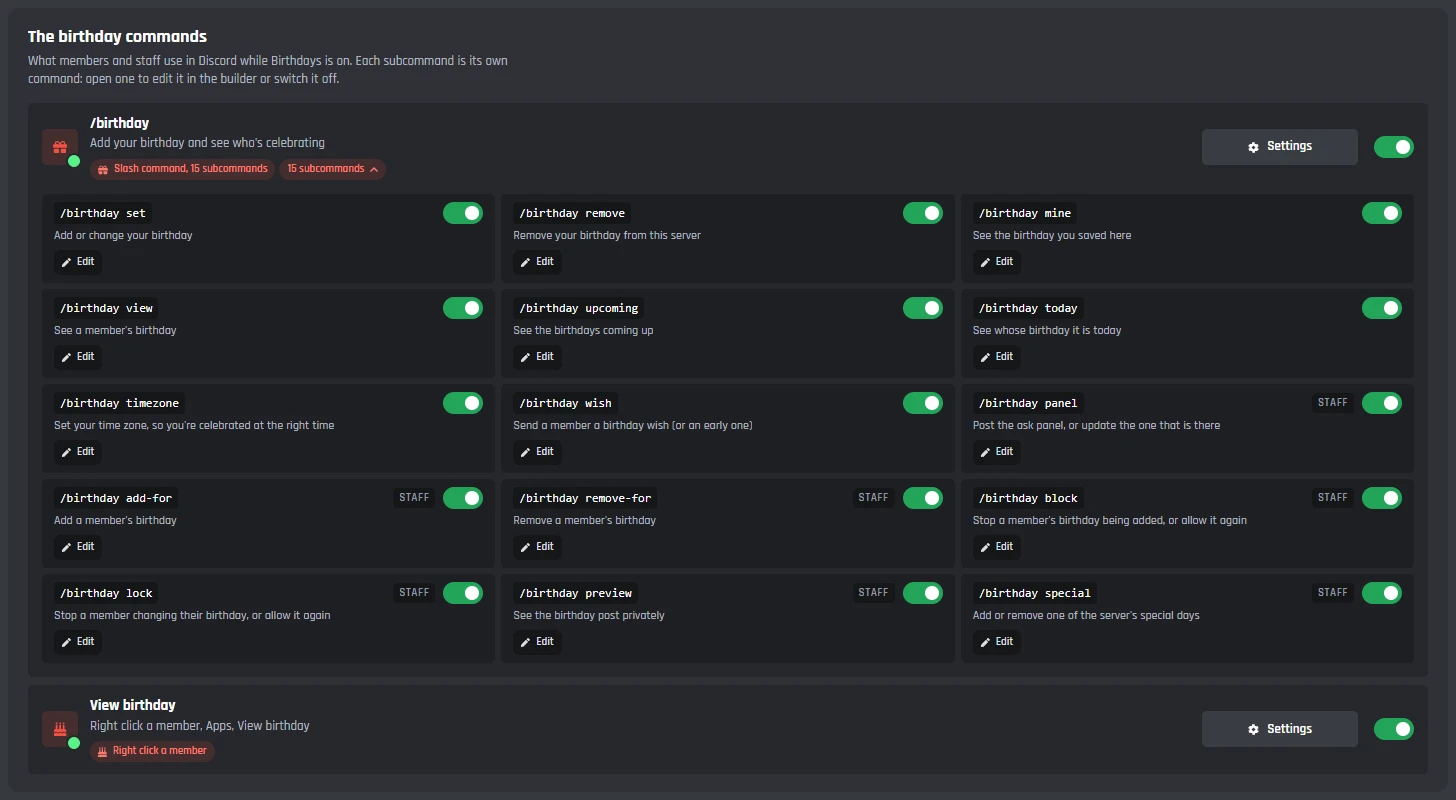
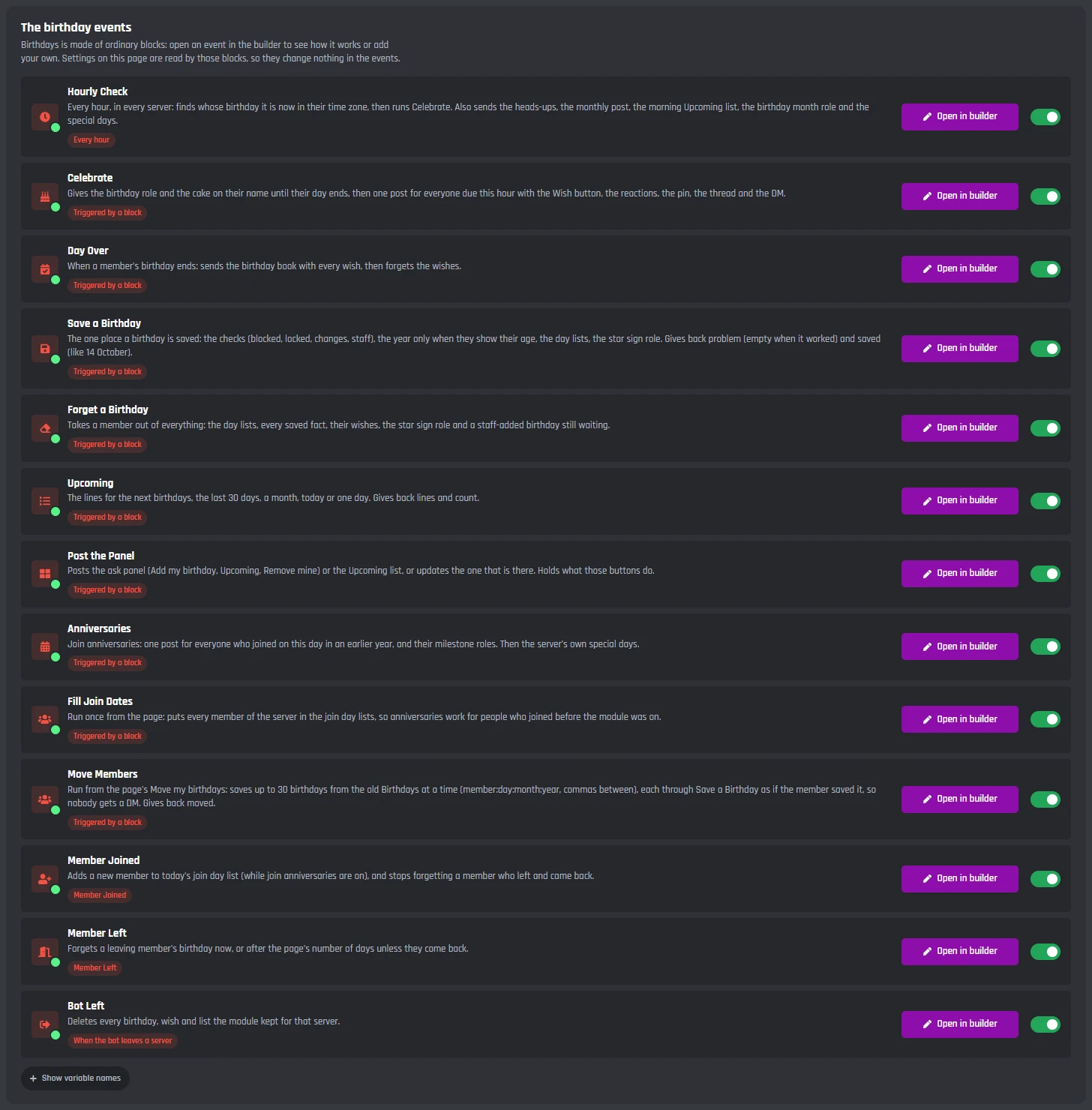
Birthdays adds /birthday with fifteen subcommands, a right click View birthday, and its events. They are made of ordinary builder blocks, so you can open them in the builder and add your own.
Commands
- /birthday set, remove, mine and timezone
- For members: add or change their birthday, remove it, see what they saved, and pick their time zone from a list as they type.
- /birthday view, upcoming, today and wish
- For everyone: look up a member, see who is next (or the last 30 days, or one month), whose birthday it is today, and send a wish.
- /birthday panel, add-for, remove-for, block, lock, preview and special
- For staff: post the ask panel, add or remove a birthday for a member, stop someone adding or changing one, see the post privately, and add special days.
- View birthday
- Right click a member, then Apps.
Events
- Hourly Check, Celebrate and Day Over
- Every hour the bot finds whose birthday it is now, celebrates them, and tidies up when each day ends.
- Save a Birthday and Forget a Birthday
- The one place a birthday is saved and the one place it is forgotten, from the panel, the commands and the page.
- Upcoming, Post the Panel, Anniversaries and Fill Join Dates
- The lists, the ask panel, join anniversaries and special days.
- Member Joined, Member Left and Bot Left
- Join dates for anniversaries, what happens when a member leaves, and a clean up when the bot leaves a server.
Birthdays is made of ordinary builder blocks, and every message it sends can be changed with the Message Builder. Open its events in your own Discord bot events builder to see how it works.
Set up a birthday bot on Discord
Haven't got a bot in your server yet? Start with how to make a Discord bot, then come back here.
- 1Open Birthdays from Modules in your dashboard and switch it on. This adds /birthday, the right click View birthday, and the events Birthdays needs.
- 2On the Celebrate tab, pick the Birthday channel and a Birthday role, or skip the role. Your bot's role has to be above the birthday role.
- 3Press Save Changes, then Post the panel on the Ask members tab.
- 4Try it: set your own birthday to today with /birthday set, and it's celebrated within the hour.
Using the old Birthdays? The new page offers Move my birthdays, which brings your settings and everyone's birthdays across.
A free Discord birthday bot
Every Birthdays setting works on the free plan, the birthday card included. There's nothing to unlock, only the limits below, which are the same on every bot.
Free
$0- The birthday post, role and month role, with a card, a pin, a thread and reactions
- Wishes, early wishes and the birthday book
- An upcoming list, a monthly post and heads-ups before a birthday
- Join anniversaries, milestone roles and your own special days
- Birthdays' commands, events and stored birthdays don't use up your free limits
On free bots, a small Made with BotGhost line shows under the messages about one time in three.
The limits
in each server- Versions of the post
- Up to 10
- Upcoming list
- Up to 25 birthdays
- Heads-ups
- 3, up to 30 days before
- Changes by a member
- Up to 10 a year
- A wish
- 200 characters
- Special days
- Up to 25
- Milestone roles
- Up to 5
Premium ($12.50 a month for one bot) takes the Made with BotGhost line off and adds unlimited commands, events, and servers. Free bots go offline after 2 days with no activity. Read about free hosting
The /birthday commands
Members and staff use /birthday in Discord. Each subcommand is its own command, so you can switch any of them off. Their replies are private.
- /birthday set, remove, mine and timezone, for a member's own birthday.
- /birthday view, upcoming and today, to see whose birthday is next, or the last 30 days, or a month.
- /birthday wish, to send a wish, or an early one up to 30 days before if you allow it.
- For staff: /birthday panel, add-for, remove-for, block, lock, preview and special.
- Right click a member, then Apps, for View birthday.
21 Oct · Jayce · in 10 days
2 Nov · allmy2 · in 22 daysGhost Lounge
Discord birthday bot questions
Didn't find your question? Ask us in the BotGhost Discord, or read the Birthdays docs.
Yes. Every Birthdays setting is free on BotGhost: the post, the birthday role, the card, wishes and the birthday book, the upcoming list, heads-ups, join anniversaries and special days. On free bots, a small Made with BotGhost line shows under the module's messages about one time in three; Premium takes it off.
Birthdays on the free planInvite your BotGhost bot to your server. In the dashboard, open Birthdays and switch it on. On the Celebrate tab, pick the birthday channel and a birthday role, press Save Changes, then post the ask panel from the Ask members tab so members can add their birthday.
See the setup stepsThey press Add my birthday on the ask panel, or use /birthday set. A short form asks for the month, the day, and how they want to be celebrated: in the channel, just the role, or not at all. They can check it with /birthday mine and remove it any time.
See a birthday step by stepYes, and it starts on. The bot gives the role with the post and takes it off at the end of their day, or after 24 hours if you pick that. It comes off even if the bot restarts. A birthday month role for everyone born this month is there too.
See what happens on the dayAt 9:00 to start with, on the hour you pick, in your server's time zone. Summer time is handled for you. Switch on Celebrate each member in their own time zone and members pick theirs with /birthday timezone, from a list as they type.
See the Celebrate tabYes. With Celebrate each member in their own time zone on, each member is celebrated at your hour in their own time zone, and their birthday role lasts until their own day ends. Members who don't pick one use the server's.
Read the Birthdays docsYes. Members can change their birthday 3 times a year to start with (1 to 10), you can lock it once it's set, and Not if it was added fewer than a number of days before stops someone setting it to today. Staff can also block a member with /birthday block.
See the Ask members tabOnly if you ask for the year and the member chooses to show their age. The year is optional, ages under 18 are never shown, and a year that makes someone under 13 is never kept. Otherwise only the day and month are kept.
Read the Birthdays docsYes. On the Special days tab, Join anniversaries posts each year on the day a member joined, with milestone roles for long time members. You can add up to 25 days of your own too, like your server's birthday, each with its own message.
See the Special days tabThe new Birthdays page shows Move my birthdays. It moves the channel, the time, the role, the message, the card, reactions and staff roles into each server, then everyone's birthdays, 30 at a time and without DMing anyone. The old module is switched off so nobody is celebrated twice.
Read the Birthdays docsNever miss a member's birthday
Switch on Birthdays, pick a channel, and post the ask panel. The free plan doesn't need a card.
Set up Birthdays for free