Twitch alerts Discord bot

@Stream Pings Tom is live on Twitch!
Your bot posts in Discord as soon as you go live.
Pick a Twitch channel, write the alert, and choose where it goes. When that channel goes live, your bot posts the alert with the stream's title and game and a link to watch. You set it up in BotGhost, the no-code Discord bot maker, and the alert comes from your own bot.
It works on the free plan. Each Twitch channel you follow uses one of your bot's custom events, and free bots get 3.
What happens when a streamer goes live
Tom streams on two evenings, and each time he goes live, an alert lands in your #stream-alerts channel.
- 18:00
Tom starts streaming
Twitch tells BotGhost the channel is live. BotGhost asks Twitch for the title, game, and viewer count, and every bot watching Tom runs its Twitch Stream Online event.
Alert posted - 18:03
The stream drops and Tom restarts it
Twitch says Tom went live again, but it's less than 5 minutes since the last alert. BotGhost ignores it, so nobody gets pinged twice.
Skipped - 21:40
Tom ends the stream
Twitch alerts only run when a channel goes live. There's no message when a stream ends.
Nothing posted - Next day, 18:00
Tom goes live again
The bot posts a new alert with that stream's title and game.
Alert posted
@Stream Pings Tom is live: Building a castle until chat says stop (Minecraft)
@Stream Pings Tom is live: Speedrunning the Ender Dragon (Minecraft)
What your Twitch alert can show
BotGhost gets the stream's details from Twitch and puts them into your message wherever you've used a variable.
<@&role ID> **{event_twitch_display_name}** is live on Twitch!

Embed author: {event_twitch_display_name}
Embed title: {event_twitch_stream_title}
Playing: {event_twitch_game_name}
Viewers: {event_twitch_viewer_count}
Image: {event_twitch_thumbnail_url}
Button link: {event_twitch_stream_url}
| Variable | What it fills in |
|---|---|
{event_twitch_display_name} | The streamer's name as it shows on Twitch |
{event_twitch_stream_title} | The stream title |
{event_twitch_game_name} | The game or category |
{event_twitch_stream_url} | A link to the stream |
{event_twitch_thumbnail_url} | A 1920x1080 preview image of the stream |
If the streamer hasn't set a title or a category, the alert says Untitled Stream or No Category instead.
How to set up Twitch alerts in Discord
You'll need a BotGhost bot in your server first. After that it's three steps in the dashboard, and you don't need anything from Twitch except the streamer's username.
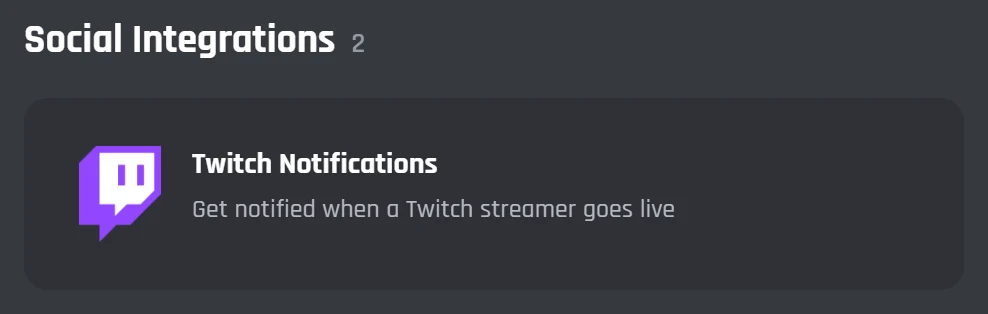
1Open Twitch Notifications
Go to Modules and press Twitch Notifications under Social Integrations. You get a new event with the Twitch Stream Online block and a Send or Edit a Message block already joined up.
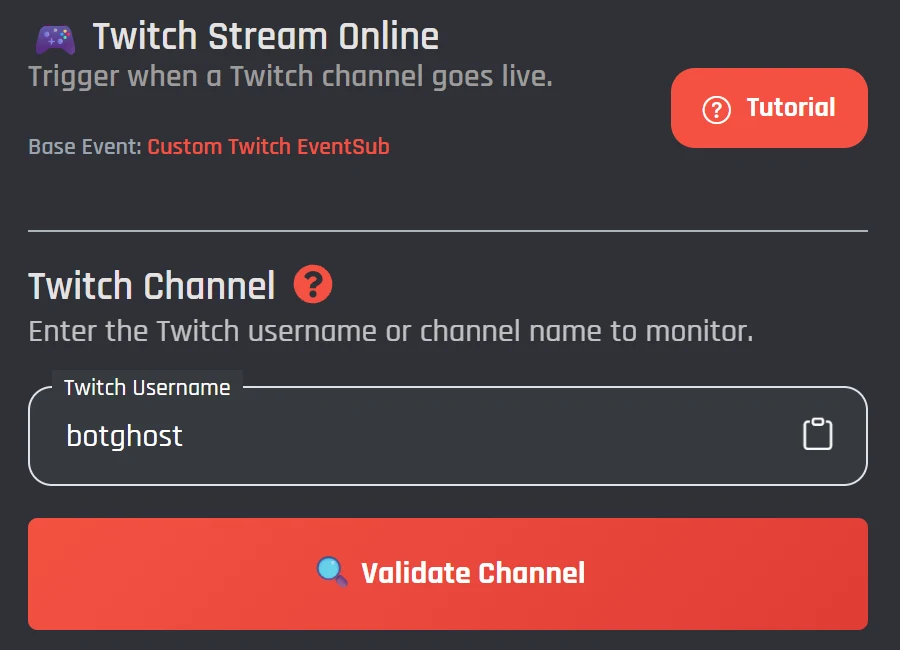
2Validate the channel
Type the streamer's Twitch username, or paste their twitch.tv link, and press Validate Channel. BotGhost checks the channel exists and starts listening for it going live.
- In the Send or Edit a Message block
- Write the alert text, with variables
- Add an embed with the stream preview
- Add a link button to the stream
- Pick the channel it posts in
3Write the alert and save
Press Edit message to write it. Under Event Scope, choose one server or all of them, then save the event. The next time that channel goes live, your bot posts the alert.
Twitch alerts by game, with role pings
A Twitch alert is an event, so you can add any block from the Discord bot event builder after the Twitch Stream Online block.
- Ping a role by putting its mention in the message. Discord only pings it if the role is mentionable, or your bot can mention all roles.
- Send each game somewhere else. A Comparison Condition checks
{event_twitch_game_name}, and each answer gets its own message block and channel. - Post in an announcement channel and add Publish a Message, so servers that follow that channel get the alert as well.
- With Premium, add Change the Bot's Status to set your bot to Streaming with a link to the stream. It stays that way until you change it, since nothing runs when the stream ends.
Twitch alerts on the free plan and with Premium
Twitch alerts don't need Premium. Premium raises how many streamers you can follow and how many servers your bot can join.
| Feature | Free | Premium |
|---|---|---|
| Twitch Stream Online event, with embeds, buttons, and role pings | Included | Included |
| Twitch channels you can follow | Up to 3 (one custom event each, shared with your other events) | Unlimited |
| Servers your bot can be in | 5 | Unlimited |
| Streaming status when you go live | No | Included |
Alerts going out don't count as activity, so a free bot that only posts alerts switches off after 2 days. How free hosting works
Alerts for each streamer in your server
If a few of your members stream, give each of them their own Twitch Stream Online event. Each event has its own message and channel, so you can word each streamer's alert their way and ping their own fans.
- One event per Twitch channel. Open Twitch Notifications again for each streamer.
- A free bot runs 3 events in total, so up to 3 streamers if those are its only events.
- Premium has no event limit, so you can add the whole stream team.
@Fabian Fans Fabian is live: Ranked until I hit Diamond (Rocket League)
@Stream Pings Tom is streaming: Building a castle until chat says stop (Minecraft)
@Jayce Live Jayce just went live: Building the farm before winter (Stardew Valley)
Twitch alerts questions
Got a question that isn't here? Ask in the BotGhost Discord, or read about action events in the docs.
Make a free bot on BotGhost and invite it to your server. Then go to Modules, press Twitch Notifications, type the streamer's Twitch username, and press Validate Channel. Write the alert in the Send or Edit a Message block, pick the channel it posts in, and save the event.
See the three stepsYes. The Twitch Stream Online event works on the free plan. Each Twitch channel you follow is one custom event, and a free bot runs 3 custom events in total, so you can follow up to 3 streamers if you have no other events. Premium removes that limit.
Compare Free and PremiumNo. When you press Validate Channel, BotGhost checks the channel exists and signs up for its go-live updates from Twitch for you. You only need the streamer's username or a link to their channel.
How setup worksYes. Put the role's mention in the message text. Discord only pings it if the role is set as mentionable, or if your bot has the Mention @everyone, @here, and All Roles permission in that channel.
Role pings and alerts by gameYes. Make one Twitch Stream Online event for each channel. Every event has its own message and channel, so each streamer can post somewhere different.
Alerts for several streamersNo. The event only runs when a channel goes live. If Twitch reports the same channel going live twice within 5 minutes, BotGhost only passes on the first, so a quick restart of the stream won't post a second alert.
What happens when a streamer goes liveCheck that the event is switched on, that Validate Channel turned green, and that the message block has a channel picked. On the free plan, check the bot is still online: BotGhost switches off a free bot after 2 days without activity, and alerts going out don't count as activity. Your bot also needs permission to send messages in that channel.
When a free bot goes offlineYes, with the YouTube Video Upload event. It sits next to Twitch Notifications on the Modules page and works the same way.
See the YouTube notifications Discord botAdd Twitch alerts to your Discord server
Make your bot, open Twitch Notifications, and validate the channel. The free plan doesn't need a card.
Set up Twitch alerts for free