Modmail Discord bot
Members DM your bot. Your staff answer in private.
Each member who DMs your bot gets their own private channel, thread or forum post in your server. Staff answer there, and the bot passes replies back by DM, from Staff rather than a name. Notes stay among staff, and closing keeps a transcript. It's all set up on one page in BotGhost, the no-code Discord bot maker.
Every setting is free on every bot, from topics to transcripts.
 BotGhost Community
Topic Report a memberHi, someone in your server keeps DMing me scam links.Write here to answer. Messages that start with the note sign stay among staff.Close
How a modmail thread works
From a member's first DM to the transcript. Press a step to see it in Discord.
Dax DMs the bot
Dax wants to report someone, so they DM your bot. They have no thread open, so the bot offers one with an Open a thread button.
What Dax wrote is kept and goes into the thread when it opens, so they don't have to say it twice. If your bot is in several servers with Modmail on, Dax picks which server's staff to reach.
BotGhost CommunityDax picks a topic
You can add up to 5 topics, like Report a member or Ask a question. The bot asks with a menu, and the topic shows on the staff side.
With no topics, the thread opens as soon as Dax presses the button. Then Dax gets a DM saying the thread is open.
Staff get a thread
A private channel opens in your staff category, named after Dax. It can be a private thread or a forum post instead.
The opening card shows who Dax is, how old their account is, the topic and what they wrote. It pings nobody. Everything else Dax sends shows up here as they write it.
Vez answers
Vez writes in the thread like any channel. The bot DMs it to Dax as a reply from Staff, so Dax doesn't see which staff member wrote, and ticks it once it's delivered.
A message that starts with # stays among staff, so the team can talk it over in the same place.
Vez closes it
Vez presses Close or runs /modmail close with a reason. The bot makes a transcript, DMs Dax that the thread is closed, and posts a line in the log channel.
Then the channel is deleted, or a thread or post is archived and locked. Next time Dax DMs the bot, they can open a new one.
A private channel, thread or forum post for each member
Pick where threads open on the Setup tab. Only your staff see them, and the member only ever talks to the bot.
A private channel
DefaultA new channel in the category you pick, named modmail-dax. It takes the category's permissions, so make the category visible only to your staff. Closing deletes it.
A private thread
A private thread in a staff channel you pick. Staff who can Manage Threads there see every one. Closing archives and locks it.
A forum post
A new post in a staff only forum, so every thread stays in one list. Closing archives and locks it.
Name threads with the member's name, their ID or the thread's number. Staff roles can press Close and use /modmail; members with Manage Server always can.
Anonymous replies and staff notes
Staff write in the thread and the bot sends their words to the member. Pick which messages go.
- Every message: Everything staff write in the thread goes to the member.
- All but notes (the default): Messages that start with the note sign stay among staff, like #check their account. The rest goes.
- Only marked ones: Only messages that start with the sign go, and the sign is taken off first. !Thanks, sorted goes as Thanks, sorted.
- Only /modmail reply: Nothing staff write goes, only what they send with /modmail reply.
Replies come from Staff to start with. Show the staff member's role, or pick another name. A ✅ on both sides says each message was delivered.
BotGhost CommunityThanks for telling us. Could you send a screenshot of one of the messages?Ghost Hangout Moderator
One bot, every server's staff
Each server has its own Modmail settings, picked from the server menu at the top of the page. When your bot is in several servers with Modmail on, the member picks which one.
- A menu of servers, up to 25, when more than one has Modmail on.
- Only members of that server can open a thread there. Anyone else is told to join first.
- Their own staff, place and messages in each server.
BotGhost CommunityBoth sides stay in step
What the member sends shows up in the thread straight away, and staff know when a reply doesn't arrive.
- Their DMs show as a card, as them with their name and picture, or as a plain line.
- Pictures are uploaded again so they keep working, or files come as links.
- Edits and deletes follow for 24 hours, when you switch them on.
- A flood limit of 10 DMs a minute to start with. Past it, the member gets one note to slow down.
- Not delivered: when a member's DMs are closed, a note in the thread says so.
Blocks, transcripts and a log
Staff handle everything from Discord with /modmail, or the Close button on the opening card.
- /modmail reply sends one reply, and can pick the name for it.
- /modmail close closes the thread with a reason the member sees.
- /modmail block and unblock stop a member opening threads, for some days or for good.
- A transcript of every thread, posted in the channel you pick.
- A log line for every thread that closes, with who closed it and why.
- Close my thread lets members close their own, while you allow it.
Closed by @Vez
Reason Sorted, thanks! The account was banned.Read the transcript
Every Modmail setting in the dashboard
Modmail has one page in your dashboard: five tabs, then its events. A live preview beside the tabs shows the messages as you change them. Set it for all servers, or server by server from the menu at the top.
Where threads open, and who answers
Switch Modmail on, pick where each member's thread opens, and pick your staff roles. Get started at the top ticks off the three steps, and the page says what's missing before members can open a thread.
BotGhost Community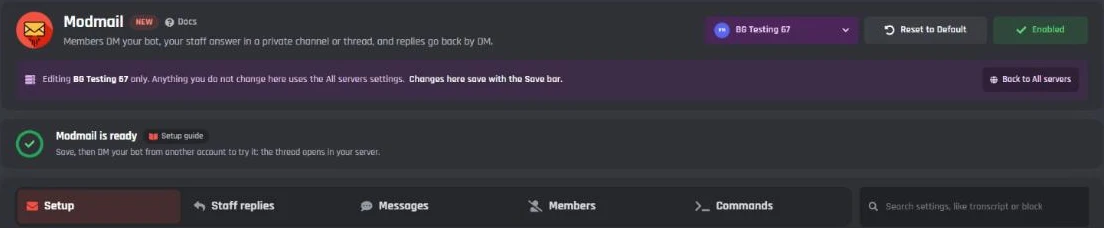
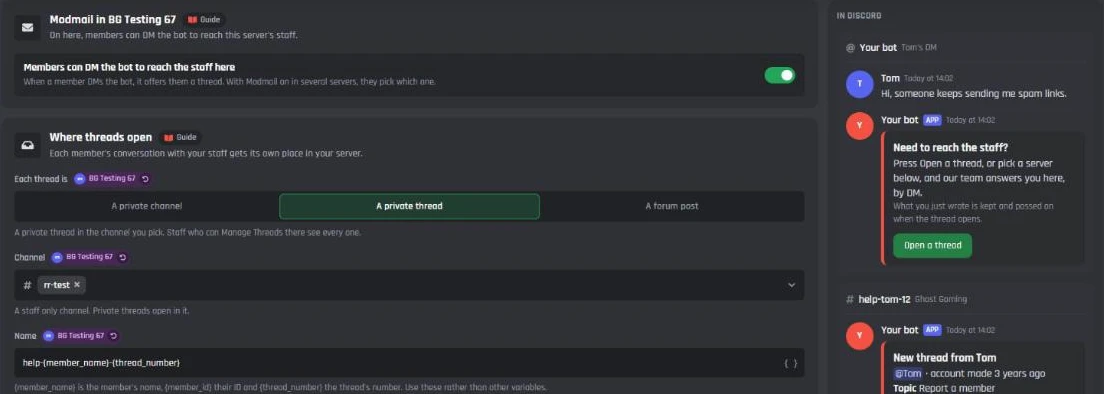
Where threads open
- A private channel
- The default. A new channel in the category you pick, with the category's permissions, so make it visible only to staff.
- A private thread
- A private thread in a staff channel you pick. Staff who can Manage Threads there see every one.
- A forum post
- A new post in a staff only forum.
- Name
- modmail-{member_name} to start with. {member_id} and {thread_number} work too. Up to 90 characters.
Who answers
- Staff roles
- Up to 10. They can press Close and use /modmail. Members with Manage Server always can.
What members pick
- The question
- What is it about? to start with, shown above the topics menu.
- Topics
- Up to 5, like Report a member or Ask a question. With none, the thread opens as soon as they press Open a thread.
Who can open one
- Account at least
- 0 days to start with, so any account can. A newer account gets the blocked message saying why. Up to 3,650 days.
Closing
- Members can close their own thread
- On to start with. Their opened message gets a Close my thread button.
- Keep a transcript
- On to start with. Made when a thread closes and posted in the channel you pick.
- Log channel
- A line for every thread that closes. Leave it empty for none.
What goes to the member, and how
Staff write in the thread and the bot passes their words on by DM. Pick which messages go, who replies come from, and what staff see of the member's DMs.
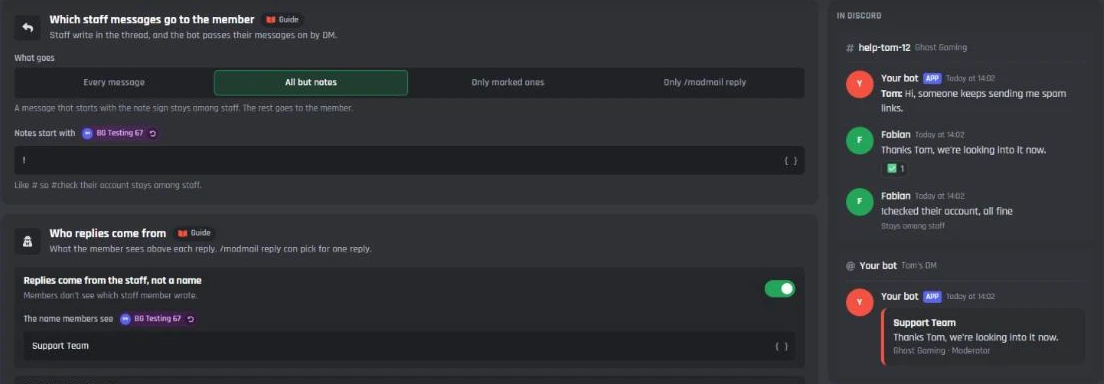
Which staff messages go to the member
- Every message
- Everything staff write in the thread goes to the member.
- All but notes
- The default. A message that starts with the note sign (# to start with) stays among staff.
- Only marked ones
- Only messages that start with the sign go, and the sign is taken off first.
- Only /modmail reply
- Nothing staff write goes, only what they send with /modmail reply.
Who replies come from
- Replies come from the staff, not a name
- On to start with, as Staff. Members don't see which staff member wrote.
- Show their staff role
- The first of your staff roles they have, like Moderator. Off to start with.
Both sides in step
- Their DMs show to staff as
- A card (the default), as them through a webhook with their name and picture, or a plain line.
- Files
- Pictures are uploaded again so they keep working, or every file comes as a link.
- React when it's delivered
- On, with ✅, on the member's DM and on the staff message.
- Edits and deletes follow
- For 24 hours, a member's edit or delete changes the copy staff see. Off to start with.
- At most
- 10 DMs a minute from one member to start with, up to 120. Past it they get one note to slow down.
Nine messages, each one yours to change
Every message Modmail sends is a whole message you can change with Edit message, with the details it fills in listed under it. A preview beside the tabs shows the one you're changing.
BotGhost CommunityThanks for telling us. Could you send a screenshot of one of the messages?Ghost Hangout
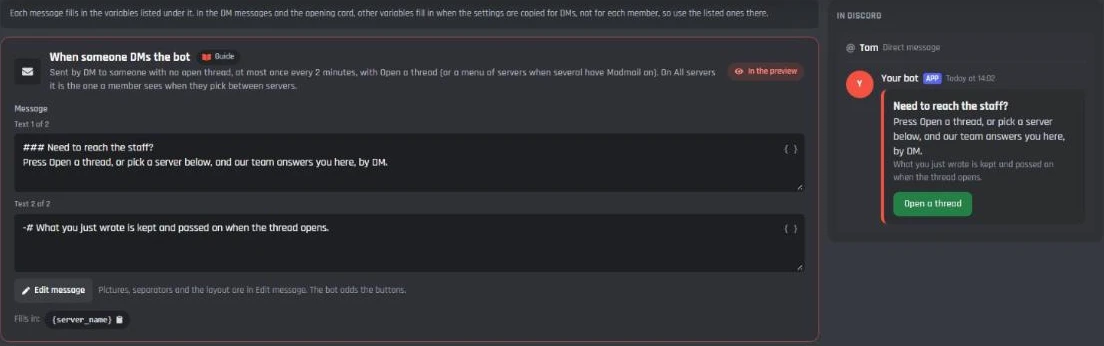
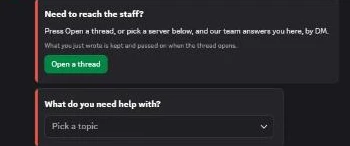
Sent by DM
DMs never carry the Made with BotGhost line.
- When someone DMs the bot
- With Open a thread, or a menu of servers when several have Modmail on.
- When their thread opens
- With Close my thread, while members may close.
- When staff reply
- For each staff message that goes to the member.
- When their thread closes
- With the reason, when staff or the member close it.
- When someone can't open a thread
- A blocked member, or an account that's too new.
- When someone isn't in that server
- When they pick a server they aren't a member of. Nothing opens.
Posted in your server
- The opening card in the thread
- Posted first in every new thread, with a Close button for staff. It pings nobody.
- When a reply can't be delivered
- Posted in the thread when the member's DMs are closed or they left, so staff know.
- The line in the log channel
- When a thread closes, with a link to the transcript.
Blocked members
Pick a server to see who is blocked there and when it ends. Unblock lifts a block early. Staff block from Discord with /modmail block, for some days or for good.
BotGhost CommunityBlocked members
- The list
- Each blocked member with when the block ends, for the server picked at the top right.
- Unblock
- Lifts the block early, the same as /modmail unblock.
- What a block does
- They can't open a thread, and an open thread stops passing their DMs on.
What staff can do in Discord
Staff answer in the thread, or with /modmail. Closing makes the transcript, DMs the member and posts the log line.
Closed by @Vez
Reason Sorted, thanks! The account was banned.Read the transcript

Staff commands
Staff are members with Manage Server, or one of the staff roles on Setup.
- /modmail reply
- Sends one reply, with anonymous to pick the name for that reply.
- /modmail close
- Closes the thread with a reason the member sees. The Close button does the same.
- /modmail block
- Stops a member opening threads in this server, for some days or always.
- /modmail unblock
- Lifts a block early.
Members
- Close my thread
- Members close their own from the opened message, while Members can close is on.
Under the tabs: the events
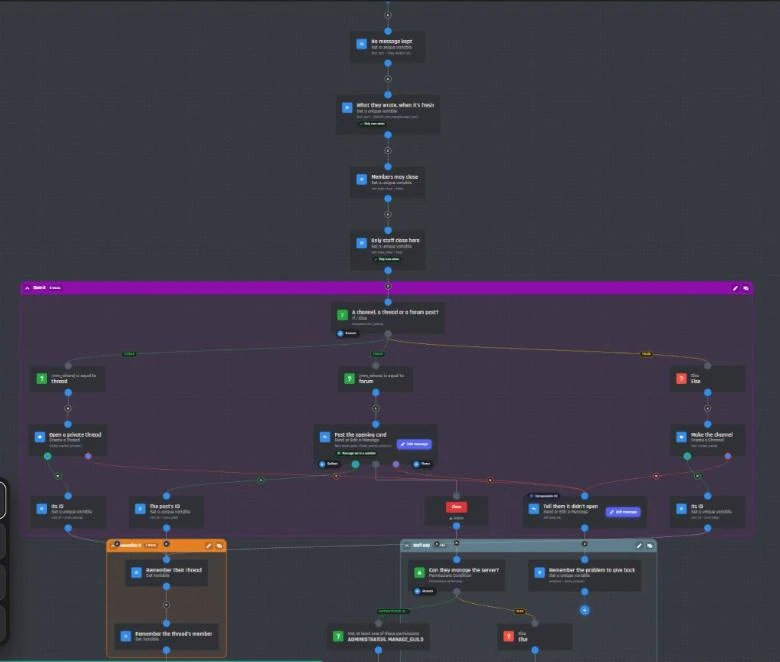
Modmail is made of ordinary builder blocks, so you can open any of its events in the builder, see how it works and add your own blocks. The settings on the page are read by those blocks, so changing a setting never needs the events made again.
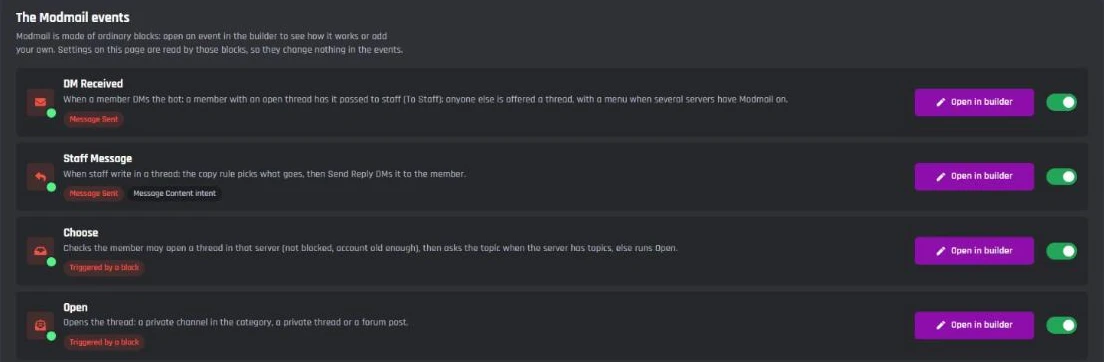
From a DM to a thread
- DM Received
- Passes a member's DM to their thread, or offers them a thread, with a menu when several servers have Modmail on.
- Choose and Open
- Check they may open one, ask the topic, then open the channel, thread or forum post and post the opening card.
- To Staff
- Posts their DM in the thread the way you picked, and reacts when it's delivered.
From staff back to the member
- Staff Message and Send Reply
- The copy rule picks what goes, then the reply goes by DM. A reply that can't be delivered gets a note in the thread.
- Close
- The transcript, the closed DM and the log line, then the channel is deleted, or a thread or post is archived and locked.
- Edited, Deleted and Channel Deleted
- Keep both sides in step when a member edits or deletes, or staff delete the channel.
Change anything, in the builder or on your website
Modmail is made of the same blocks you use for your own commands and events, so nothing about it is locked.
Open it in the builder
Every Modmail event and /modmail command opens in the builder. See how a thread opens, or add your own blocks, like a role check before a thread opens or a ping in another channel.
Server admins manage it on your website
With a BotPanel website for your bot, each server's admins sign in to change where threads open, staff replies and every message for their own server, and to unblock members.
Set up modmail on Discord
Haven't got a bot in your server yet? Start with how to make a Discord bot, then come back here.
- 1Open Modmail from Modules in your dashboard and switch it on. Pick a server at the top right to set it up there only.
- 2Under Where threads open, pick a staff only category, channel or forum.
- 3Under Who answers, pick your staff roles.
- 4Press Save Changes.
- 5Try it: DM your bot from another account and press Open a thread.
Using the old Modmail? The new page offers Move to Modmail, and you can undo it for 30 days.
BotGhost CommunityA free Discord modmail bot
Every Modmail feature works on the free plan. There's nothing to unlock, only the limits below, which are the same on every bot.
Free
$0- Private channels, threads or forum posts, with topics
- Anonymous replies, staff roles and notes among staff
- Cards, pictures, edits and deletes kept in step
- Blocks, transcripts and a log channel
- Every message yours to change, and a menu of servers
- Its commands, events and saved values never count toward your free limits
On free bots, a small Made with BotGhost line shows under the opening card, the transcript and the log line about one time in three. DMs never have it.
The limits
in each server- Topics
- Up to 5
- Staff roles
- Up to 10
- Servers in the menu
- Up to 25
- Account age check
- Up to 3,650 days
- Flood limit
- Up to 120 DMs a minute
- Edits and deletes follow
- 24 hours
Free bots go offline after 2 days with no activity, and Start brings them back. Read about free hosting
Discord modmail questions
Didn't find your question? Ask us in the BotGhost Discord, or read the Modmail docs.
Yes. Every Modmail feature is free on BotGhost: private threads, topics, anonymous replies, staff notes, blocks, transcripts and the log, in as many servers as your bot is in. Its commands, events and saved values don't count toward your free limits.
Modmail on the free planA member DMs your bot. The bot offers them a thread, and opens a private channel, private thread or forum post in your server for your staff. Staff write there, and the bot passes their replies to the member by DM. Closing it makes a transcript and tells the member.
See a thread step by stepYes, and they do to start with. Replies come from Staff, or a name you pick, so members don't see who wrote. You can show the staff member's role, like Moderator, and /modmail reply can pick the name for a single reply.
See how staff replyYes. To start with, a message that starts with # stays among staff and never reaches the member. You can change the sign, send only marked messages, or send only what staff send with /modmail reply.
See the four waysYes. Each server has its own settings, picked from the server menu at the top of the page. When your bot is in several servers with Modmail on, a member who DMs it picks which server's staff to reach from a menu, and only servers they're a member of open a thread.
See several serversYes. Staff run /modmail block for some days or for good, with a reason the member sees. Blocked members show on the Members tab with when the block ends, and Unblock lifts it early. You can also make accounts wait until they're a number of days old.
See blocks and transcriptsYes, to start with. When a thread closes, the bot makes a transcript and posts it in the channel you pick, and the log channel gets a line with who closed it and why.
See transcripts and the logYes. Every message is yours to change with Edit message. Modmail is made of ordinary builder blocks, so you can open any of its events in the builder and add your own blocks, like a role check or a message to another channel.
See how it's builtThe new page offers Move to Modmail. It checks what moves first, copies your old settings and blocks into the new module, and switches the old one off once no thread is open. You can undo the move for 30 days.
Read the Modmail docsGive members a private line to your staff
Switch on Modmail, pick where threads open and pick your staff roles. The free plan doesn't need a card.
Set up Modmail for free