Giveaways
Run giveaways your members can trust, with one press to enter and winners picked fairly.
Giveaways lets your bot run giveaways in your server. Your bot posts the giveaway, members press Enter to join, and when the time is up the bot picks the winners at random and pings them. The post keeps its entry count and end time up to date, and nothing is lost when your bot restarts. Giveaways is free for every bot.
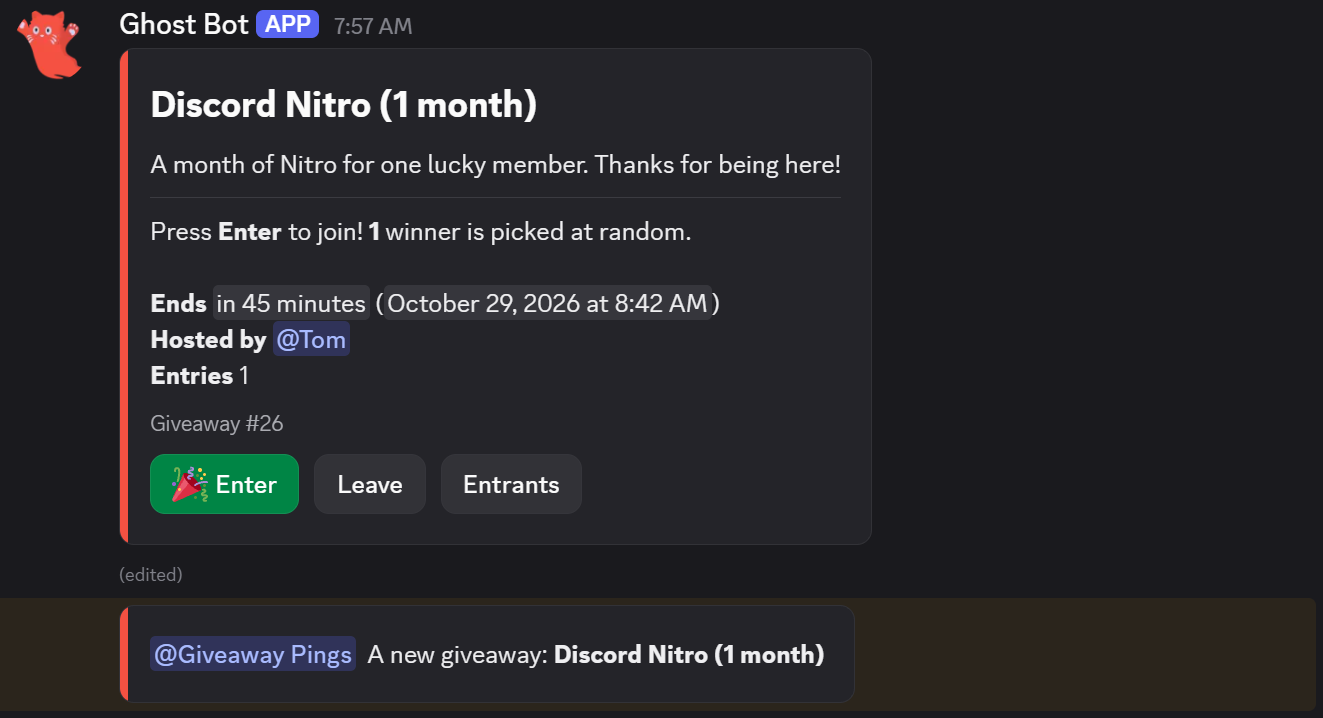
What your members will see
Before you start
You need:
- Your bot in your Discord server. See Invite Your Bot if it isn't yet.
- A channel for giveaways, like
#giveaways. - In that channel, your bot needs View Channel, Send Messages and Embed Links.
- To give winners a role, your bot's own role above that role, with Manage Roles turned on.
Set up giveaways
- 1
Turn on Giveaways
Open Giveaways in your bot's dashboard and press Enable at the top right.

- A Enable turns Giveaways on. It adds the
/giveawaycommands, the End giveaway and Reroll giveaway right click commands, and the events Giveaways needs. - B The server you're setting up. The channel, the hosts and the entry rules belong to one server, so pick the server first. A setting this server has its own value for is tagged with the server's name and icon.
- C Reset to Default puts every setting back to how a new Giveaways starts. The giveaway channel stays.
- D Docs opens this page.
- A Enable turns Giveaways on. It adds the
- 2
Pick the channel and the hosts
On the Post tab, pick the channel giveaways are posted in. Then pick the roles that can host giveaways, if anyone other than members with Manage Server should. See Where giveaways go below.
- 3
Save
A bar pops up at the bottom of the page. Press Save Changes.

- 4
Start your first giveaway
Run
/giveaway startin your server, or press Start a giveaway on the Post tab. To try it out, start a short one and cancel it with/giveaway cancel.
- A What to do next. Once everything is done, it says Giveaways are ready.
- B The steps, ticked off as you do them. Press one to go to it.
The tabs
Everything else is on six tabs. On the first four, the preview on the right shows what members see in Discord.

- A Post: where giveaways go, who hosts them, the post and its buttons.
- B Entering: who can enter, bonus entries and the replies members get.
- C Winners: the draw, the winners' messages, a winner role and DMs.
- D Prizes: a claim button, a time to claim and prize codes.
- E Schedule: saved giveaways, and giveaways that start again and again.
- F Giveaways and stats: the giveaways running now, the ones that ended, and totals.

The preview beside the Post tab, with sample details
Post
Start a giveaway
Press Start a giveaway on the Post tab to start one from the dashboard. It's the same as /giveaway start in Discord.
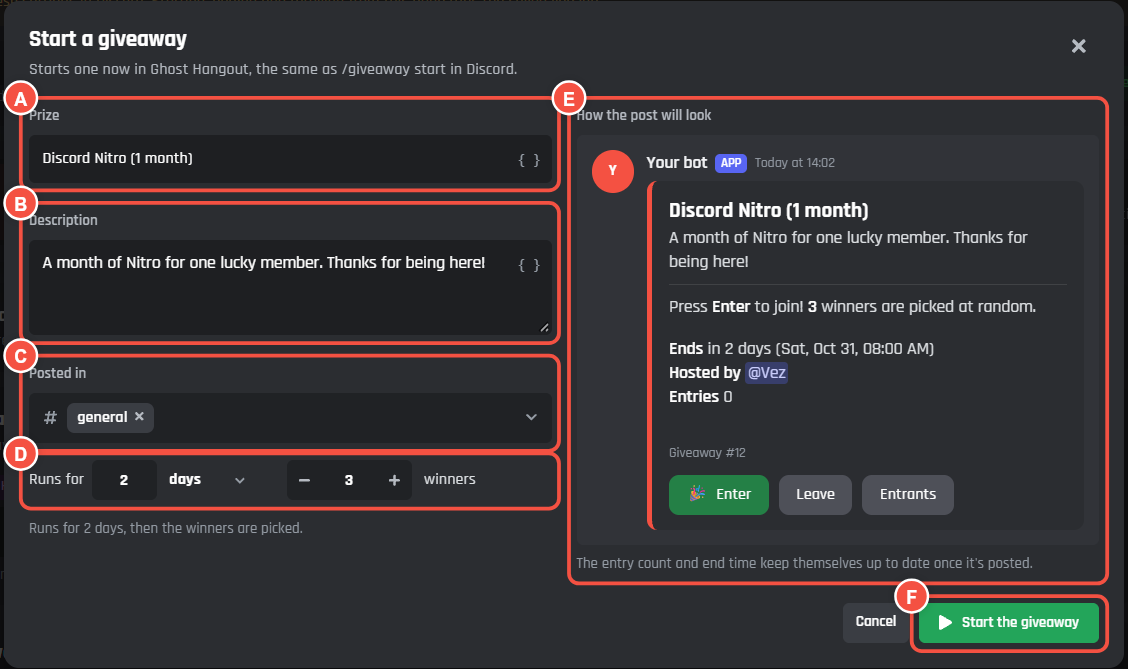
- A Prize: what the winners get.
- B Description: a line under the prize. Leave it empty for the post's own text.
- C Posted in: the channel. It starts on your giveaway channel.
- D Runs for and how many winners: from 1 minute to 90 days, and up to 50 winners.
- E How the post will look.
- F Start the giveaway posts it straight away.
Save your bot first: starting from the page runs the saved version of your settings.
Where giveaways go
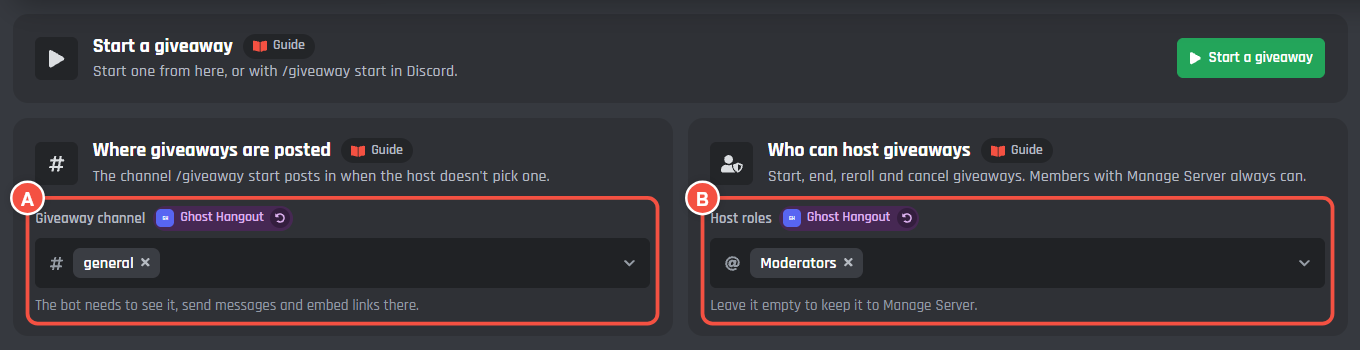
- A Giveaway channel: where
/giveaway startposts when the host doesn't pick a channel.
Who can host
- B Host roles: members with one of these roles can start, end, reroll, edit, pause and cancel giveaways. Members with Manage Server always can. Leave it empty to keep it to Manage Server.
The giveaway post
The post has three messages, one for each stage, all on the same post. Each has its own card.
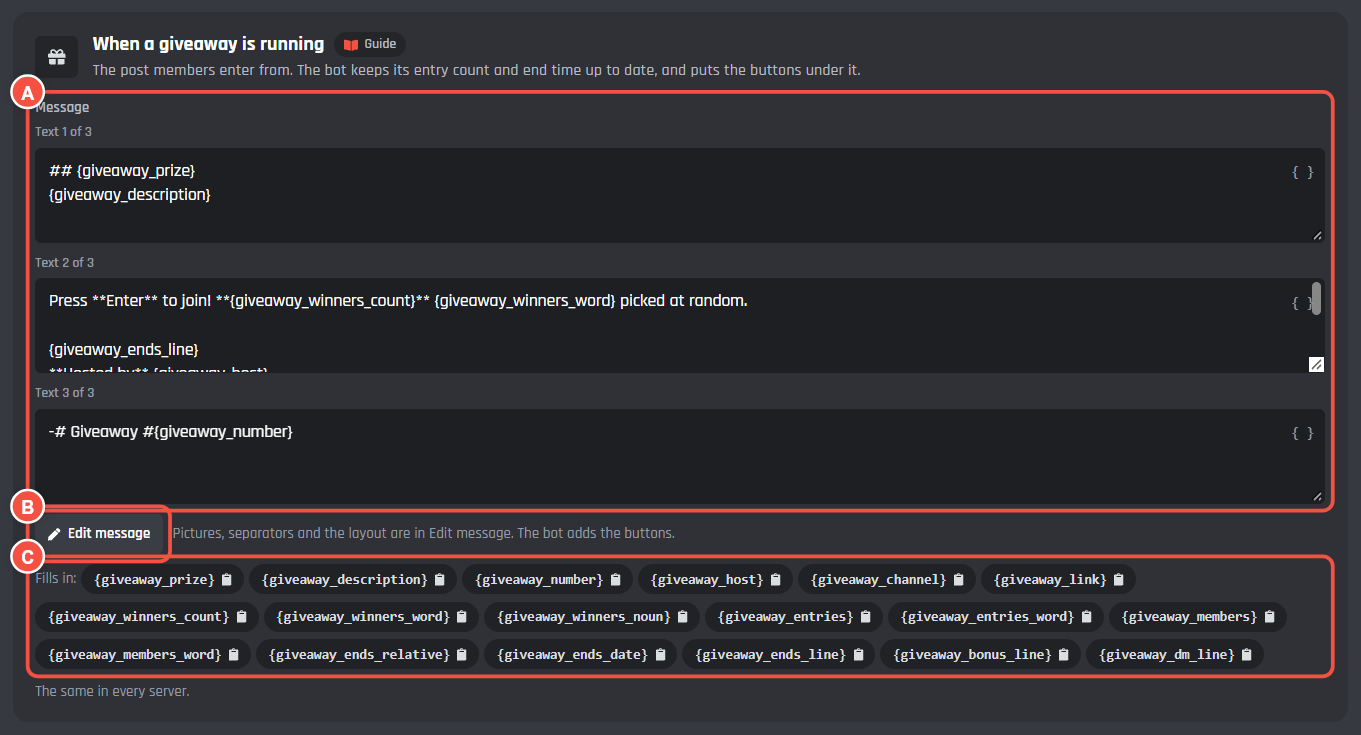
- A Message: a box for each text part of the message, like the heading, the details and the footer.
- B Edit message opens the Message Builder, for pictures, separators and the layout.
- C The variables this message fills in. Press one to copy it.
The post's three messages are the same in every server.
| Message | When it's shown |
|---|---|
| When a giveaway is running | The post members enter from. The bot keeps its entry count and end time up to date |
| When a giveaway ends | The same post once the winners are picked. Only the Entrants button stays |
| When a giveaway is cancelled | The same post when a host cancels it. Nobody wins, and the buttons go |
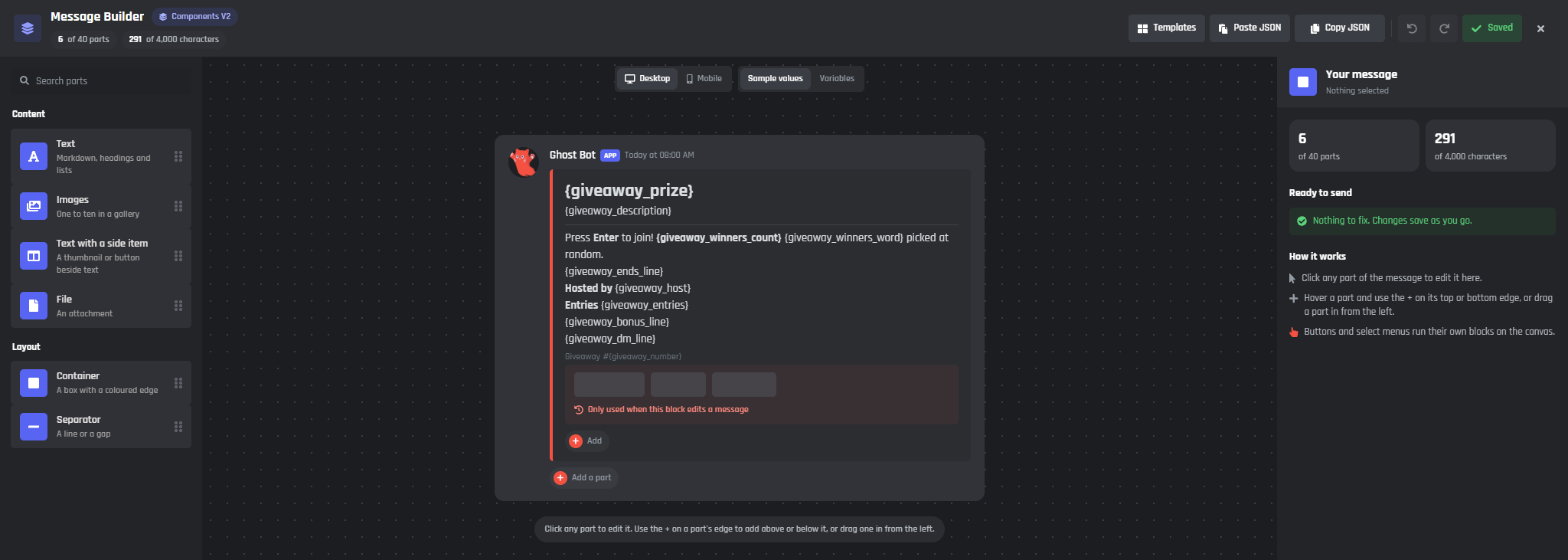
Edit message opens the Message Builder
The bot adds the buttons under the post itself, so you don't add them in the Message Builder.
The buttons
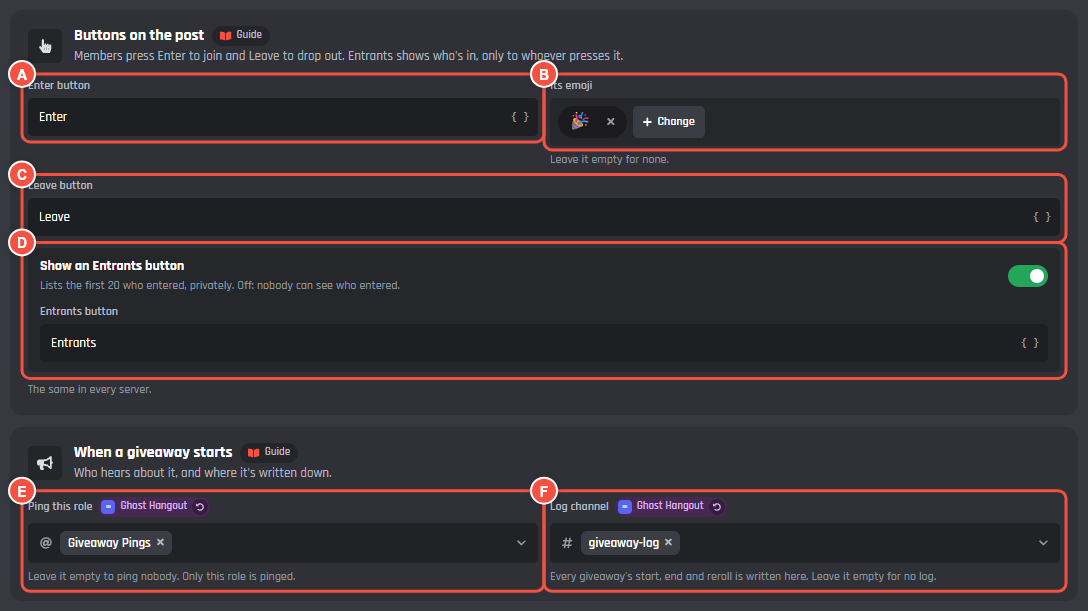
- A Enter button: the words on the button members press to join.
- B Its emoji: press Change to pick another. Leave it empty for none.
- C Leave button: members press it to drop out.
- D Show an Entrants button: lists the first 20 who entered, privately, to whoever presses it. Entrants button is the words on it. Off, nobody can see who entered.
The buttons are the same in every server.
When a giveaway starts
- E Ping this role: pinged when a giveaway starts. Only this role is pinged. Leave it empty to ping nobody.
- F Log channel: every giveaway's start, end and reroll is written here. Leave it empty for no log.
The log
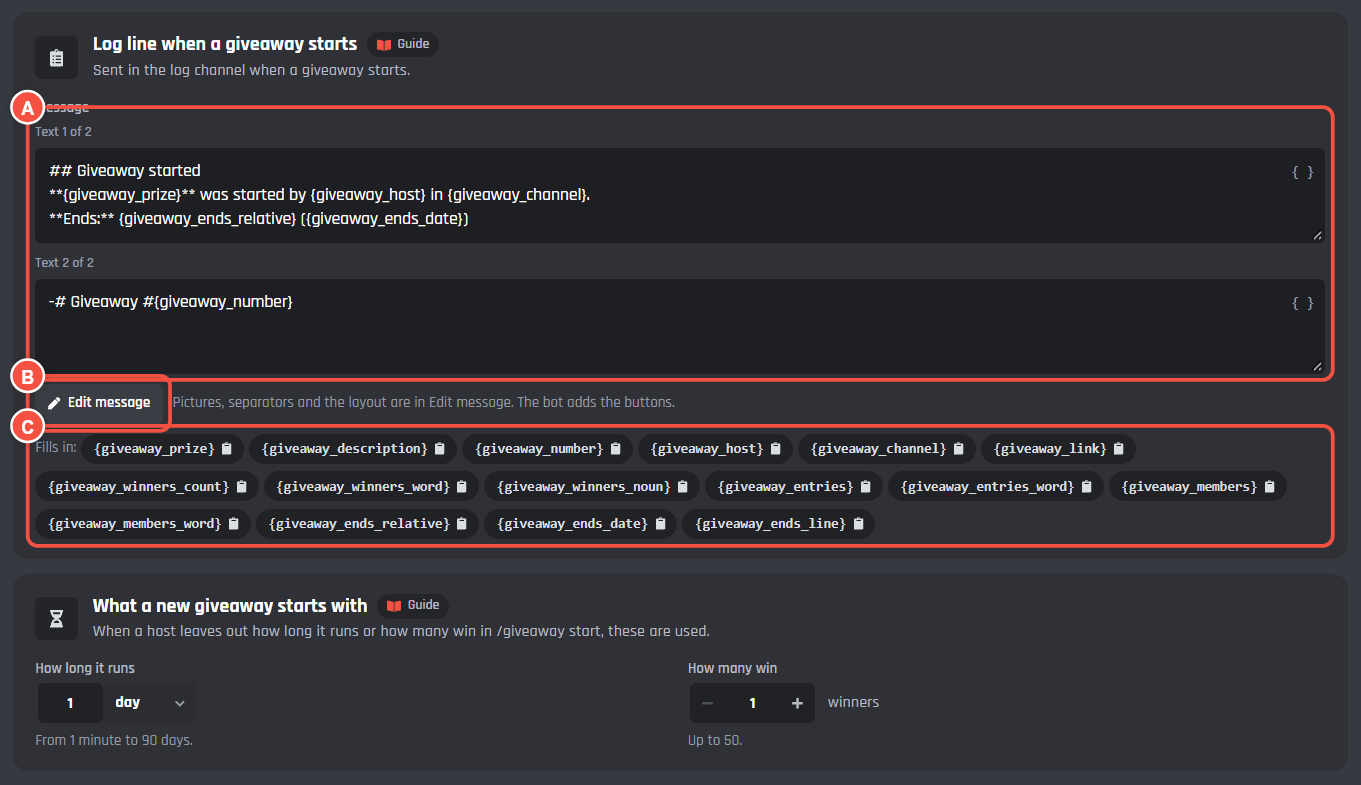
- A Log line when a giveaway starts: the message sent in the log channel.
- B Edit message opens the Message Builder.
- C The variables it fills in.
The Winners tab has the Log line when a giveaway ends. Edits, pauses, rerolls and cancels get a short log line of their own.
What a new giveaway starts with
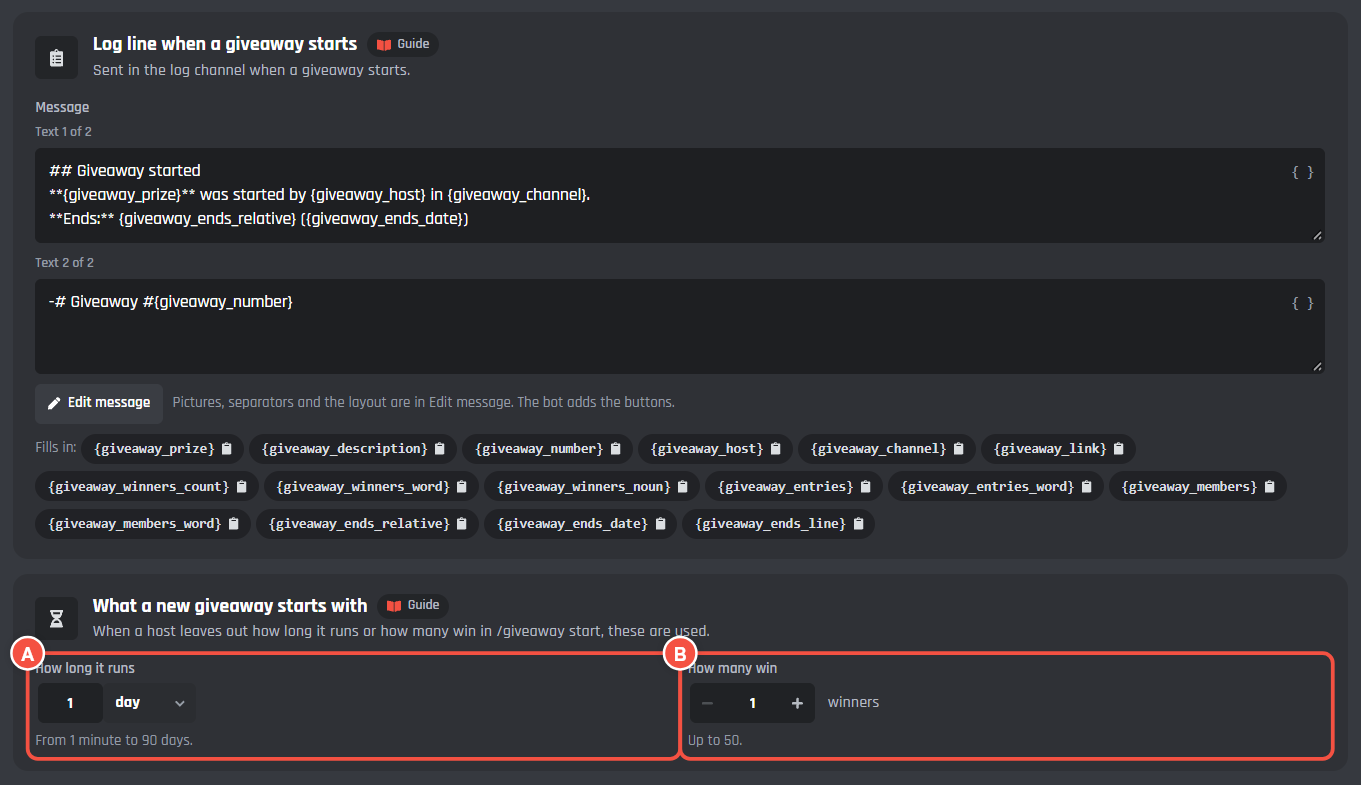
- A How long it runs: used when a host leaves out the duration in
/giveaway start. From 1 minute to 90 days. It starts at 1 day. - B How many win: used when a host leaves out the winners. Up to 50.
Entering
Who can enter
Every box can be left empty. With all of them empty, everyone in the server can enter. Each rule is checked when a member presses Enter.
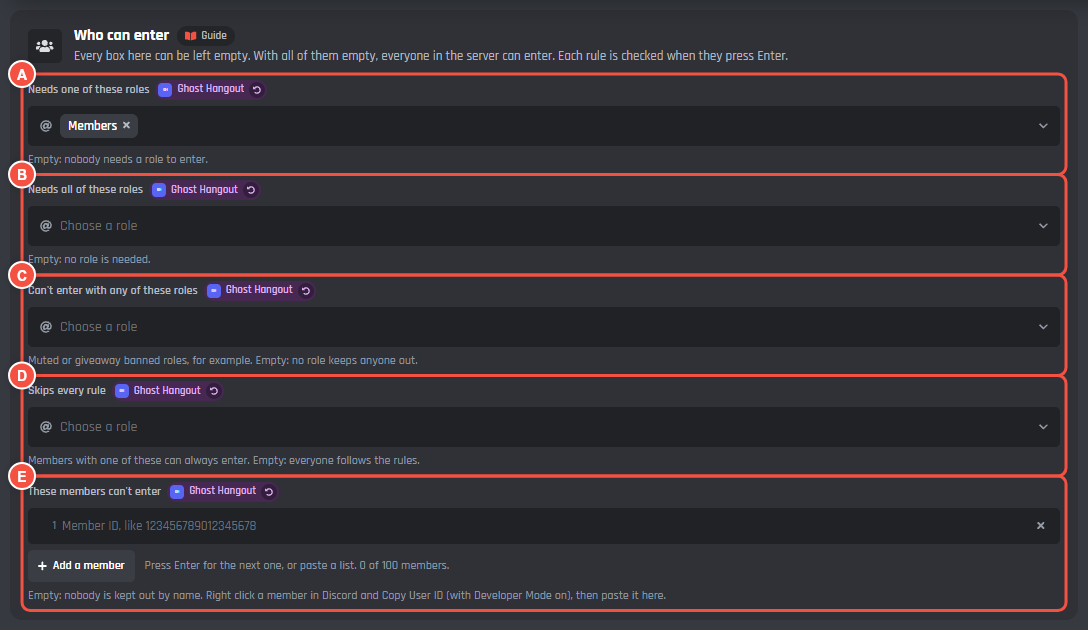
- A Needs one of these roles.
- B Needs all of these roles.
- C Can't enter with any of these roles: muted or giveaway banned roles, for example.
- D Skips every rule: members with one of these can always enter.
- E These members can't enter: paste a member's ID, up to 100 members. In Discord, turn on Developer Mode, right click a member and press Copy User ID. Add a member adds another row.
Entering a giveaway is always free, so a role that comes with a server subscription (a paid role) can't be picked in these lists, as a bonus role or as the winner role.
Bonus entries
Bonus entries give members with a role extra chances, like Server Boosters. The post says who gets them, so everyone can see it's fair.
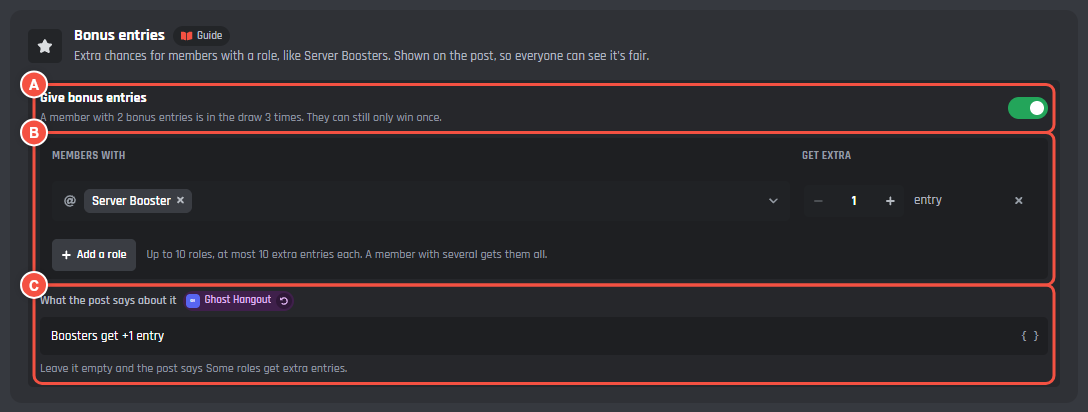
- A Give bonus entries: the switch. A member with 2 bonus entries is in the draw 3 times. They can still only win once.
- B Members with a role get extra entries, from 1 to 10. Add a role adds another row, up to 10 roles. A member with several of the roles gets the bonus of each.
- C What the post says about it: like
Boosters get +1 entry. It fills in{giveaway_bonus_line}on the post. Left empty, the post says Some roles get extra entries.
Account age and time in the server

- A Discord account at least: how many days old a member's Discord account must be. This keeps brand new accounts out, so nobody makes extra accounts to win.
- B In the server at least: how many days they must have been in your server.
Use 0 for no limit.
A custom variable they need
- C Read it from: one of your bot's member number variables from Data Storage, like a level, XP or points another system keeps. Leave it on None needed to let everyone enter.
- D Members need at least: how much they need. 0 lets everyone enter.
Replies to members
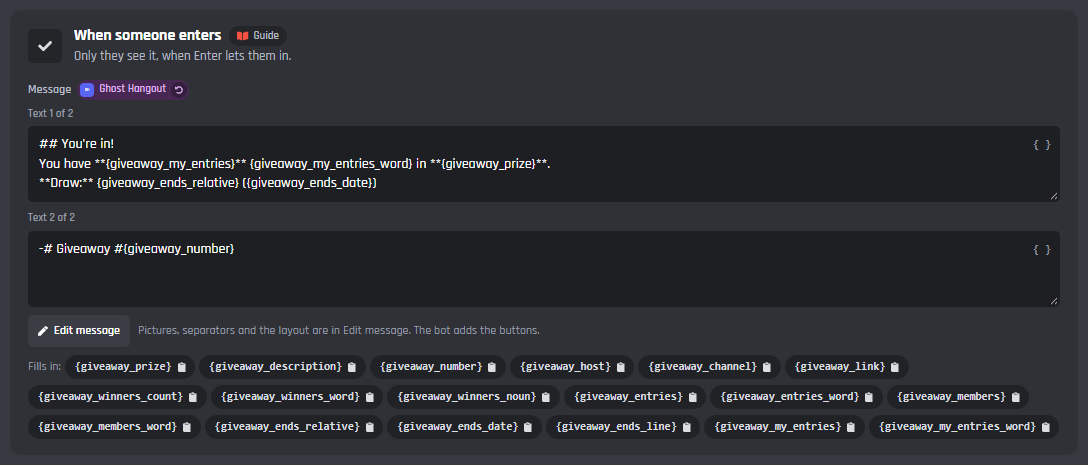
Each reply only shows to the member who pressed the button. Each one has its own card, with Edit message and the variables it fills in. The replies are this server's own, so each server can word them its own way.
| Reply | When it's sent |
|---|---|
| When someone enters | Enter lets them in. {giveaway_my_entries} is their entries, counting bonus entries |
| When they're already in | They press Enter again |
| When they can't enter | A rule above keeps them out. {giveaway_problem} says why |
| When they leave | They press Leave |
| When the giveaway isn't open | They press a button on a giveaway that ended, was cancelled, or whose winners are being picked |
| When the giveaway is paused | They press Enter while a host has paused the giveaway |
Winners
Picking the winners
Winners are picked at random from every entry. Someone can only win once per giveaway, and a reroll never picks an earlier winner.
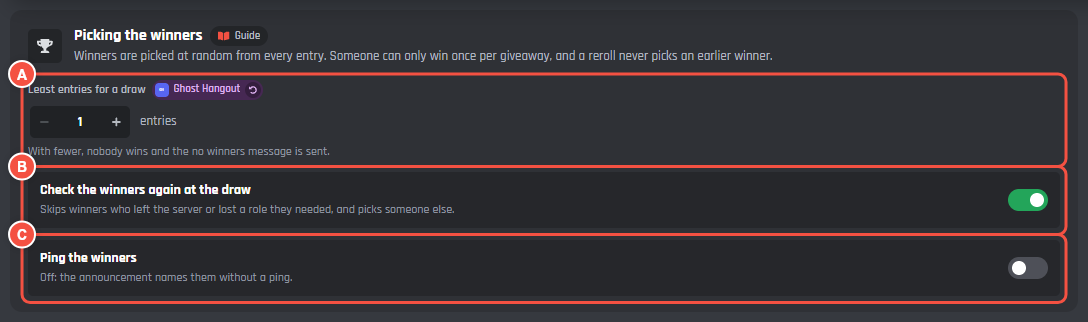
- A Least entries for a draw: with fewer entries than this, nobody wins and the When nobody wins message is sent.
- B Check the winners again at the draw: skips winners who left the server or lost a role they needed, and picks someone else.
- C Ping the winners: off, the announcement names them without a ping.
The winners' messages
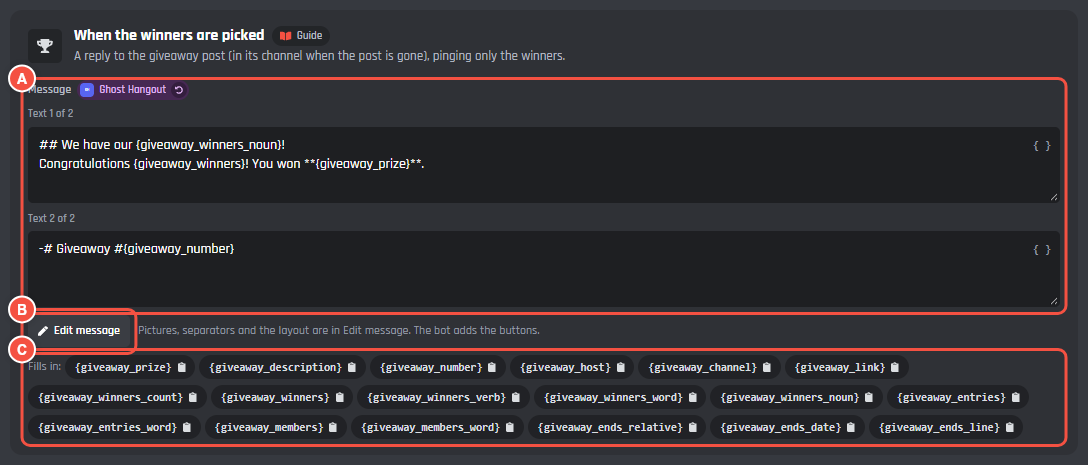
- A Message: the text parts of the message.
- B Edit message opens the Message Builder.
- C The variables it fills in, like
{giveaway_winners}.
The winners' messages and the winner DM are this server's own.
| Message | When it's sent |
|---|---|
| When the winners are picked | A reply to the giveaway post (in its channel when the post is gone), pinging only the winners |
| When nobody wins | Fewer people entered than the least entries, or nobody who entered can be picked, because they left or failed the check at the draw |
| When winners are rerolled | After a host rerolls. Only the new winners are pinged |
Winner role
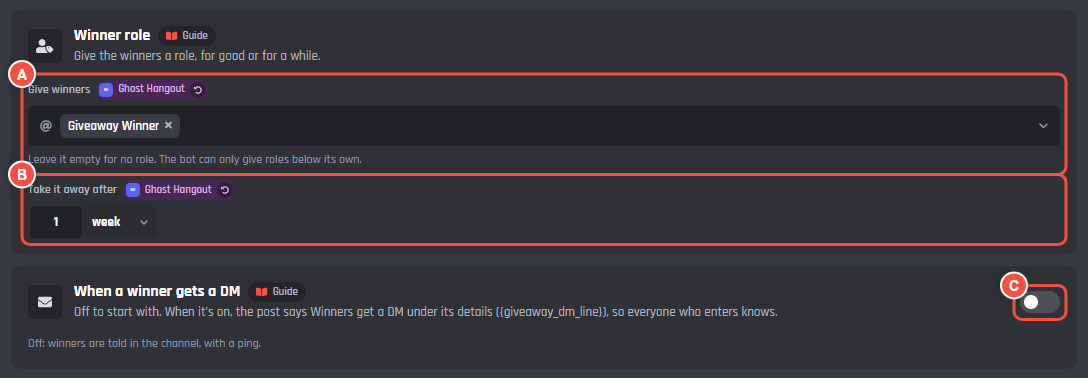
- A Give winners: a role for the winners. Leave it empty for no role. Your bot can only give roles below its own.
- B Take it away after: the bot takes the role off again after this long. Leave it empty and they keep it.
Winner DMs
- C Send winners a DM: off to start with, so winners are told in the channel, with a ping. Turn it on to also send each winner a DM. The message shows under the switch once it's on.
Keep links out of the DM: Discord treats DMs with links from bots as spam. Winners with DMs closed are still pinged in the channel. While DMs are on, the post says Winners get a DM when they win. under its details ({giveaway_dm_line}), so everyone who enters knows.
The Log line when a giveaway ends card is on this tab too. See The log.
How long entries are kept

- A Keep them for: after the draw, who entered stays for rerolls and the Entrants button, then it's deleted. From 1 to 90 days. It starts at 30. Rerolls work until then.
Prizes
The claim button
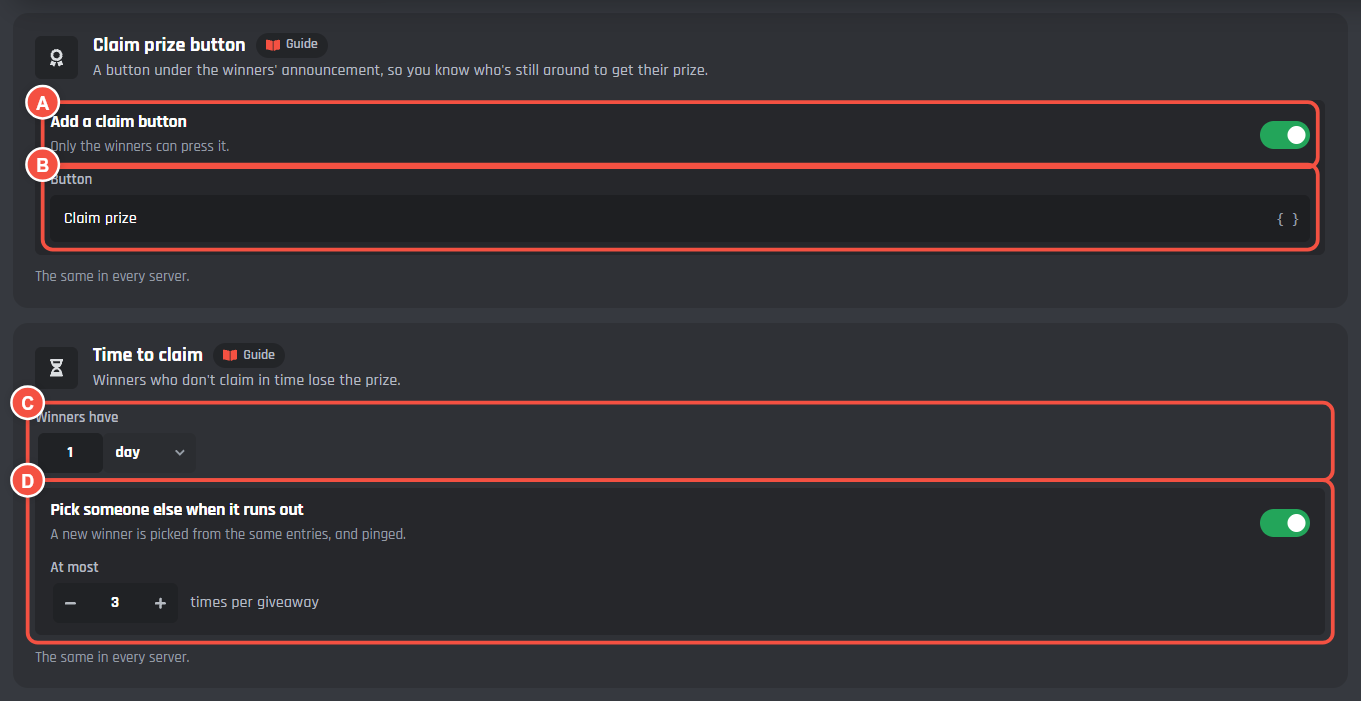
- A Add a claim button: a button under the winners' announcement, so you know who's still around to get their prize. Only the winners can press it.
- B Button: the words on it.
Time to claim
- C Winners have: how long winners have to claim. Winners who don't claim in time lose the prize. Leave it empty for no time limit.
- D Pick someone else when it runs out: a new winner is picked from the same entries, and pinged. At most sets how many times per giveaway, up to 20.
The claim button and the time to claim are the same in every server.
Prize codes
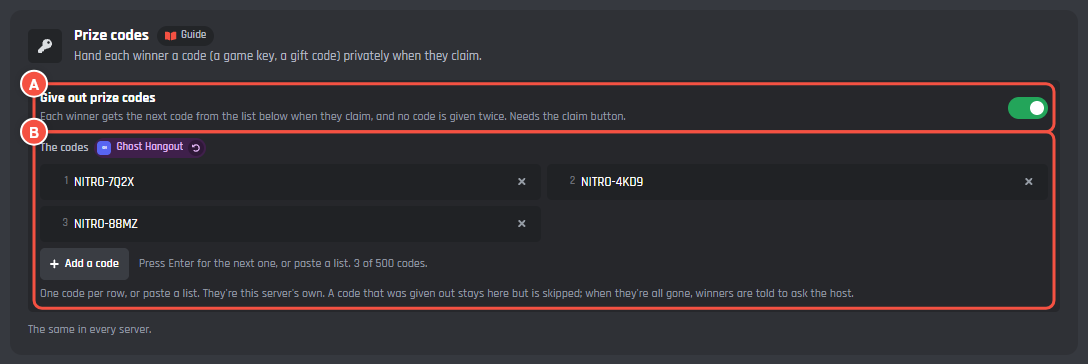
- A Give out prize codes: hand each winner a code, like a game key or a gift code, privately when they claim. It needs the claim button.
- B The codes: one code per row, or paste a list, up to 500. Add a code adds a row. Each winner gets the next code, and no code is given twice. A code that was given out stays in the list but is skipped. When they're all gone, winners are told to ask the host. The codes are this server's own.
Claim replies
Each reply only shows to the member who pressed the claim button.
| Reply | When it's sent |
|---|---|
| When a winner claims their prize | After they press the claim button |
| When a winner gets a prize code | With prize codes on. {giveaway_code} is the code, hidden until they click it |
| When someone else presses claim | Someone who didn't win presses the button |
| When a winner claims too late | The time to claim has run out |
Schedule
Saved giveaways
Save the giveaways you run often, ready to start in one press. Switch on Start it again and again for a weekly or monthly one.
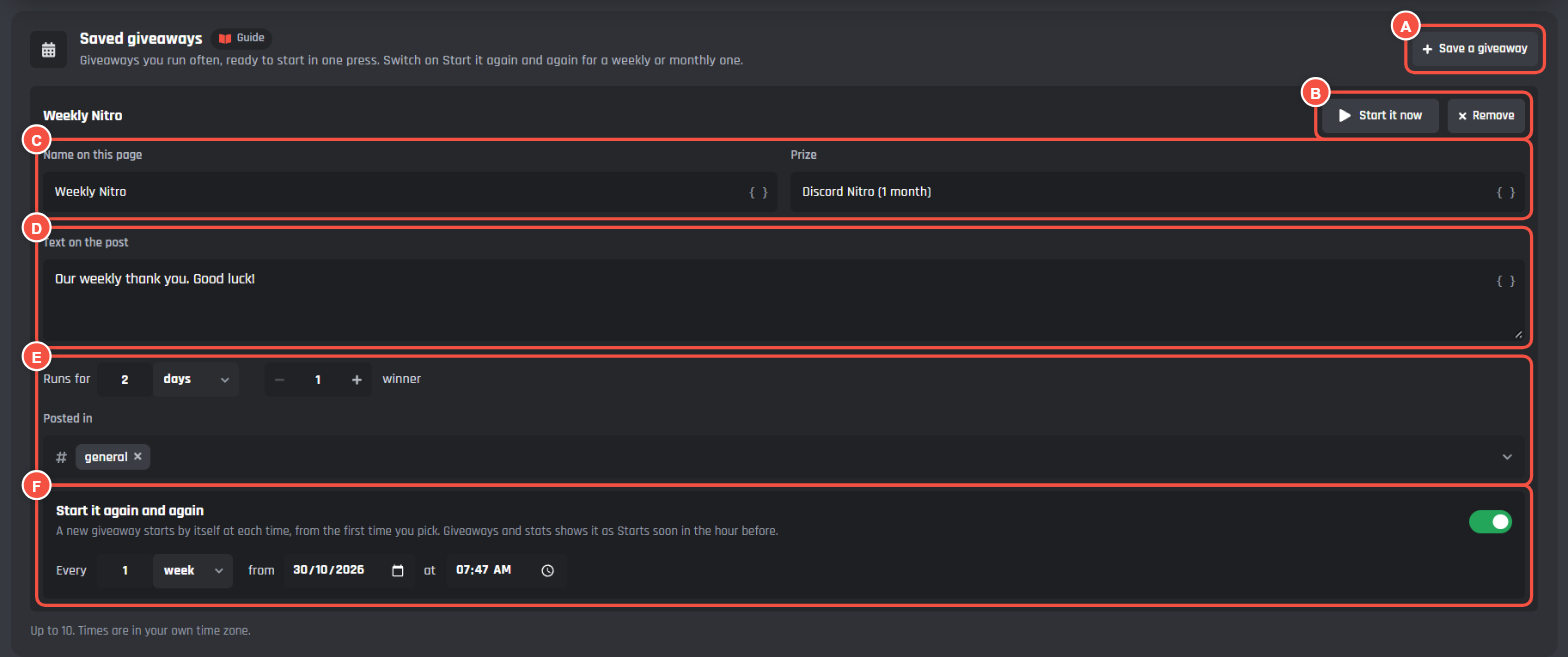
- A Save a giveaway adds one. Up to 10.
- B Start it now starts it straight away. Remove deletes the saved giveaway.
- C Name on this page and Prize.
- D Text on the post: leave it empty for the post's own text.
- E Runs for, how many winners and the channel it's Posted in.
- F Start it again and again: a new giveaway starts by itself at each time, Every so often (at least every hour) from the first date and time you pick. Times are in your own time zone.
Giveaways and stats shows a repeating giveaway as Starts soon in the hour before it starts.
Giveaways and stats
Giveaway stats
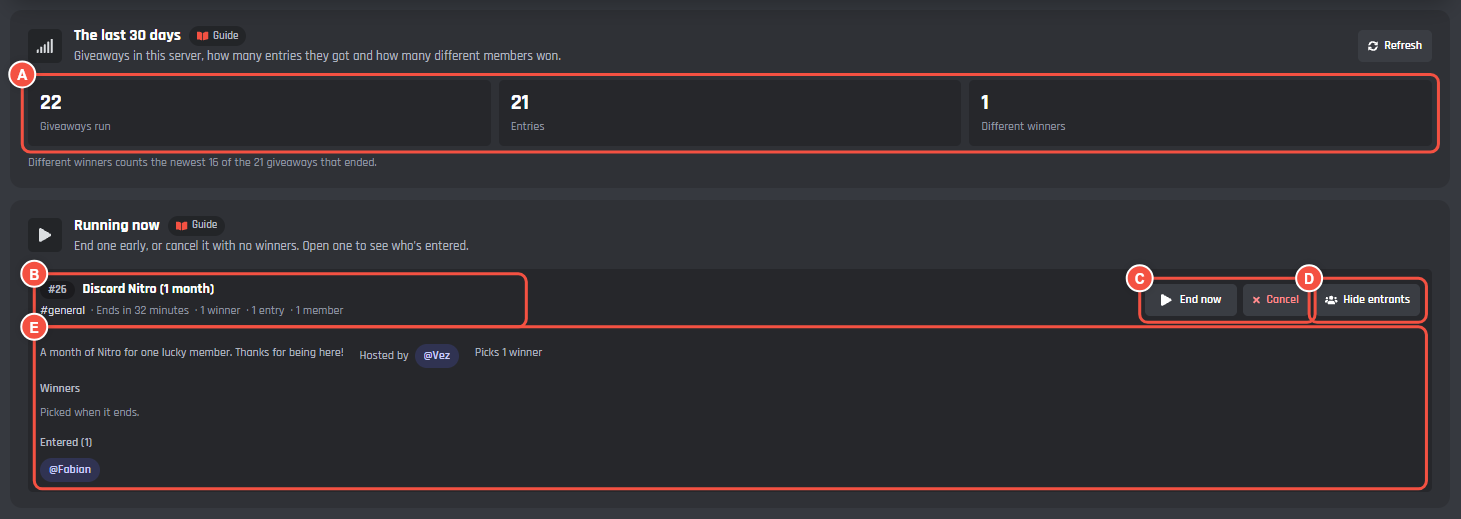
- A The last 30 days: the giveaways run in this server, how many entries they got and how many different members won. Refresh loads them again.
Running giveaways
- B Running now: each giveaway with its number, prize, channel, end time, winners and entries.
- C End now ends it early and picks the winners. Cancel stops it with no winners: press it, then Sure? Cancel it.
- D Entrants and winners opens it. Hide entrants closes it again.
- E What it says, who hosted it, the winners once they're picked, and who entered. Press a member to copy their mention.
Ended giveaways
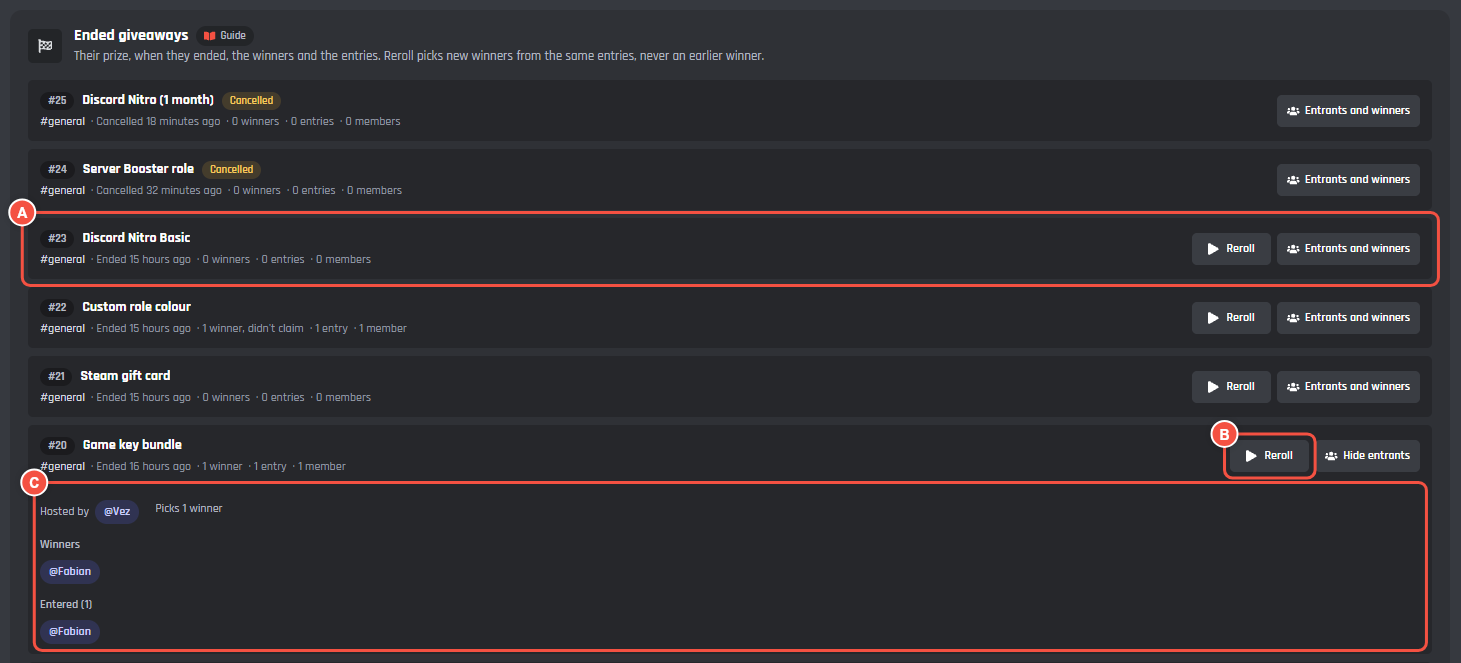
- A An ended giveaway: its prize, when it ended, the winners and the entries. A cancelled one is tagged Cancelled.
- B Reroll picks new winners from the same entries, never an earlier winner.
- C Opened with Entrants and winners: who hosted it, who won and who entered.
Ended giveaways stay for as long as entries are kept (Winners tab).
Drops
A drop is a giveaway where the first people to press win, with no draw. Start one with /giveaway drop. The post has a Grab it button and says how many prizes are left. Each member can grab once, and when they're all gone the drop ends by itself. A drop runs for a week. With prize codes on, each member who grabs one gets a code.
Picture cards
Giveaways can put an image card on its messages, made with the Card Studio. Each message that can have one has Add a picture card, Designs and Edit card under it. Edit card opens the Card Studio on that card, and the preview shows it under the message.
| Card | Where it shows | Starts |
|---|---|---|
| Winner | On the winners announcement, and a reroll's | On |
| Nitro winner | A second winner design, picked under Designs | |
| Giveaway live | On the giveaway post, drawn once when it goes up | Off |
| Entry ticket | On the private You're in! reply, with their ticket number | Off |
| Results | On the ended post: the winners, who claimed, and entries per hour | Off |
| Drop | On a drop's post, and again when it ends with who grabbed it | Off |
| Luckiest members | With /giveaway luckiest (see below) |
Off |
- The winner card shows the first winner's picture, with "+2 more" when there are more.
- The results card's chart counts entries from when the card is turned on.
- Cards are free on every bot. A bot draws up to 30 cards a minute; on a very busy giveaway some replies go without one.
Luckiest members
/giveaway luckiest shows who has won the most giveaways in the server this year, as a column chart with the top 5. Every draw, reroll and drop grab counts. A reroll takes the win back from the member it replaced, and the count starts again each new year. With the card off, the command replies with a list instead. Turn it on and change it on the Giveaways and stats tab.
Commands
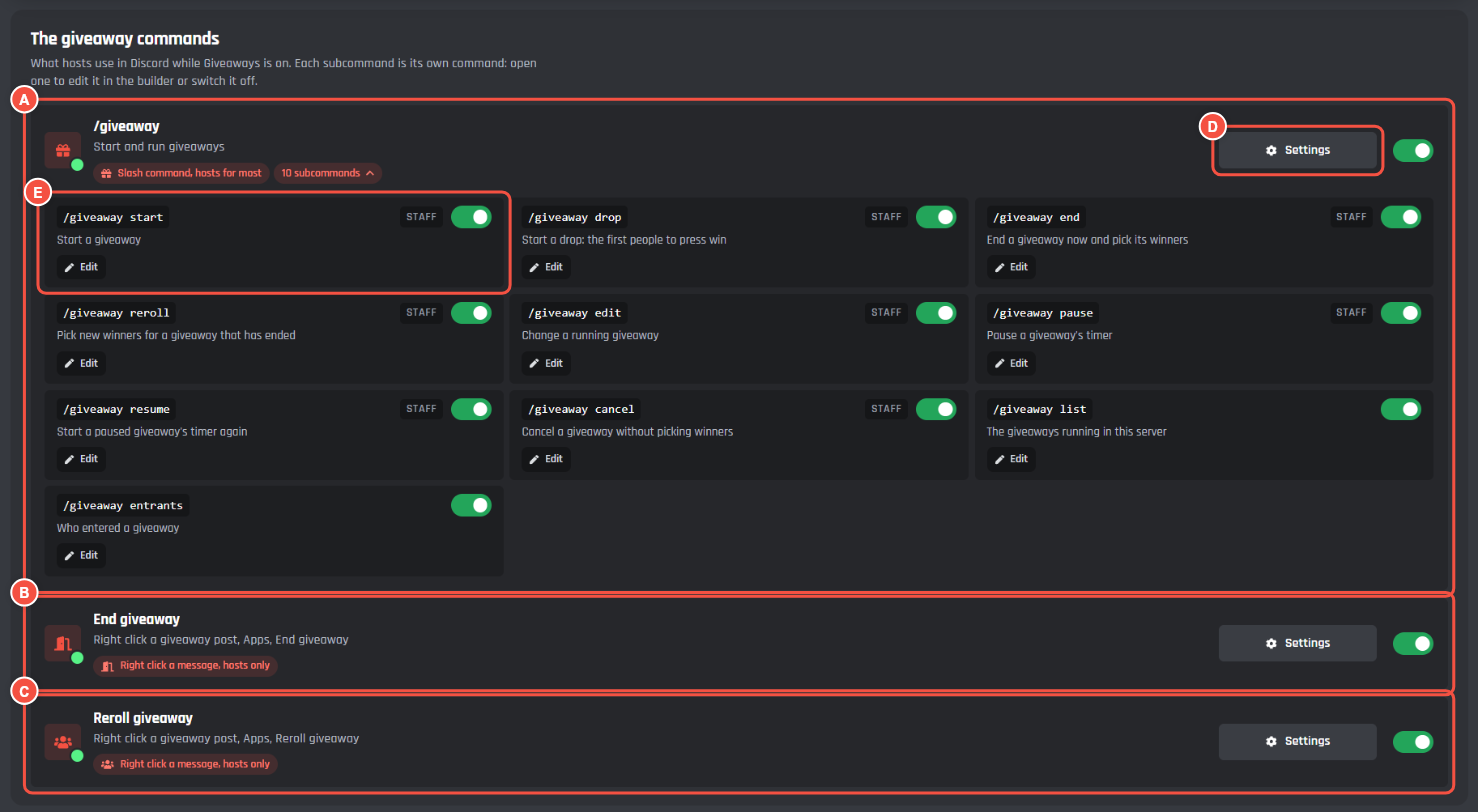
- A
/giveaway: press 11 subcommands to see them all. Each subcommand is its own command. STAFF marks the ones only hosts can use. - B End giveaway: right click a giveaway post, Apps, End giveaway. For hosts.
- C Reroll giveaway: right click a giveaway post, Apps, Reroll giveaway. For hosts.
- D Settings opens the command in the builder. The switch next to it turns the command on or off.
- E A subcommand: its switch turns it on or off, and Edit opens it in the builder.
The giveaway option is the giveaway's number. The post says it at the bottom, like Giveaway #12.
| Command | What it does | Who |
|---|---|---|
/giveaway start |
Start a giveaway. Leave out the prize and a form asks for the prize, description, duration and winners. A duration is like 30m, 2h or 2d 12h |
Hosts |
/giveaway drop |
Start a drop: the first people to press win | Hosts |
/giveaway end |
End a giveaway now and pick its winners | Hosts |
/giveaway reroll |
Pick new winners for a giveaway that has ended. how_many picks fewer, and member replaces just that winner |
Hosts |
/giveaway edit |
Change a running giveaway's prize, winners, time left from now or description | Hosts |
/giveaway pause |
Pause a giveaway's timer. Nobody can enter while it's paused | Hosts |
/giveaway resume |
Start a paused giveaway's timer again, with the time it had left | Hosts |
/giveaway cancel |
Cancel a giveaway without picking winners. delete_post deletes its post too |
Hosts |
/giveaway list |
The giveaways running in this server, privately | Everyone |
/giveaway entrants |
Who entered a giveaway, 20 to a page, privately and without pinging them | Everyone |
/giveaway luckiest |
Who has won the most giveaways this year, as a card or a list | Everyone |
| End giveaway | Right click a giveaway post to end it now | Hosts |
| Reroll giveaway | Right click a giveaway post to pick new winners | Hosts |
Hosts are members with a host role from the Post tab, or Manage Server.
Events
Giveaways is made of ordinary builder blocks. Open an event to see how it works, or add your own blocks.
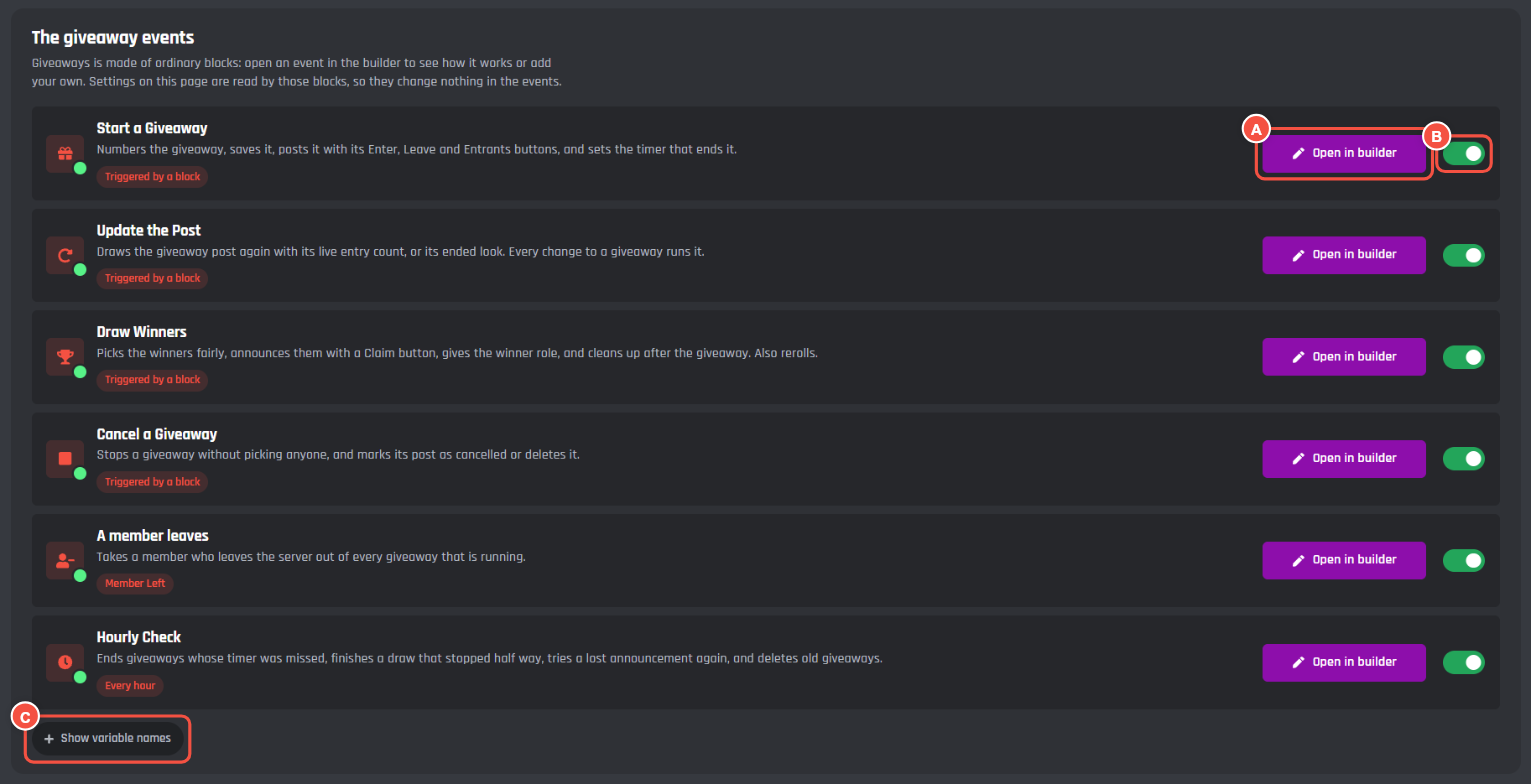
- Start a Giveaway numbers the giveaway, saves it, posts it with its buttons, and sets the timer that ends it.
- Update the Post draws the post again with its live entry count, or its ended look.
- Draw Winners picks the winners, announces them with the claim button and gives the winner role. It also rerolls.
- Cancel a Giveaway stops a giveaway without picking anyone.
- A member leaves takes a member who leaves the server out of every giveaway that is running.
- Hourly Check ends giveaways whose timer was missed, finishes a draw that stopped half way, and deletes old giveaways.
- A Open in builder opens the event in the Command Builder.
- B The switch turns the event on or off.
- C Show variable names shows the variable behind each setting on the page, if you want to use them in your own commands.
The first four run when another block triggers them, with Trigger a Custom Event: the commands, the buttons, the page and the hourly check all use them.
The settings on this page are read by the events' blocks, so changing a setting never changes the events. If you change an event and want the original back, use its reset on the Giveaways page.
Message variables
Every giveaway message can use these. Each message card lists the ones it can use.
| Variable | What it shows |
|---|---|
{giveaway_prize} |
The prize |
{giveaway_description} |
The description the host typed, empty when none |
{giveaway_number} |
The giveaway's number, like 12 |
{giveaway_host} |
Who started it, as a mention |
{giveaway_channel} |
The giveaway's channel, as a mention |
{giveaway_link} |
A link to the giveaway post |
{giveaway_winners_count} |
How many winners it picks |
{giveaway_winners} |
The winners, as mentions |
{giveaway_winners_verb} |
"was" for one winner, "were" for more |
{giveaway_winners_word} |
"winner is" for one winner, "winners are" for more |
{giveaway_winners_noun} |
"winner" or "winners" |
{giveaway_entries} |
Entries so far, counting bonus entries |
{giveaway_entries_word} |
"entry" or "entries" |
{giveaway_members} |
How many members entered |
{giveaway_members_word} |
"member" or "members" |
{giveaway_bonus_line} |
Who gets bonus entries (empty when bonus entries are off) |
{giveaway_ends_relative} |
When it ends, like "in 2 hours" |
{giveaway_ends_date} |
When it ends, as a date and time |
{giveaway_ends_line} |
"Ends in 2 days" with the date, or that it's paused |
{giveaway_dm_line} |
"Winners get a DM when they win." while winner DMs are on, else empty |
{giveaway_my_entries} |
The member's entries (private replies) |
{giveaway_my_entries_word} |
"entry" or "entries" (private replies) |
{giveaway_problem} |
Why the member can't enter (private replies) |
{giveaway_code} |
The winner's prize code (claim replies) |
Limits
| What | Limit |
|---|---|
| Giveaways running at once, per server | 25 |
| Winners per giveaway | 50 |
| How long a giveaway runs | 1 minute to 90 days |
| Bonus entry roles | 10, each +1 to +10 |
| Saved giveaways | 10 |
| Entries kept after the draw | 1 to 90 days, 30 to start |
Every feature is free for every bot. On free bots, the module's messages have a small Made with BotGhost line under them. Premium bots don't.
Fair and within Discord's rules
- Entering is always free. Don't ask members to pay, buy items or join another server to enter.
- Winners are told in the channel. DMs to winners are off until you turn them on.
- Giveaways only keeps member IDs. Who entered is deleted after the days you set on the Winners tab, and members who leave your server are taken out of running giveaways straight away.
- The post shows who gets bonus entries, and the Entrants button and
/giveaway entrantsshow who entered, so everyone can see the draw is fair.
Good to know
- Each server has its own channel, hosts, entry rules, replies, bonus entries, draw settings, winners' messages, winner role, prize codes and saved giveaways. Pick the server at the top of the page before you set them. A setting a server has its own value for is tagged with the server's name and icon. The post's messages and buttons, the claim settings, the defaults and the log lines are the same in every server; their cards say so.
- Show variable names under the events shows the variable behind each setting, if you want to use them in your own commands.
- Your bot can be offline when a giveaway ends. The Hourly Check ends it once your bot is back.
- After an update to Giveaways, the page shows an Update button. Your own changes to the events are kept.
Common questions
A giveaway ended but nobody won
Check that:
- Enough members entered. With fewer entries than Least entries for a draw on the Winners tab, nobody wins.
- The members who entered are still in the server and still pass the rules on the Entering tab. With Check the winners again at the draw on, those who don't are skipped.
The winners didn't get the winner role
Check your bot's role is above the winner role in Server Settings > Roles, and has Manage Roles.
What happened to the old Giveaways?
The new Giveaways replaces the old Giveaways page. Bots that still have the old one on keep it as Giveaways (old) in the module list. Its settings don't move across, so set up the new one from the start.