BotPanel
A website for your bot, a dashboard where the servers using it change their own settings, and the tools to hear from your users.
BotPanel gives your bot its own website at <your bot's ID>.botghost.app. Visitors see what your bot does and how to add it. Server admins sign in on the same site and change your bot's settings for their own server, without asking you. Nothing is installed and nothing is hosted by you.
Everything is set up in BotPanel in your bot's dashboard.
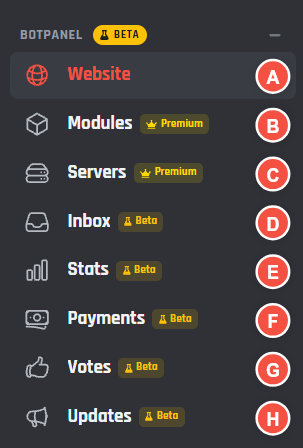
The BotPanel group in the sidebar
- A Website: build the site, pick its design and pages, and put it live.
- B Modules: choose which settings server admins can change, and make modules of your own.
- C Servers: the servers using your dashboard and what each one changed.
- D Inbox: messages, ideas and ban appeals from your website.
- E Stats: how your bot is used.
- F Payments: try selling your bot's own Premium with test sales, gifts and codes. Stripe is coming later in the beta.
- G Votes: top.gg rewards, reminders and top voters.
- H Updates: posts for your website and the servers that follow them.
Three parts
| Part | Who uses it | Where it is |
|---|---|---|
| The website | Anyone who finds your bot | <your bot's ID>.botghost.app |
| The server dashboard | Admins of the servers using your bot | The same site, after Sign in with Discord |
| Community features | Your bot's users, and you replying | Pages on the site, with their inbox in your dashboard |
Plans
| Free | Premium | Premium with BotPanel Plus | |
|---|---|---|---|
| A one page website | Yes | Yes, without the BotGhost line | Yes, without the BotGhost line |
| The full website, every page, six designs | No | No | Yes |
| Server dashboard | No | In 3 servers | In every server |
| Change log | No | 7 days | 90 days, with Undo |
| Inbox, Ideas, Ban appeals, Votes, Updates and Stats | No | No | Yes |
Plans has the full list.
BotPanel is in an open beta. Things are experimental and may break or not work as expected: press Report a bug on the yellow strip at the top of any BotPanel page and we will fix it as soon as we can. While the beta runs, Premium covers every BotPanel feature, including the ones that normally need BotPanel Plus. When it ends, those features need Plus again, and everything you built is kept.
Get started
- 1
Build the website
Open BotPanel > Website, pick a template and layout, then fill in the pages. The preview beside the settings shows each change.
- 2
Put it live
Press Go live at the top of the page. The site is up straight away at the address in the header.
- 3
Open the server dashboard (Premium)
Set up Sign in with Discord, choose who gets in, and pick the modules admins can change. Then share the website with the servers using your bot.
Every page
The website
- Website builder: the Website page, saving, going live and taking the site down.
- Templates and layouts: a one page site or the full website.
- Design: the six designs, colours and fonts.
- Navigation: the menu, the buttons and the footer.
- Address and domain: your botghost.app address.
- SEO and sharing: search results, tabs and link previews.
- Pages: Home, Features and About, Commands, FAQ and Docs, Status, Premium page, and Support and legal.
The server dashboard
- Server dashboard: turning it on and what each status means.
- Sign in with Discord and Who gets in.
- How it looks: layout, pages, fonts and colours.
- Modules, Make a module and Presets.
- Commands per server.
- Servers and the change log.
- Bot profile and Music.
- Using a bot's server dashboard: a guide to send to server admins.
Community features
- Inbox, Ideas and Ban appeals.
- Votes and Updates.
- Leaderboards and Discover and My account.
Your numbers