Features and About
The Features page, with a card and a page for each feature, and the About page with your story, your team, and your milestones.
Two pages tell visitors about your bot in your own words. Features has a card for each thing your bot does, and a page of its own for each feature you write more about. About has your bot's story, the people behind it, and how you got here.
Both are full website pages, so they need Premium with BotPanel Plus.
Features
Features shows once you add a feature. The same cards also fill the Features and Highlights sections of your home page (see Home).
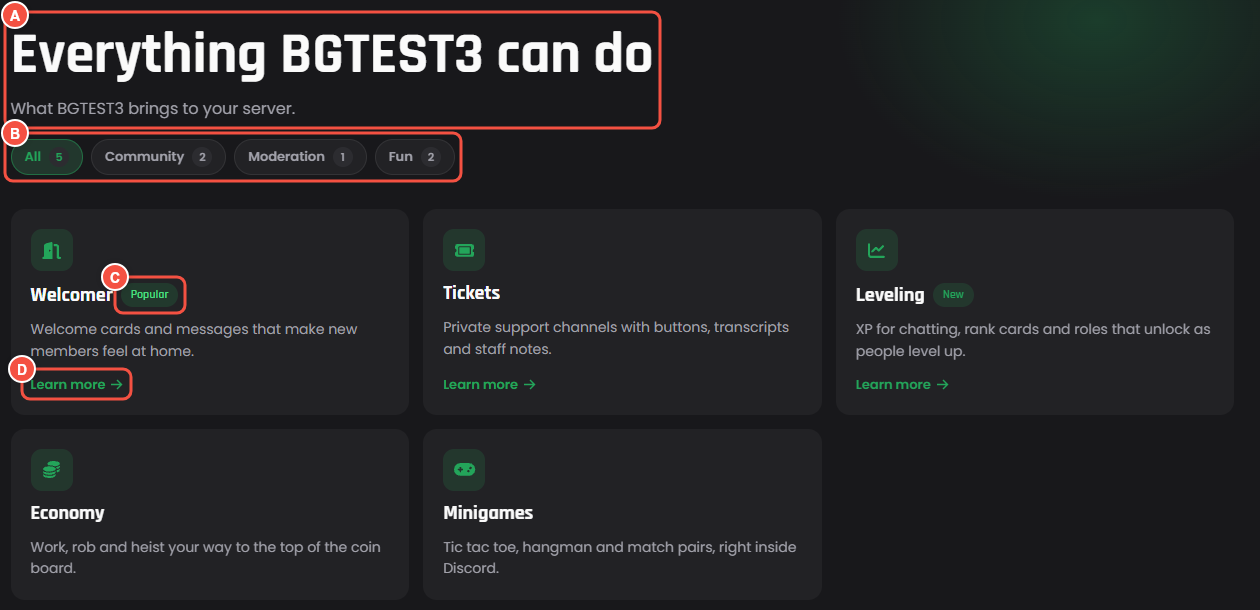
The Features page, as visitors see it
- A The title and the line under it.
- B The category chips filter the cards. They show once a feature has a category.
- C A badge on a card: New, Popular, or Premium.
- D Learn more opens the feature's own page. Only cards with something more to show have it.
Adding a feature
Press Add a feature and fill it in. You can have up to 12.
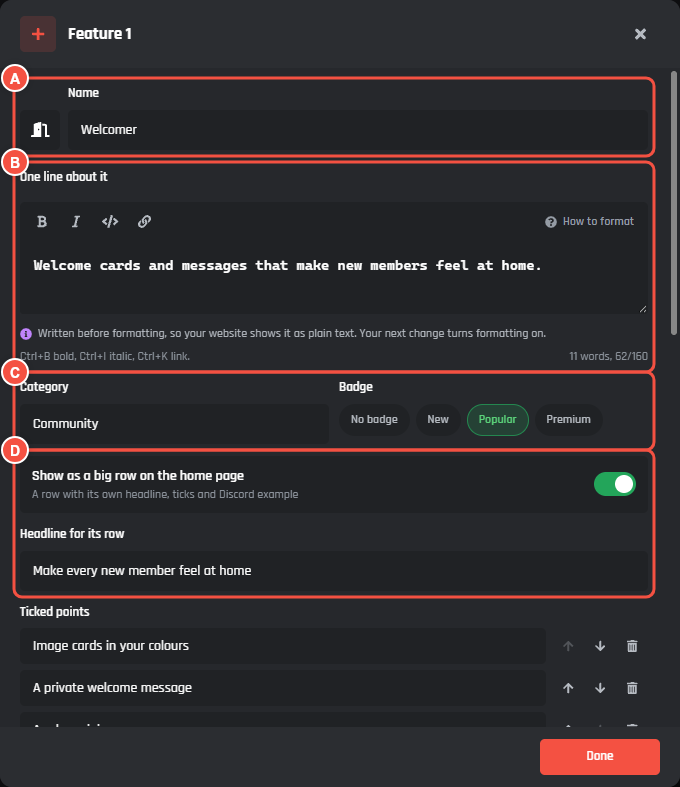
Pages > Features, with a feature open
- A The icon and Name, up to 40 characters.
- B One line about it: the line on its card, up to 160 characters. Bold, italic, code, and links work.
- C Category and Badge. A category you have used before is offered as you type.
- D Show as a big row on the home page, with Headline for its row. Up to 3 features can have one.
Every feature needs a name and a line about it. The rest is optional, further down the same window:
- Ticked points: up to 4 short lines with a tick, up to 80 characters each. They show on its big row and on its own page.
- More about it, for its own page: up to 2,500 characters, with headings, lists, and up to 4 pictures.
- Set it up in a minute: up to 3 steps, each with a Step (up to 40 characters) and What to do (up to 120).
- Beside it, at the end: what shows next to the feature on the home page and on its own page. See below.
Beside it
Show picks one of two:
- Discord preview: a message from your bot, drawn like Discord. Preview from picks where it comes from:
- Your Welcomer fills itself in from your Welcomer's welcome message, with New member in place of a name.
- Your ticket panel fills itself in from your first ticket panel and its ticket types.
- What you write: a message you write here, with a Channel, a Message, an Embed title, an Embed text, and up to 3 buttons in Discord's colours.
- A photo or GIF: upload a PNG, JPG, WebP or GIF up to 4 MB (GIFs keep moving), or paste an https link. What it shows describes it for people who cannot see it, up to 120 characters.
Until your Welcomer has a welcome message on, or Tickets is set up, those previews show a plain one with no made up names.
A feature's own page
Each feature with more to show gets a page at /features/ and its name, like /features/auto-mod. A feature has a page once it has more text, steps, a Discord example, or a photo. The page has the feature's icon, name, line, and ticked points, an Add to Discord button, what is beside it, the text you wrote, your steps, and up to 3 more features. While your server dashboard is on, it also has Set it up.
Top of the page
Title and Under the title. Empty, they say "Everything your bot can do" and "What your bot brings to your server.", with your bot's name.
About
About shows once you write your story, add a person, or add a milestone. Each part shows only when it has something in it. The footer links to it as About and team.
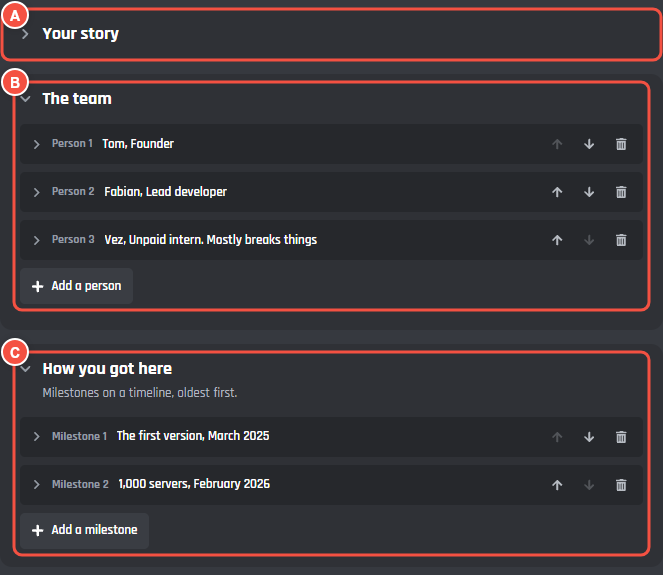
Pages > About
- A Your story: how your bot started and what it is for. Press it to open the editor. Up to 3,000 characters, with headings, lists, and up to 4 pictures.
- B The team: up to 12 people, each with a Name (up to 32 characters) and What they do (up to 60). Each person shows as a card with their initial.
- C How you got here: up to 8 milestones on a timeline, oldest first. Each has a Milestone (up to 60 characters), When (up to 30, like February 2026), and More about it (up to 200).
The page's title is "About" and your bot's name until you write your own in Title. Under the title is empty unless you write it.