Presets
Save named sets of values for a module, pick where new servers start, and let admins apply one in a click.
A preset is a named set of values for one module's settings, like "Strict" and "Relaxed". Server admins apply one on the dashboard, see what it changes, and save it like any other change. One preset per module can be where every new server starts. Presets need Premium.
Make a preset
In BotPanel > Modules, press Presets on a module's row. The presets window opens over the page. With none yet, press Make the first preset.
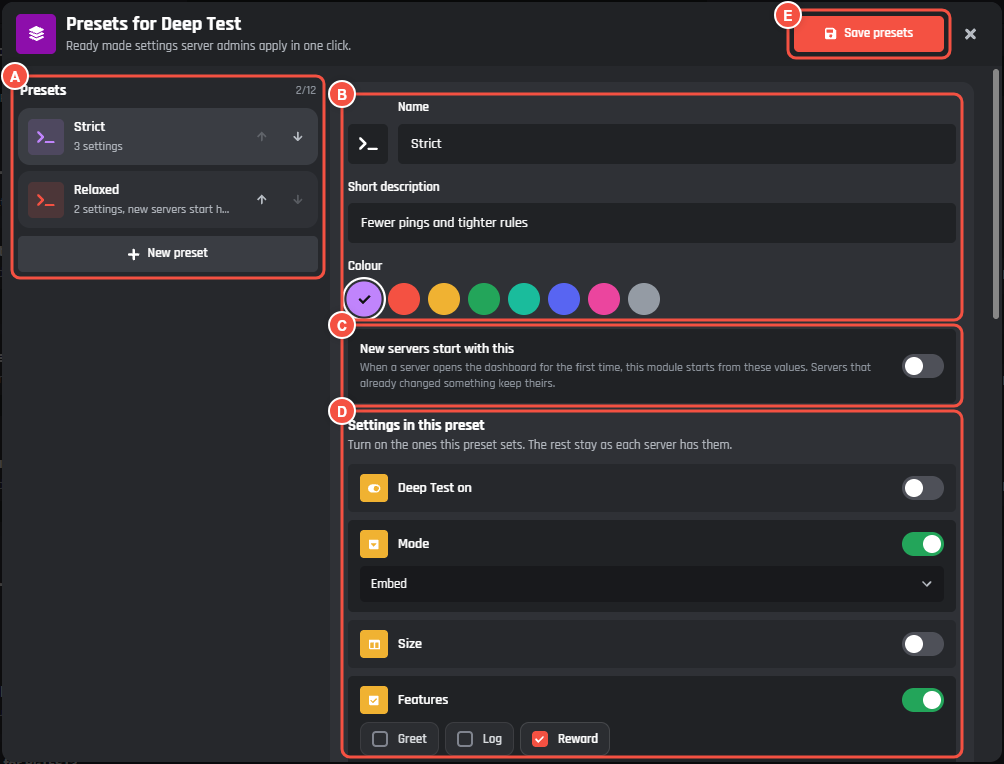
BotPanel > Modules > Presets
- A The presets, in the order servers see them, with the arrows to reorder them and New preset.
- B The preset's icon, Name, Short description and Colour.
- C New servers start with this.
- D Settings in this preset: a switch for each setting it can hold, with the value under it.
- E Save presets.
For each preset:
- Give it a Name, up to 40 characters, and a Short description of up to 120.
- Pick an icon and one of eight colours.
- Under Settings in this preset, turn on the settings it sets and pick their values. A switch picks Turns it on or Turns it off. The settings you leave off stay as each server has them. A value left empty gives servers the setting's starting value.
- Press Save presets.
A module has up to 12 presets, and a preset sets up to 40 settings. Delete preset asks Confirm? first. Closing with changes that aren't saved asks first.
What a preset can hold
Presets hold switches, text, numbers, choices, lists and messages. Channels, roles, members, pictures and lists of cards stay each server's own, because they are different in every server, and so does any setting that isn't saved in a variable. The window lists which of the module's settings stay each server's own.
A setting that Needs Premium can go in a preset: only servers with that Premium get it, and the rest keep theirs. A setting only some people may change can only be applied by people who may change it.
Where new servers start
Turn on New servers start with this on one preset. When a server opens the dashboard for the first time, the module starts from that preset's values. Servers that already changed something keep theirs. The row on the Modules page shows the preset count, and pointing at it shows which one new servers start with.
On the server's change log this shows as "Started from preset" with the preset's name. With BotPanel Plus, admins can undo it like any change.
The preset new servers start with writes into each new server's stored values, so a collaborator needs Manage stored data to pick it, change what it sets, or delete it. With Manage BotPanel alone they can edit the other presets.
What server admins see
A module with presets has Start from a preset at the top of its page on the dashboard.
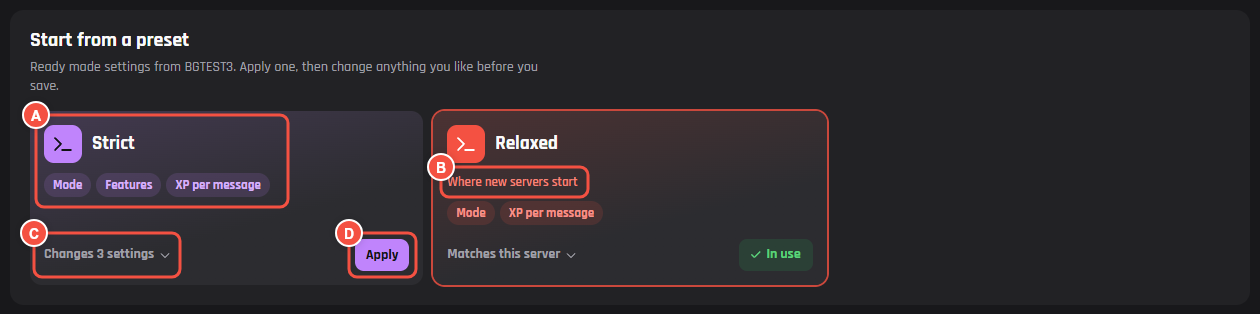
On your website: a module's page
- A A preset's tile, in its colour, with the settings it sets.
- B Where new servers start, on that preset.
- C Changes 3 settings opens what it would change: each setting from its value now to the preset's.
- D Apply puts the values on the page.
Applying never saves by itself. The page says "Strict is on the page. Press Save to keep it." and the admin can change anything before pressing Save. A preset that already matches the server says Matches this server and In use. Settings the admin can't change stay as they are, and the panel says how many.
The save logs one row, "Applied preset" with its name. With BotPanel Plus, Undo on that row takes back every setting it changed. See Servers and the change log.