Server dashboard
Let the servers using your bot change its settings for themselves, on your bot's website.
The server dashboard is part of your bot's website. A server's admins sign in with Discord, pick one of their servers, and change your bot's settings for that server only. They never see your BotGhost dashboard, your other servers, or another server's settings. Your bot uses a saved change straight away, with nothing to restart.
What each plan gets
| Free | Premium | Premium with BotPanel Plus | |
|---|---|---|---|
| Server dashboard | No | In 3 servers | Every server |
| Change log | No | 7 days | 90 days |
| Undo on the change log | No | No | Yes |
| Letting servers manage your commands | No | No | Yes |
On Premium, the 3 places go to the first 3 servers whose admins open the dashboard. A fourth server sees This dashboard is full until you free a place in BotPanel > Servers (see Servers and the change log). With Just my server, the dashboard opens in one server and takes no place at all.
Without Premium, Website > Dashboard shows Server dashboards need Premium and none of the setup.
Turn it on
- 1
Set up sign in
Server admins sign in through your bot's own Discord app. In BotPanel > Website, open the Dashboard tab and press Set up sign in. It takes two changes in the Discord Developer Portal. See Sign in with Discord.
- 2
Switch on the server dashboard
On the same tab, turn on the switch on the Server dashboard card, then press Save on the Save bar at the bottom of the page. It adds a Dashboard button to your website.
- 3
Pick what admins can change
In BotPanel > Modules, put BotGhost's modules on your website, or make your own. Each module is a page of settings on the dashboard. See Modules.
- 4
Put your website live
The dashboard opens once your website is live. See Your website.
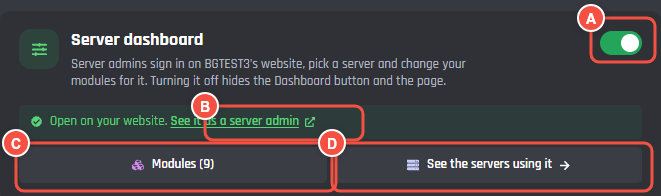
Website > Dashboard
- A The switch. Off hides the Dashboard button and every server's dashboard.
- B See it as a server admin opens your website's server list, so you can sign in and look at a server the way its admins do.
- C Modules opens BotPanel > Modules, with how many modules are on the dashboard.
- D See the servers using it opens BotPanel > Servers.
The line under the card says where things stand:
| The line says | What to do |
|---|---|
| Off. Your website has no Dashboard button and no server dashboards. | Turn on the switch. |
| On, but nobody can open it until Sign in with Discord is set up above. | Set up sign in. |
| On, but signing in fails: the redirect is missing in the Discord Developer Portal. | Add the redirect again. See step 1. |
| Ready. It opens once your website is live. | Launch your website. |
| Open on your website. | Nothing. Server admins can sign in. |
Where each part is set up
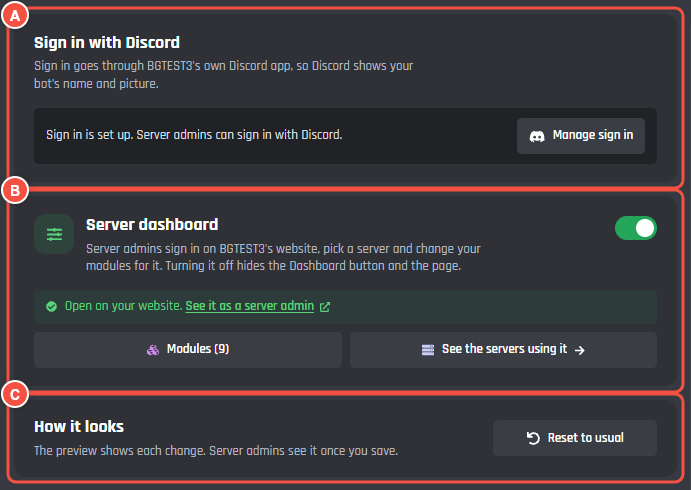
BotPanel > Website > Dashboard
- A Sign in with Discord, first on the tab, because nothing else works for server admins until it is set up.
- B Server dashboard, the switch and where things stand.
- C How it looks: the layout, pages, fonts and colours. Further down is Who can open server dashboards.
The preview beside the tab shows the sign in page until sign in is set up, then a server's dashboard made from your modules with their starting values. Saving is off in the preview.
| What | Where | Guide |
|---|---|---|
| Sign in with Discord | Website > Dashboard | Sign in with Discord |
| Who can open it | Website > Dashboard, Who can open server dashboards | Who gets in |
| How it looks | Website > Dashboard, How it looks | How it looks |
| What admins can change | BotPanel > Modules | Modules and Make a module |
| Ready made sets of values | BotPanel > Modules, Presets | Presets |
| Turning commands off per server | BotPanel > Modules, Let servers manage your commands | Commands per server |
| The servers using it, and what they changed | BotPanel > Servers | Servers and the change log |
| The bot's own profile in a server, and the Music panel | The server dashboard | Bot profile and Music |
To send your members a walkthrough, link them to Using a bot's server dashboard.
Collaborators need the Manage BotPanel permission to change any of this. Sign in also needs Manage secrets.