Servers and the change log
See every server using your dashboard, read what each one changed, free a place, reset a server, and undo changes.
BotPanel > Servers lists every server whose admins opened your dashboard, with everything each one changed. It needs Premium.
The header shows whether sign in is set up (Sign in ready or Sign in not set up), a button to your modules, and See it as a server admin. Under it, What server admins see draws the three steps they go through, with your first module.
The servers using your dashboard
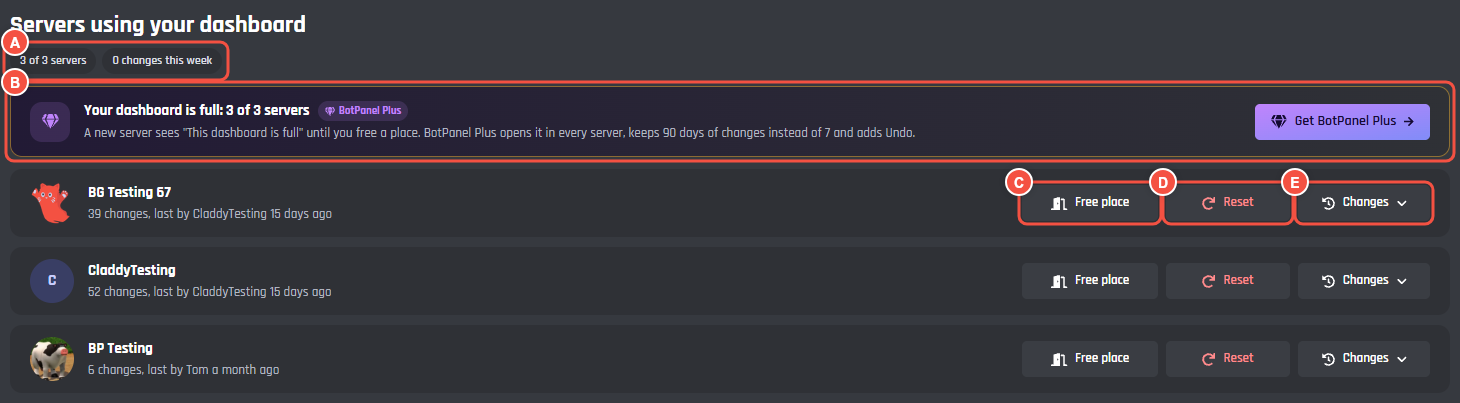
BotPanel > Servers
- A How many servers, like 2 of 3 servers on Premium, and the changes this week.
- B On Premium without Plus: how many places you have, and what Plus adds.
- C Free place gives that server's place back.
- D Reset puts every setting back to the defaults for that server.
- E Changes opens that server's change log.
The newest servers are at the top. Each row says how many changes it has and who made the last one, or when it was opened if nothing changed yet. With more than five servers, a search box finds one by name or ID.
Places on Premium
On Premium your dashboard works in 3 servers: the first 3 whose admins open it. Once they're taken, the strip says Your dashboard is full and a new server sees This dashboard is full until you free a place.
Free place asks Free it? first. The server leaves the list, and the next server to open the dashboard takes the place. The freed server's values stay where they are, so if it gets a place again it carries on where it left off.
A server opened while the bot had BotPanel Plus keeps its row when Plus ends. If it is past your 3 places, it is closed until you free another server's place or get Plus again.
With BotPanel Plus, there's no limit and no Free place button. Just my server takes no place.
Reset a server
Reset asks Reset all? first, then puts every setting the dashboard can change back to the default for that server. The server's change log shows "The bot owner reset this server".
The change log
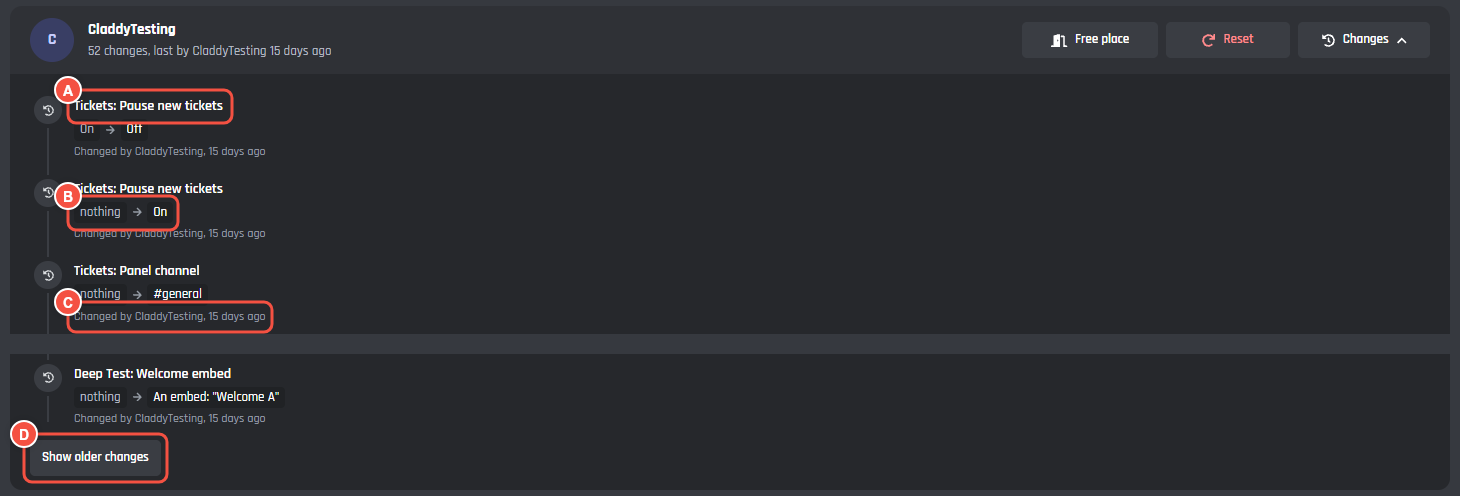
BotPanel > Servers, a server's Changes
- A The module and the setting.
- B The value before, and after.
- C Who made the change, and when. An undone change says ", later undone".
- D Show older changes loads the next 30.
Channels and roles show by name while your bot can still see them. You see every value, including settings only the server owner can change. Presets show as one row each, like "Applied preset Strict". Undos show as Put back, and resets as Reset to the defaults.
The log is kept 7 days on Premium, and 90 days with BotPanel Plus.
Collaborators need Manage BotPanel for this page. Without View stored data they see who changed which setting and when, without the values. Reset also needs Manage stored data.
On the server dashboard
Server admins see their own server's log on the Change log page, and the recent changes for a page at its foot. New websites start with the Change log page off: turn it on in How it looks.
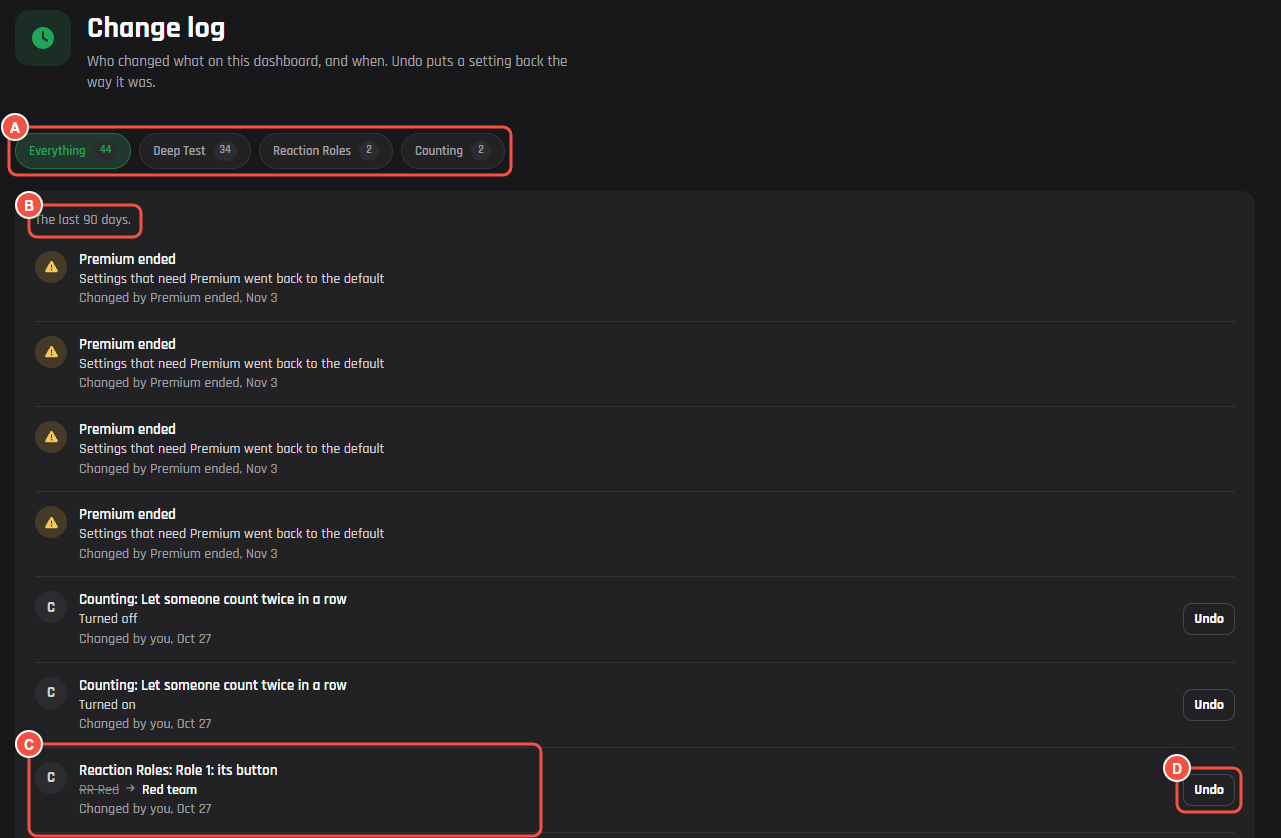
On your website: a server's Change log page
- A Show changes to: Everything, one module, or Commands, each with how many changes. Only modules with changes are listed, and the chips show once there are changes in two or more.
- B How long changes are kept, like "The last 90 days."
- C A change: the module and setting, the old value crossed out beside the new one (or words like "Turned on" and "Cleared, was 25"), and who changed it and when.
- D Undo.
Undo
Undo comes with BotPanel Plus. Anyone who can open that server's dashboard can press Undo on a change, then Undo it? to confirm. It puts the setting back the way it was before that change, and logs the undo too.
Some rows can't be undone: a reset by the bot owner, Premium ending, changes to who has access, and who can change a setting. Without Plus, the log says "Undo is not on for this bot".
See it as a server admin
See it as a server admin opens your website's server list in a new tab. Sign in with your own Discord account and open a server where you have Manage Server: you see exactly what its admins see. Anything you save there is real, goes to that server, and is logged under your name.