Bot profile and Music
Let a server give your bot its own nickname, picture, banner and about me, and show its music on your website.
Two parts of the server dashboard change how your bot shows up in one server: the Bot profile page, and the Music panel on the On the website page. Only people with Manage Server in that server see them, never people let in by a role, a permission or their ID. Both come with BotPanel Plus.
Bot profile
On the Bot profile page, a server's admins give your bot its own nickname, picture, banner and about me in their server. Every other server sees your bot as usual.
It is a perk of your bot's own Server Premium: you pick which parts each tier gives in BotPanel > Payments, and a higher tier has everything a lower one has. The page shows on the dashboard when Bot profile is on in How it looks.
The page has:
- Nickname: shown in the member list and on its messages in this server, up to 32 characters. Empty uses the usual name.
- Picture and Banner. A square picture works best for the picture, and about 5 by 2 for the banner. Animated pictures are kept still.
- About me: a line on its profile card in this server, up to 190 characters and 6 lines, with no
@everyone,@hereor pings. - A preview of the bot in the member list, on a message, and on its profile card, as it will look.
- Reset to default, which puts your bot's usual profile back in this server. It asks Reset it? first.
Saving sends the change to Discord straight away: "Saved. Discord shows it in a moment." The picture and banner can change 3 times an hour, and when Discord asks for a wait, the page says how long.
A part the server's tier doesn't give is locked, with a link like "Premium+ or higher needed to change this" that opens that tier. With no part unlocked, the page offers your lowest tier that gives one.
When a server's Premium ends or drops below a part's tier, or you turn the perk off, that part goes back to your bot's usual profile within a few minutes. Every profile change shows on the server's change log, and with BotPanel Plus it can be undone there.
Music panel
Your website's Music page shows what your bot is playing in a server, with its queue and controls. You add and set up that page in Pages, including who can see it and who can use the controls. The server dashboard is where each server decides whether its music shows.
The Music panel is on the dashboard's On the website page, which shows when the Leaderboard page or On the website is on in How it looks. It starts on in every server.
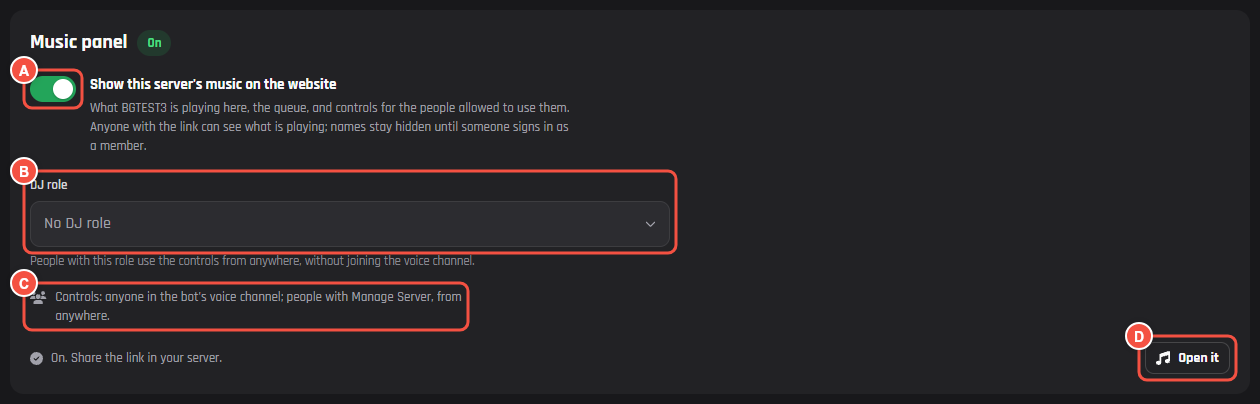
On your website: a server's On the website page
- A Show this server's music on the website. Off, the server's music isn't on your website.
- B DJ role: people with it use the controls from anywhere, without joining the voice channel. It shows when your Music page lets a DJ role control the music.
- C Who can use the controls in this server, like "Controls: anyone in the bot's voice channel; people with Manage Server, from anywhere."
- D Open it opens this server's music on your website. Share the link in your server.
Changes here save with the panel's own Save, and Cancel throws them away.