Address and domain
Your website's botghost.app address, how to copy and open it, and own domains.
Your botghost.app address
Every bot's website is at its own address: your bot's ID, then .botghost.app. A bot with the ID 1283303475681431674 has its site at 1283303475681431674.botghost.app. The address is there from the start and never changes, but nobody can open your site until you press Go live.

The top of BotPanel > Website
- A Your website's address.
- B Copy puts the full address, with
https://, on your clipboard. The button says Copied. If your browser doesn't allow copying, it says Select it: select the address and copy it yourself. - C Your own domain opens the own domain window.
- D Open website opens your live site in a new tab. It only shows while the site is live.
The preview on the right of the page shows the same address in its address bar.
It's a normal web address. Put it in your bot's Discord profile, in your support server, on your top.gg page, or anywhere you list your bot. Every page of your site sits under it, like 1283303475681431674.botghost.app/commands.
Your own domain
Own domains are built and open after the beta. Until then, the Your own domain button and card say own domains aren't switched on yet, and your botghost.app address keeps working.
With your own domain, your website shows on an address you own, like ghostbuddy.gg, in place of the botghost.app one. The padlock (HTTPS) is set up for you, and anyone who opens your botghost.app address is sent to your domain.
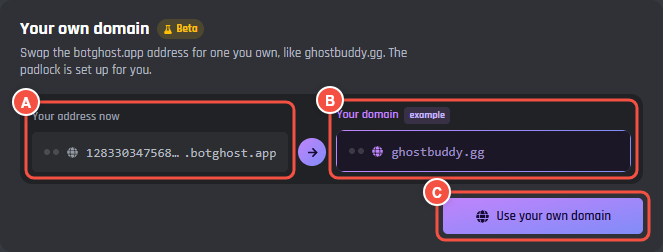
Website > Design > Your own domain
- A Your address now: your botghost.app address.
- B An example of your own domain in its place.
- C Use your own domain opens the own domain window. While own domains aren't switched on, the button says See how it works.
The card is on the Design tab, under Layout. Own domains will be part of BotPanel Plus, and only the bot owner will be able to add or remove one.