Votes
Connect top.gg so your bot rewards the people who vote for it, reminds them to vote again, and shows its top voters on your website.
BotPanel > Votes connects your bot's top.gg page to BotGhost. Each time someone votes on top.gg, your bot can reward them, DM them 12 hours later when they can vote again, and keep count of their votes and streak. Your website's Vote page sends people to top.gg and shows them their own streak.
Votes come with BotPanel Plus. See Plans. Visitors only need sign in to see their own countdown and streak on the Vote page.
Only the bot's owner can set up votes. Collaborators see a note instead, and can still build Top.gg Vote events in Custom Events.
The page has four tabs: Setup, Rewards, Reminders and Stats. It opens on Setup until top.gg is connected, then on Rewards.
Connect top.gg
You need your bot listed on top.gg and access to its Edit page there.
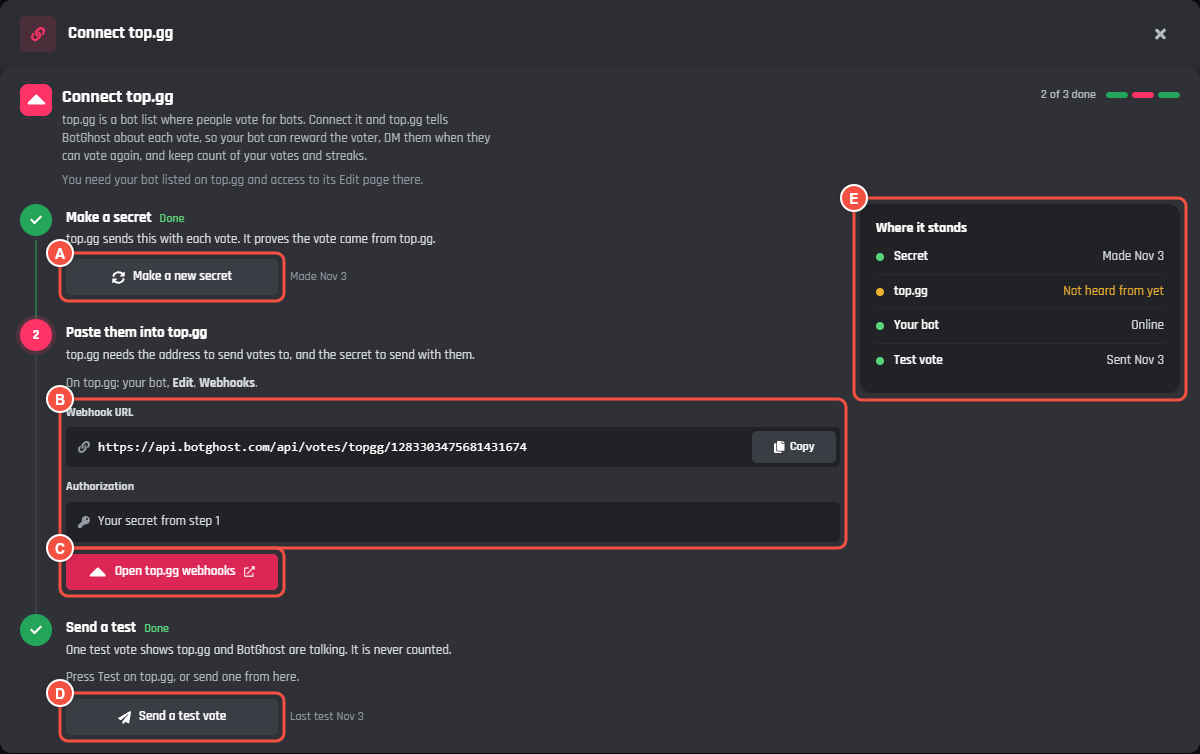
BotPanel > Votes > Setup, Connect top.gg
- A Make a secret, or Make a new secret once you have one. The secret shows once, so copy it straight away.
- B Webhook URL with Copy, and Authorization, which is your secret from step 1.
- C Open top.gg webhooks opens your bot's webhook settings on top.gg.
- D Send a test vote opens the test window.
- E Where it stands: your secret, when BotGhost last heard from top.gg, whether your bot is online, and your last test.
- 1
Make a secret
On the Setup tab, press Connect top.gg, then Make a secret. top.gg sends the secret with each vote, which proves the vote came from top.gg. Copy it now: it only shows once.
- 2
Paste them into top.gg
On top.gg, open your bot, then Edit, then Webhooks. Paste the Webhook URL from BotGhost, and paste your secret into Authorization. Save it on top.gg.
- 3
Send a test
Press Test on top.gg, or Send a test vote in BotGhost. In the test window, Who votes takes a Discord user ID. Leave it empty to vote as yourself. Switch on Weekend vote to try a weekend vote.
A test runs your vote events for real, so your bot has to be online. Tests never count toward your numbers.
The badge in the header says Not set up, Waiting for top.gg or Connected. It turns to Connected once top.gg sends its first vote or test. A test sent from BotGhost runs your events but doesn't prove top.gg can reach you.
Make a new secret replaces your secret. top.gg stops reaching BotGhost until you paste the new one there, so the button asks you to press again first.
Rewards
The Rewards tab sets what a voter gets. Each reward runs on every vote.
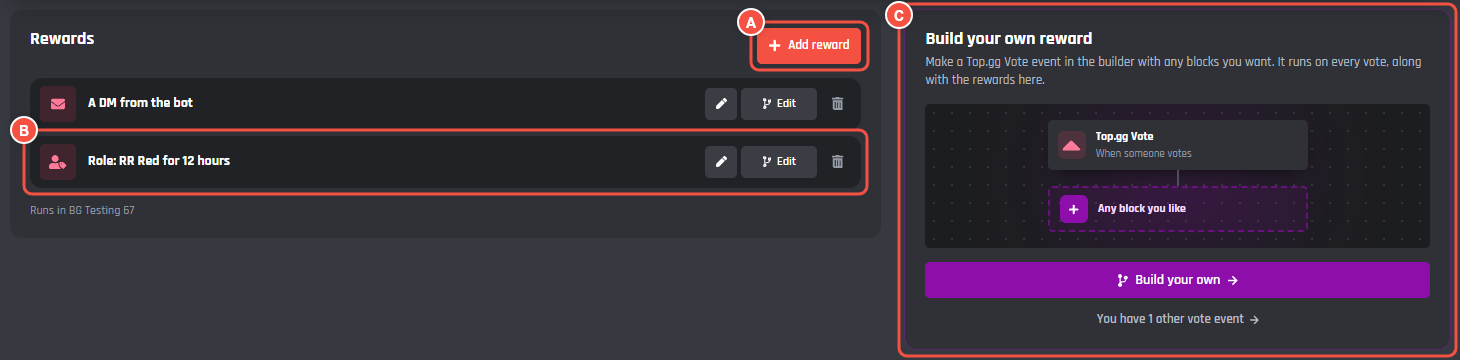
BotPanel > Votes > Rewards
- A Add reward opens the reward picker. With no rewards yet, the tab shows the five kinds straight away.
- B A reward with what it does. Change (the pen) changes it here, Edit opens it in the builder, and Remove (the bin) takes it out after a second press.
- C Build your own reward: a Top.gg Vote event in the builder, with any blocks you want. It runs on every vote, along with your rewards.
| Reward | What it does |
|---|---|
| Give a role | Gives a role in the server you pick. For a while takes it back after the time you set. Theirs to keep leaves it. |
| Add coins | Adds an amount to a member number variable for every vote. Double at weekends doubles it, the way top.gg counts weekend votes double. |
| Say thanks | Posts your message in a channel. |
| Send a DM | DMs your message to the voter. |
| Streak bonus | Adds a bonus to a member number variable every so many votes in a row. |
Coins and streak bonuses need a member number variable. If your bot has none, Make a Coins variable makes one.
BotGhost keeps your rewards as blocks in a normal Top.gg Vote event called Vote rewards, so press Save Changes on the bar at the bottom after adding or changing one. All your rewards run in one server, shown under the list.
A reward can show a warning:
- Not joined to the event, so it never runs: its block isn't connected to the event in the builder.
- Off: the block is switched off.
- Changed in the builder: you edited it in the builder, so Change is gone from its row. Edit still opens it.
Reminders
The Reminders tab sends a DM 12 hours after a vote, when the voter can vote again.
- Send reminders turns them on.
- The message is the DM, up to 400 characters. The buttons under it add
{user},{botpanel.vote_link},{botpanel.vote_count}and{botpanel.vote_streak}. When people can sign in on your website, the bot adds a line under the message with a link to turn reminders off. - Your vote link is the link
{botpanel.vote_link}uses. Leave it empty to use your bot's top.gg page. - Show top voters on your website puts names and pictures on your Vote page. It starts off.
Press Save when you're done.
Stats
The Stats tab shows Today, Last 30 days, People who voted and All time votes, a chart of votes per day over the last 30 days, Top voters (This month or All time), and Recent votes. Test votes aren't counted.
top.gg lets someone vote once every 12 hours. A vote within 36 hours of their last one keeps their streak going.
The Vote page on your website
The Vote page shows once you add Your bot's top.gg page in Website > Pages > Vote.
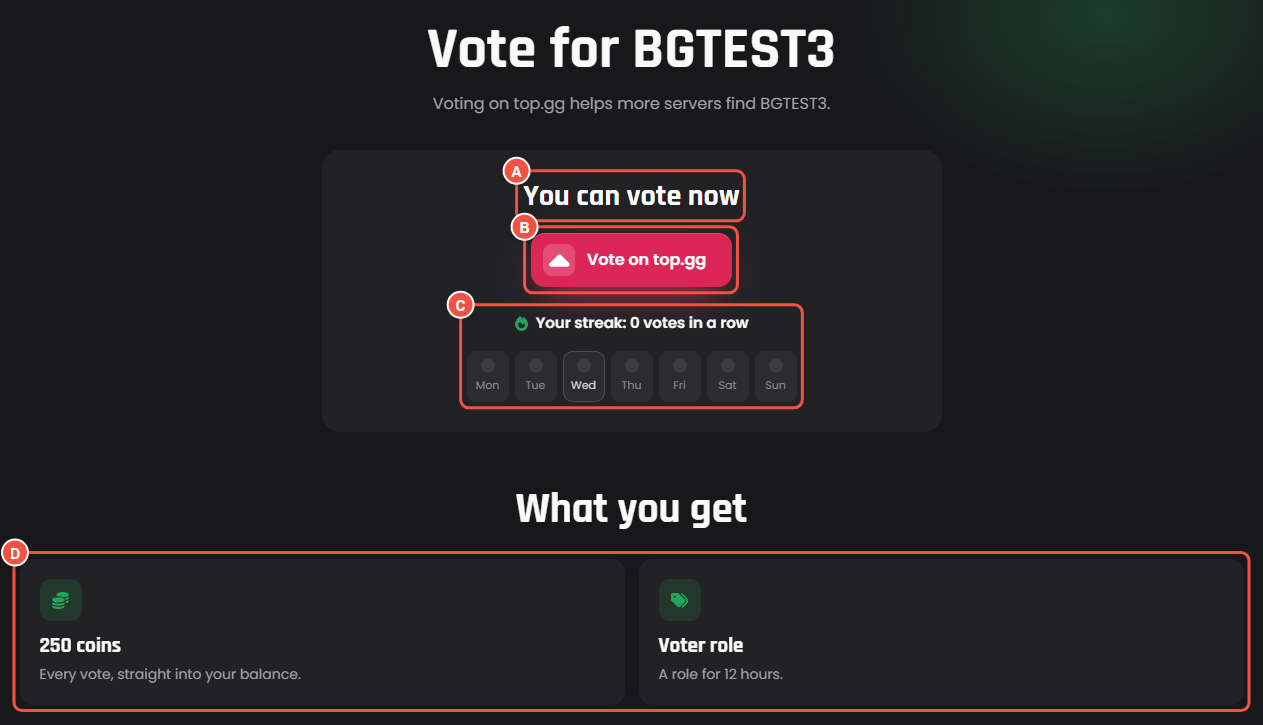
The Vote page on your website, signed in
- A You can vote now, or You can vote again in with a countdown.
- B The button that opens top.gg, like Vote on top.gg.
- C Your streak, like "0 votes in a row", over the days of this week, with the days they voted lit up.
- D What you get: a card for each reward.
Once they have voted and your reminders are on, the card also has a DM me when I can vote again switch. With Show top voters on your website on, Top voters lists the top 10 for This month and All time under the card.
Visitors who aren't signed in see the button, "Opens top.gg in a new tab. You can vote again every 12 hours.", and Sign in to see your streak.
In Website > Pages > Vote you also set:
- The page's title and intro.
- Button colour: top.gg's pink, Your site's colour, or Pick one.
- What voters get. Your rewards make cards by themselves. You can hide one or put it in your own words, and Add your own card adds a card with a title of up to 40 characters and up to 120 characters under it.
The Top.gg Vote event
When someone votes for the bot on top.gg runs for each vote. Press Events and variables in the page header, then Build. The builder asks which server the event runs in.
| Variable | What it holds |
|---|---|
{botpanel.vote_user} |
The voter, as a mention |
{botpanel.vote_user_id} |
The voter's Discord ID |
{botpanel.vote_user_name} |
The voter's name |
{botpanel.vote_weekend} |
true for a weekend vote |
{botpanel.vote_count} |
Their total votes |
{botpanel.vote_streak} |
Their vote streak |
{botpanel.vote_month_count} |
Their votes this month |
{botpanel.vote_next} |
When they can vote again |
{botpanel.vote_link} |
Your vote link |
{botpanel.vote_test} |
true for a test vote |
These work in any command or event:
| Variable | What it holds |
|---|---|
{botpanel.member_votes} |
How many times this member voted for the bot on top.gg |
{botpanel.member_vote_streak} |
Their streak: votes no more than 36 hours apart. 0 once it ends. |
{botpanel.member_last_vote} |
When they last voted, as a Discord timestamp, or never |
{botpanel.member_can_vote} |
true when they can vote again |
Try this in a Send or Edit a Message block:
Thanks {botpanel.vote_user}! That's vote {botpanel.vote_count}, and your streak is {botpanel.vote_streak}. Vote again {botpanel.vote_next}.
On Tom's twelfth vote, with three in a row, he reads "Thanks @Tom! That's vote 12, and your streak is 3. Vote again", followed by when his next vote opens.