Status
A page that shows whether your bot is online, with a note for visitors, its numbers, and past problems.
The Status page tells visitors whether your bot is working, so nobody has to ask in your support server. It fills itself in from your bot: whether it is online right now, how many servers it is in, and how many commands it has. You can add a note, choose which numbers show, and list past problems.
Status is a full website page, so it needs Premium with BotPanel Plus. It needs nothing else: it shows as soon as it is switched on.
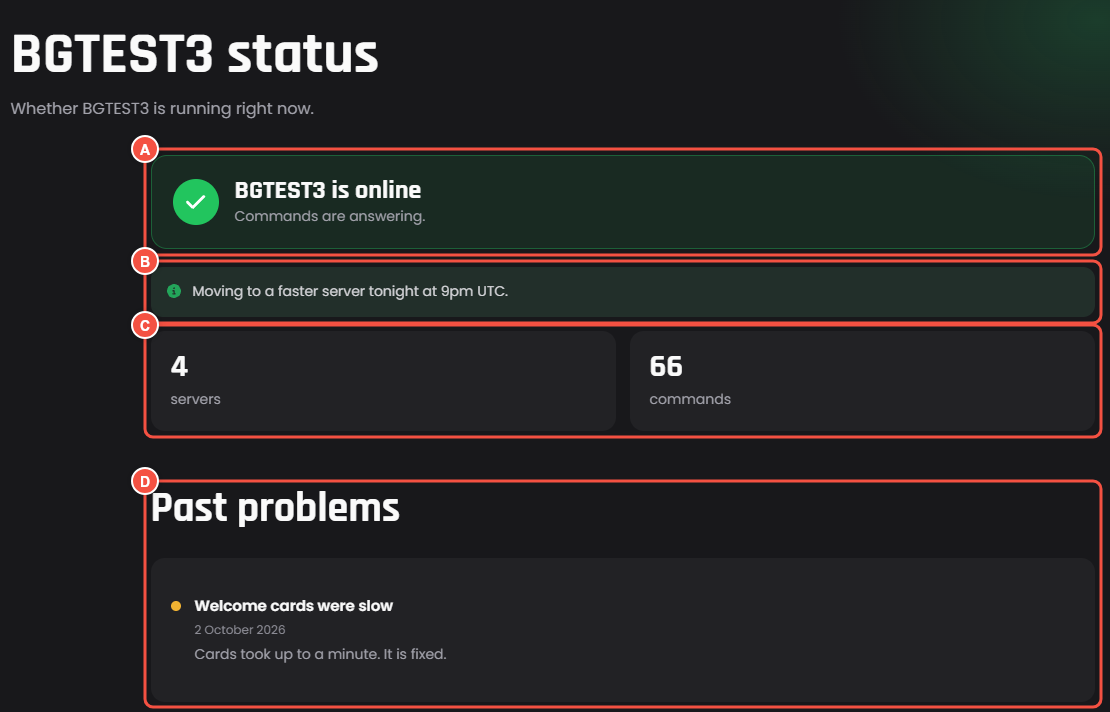
The Status page, as visitors see it
- A Whether your bot is online right now. Online says "Commands are answering." Offline says it will be back soon, and points to your support server when you have one.
- B Your note for visitors.
- C The numbers you picked.
- D Past problems, on a timeline.
With Time online over the last 90 days switched on, the page also shows Time online: a bar for each of the last 90 days, in UTC. Hover over a bar to see that day.
The settings
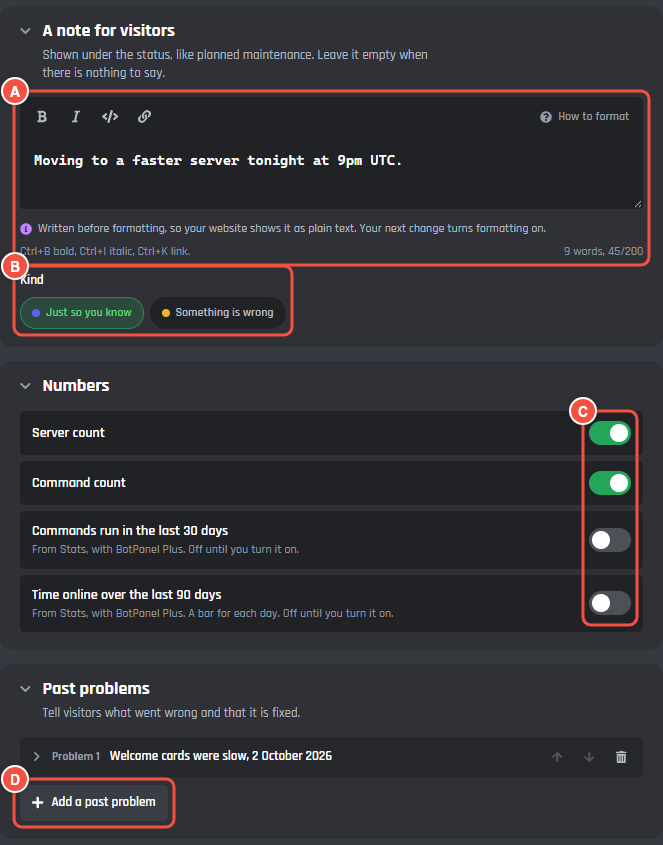
Pages > Status
- A A note for visitors: shown under the status, like planned maintenance. Up to 200 characters, with bold, italic, code, and links. Leave it empty when there is nothing to say.
- B Kind: Just so you know for news like maintenance, or Something is wrong, which shows the note in amber with a warning sign.
- C Numbers: which numbers show.
- D Add a past problem adds a problem to the timeline.
Numbers
| Switch | Starts | What it shows |
|---|---|---|
| Server count | On | How many servers your bot is in |
| Command count | On | How many commands your site lists |
| Commands run in the last 30 days | Off | From Stats |
| Time online over the last 90 days | Off | Your uptime as a percentage, and the bars for each day |
The last two come from Stats, so only the bot's owner can turn them on. A collaborator sees them greyed out. Time online starts counting from the first day Stats counted your bot.
Past problems
Tell visitors what went wrong and that it is fixed. You can list up to 6. Each has:
- What happened: up to 60 characters, like "Welcome cards were slow".
- When: up to 30 characters, like 2 October 2026.
- More about it: up to 300 characters, with bold, italic, code, and links.
- Only slow, not down: shows the problem in amber instead of red.
Top of the page
Title and Under the title. Empty, the title is your bot's name and "status", and the line says "Whether your bot is running right now.", with your bot's name.
Good to know
- Online or offline comes from your bot itself. You never set it by hand.
- The note stays until you clear it. Empty the field and save when the work is done.
- Turning off Server count or Command count here does not change the numbers on your home page. Those are set in the Numbers section of the Home page.