Premium page
The Premium page on your bot's website, with your plans, a Compare plans table, and questions about paying.
The Premium page shows the Premium plans you sell for your bot, a table comparing Free with each plan, and answers to questions about paying. The plans come from BotPanel > Payments.
Selling your own Premium opens later. Until it does, the Premium page stays off your live site, whatever its switch says. You can get its words, its table, and its questions ready now.
The Premium page needs Premium with BotPanel Plus, the full website, and sign in with Discord set up on the Dashboard tab.
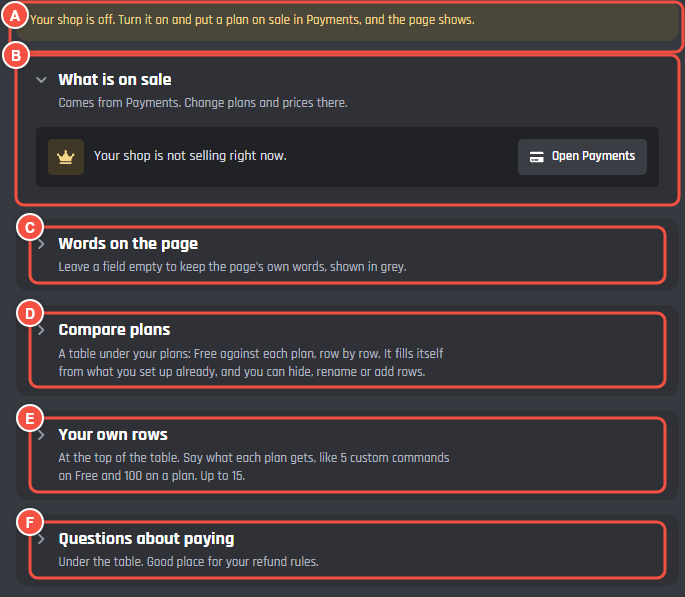
Pages > Premium
- A What keeps the page off your site, in amber. While selling is closed, it says your shop is off.
- B What is on sale: the plans on sale from Payments. Until selling opens, it says Your shop is not selling right now. Open Payments takes you there.
- C Words on the page: the page's title and the words under it.
- D Compare plans: open it for Show the table and the table's rows.
- E Your own rows: rows you add at the top of the table.
- F Questions about paying: open it for Write your own.
What visitors will see
Once selling opens, the page has:
- Your title and intro.
- Your plans, each with its name, its price, its perks, and a button to get it.
- Compare plans: a table of Free against each plan, row by row. With plans for both servers and members, visitors switch between For servers and Just for you. With monthly and yearly prices, they switch between Monthly and Yearly and see how much yearly saves.
- Questions about paying.
Words on the page
- Page title: up to 80 characters. Empty shows your bot's name and "Premium".
- Intro under the title: up to 1,000 characters, with headings, lists, bold, and links, but no pictures. Empty shows a line that fits what you sell, like "More from Vez, for your whole server or just for you."
Compare plans
The table sits under your plans. Turn off Show the table to leave it out.
The rows fill themselves in from what you have set up, in three kinds:
- Perks: the perks of your plans in Payments.
- Commands: commands you marked Needs Premium in the command builder.
- Dashboard settings: settings from the Module Maker that need a Premium tier.
Each row shows which plan it starts from. A row no plan on sale has yet says so and stays out of the table. To change a row:
- Type a new name in its box. Leave it empty to keep the name in grey.
- Press the eye to hide it from the table, and again to show it.
Under the list, a line says how many rows show, like 12 of 15 shown.
Your own rows
Your own rows go at the top of the table, up to 15. Each has a Row name, Who gets it (Everyone, Free too, or a plan and up), and What each gets in each column, like 5 on Free and 100 on a plan. An empty cell shows a tick where the row is included and a dash where it is not. You can add your own rows once a plan is on sale.
Questions about paying
Under the table. To start with, the page shows ours: how to get Premium, cancelling, and monthly or yearly. Write your own swaps them for questions you can change, up to 6. Each has a Question (up to 120 characters) and an Answer (up to 600, with formatting but no pictures). It is a good place for your refund rules. Use ours instead goes back to ours.
Saving
The words, the table, and the questions save with the Save bar at the foot of the page, like every other page. Plans and prices are changed in Payments, not here.