Discord moderation bot
Warnings, timeouts, and bans, with a log of every case.
Switch on the Moderation module and your bot gets 26 slash commands to warn, time out, kick, and ban members, clear messages, and lock channels. Every punishment gets a case number and a DM to the member saying why, and it goes in your log channel if you turn logging on. You build it in BotGhost, the Discord bot maker, and we host it.
The Moderation module is free. Managing Discord's AutoMod through your bot needs Premium.

Discord moderation commands
The module has 26 slash commands. Every command has its own switch on the Moderation page, so if your server has no voice channels, turn the voice ones off.
Bans and kicks
/ban addBan a member/ban tempBan someone for a set time/ban removeLift a ban by user ID/kickKick someone from the server
Timeouts and warnings
/mute addTime a member out for a set time/mute removeEnd a timeout early/warnWarn a member, with a reason
Cases, notes, and history
/case viewSee the details of a case/case removeDelete a case/note addAdd a moderator note to a member/note viewRead a member's note/note removeDelete a note/user historySee a member's moderation history/user clear-historyWipe a member's historyAdmin only
Channels and messages
/purgeDelete a batch of messages/slowmodeChange a channel's slowmode/channel lockStop everyone sending messages in a channel/channel unlockLet them send messages again
Roles, nicknames, and voice
/role addGive a member a roleAdmin only/role removeTake a role awayAdmin only/role tempGive a role for a set timeAdmin only/user nickChange a member's nickname/voice deafDeafen and mute someone in voice/voice undeafUndo it
Server info
/pingCheck the bot's ping/server-infoPost some info about your server
Bans, kicks, timeouts, warnings, and voice punishments all get a case number. If someone asks why they got muted last week, /case view pulls it up, and /user history lists every case on them.
Set up the Moderation module
- 1Make your bot and add it to your server. If you've never done that, follow How to make a Discord bot first.
- 2Open Modules in the dashboard and find Moderation in the list. Click it and press Enable.
- 3Scroll to Command Settings to say who's allowed to use the commands. Switch on Enable Moderation Logging and a channel picker shows up.
With Default Permissions on, anyone with Manage Messages can use the moderator commands, and anyone with Administrator can use the admin ones. To decide for yourself, add roles to Admin Roles and Moderator Roles.
Put your bot's role above the roles of the people it'll punish, or Discord won't let it ban or time them out.
The Moderation module in the docs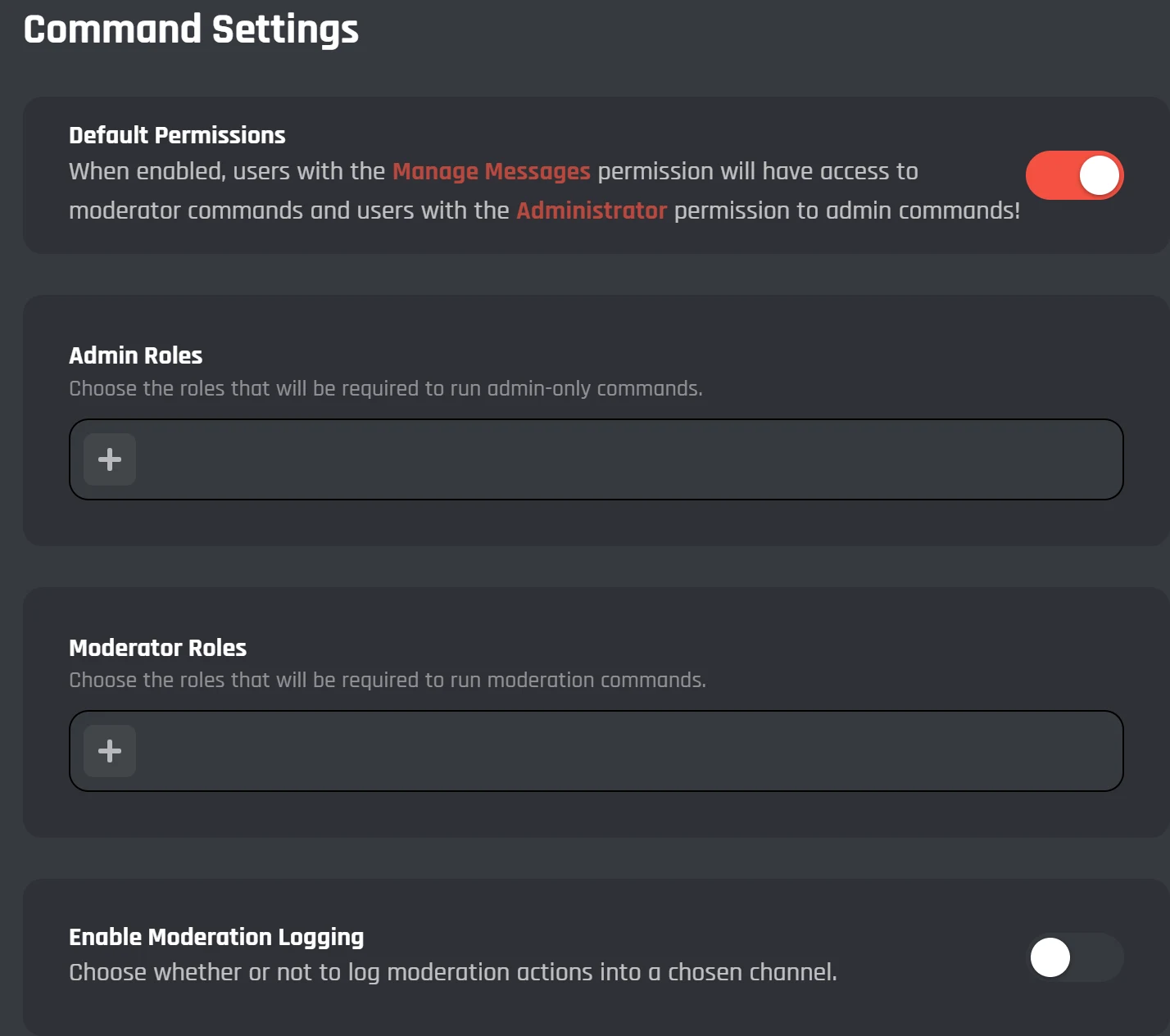
Tell members why they were punished
With Send Direct Messages on, the bot DMs each member it punishes. It sends a default message until you write your own.
- Send it as plain text or as an embed, up to 2,000 characters.
- Drop
{action},{moderator},{time},{case}, or{reason}into your message and the bot fills each one in. - There are two colour settings: one for the punishment message in the channel, one for the log.
- Ban: Delete Messages clears a banned member's recent messages too.
Automatic punishments for repeat rule breakers
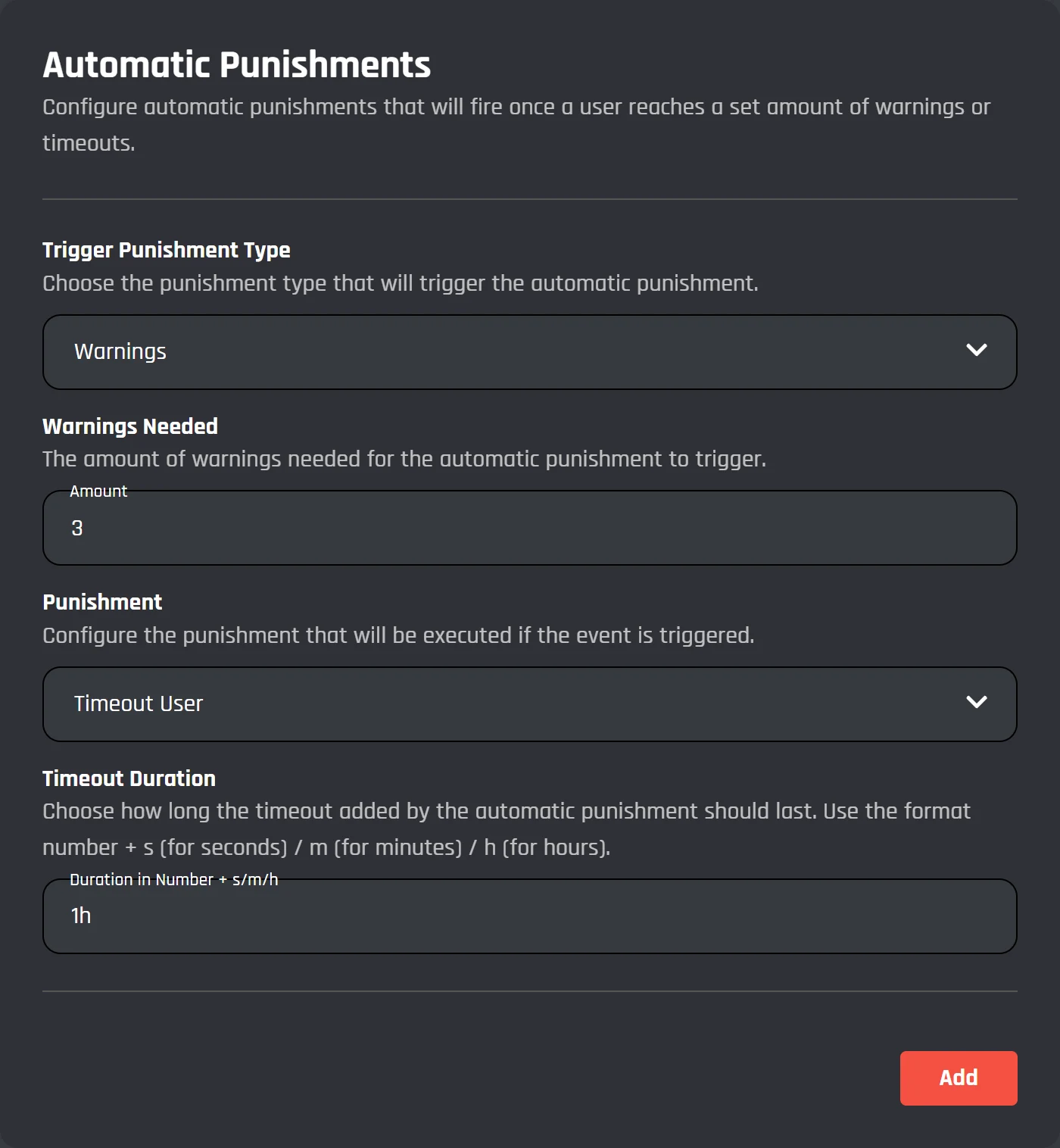
The bot counts each member's warnings and timeouts. When someone reaches the number in one of your rules, it gives them the punishment that rule sets.
- 3 warningsTimeout for 1 hour
- 6 warningsKick
- 3 timeoutsBan
A rule watches warnings or timeouts. The punishment at the end can be a timeout, a kick, or a ban. For a timeout you type the length as a number and a letter, so 30m is half an hour and 1h is an hour (s works for seconds). Press Add to save a rule, then set up the next.
Discord AutoMod rules from your bot
The Discord Automod module makes rules in Discord's built-in AutoMod for you. Discord blocks the message before anyone sees it and shows the member the message you wrote. It needs Premium.
- /discord-automod creates a filter: name the rule, add the words to block, and press Create Rule. The same command deletes a filter.
- Choose which roles can make and delete rules, and which roles and channels the rules skip.
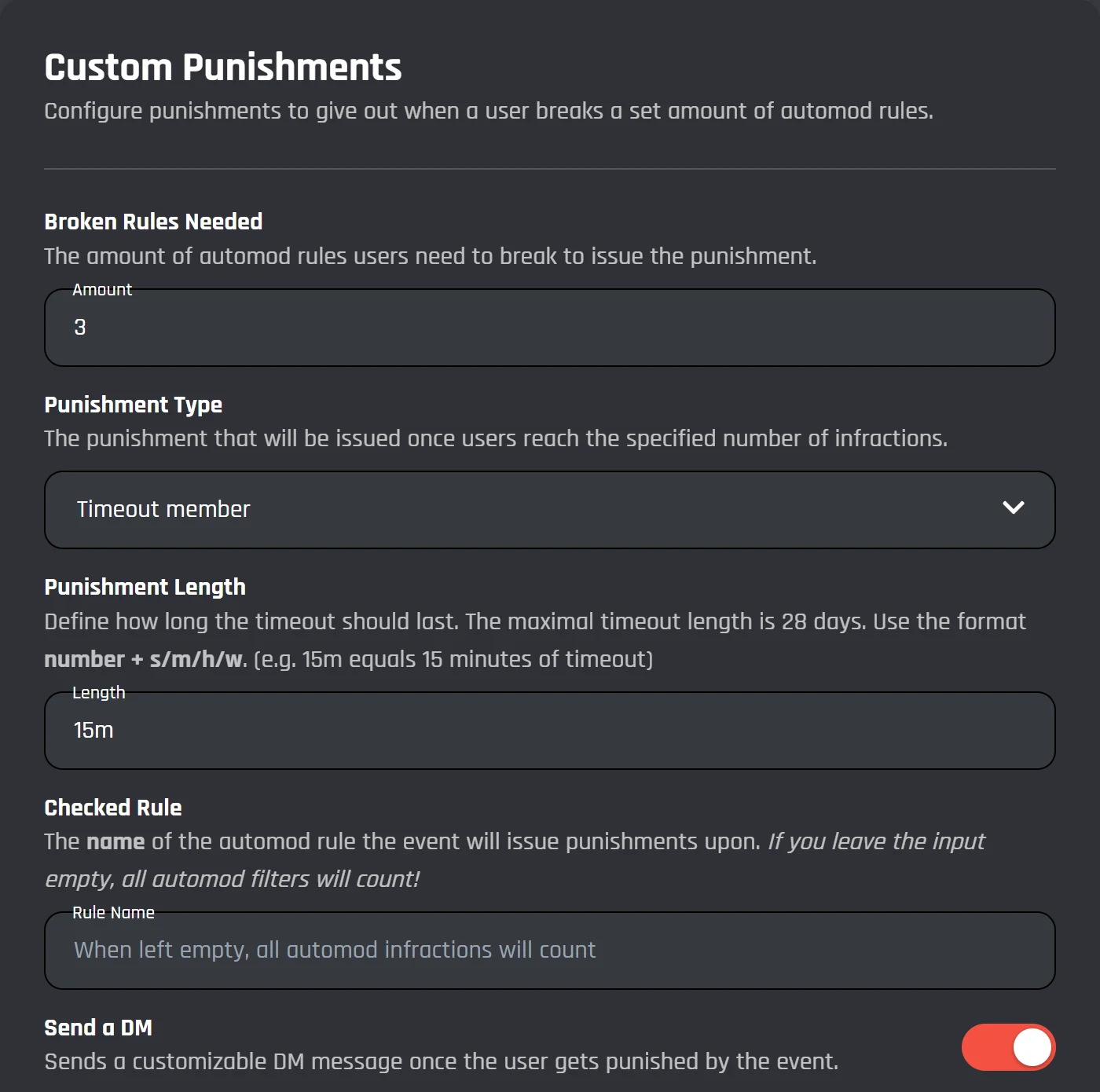
- Once a member has broken your chosen number of rules, the bot can time them out (for up to 28 days), kick them, or ban them, with a DM if you like. It can watch one rule by name, or all of them.
Build your own moderation rules with blocks
The punishments are blocks in the Discord bot command builder too: Ban a Member, Kick a Member, Timeout a Member, Purge Messages, and Delete a Message. Join them to an event like When a new message is sent and you can make rules the module doesn't have.
To get AI to check messages, add the Send an API Request block and pick a template:
- Check a message for harmful content
- Does this break the rules? (AI judge)
- Toxicity score (Perspective API)
The AI only sends back an answer. You decide what happens with a Comparison Condition, so the bot only deletes a message the AI flagged. Save your API key in Secrets (5 on the free plan). More AI blocks are on the AI Discord bot page.
That's Dax's third warning, so a "3 warnings: timeout for 1 hour" rule times him out.
A case log for every member
Every punishment takes the next case number, and with logging on it's posted in your log channel. Case numbers count up across everyone, so if Dax gets cases 12, 15, and 19, other members got the ones in between.
- /user history lists every case on a member, so a new mod can see what happened before they joined.
- /case view pulls up one case by its number, and /case remove deletes one that was a mistake.
- /note add leaves a note on a member for your mods, and /note view reads it back.
Free moderation bot, or Premium
The whole Moderation module is free, and its commands don't use up your 3 custom commands. Premium adds the Discord Automod module and removes the free plan's limits on commands, events, and servers.
| Feature | Free | Premium |
|---|---|---|
| Moderation module: all 26 commands, logs, DMs, and automatic punishments | Included | Included |
| Discord Automod module: /discord-automod and its punishments | Not included | Included |
| Your own moderation commands and events | 3 commands, 3 events | Unlimited |
| Send an API Request block with the AI moderation templates | Included | Included |
| Secrets for API keys | 5 | 50 |
| Servers | 5 | Unlimited |
Free bots switch off after 2 days without activity. How hosting works
Discord moderation bot questions
Something else? Ask in the BotGhost Discord, or read the Moderation module docs.
It's the bot your mods use to deal with people breaking the rules. They ban, kick, warn, and time out members with slash commands, and the bot writes each one down and posts it in a log channel. On BotGhost it's your own bot, running the Moderation module.
See every moderation commandFirst you need a BotGhost bot that's already in your server. After that it's a couple of clicks: open Modules in the dashboard, click Moderation, and press Enable. Then pick who gets the commands and switch logging on if you want it. There's no code to write, and we run the bot for you.
Set up the Moderation moduleYes. All 26 commands, logging, DMs, and automatic punishments work on the free plan, and they don't count toward your 3 custom commands. A free bot can be in 5 servers and switches off after 2 days without activity. The Discord Automod module is the part that needs Premium.
Compare Free and PremiumOut of the box it goes by Discord permissions. Manage Messages gets you the moderator commands and Administrator gets you the admin ones (that's the Default Permissions switch). To give certain roles the commands as well, add them in Admin Roles and Moderator Roles.
Command settingsYes, with Automatic Punishments. You set a number of warnings or timeouts, and when a member reaches it the bot times them out, kicks them, or bans them. You can stack rules, say a timeout at 3 warnings and a ban at 6.
How automatic punishments workIt's usually role order. Discord won't let a bot punish anyone whose top role is higher than the bot's. Open Server Settings, go to Roles, and drag your bot's role up to the top. While you're in there, check it has the permissions it needs (Administrator covers all of them).
Common issues in the docsWith Premium, yes. Run /discord-automod (from the Discord Automod module) and it adds a rule with your blocked words to Discord's own AutoMod. From then on Discord stops those messages before anyone sees them. On the free plan you'd make a word filter yourself out of blocks.
See Discord AutoMod on your botIt can. Send an API Request comes with templates for this: one runs a message through OpenAI's moderation model to check for harmful content, another asks an AI if it breaks your rules. Add a Comparison Condition after it so the bot only deletes what gets flagged.
Build your own moderation rulesThe Welcomer module handles those. Its Suspicious account path looks for brand new accounts, accounts with no avatar, and links in names. It can put them in a quarantine role, DM them, or kick them. A separate path watches for lots of people joining at once.
See the Discord welcome botMake your Discord moderation bot
Make a bot, turn on Moderation, and your mods can be using /warn a few minutes from now. You won't need a card for the free plan.
Create your bot for free