Moderation
Moderate your server with a set of powerful commands!
.png)
The Moderation module allows you to setup a highly customizable moderation system you can create for your server, with warnings, timeouts, auto-punishments and more features.
Common Issues
Experiencing issues with the module? Check out the common issues below. If your issue is not listed in this page, make sure your module is updated to the latest version. If you are still experiencing issues with the module, join our support server to ask for further help.
It is advised that you Enable Moderation Logging to make sure you can see details about possible errors.
Roles not being added / removed
If the /role add, /role remove or /role temp commands are not working, it is likely because the role that you are trying to add or remove is above the bot's role in your server settings. The steps below will most likely solve your issue:
- 1
Make sure your bot has the administrator permission in your server. You can check this by looking at the permissions from your bot's role.
- 2
Make sure the bot's role is at the top of the role list. If this is not the case, drag the role to the top.
- 3
If you're still experiencing issues, join our support server to ask for further help, we'll do our best to solve your issue!
Users not being muted, kicked or banned
If the /mute add, /kick, /ban add or /ban temp command is not working, it is likely because the role of the target user is higher than the role from the bot. You are likely to solve this with the steps below:
- 1
Make sure your bot has the administrator permission in your server. You can check this by looking at the permissions from your bot's role.
- 2
Make sure the bot's role is at the top of the role list. If this is not the case, drag the role to the top.
- 3
If you're still experiencing issues, join our support server to ask for further help, we'll do our best to solve your issue!
Watch the Tutorial
Settings
Command Settings
.png)
Default Permissions
If you have this enabled, users with the manage messages permission will be able to use moderator commands. Users with the administrator permission will be able to use admin commands.
Admin Roles
Here you can select one or more roles that you want to allow to use admin commands. Admin roles can access commands that are only meant for managing the server. Examples of these are: /role add, /role remove, /role temp and /user clear-history but those may not be all. You can view a list with all commands in the commands section.
Moderator Roles
Here you can select one or more roles that you want to allow to use moderator commands. Moderator roles can only access commands meant for moderating the server, such as: /ban add, /case view and /warn, but those are not all. You can view a list with all commands in the commands section.
Enable Moderation Logging
When enabled, all moderation actions will be logged to a channel.
Moderation Log Channel
Here you can select the channel where you want to log moderation actions. This setting only shows if you Enable Moderation Logging.
Visual Settings
.png)
Punishment Color
Here you can select what color that you want to use for punishment messages. Punishment messages are sent to the channel where the punishment has been issued.
Logging Color
Here you can select what colour you want to give to log messages. Log messages are sent to the moderation log channel, if enabled.
Behaviour Settings
.png)
Send Direct Messages
Here you can select whether you want to send a direct message to the user that has been punished.
Direct Message
Here you can edit the message that a user gets after being punished. If the setting above has been disabled, the user will not get any direct message. You can use a set of variables in the direct message, you can read more about that here. This setting only shows if the Send Direct Messages setting is enabled.
Ban: Delete Messages
Here you can select whether or not you want to delete a user's messages when they have been banned from the server.
Auto-Punishment Settings
.png)
Trigger Punishment Type
In this selection, you can select what type of punishment should trigger the auto punishment.
Warnings / Timeouts Needed
This is the number of warnings or timeouts needed before the auto punishment is triggered.
Punishment
Here you can select the type of punishment that a user should get when they reach the amount of warnings / timeouts entered above.
Timeout Duration
This is the time a user should be timed out when they trigger an auto-punishment. This setting is only shown if you selected "Timeout User" in the Punishment settings.
To save the punishment's settings, you need to click "Add" in the bottom-right corner of the settings. This will reset the fields so you can set up another punishment.
Punishments
Here you can manage your currently active punishments. The same settings as Auto-Punishments apply. You are able to edit / delete these punishments. A maximum of 10 punishments is present.
To save the edits you made on the punishment's settings, you need to click "Edit" in the bottom-right corner of the settings.
.png)
Variables
Here are some module variables that can be used in the direct message section.
| Variable | Details |
|---|---|
{action} |
This variable will show the type of punishment the user got. For example: warn, mute or ban. |
{moderator} |
This variable will mention the moderator that gave the punishment. |
{time} |
This variable will show you the timestamp of the moment the punishment was issued. |
{case} |
This variable will show you the ID of the moderation case. |
{reason} |
This variable will return the reason for the punishment, this reason was provided by the moderator. |
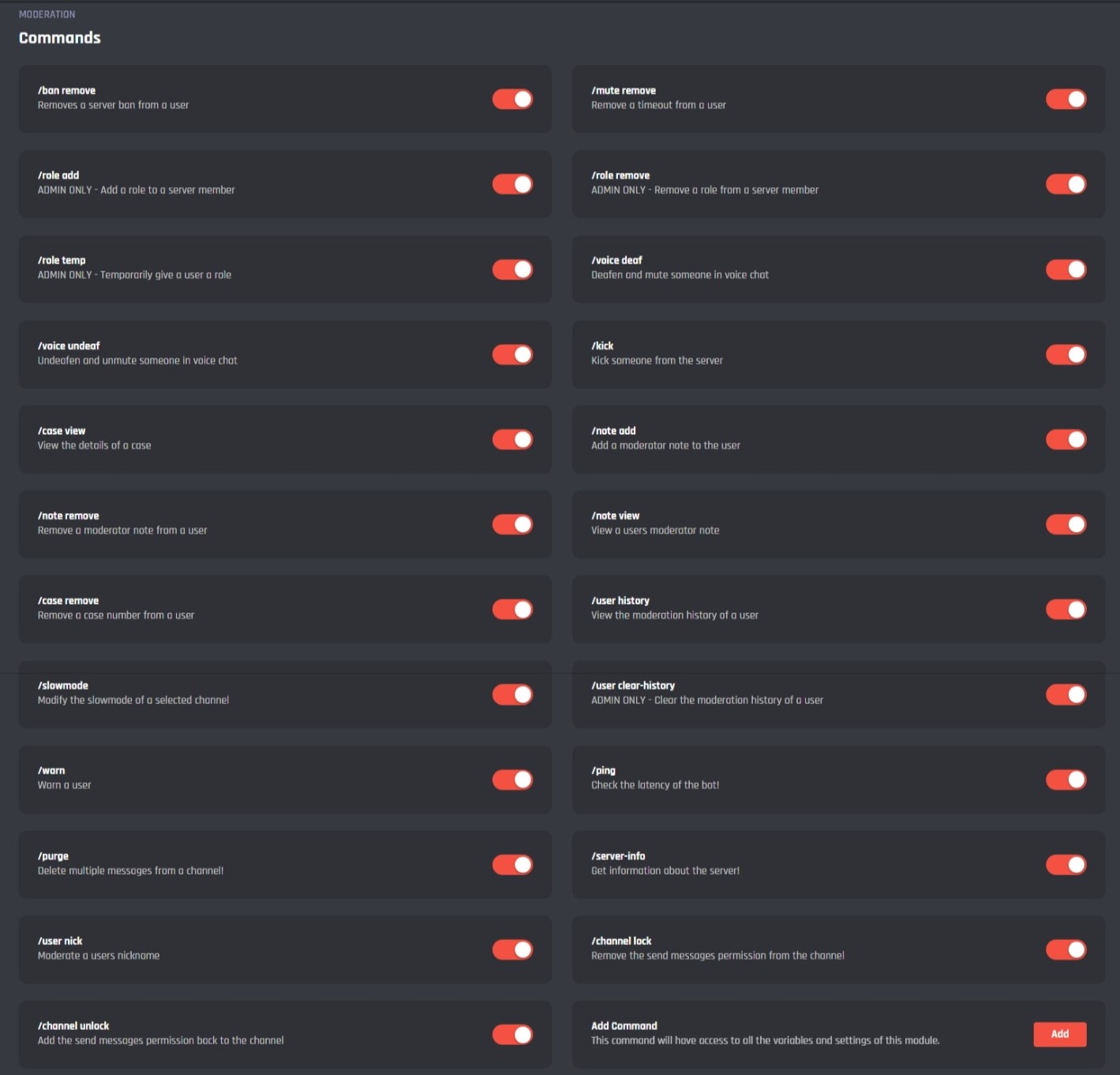
Commands
/ban add
This command allows you to ban a user from the server.
.png)
/ban remove
This command allows you to unban a user from the server on ID
.png)
/ban temp
This command allows you to temporarily ban a user from the server
.png)
/mute add
This command allows you to put a user in time-out
/mute remove
This command allows you to remove a timeout from a user
/role add
This command allows you to ddd a role to a user
/role remove
This command allows you to remove a role from a user
/role temp
This command allows you to temporarily give a user a role, this role will be removed after a selected amount of time
/voice deaf
This command allows you to deafen someone in a voice channel
/voice undeaf
This command allows you to undeafen someone in a voice channel
/kick
This command allows you to kick a user
/case view
This command allows you to get the content of a moderation case
/note add
This command allows you to add a note to a user
/note remove
This command allows you to remove a note from a user
/note view
This command allows you to get the content of a note from a user
/case remove
This command allows you to delete a moderation case
/user history
This command allows you to view the punishment history of a user
/slowmode
This command allows you to enable or edit the slow mode setting of a channel
/user clear-history
This command allows you to clear the punishment history of a user
/warn
This command allows you to warn a user
/ping
This command allows you to get the latency of the bot
/purge
This command allows you to delete up to 100 messages at the same time from a channel
/server-info
This command allows you to get information about the server, such as the server name, member count, description and more
/user nick
This command allows you to change the nickname of a user
/channel lock
This command allows you to change the channel permissions so that no one can send messages anymore
/channel unlock
This command allows you to change the permissions in a channel back so that everyone can send messages again
/say
This command allows you to send a message with the bot.
[👑] Add Command
By clicking the add command button you can create your own command for the moderation module using all the module variables and settings.
Events
.png)
Moderation Handler
This event will enforce the auto-punish settings.
Temporary Role & Ban Check
This command will make sure temporary roles or bans are removed on time.
[👑] Add Event
By clicking the add event button you can create your own event for the moderation module using all the module variables and settings.
It's advised that you do not edit the commands and events unless you have a good understanding of BotGhost and its Command Builder. If you encounter any issues, you might want to reset the module for it to work again as intended.
Additionally, a copy of the edited commands / events will be created if you update the module.