Invite Tracker
Who invited whom in your server, with real, fake and left invites, boards, personal links and campaign links. Free for every bot.
Invite Tracker works out which invite each new member used and counts it for the person who made it. Joins from brand new accounts, people inviting themselves and members who leave straight away are counted as fake, with the reason. Members see their counts and the top inviters with /invites, staff get a log of every join and leave naming the inviter, and you can hand out personal links and campaign links to see where people come from.
Invite Tracker is free for every bot. There's no Premium part, and its runs, variables and stored values never count toward your free limits.
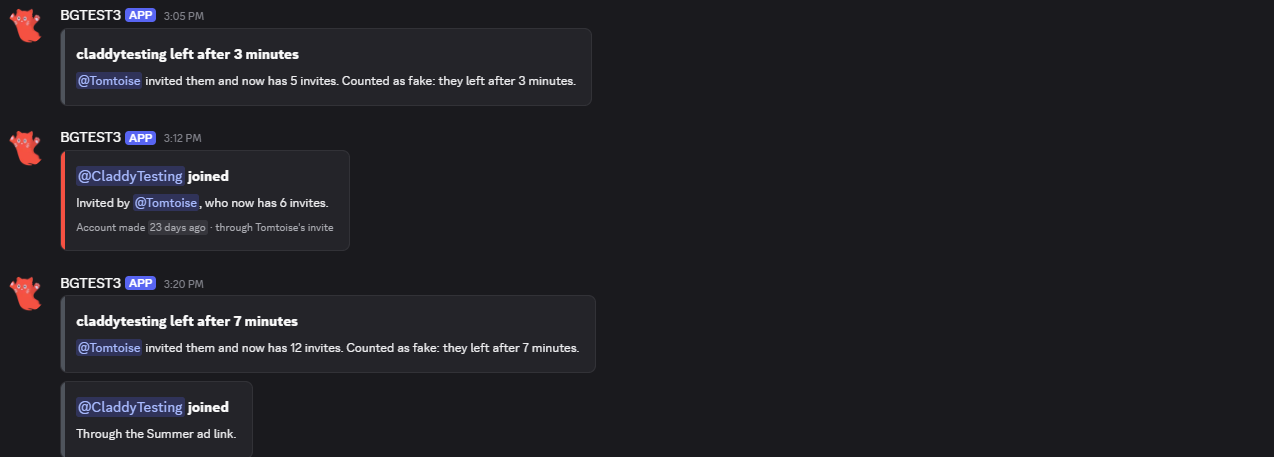
The invite log in Discord
Before you start
You need:
- Your bot in your Discord server. See Invite Your Bot if it isn't yet.
- Manage Server for your bot. Discord only shows a bot its invites and their uses with this permission. Without it, the bot can't tell which invite anyone used.
- The Server Members intent turned on in the Discord Developer Portal (your bot, Bot), so the bot hears joins and leaves.
- A staff channel for the invite log, like
#invite-log. In it, your bot needs View Channel, Send Messages and Embed Links. - Create Invite in the channel personal links and campaign links open in.
Setup
- 1
Turn on Invite Tracker
Open Invite Tracker in your bot's dashboard and press Enable at the top right. It adds the events and the
/invitescommand, and the custom variables it keeps its settings in.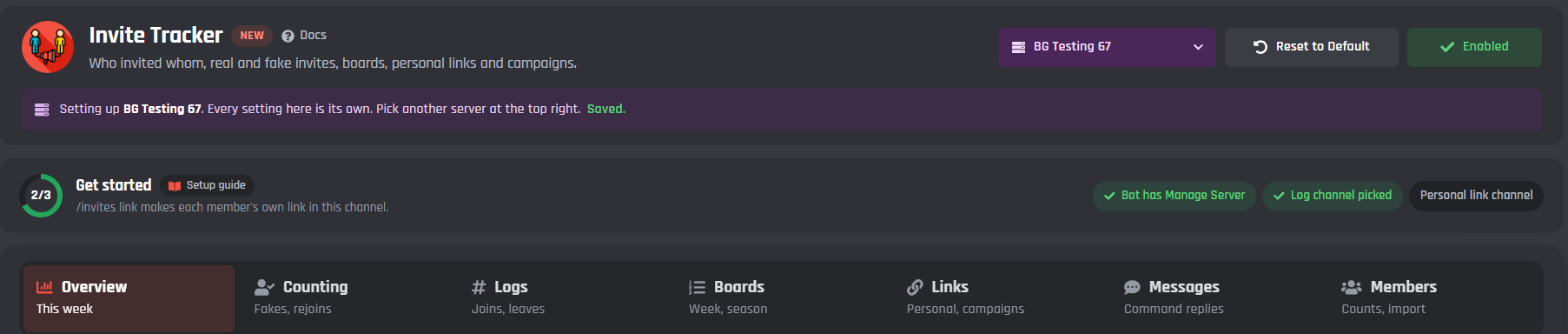
Every setting belongs to one server (its channels, its roles and its counts), so pick the server in the menu at the top right first. Reset to Default puts every setting in that server back to how a new Invite Tracker starts. The channels and roles stay.
- 2
Follow Get started
The strip under the header ticks off three steps. Press one to go to its tab.
- Bot has Manage Server: if it's missing, give your bot's role Manage Server in Server Settings > Roles. The page also shows "The bot can't see invites in" your server until it has it.
- Log channel picked: pick the channel on the Logs tab.
- Personal link channel: pick where
/invites linkopens on the Links tab, or turn personal links off.
Once all three are done, it says You're set.
- 3
Save
A bar pops up at the bottom of the page. Press Save Changes. Your bot restarts to pick up the changes, which takes about 20 seconds.

- 4
Try it
Make an invite from your own account and have a friend or a second account join with it. The log channel shows the join, naming you as the inviter, and
/invites showshows your count. If the second account is less than 7 days old, the join is logged as fake: that's the default fake check doing its job.
How invites are counted
When someone joins, the bot compares every invite's uses with the last time it looked. The invite whose uses went up is the one they used. Each join is then one of these:
| How they joined | Counts for |
|---|---|
| An invite | The person who made it |
| A personal link | The member it belongs to, even though the bot made it |
| A campaign link | Nobody. The campaign gets the numbers instead |
| The vanity link | Nobody |
| A link with no inviter | Nobody (the server widget and some apps make these) |
| A bot being added | Nobody |
| A guest invite | The person who made it |
| Couldn't tell | Nobody. See Joins the bot couldn't tell |
The bot never guesses. When two people join at the same moment through different links, both are "couldn't tell", so nobody gets an invite that isn't theirs. When several people join through the same link at once, all of them count.
Every member has these numbers:
- Joined: every join counted for them, real or fake.
- Left: people they brought in who left.
- Fake: joins that turned out fake.
- Bonus: invites staff gave or took.
- Total: joined + bonus, minus left and fake. It's never shown below 0.
So a fake join adds nothing to the total, a leave takes one off, and someone who leaves inside the fake window moves from left to fake. One person never costs their inviter two invites.
The tabs
Everything else is on seven tabs. The preview on the right shows what members and staff see in Discord for the tab you're on.
- Overview: how people joined this week, the top inviters and the top links.
- Counting: what counts as fake, leaves, rejoins, when a join counts and how long members who left are kept.
- Logs: the log channel and the log messages.
- Boards: the board, the season, the board card and the board on your website.
- Links: personal links, campaigns and who can change invites.
- Messages: the command replies.
- Members: everyone's counts, the imports and the server reset.
Overview
Three cards, read only, for the server you picked. Refresh reads them again.
- This week in your server: how many people joined in the last 7 days, with a bar for each way in (invites, personal links, campaigns, the vanity link and couldn't tell). When some joins couldn't be told, a line says how many and why.
- Top inviters this week: who brought in the most people this week.
- Top links this week: the invite codes people joined through this week.
Counting
What counts as fake
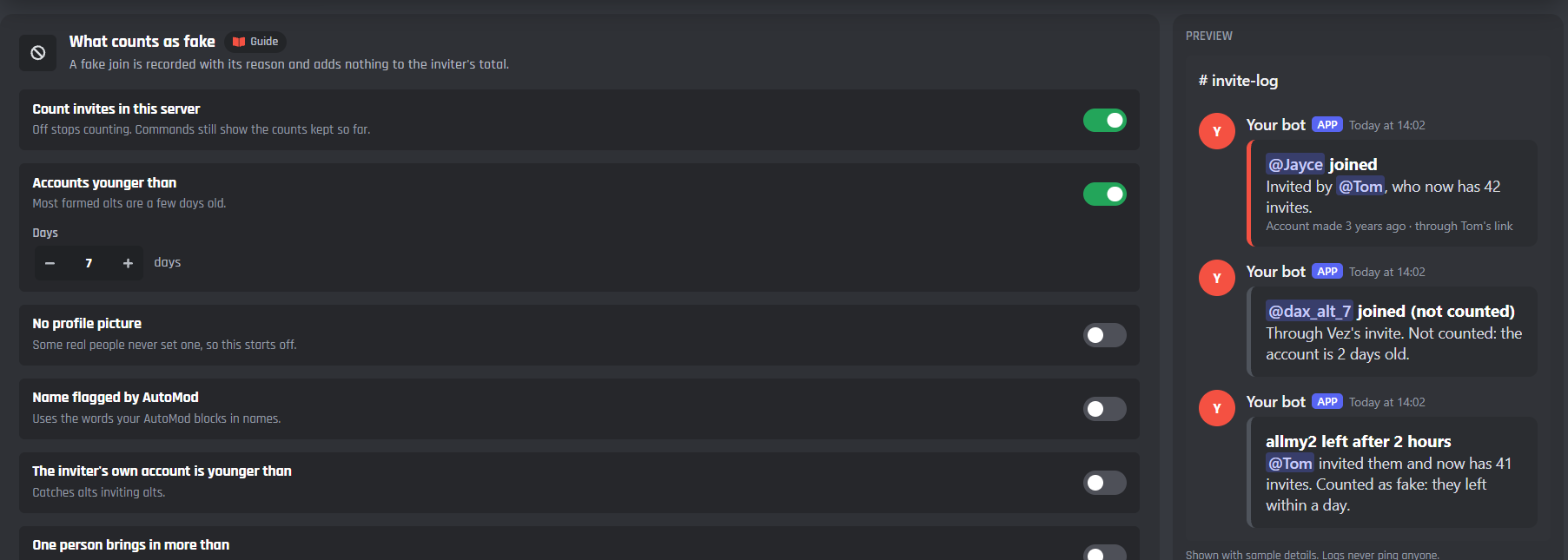
A fake join is recorded with its reason and adds nothing to the inviter's total.
- Count invites in this server: on to start with. Off stops counting. Commands still show the counts kept so far.
- Accounts younger than: on to start with, at 7 days (1 to 3,650). Most farmed alt accounts are a few days old.
- No profile picture: off to start with, because some real people never set one.
- Name flagged by AutoMod: off to start with. Uses the words your server's AutoMod blocks in names.
- The inviter's own account is younger than: off to start with, 7 days. Catches alts inviting alts.
- One person brings in more than: off to start with. More than 10 people (2 to 500) within 10 minutes (1 to 1,440), usually a farm.
- Roles whose invites never count: invites made by members with these roles count as fake. Leave it empty for none.
Inviting yourself is always fake. Invites made by bots never count.
Leaves
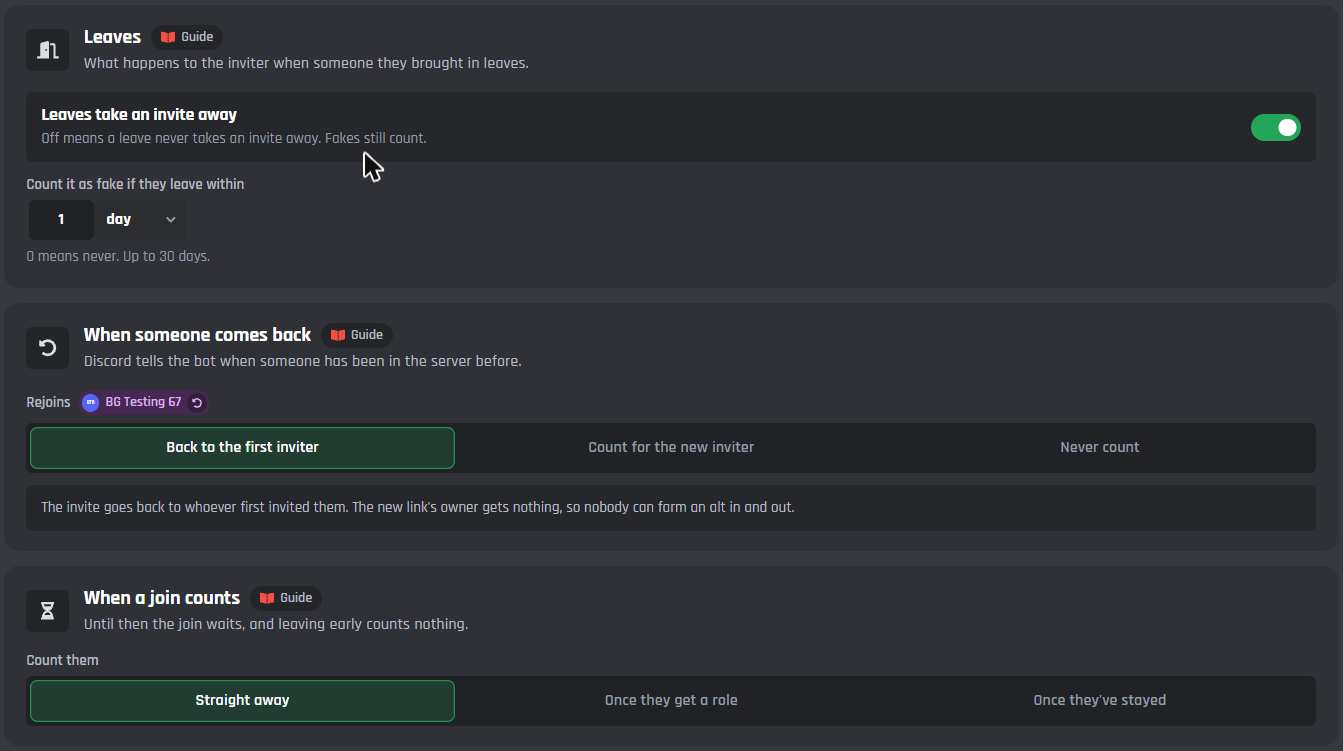
- Leaves take an invite away: on to start with. When someone leaves, the person who invited them loses that invite. Off means a leave never takes one away; fakes still count.
- Count it as fake if they leave within: 1 day to start with, up to 30 days. 0 means never. A member who leaves sooner is counted as fake instead of left, and the leave log says so.
A fake or uncounted join that leaves changes nothing for the inviter.
When someone comes back
Discord tells the bot when someone has been in the server before.
- Back to the first inviter (to start with): the invite goes back to whoever first invited them. The new link's owner gets nothing, so nobody can farm an alt in and out.
- Count for the new inviter: a rejoin counts as a fresh join for whoever's link they used this time.
- Never count: the rejoin is recorded, but nobody's count changes.
The first inviter only gets it back while their record is still kept (see Forget members who left). Someone who was in the server before tracking started counts for nobody.
When a join counts
- Straight away (to start with).
- Once they get a role: pick the role your verification or onboarding gives. The join counts when they get it.
- Once they've stayed: from 1 minute to 30 days, 1 day to start.
Until then the join waits, and leaving early counts nothing.
Forget members who left
- Forget members who left after: 30 days to start with, 0 to 90. Their record of who invited them is deleted then. Their inviter's numbers stay. Keep it long enough to spot someone coming back.
Logs
Where invite logs go
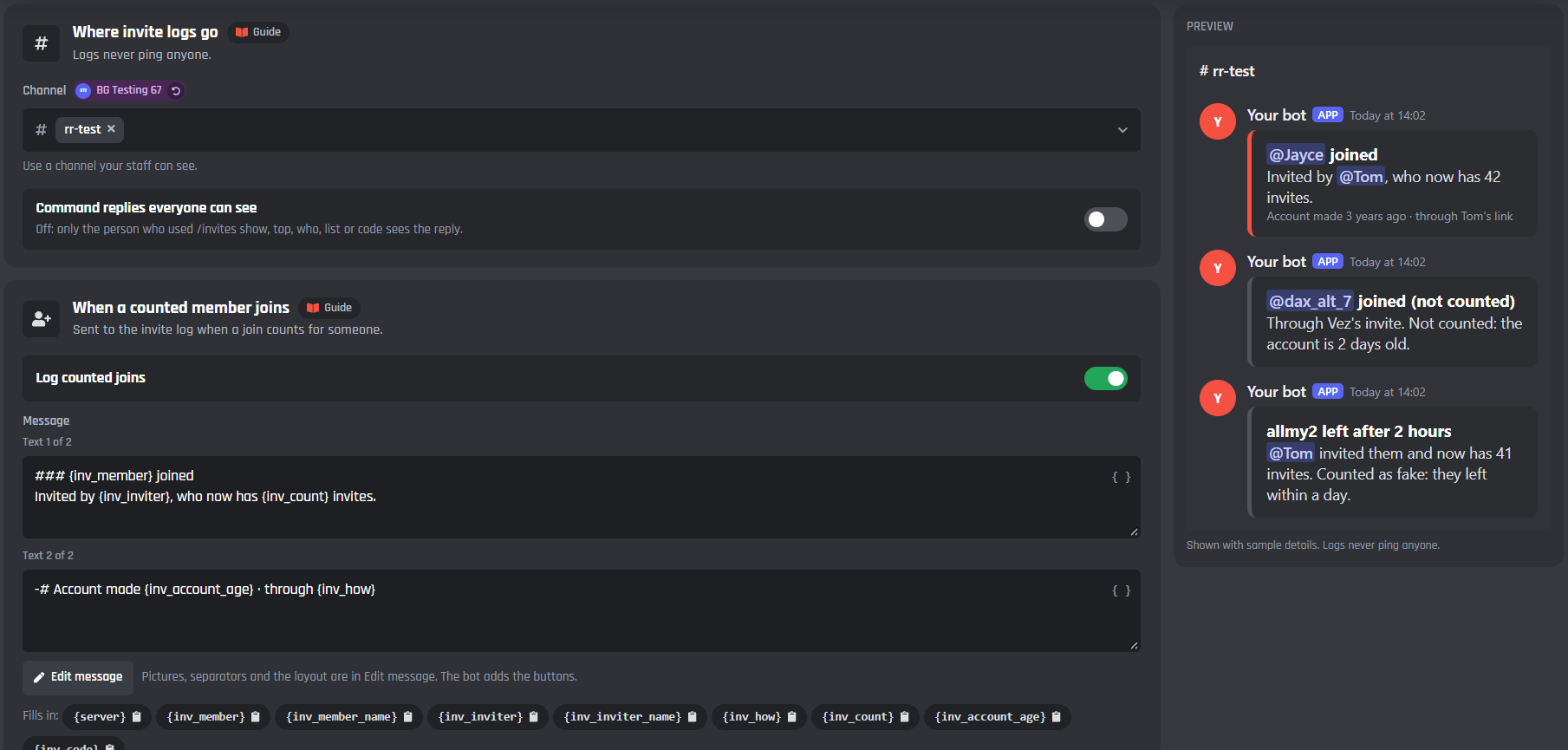
- Channel: a channel your staff can see. Logs never ping anyone.
- Command replies everyone can see: off to start with. Off, only the person who used
/invites show,top,who,listorcodesees the reply.
The invite log messages
Each log has its own card with its switch, the message, Edit message and the variables it fills in.
- When a counted member joins (Log counted joins, on): who joined, who invited them and their new count, when the account was made and how they joined.
- When a join is counted as fake (Log fake joins, on): says why in plain words, like "the account is 2 days old".
- When someone joins through the vanity link, a campaign or a link with no inviter (Log other joins, on): nobody's count changes. Also sent for joins still waiting to count.
- When the bot can't tell which invite was used: shares the Log other joins switch. It says why, like "the bot needs Manage Server".
- When lots of people join at once (One summary when lots of people join at once, on): when more than 20 people join within 30 seconds, single logs stop and one summary goes out a minute later. Single logs come back once it's quiet.
- When a member leaves (Log leaves, on): how long they stayed and what it did to the inviter. Sent when someone had invited them.
- When the bot thanks the inviter (Thank the inviter by DM, off): a DM to the inviter after a counted join. If their DMs are closed, nothing else changes.
Boards
Who shows on the board
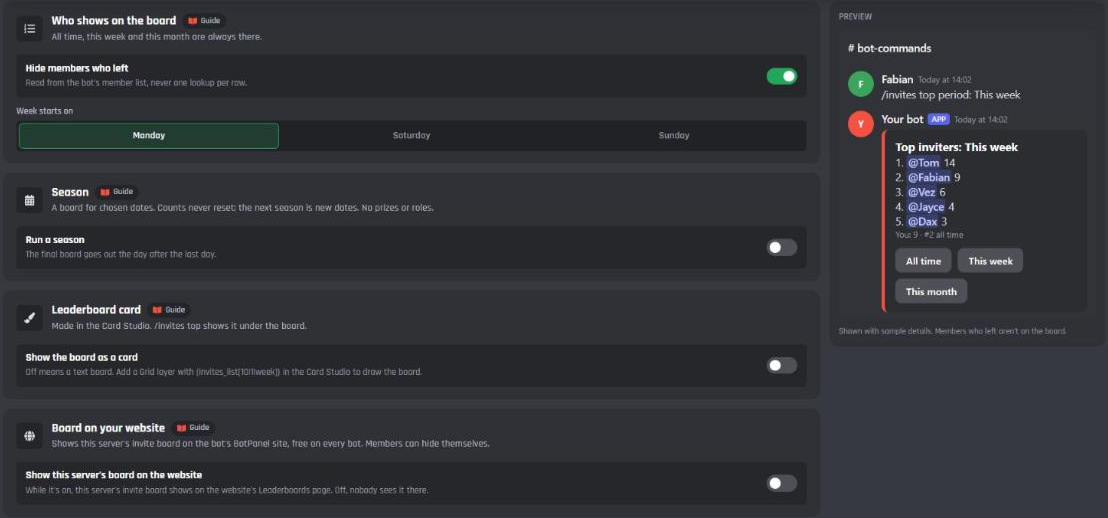
All time, this week and this month are always there.
- Hide members who left: on to start with. Inviters who left the server aren't on the board.
- Week starts on: Monday (to start with), Saturday or Sunday.
Seasons
A board for dates you pick, like a month-long push. Counts never reset: the next season is just new dates. There are no prizes or roles.
- Run a season: off to start with.
- Name: up to 50 characters, like December push.
- From and To: the season's dates.
- Post the final board in: the channel for the final board. It goes out the day after the last day.
/invites top with Season shows the season's board, named after the season.
Leaderboard card
- Show the board as a card: off to start with. On,
/invites topshows the board as a picture under the text. Pick a design chooses one of the card designs and Edit in Card Studio opens it in the Card Studio. Add a Grid layer with{invites_list[10|1|week]}to draw the board.
Board on your website
- Show this server's board on the website: off to start with. While it's on, this server's invite board shows on your bot's BotPanel website, on the Leaderboards page, which comes with BotPanel Plus. Members can hide themselves from it.
If your bot has no BotPanel website yet, the card says so.
Links
Personal links
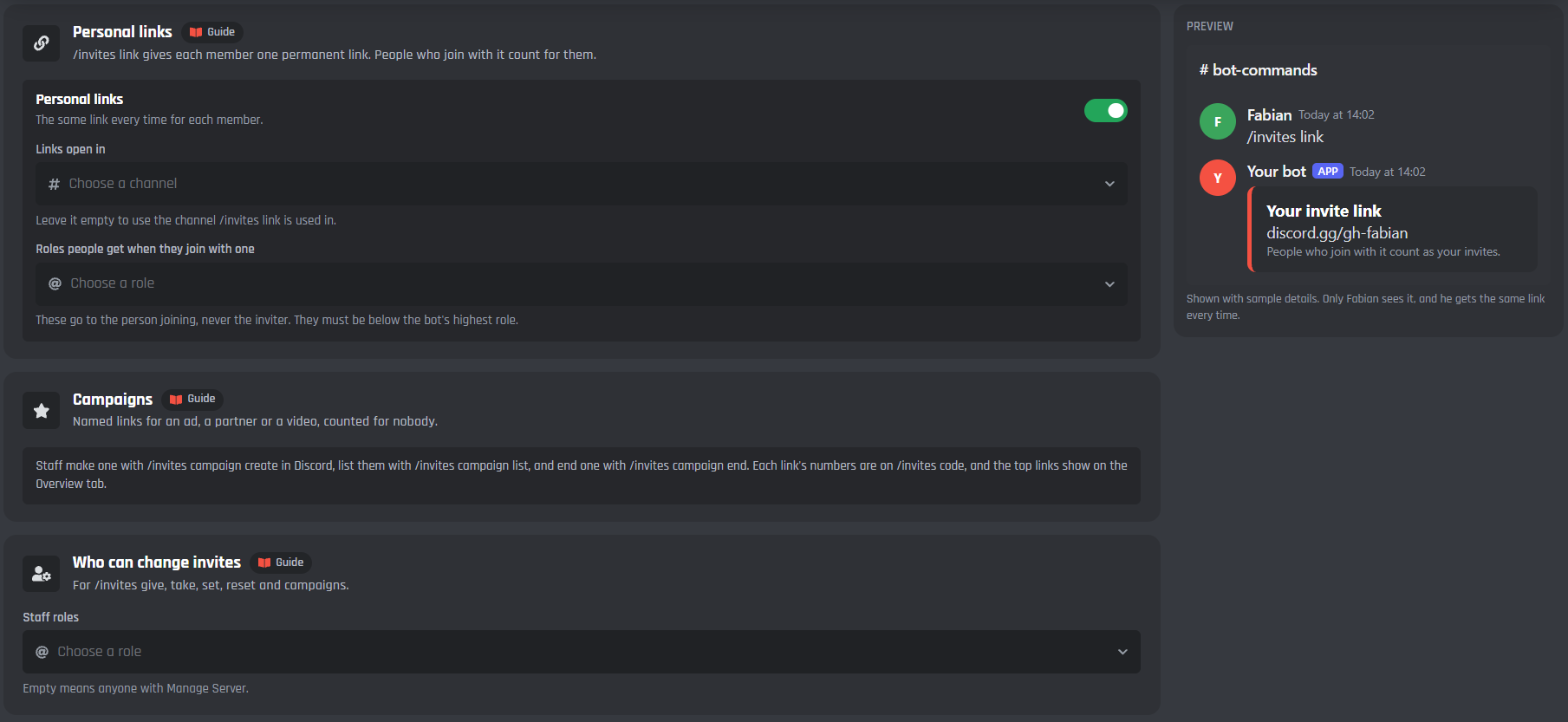
/invites link gives each member one permanent link, the same one every time. People who join with it count for them.
- Personal links: on to start with.
- Links open in: the channel new members land in. Leave it empty to use the channel
/invites linkis used in. - Roles people get when they join with one: up to 5. These go to the person joining, never the inviter, and must be below the bot's highest role.
Campaigns
Campaign links are named links for an ad, a partner server or a video. Joins through them count for nobody: the campaign gets the numbers. Staff make one with /invites campaign, see each link's numbers with /invites code, and the top links show on the Overview tab. See /invites campaign.
Who can change invites
- Staff roles: who can use
/invites code,give,take,set,resetandcampaign. Empty means anyone with Manage Server. Anyone with Administrator or Manage Server can always use them.
Messages
Command replies
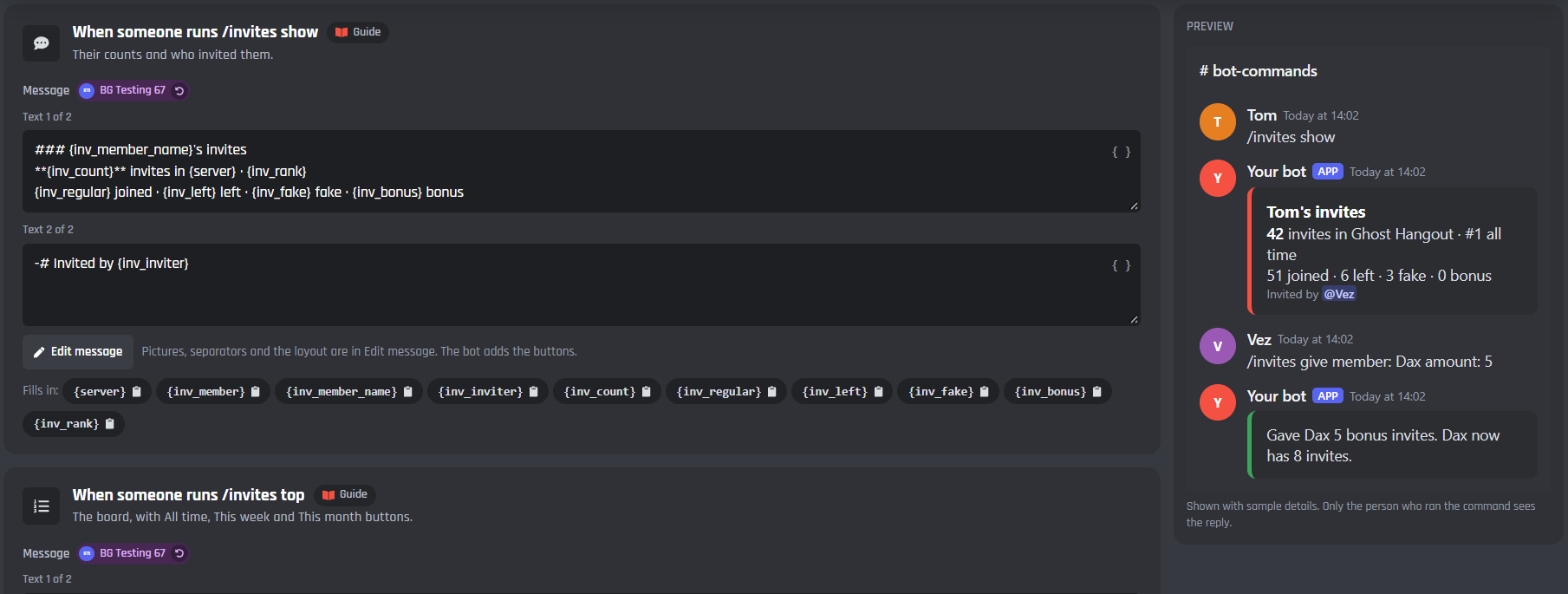
Each command reply has its own card with the message, Edit message and the variables it fills in.
| Card | When it's sent |
|---|---|
| When someone runs /invites show | Their counts, their place and who invited them |
| When someone runs /invites top | The board, with All time, This week and This month buttons |
| When someone runs /invites who | Who invited a member, how and when |
| When someone runs /invites list | The last 10 people they invited, with who's still here |
| When someone runs /invites link | Their own link. Only they see it |
| When someone runs /invites code | A link's uses, who it counts for, and how its joins are doing |
| When staff change someone's invites | Only the staff member sees it. A change made on the website goes to the invite log |
| When staff reset someone | Asks first, with Reset and Cancel buttons |
| When a campaign is made | The campaign link. Only the staff member sees it |
| When a season ends | The final board, in the season's channel |
Members
Search and edit members
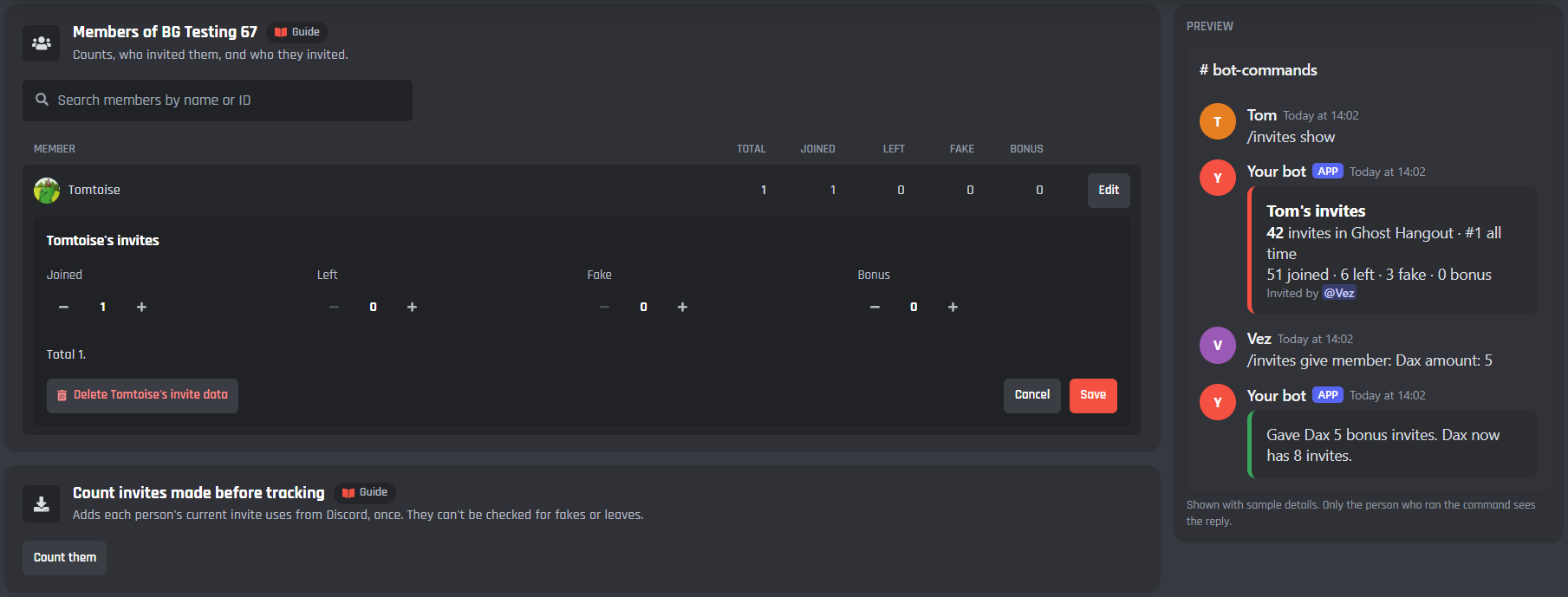
Everyone with invite counts in the server, with their total, joined, left, fake and bonus. Search by name or ID.
Press Edit on a row to see who invited them, the latest people they invited and their personal link, and to change their joined, left, fake and bonus numbers. Press Save to keep the change. Delete their invite data (press it twice) removes their record, their counts and their links.
Count invites made before tracking
Discord keeps a count of uses on every invite. Count them adds each invite's uses to the person who made it, once. These joins happened before tracking, so they can't be checked for fakes or leaves. The bot remembers which invites it counted, so pressing it again never counts the same uses twice.
Import from another bot
Bring counts over from another bot or a spreadsheet: upload a CSV with a member ID, joined, left, fake and bonus on each line. You see a preview first: how many members are new and how many already have counts (theirs are replaced). Then press Import. A backup is kept for 30 days.
Reset this server
Puts everyone's counts in the server back to 0. Type the server's name and press Reset. Who invited whom stays, and a backup is kept for 30 days. The backups show under the button, each with Restore (press it twice).
To reset one member, use /invites reset.
Commands
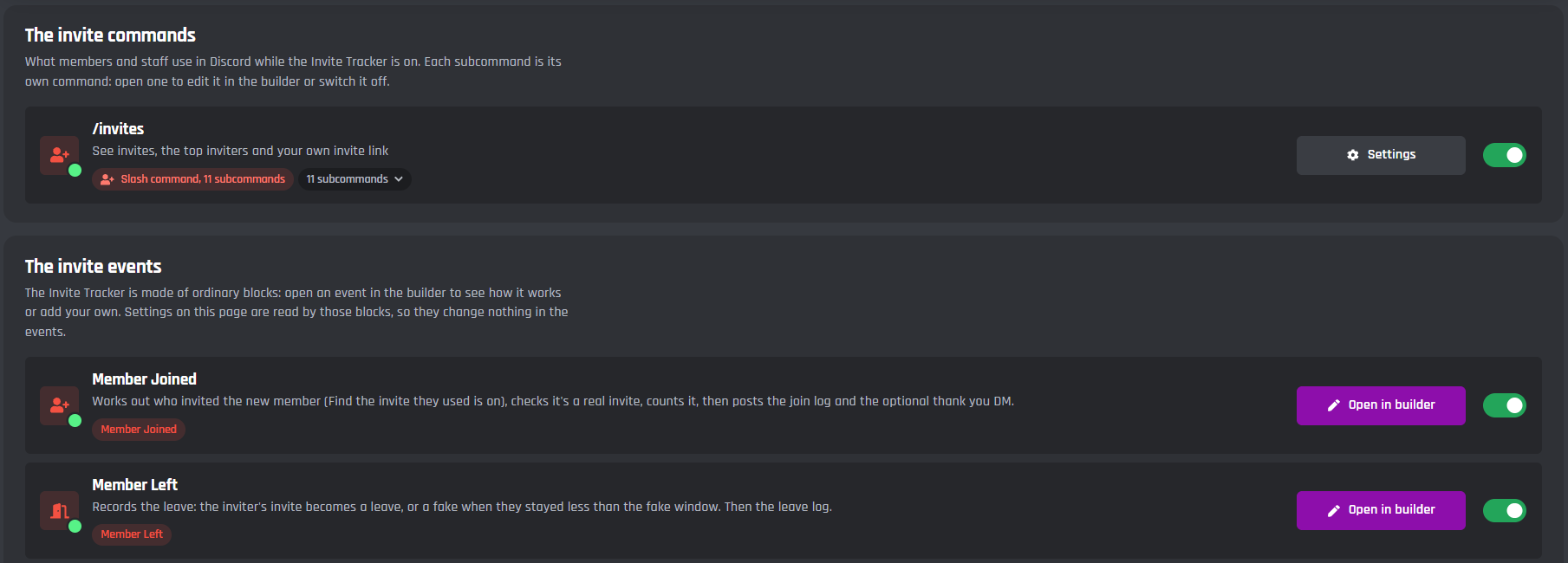
/invites has 11 subcommands. Each one is its own command on the page: open one to edit it in the builder, or switch it off.
| Command | Who | What it does |
|---|---|---|
/invites show |
Everyone | Their counts, or a member's: total, joined, left, fake, bonus, their place and who invited them |
/invites top |
Everyone | The top inviters |
/invites who |
Everyone | Who invited a member, how and when |
/invites list |
Everyone | The last 10 people a member invited, with who's still here |
/invites link |
Everyone | Their own permanent invite link |
/invites code |
Staff | How one invite link is doing |
/invites give |
Staff | Bonus invites for a member, or everyone with a role |
/invites take |
Staff | Takes bonus invites from a member, or everyone with a role |
/invites set |
Staff | Sets a member's total |
/invites reset |
Staff | Resets one member's counts |
/invites campaign |
Staff | Makes, lists or ends a campaign link |
Staff means anyone with Administrator, Manage Server or one of the staff roles. Anyone else gets "You need Manage Server or a staff role to change invites here."
Replies to show, top, who, list and code are private unless Command replies everyone can see is on (Logs tab). link and the staff replies are always private.
/invites show
- member: whose invites. Left out, it's yours.
Discord can't run a bare /invites once it has subcommands, so your own counts are /invites show.
/invites top
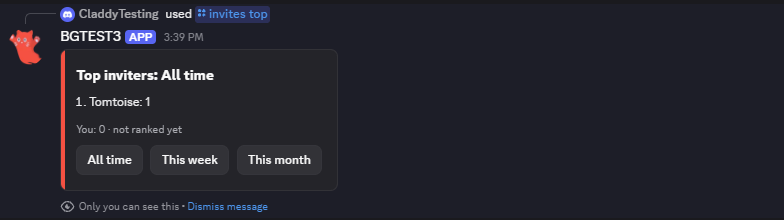
- period: All time (when left out), This week, This month or Season.
- page: which page of 10. The first when left out.
Under the board is your own count and place. The All time, This week and This month buttons show that board in the same message, and keep working for a year.
/invites who
- member: who to look up. Left out, it's you.
It says who invited them, through what (an invite, a personal link, a campaign link, the vanity link) and when they joined. For someone the bot has no record of, it says "nobody the bot knows of".
/invites list
- member: whose list. Left out, it's yours.
The last 10 people they invited, each with how it counted: counted, fake, pending, rejoined or left.
/invites link
No options. The bot makes the member's personal link in the channel from Links open in, or gives back the one they already have. If personal links are off, it says so. If the bot can't make invites in that channel, it says it needs Create Invite there.
/invites code
- code: the code or the whole link.
Discord's uses, the use limit and when it ends, who it counts for, and its joins: how many joined, are still here, left and were fake.
/invites give and /invites take
- amount: how many.
- member: who gets them, or who loses them.
- role: or everyone with this role.
- reason: optional.
Pick a member or a role. Bonus invites add to or take from the total; joined, left and fake stay as they are.
/invites set
- member and total: the bot moves their bonus so their total comes out at that number. Joined, left and fake stay true.
/invites reset
- member: whose invites.
It asks first, with Reset and Cancel. Reset puts their counts back to 0, and who invited whom stays. The buttons keep working for a year. The whole server is reset on the Members tab.
/invites campaign
- action: Create, List or End.
- name: the campaign's name to create it (up to 50 characters), or its code to end it.
- channel: where the link opens. Left out, it's the personal link channel, then the channel the command is used in.
Create makes a permanent link that counts for nobody and gives it to you privately. List shows the bot's campaign links with how many joined, are still here and were fake. End deletes the link and tells you how many times it was used. Its numbers stay.
Events
Invite Tracker is made of ordinary builder blocks. Open an event to see how it works, or add your own blocks.
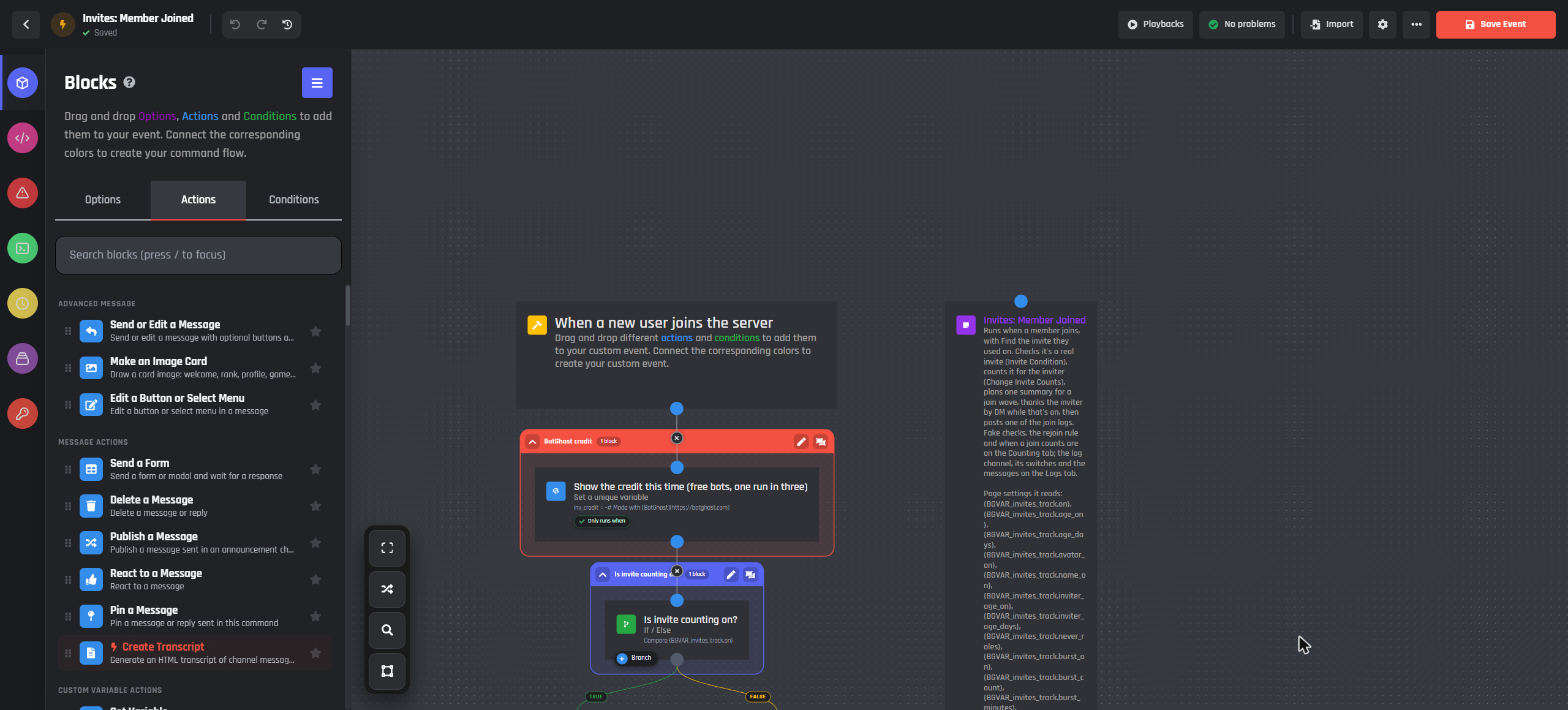
- Member Joined runs when someone joins, with Find the invite they used on. It checks it's a real invite with an Invite Condition, counts it with Change Invite Counts, plans one summary for a join wave, thanks the inviter by DM while that's on, then posts one of the join logs.
- Member Left records the leave: the inviter's invite becomes a leave, or a fake when they stayed less than the fake window. Then the leave log.
- Count Pending runs when a member gets a role. While When a join counts is Once they get a role, their waiting join counts when they get that role.
- Count Changed runs on When someone's invite count changes. It keeps each member's total in the
invites_totalmember variable, which the website's board and My account read, and deletes it at 0. Add your own blocks under it. - Hourly posts the season's final board the day after it ends, once, and clears the join wave counts.
- Board works out the board for a period and page, and where one member stands on it.
/invites topand its buttons run it. - Website Change runs when a server admin gives, takes, sets or resets a member's invites on your bot's website. It makes the change with Change Invite Counts, so it counts and logs like
/invites give.
Open in builder opens an event in the Command Builder, and the switch turns it on or off. Show variable names shows the variable behind each setting on the page, if you want to use them in your own commands.
The settings on this page are read by the events' blocks, so changing a setting never changes the events. After an update to Invite Tracker, the page shows an Update button. Your own changes to the events and messages are kept.
Builder blocks
What Invite Tracker does with invites is built into the builder, so you can use the same pieces in any command or event, with or without the module.
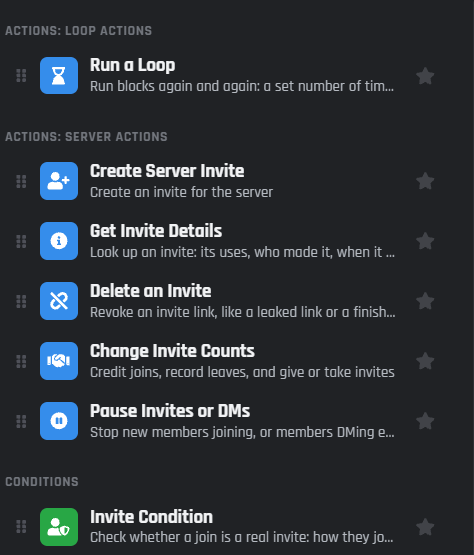
- Change Invite Counts: count a join, record a leave, give or take bonus invites, set a total, or reset.
- Invite Condition: is this join a real invite?
- Get Invite Details and Delete an Invite: look up or remove one invite.
- Create Server Invite: Who it counts for makes personal links and campaign links.
- Run a Loop: Every invite in the server goes over each invite.
- When a new user joins: Find the invite they used fills in who invited them.
- When someone's invite count changes: runs after every change.
- Invite variables read the counts anywhere, like
{user_invites.total}or{invites_top[10|1|week]}.
Message variables
Each message card lists the variables its message fills in.
| Variable | What it shows |
|---|---|
{server} |
The server's name |
{inv_member} |
The member who joined or left, or the one a command is about, as a mention |
{inv_member_name} |
That member's name |
{inv_inviter} |
Who invited them, as a mention (or how they joined when nobody did) |
{inv_inviter_name} |
The inviter's name |
{inv_how} |
How they joined: Tom's invite, Tom's link, the Summer ad link, the vanity link |
{inv_count} |
The inviter's invites now (or the member's own, in a command) |
{inv_regular} |
Joins they brought in |
{inv_left} |
People they brought in who left |
{inv_fake} |
Joins counted as fake |
{inv_bonus} |
Bonus invites staff gave |
{inv_rank} |
Their place on the all time board, like #3 all time, or not ranked yet |
{inv_reason} |
Why a join was fake or couldn't be told, or what a leave did |
{inv_stayed} |
How long they stayed, or when they joined |
{inv_account_age} |
When their account was made, like 3 years ago |
{inv_code} |
The invite code |
{inv_campaign} |
The campaign's name |
{inv_top} |
The board, one line per member |
{inv_period} |
The board's period: All time, This week, This month or the season's name |
{inv_link} |
The invite link |
{inv_change} |
What staff changed, like Gave Dax 5 bonus invites |
{inv_by} |
Who made the change |
{inv_wave_count} |
How many people joined in the wave |
{inv_list} |
A list: who they invited, or a link's numbers |
The Welcomer can use these numbers too. In a welcome message, {inviter_total} is the inviter's total here (this join included) and {inviter_real} is their joins less fakes and leaves, without bonus invites. Both are empty while the Invite Tracker is off.
BotPanel
Invite Tracker works fully on your bot's BotPanel website:
- Settings: server admins change every setting and message for their own server: what counts as fake, leaves and rejoins, the invite log, boards and the season, personal links and staff roles.
- The board: once a server turns on Show this server's board on the website, its invite board shows on the Leaderboards page, which comes with BotPanel Plus. Members can hide themselves from it.
- My account: members see their own invites.
- Giving and taking: server admins can give, take, set or reset a member's invites on the website. The change runs through the Website Change event, so it's counted and logged like
/invites give.
Campaign links are made in Discord with /invites campaign, because the bot makes the invite. The imports are on your dashboard only.
Privacy and Discord's rules
Discord's rules forbid rewarding people for invites: no roles, prizes or perks for bringing people in. So Invite Tracker never gives any. Counts, boards and the thank-you DM recognise people without a prize, seasons are just a board, and the roles a personal link gives go to the person joining, never the inviter. Discord's rules apply to your own blocks too, so don't build invite rewards with the count changed event or the invite variables.
What Invite Tracker keeps, per server:
- Who invited whom: the member's ID, the inviter's ID, the invite code, how they joined, the campaign's name, when they joined and left, and how it counted, with a short reason code for fakes.
- Each member's counts.
- The links made with Who it counts for.
- Backups from an import or a server reset, for 30 days.
- Each member's total in
invites_total, for the website's board and My account.
No names, pictures or messages are stored; names are read from Discord when they're shown. A server's records are only used for that server, never combined with another server's.
- The record of a member who left is deleted after Forget members who left. Their inviter's numbers stay.
- When your bot leaves a server, everything Invite Tracker kept for it is deleted 30 days later. If the bot comes back before then, nothing is deleted.
- To delete one member's data, use Delete their invite data on the Members tab.
Moving from Invite Tracker (old)
If your bot has the old Invite Tracker on, the page shows Bring over everyone's invites from Invite Tracker (old). Press Move my settings and invites.
- It checks first, then shows what moves: the servers, the members with invites, and each server's top members with their old and new totals (which are the same).
- "Invited by" records come over for members still in the server. Members who already left don't, since their leave is already counted.
- Your settings come over: the join message becomes the join log, and fake accounts and Ignored Roles keep working. Ignored Roles now checks the inviter, as its help text always said.
- Leaving early doesn't count as fake for moved servers, the way the old module counted. Change it on the Counting tab.
- Reward roles aren't moved, because Discord's rules forbid invite rewards.
The old module is switched off only when every total matches. Save your bot to switch over. Undo the move puts the old one back on and this one off, for 30 days.
Bots that don't press Move get a notice on the page for 30 days, then the move runs by itself with the same checks and the same 30-day undo. On free bots the old module never counted anything, so only the settings move.
Every limit
| What | Limit |
|---|---|
| Accounts younger than | 1 to 3,650 days, 7 to start |
| The inviter's own account younger than | 1 to 3,650 days, 7 to start (off) |
| One person brings in more than | 2 to 500 people within 1 to 1,440 minutes, 10 in 10 to start (off) |
| Count it as fake if they leave within | 0 to 30 days, 1 day to start |
| Once they've stayed | 1 minute to 30 days, 1 day to start |
| Forget members who left after | 0 to 90 days, 30 to start |
| A join wave | More than 20 joins in 30 seconds |
| Board | 10 a page |
| /invites list | The last 10 |
| Campaign name | 50 characters |
| Roles people get with a personal link | 5 |
| Giving or taking on the website | 1 to 10,000 at a time |
| /invites top and /invites reset buttons | Keep working for a year |
| Boards and link numbers | Up to a minute behind |
| Backups | Kept for 30 days |
Every feature is free for every bot. On free bots, the module's messages sometimes have a small Made with BotGhost line under them, about one time in three. Premium bots never do. Invite Tracker's runs, variables and stored values never count toward your free limits.
Good to know
- Each server has its own settings and counts. Pick the server at the top of the page before you change them.
- Counts are kept in BotGhost's invite record, not in custom variables, so a big server's counts never touch your stored values.
- After a restart, the bot needs a first look at the invites. A join in that moment is "couldn't tell".
Common questions
Joins the bot couldn't tell
A join is "couldn't tell" when no invite's uses went up, or the bot couldn't be sure whose it was:
- The bot needs Manage Server: without it, Discord won't show the bot its invites. Give your bot's role Manage Server in Server Settings > Roles.
- Discovery or an app: people who join from Server Discovery or through an app use no invite.
- Two people joined at the same moment through different links: the bot never guesses, so neither counts.
- The bot had just started: it hadn't looked at the invites yet.
The log says which one it was.
Can I give a role when someone reaches 10 invites?
No. Discord's rules forbid rewarding invites, so Invite Tracker has no reward roles or prizes, and your own blocks shouldn't add them either. Boards, seasons and the thank-you DM recognise your top inviters without a prize.
Someone left and came back. Who gets the invite?
With Back to the first inviter (the default), the person who first invited them gets the invite back, as long as their record was still kept. The owner of the link they used this time gets nothing. Change it in When someone comes back.
Why don't campaign joins count for anyone?
A campaign link is for measuring an ad, a partner server or a video, not a person. Its joins are counted for the campaign: see them with /invites code or /invites campaign with List. For a link that counts for a member, use their personal link.
How do I bring over counts from another bot or a spreadsheet?
Export them as a CSV with a member ID, joined, left, fake and bonus on each line, then use Import from another bot on the Members tab. You see a preview first, and a backup is kept for 30 days.
A member's count looks wrong
Run /invites show for them to see joined, left, fake and bonus. A leave takes one off, and a leave inside the fake window counts as fake instead. To correct it, press Edit on their row on the Members tab, or use /invites set.