Change Invite Counts
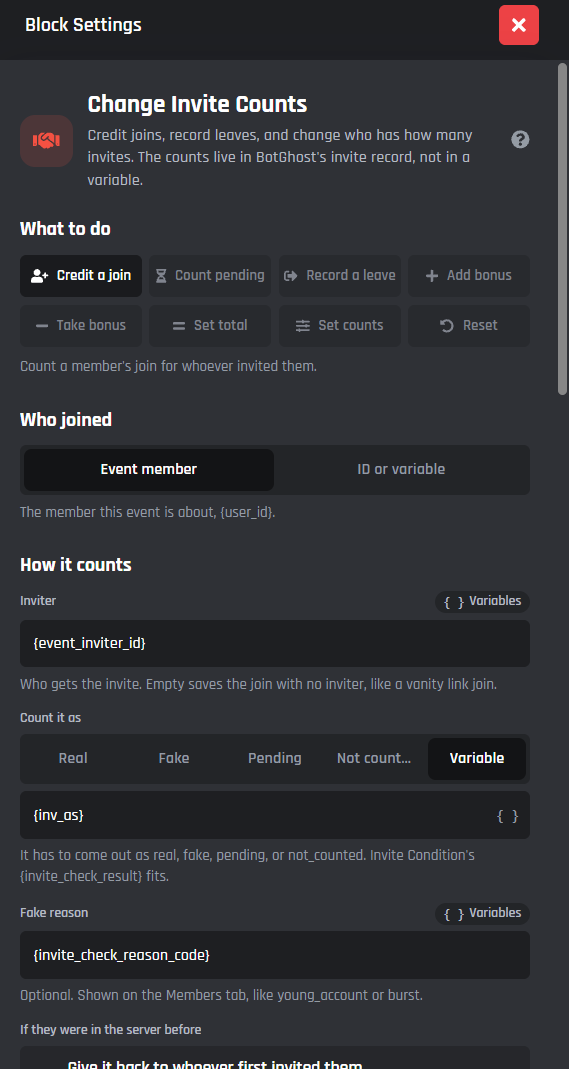
Change Invite Counts credits joins, records leaves, and changes who has how many invites. The counts live in BotGhost's invite record for the server, not in a custom variable, so they never count toward your stored values. The Invite Tracker module is built on it, and you can use it in any command or event without the module.
Every member has these numbers: regular (joins counted for them, real or fake), left, fake, bonus and rejoins. Their total is regular + bonus, minus left and fake, never shown below 0.
What to do
Pick one at the top. Each shows only its own fields.
| Mode | What it does |
|---|---|
| Credit a join | Counts a member's join for whoever invited them |
| Count pending | Turns a join saved as pending into a real one, like once they've stayed a while |
| Record a leave | When a member leaves, takes the invite away from whoever invited them |
| Add bonus | Gives a member extra invites on top of the ones they earned |
| Take bonus | Takes bonus invites away from a member |
| Set total | Changes a member's bonus so their total comes out at this number |
| Set counts | Corrects a member's regular, left, fake and bonus numbers. Blank leaves one as it is |
| Reset | Sets invite counts back to 0 |
Member
Who joined, who left, or whose invites. The event's member ({user_id}) to start with, or an ID, a user option or a variable.
Credit a join
- Inviter: who gets the invite.
{event_inviter_id}to start with. Empty saves the join with no inviter, like a vanity link join. - Count it as: Real, Fake, Pending or Not counted, or a variable that comes out as
real,fake,pendingornot_counted. An Invite Condition's{invite_check_result}fits. - Fake reason: optional, for fakes.
{invite_check_reason_code}to start with. Shown on the Invite Tracker's Members tab. - If they were in the server before:
- Give it back to whoever first invited them (to start with): their first inviter gets the invite back, once.
- Count it for the new inviter: whoever invited them this time gets it.
- Never count it: a rejoin never counts for anyone.
- Read it from a variable:
first,newornever, like a setting on a module page.
- Where the join came from: the invite code, join type and campaign. They come from When a new user joins; leave them as they are unless you track joins another way.
The same join credited twice changes nothing. Someone who invited themselves is always fake, and a bot inviter is never counted.
Record a leave
- Fake if they stayed less than (seconds): a leave sooner than this counts as fake instead of left. 86400 (1 day) to start with, 0 never.
- Leaves take an invite away: on to start with. Off keeps the invite, and the leave is only noted.
- Forget them after (days): 0 to 90, 30 to start with. Their join record is deleted then, and their invite stays counted as left.
A leave from a fake or uncounted join changes nothing.
Add bonus, Take bonus and Set total
- Amount (or Total for Set total): a whole number, or a variable like
{option_amount}. - Reason: optional. Passed to When someone's invite count changes.
Reset
- One member or Everyone in the server.
- Keep who invited whom: on to start with. Counts go to 0, and the join records stay for rejoins and lookups.
- Keep a backup for 30 days: for Everyone in the server, on to start with. Restore it from the Invite Tracker's Members tab.
Advanced
- Quietly: don't run When someone's invite count changes for this change, like for an import.
- Variable names start with:
invitesto start with. Change it when two of these blocks run in one command.
Variables
| Variable | What it gives |
|---|---|
{invites_member_id} |
Whose count changed: the inviter on a join or a leave |
{invites_total} |
Their total after the change |
{invites_regular} |
Their regular invites |
{invites_left} |
Invites taken away by leaves |
{invites_fake} |
Their fake invites |
{invites_bonus} |
Their bonus invites |
{invites_rejoins} |
People who came back through them |
{invites_before} |
Their total before the change |
{invites_change} |
How much the total changed, like 1 or -1 |
{invites_result} |
What happened: counted, fake, pending, rejoin_returned, rejoin_ignored, not_counted, already_done or no_record |
{invites_stayed} |
On a leave: how long they stayed, in words |
{invites_backup_id} |
Reset everyone: the backup to restore from the Members tab |
When it fails
It goes down its error path, with the reason in {error_reason}, when:
- It isn't run in a server ("Change Invite Counts only works in a server").
- The member or inviter isn't an ID, like "Inviter must be a member ID, got 'Tom'".
- An amount or count isn't a whole number.
- The counts couldn't be saved ("Invite counts couldn't be saved. Try again.").
Discord's rules forbid rewarding people for invites. Don't use these counts to give roles, prizes or perks for bringing people in.
Enable Success/Error Handles
Enable Success / Error Handles to detect success and errors inside of the action block. The green path on the bottom left side of the block runs when it works, and the red path on the bottom right side runs when it fails. The error variables are listed here.