Run a Loop
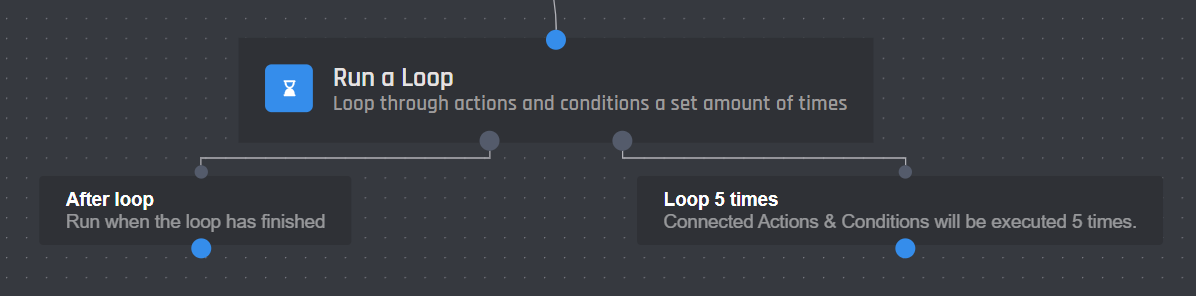
Loops allow you to repeat connected actions and conditions a set amount of times. You can change the number of times a loop is run by setting the loop count with a number or variable. Actions and conditions connected to the Loop X Times block will then be run that many times. Once the loop has finished actions and conditions connected to the 'After Loop' block will be run like normal. This block will open a world of possibilities for users to explore.
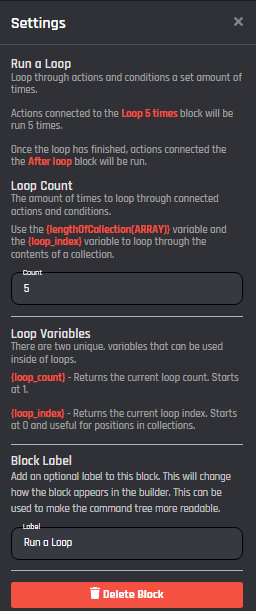
Settings
Loop Count
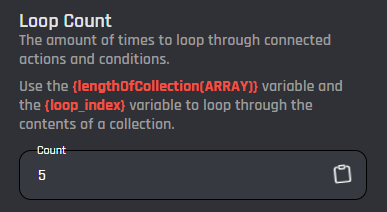
The "Loop count" section will determine the number of times the actions that follow should repeat. By default this is set to a count of 5, however, you can loop actions up to 1000 times. All variables can be used. If you want to loop through all values of a collection, you can use the {lengthOfCollection()} variable to loop as many times as the length of the collection.
Timeout
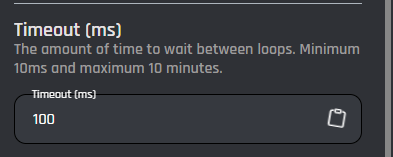
This setting lets you specify the timeout between loop iterations. This means that once one iteration is completed, the bot will wait the provided amount of ms before starting the next iteration. The minimum timeout is 10 milliseconds and the maximum is 600000 milliseconds (10 minutes). Remember that 1 seconds equals to 1000 milliseconds (or ms).
Every member of the server
Pick Every member of the server to run the loop once for every member of the server it runs in, with each member's ID in {loop_member_id}. Use <@{loop_member_id}> to mention them.
- Only members with these roles: leave it empty to go over everyone, or pick roles to go over members with any of them. Role IDs and variables work too.
- It goes over up to 100,000 members. On a bigger server it stops there and writes a note in your Error Logs.
- Your bot needs the Server Members intent, turned on in the Discord Developer Portal under Bot. Without it, or outside a server, the loop goes down its error path.
- The timeout above is the wait between members, so a big server takes a while. Members loops don't have the 1000 cap.
Every invite in the server
Pick Every invite in the server to run the loop once for every invite in the server it runs in, with the invite's code in {loop_invite_code}. All three filters are optional:
- Made by: only invites this member made, like
{user_id}for a/myinvitescommand. - At most this many uses: 0 finds invites nobody used.
- Ending within (seconds): only invites that end soon. Invites that never end are left out.
The bot needs Manage Server. It reads up to 1,000 invites once, when the loop starts. Without the permission, or outside a server, the loop goes down its error path. Pair it with Delete an Invite to clean up old invites.
Limitations
There are a few limitations on loops to discourage abuse of the system:
- Loops have a minimum timeout of 10 ms between each loop and a maximum of 600000 milliseconds (10 minutes).
- You can not run loops inside of loops.
- A max loop count of 1000 exists.
These limitations may change as we monitor how people are using loops.
Loop Variables
This action comes with two variables, they are:
| Variable | Description |
|---|---|
{loop_count} |
Returns the current loop count. Starts at 1. |
{loop_index} |
Returns the current loop index. Starts at 0 and is useful for when looping through collections. |
When the loop goes over every member of the server, {loop_member_id} is the ID of the member this round is for.
When the loop goes over every invite in the server, each round has:
| Variable | Description |
|---|---|
{loop_invite_code} |
The invite's code |
{loop_invite_uses} |
How many times it was used |
{loop_invite_max_uses} |
Its most uses, 0 for no limit |
{loop_invite_inviter_id} |
Who made it |
{loop_invite_channel_id} |
The channel it opens |
{loop_invite_expires_at} |
When it ends, as a Discord timestamp, or never |
{loop_invite_temporary} |
true when it gives temporary membership |
Stop a Loop Action
Loops have a unique Stop a Loop action that can be run to stop any running loop. This action can be used with conditions to conditionally stop a loop.