# Changing Your Subscription

### Changing your current premium subscription

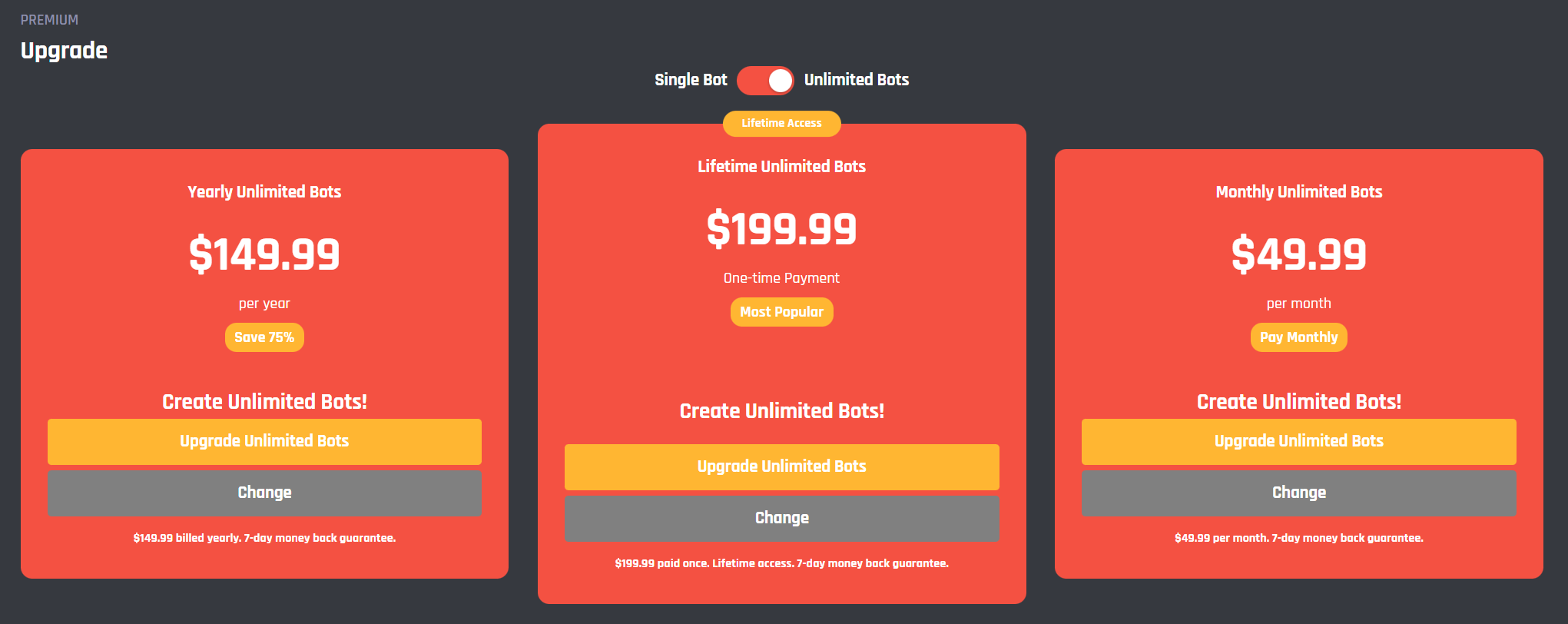
1. Go to the [<mark style="color:blue;">**premium page**</mark>](https://dashboard.botghost.com/dashboard/premium) and click 'change' under any preferred subscription.

<figure><img src="https://1937909199-files.gitbook.io/~/files/v0/b/gitbook-x-prod.appspot.com/o/spaces%2F-Lm_hW5MApY3J0lRhi0M%2Fuploads%2FQ6juHnMimMcdCFes6ITx%2FA0929EC6-4577-43F8-8C13-09C699ABA167.png?alt=media&#x26;token=cbbd6d58-4ddb-428e-b704-09aeeaca51d4" alt=""><figcaption></figcaption></figure>

2\. Enter your subscription email. If you do not know this, please check one of your mailboxes and look for an email that you received when you bought your first/current subscription.

<figure><img src="https://1937909199-files.gitbook.io/~/files/v0/b/gitbook-x-prod.appspot.com/o/spaces%2F-Lm_hW5MApY3J0lRhi0M%2Fuploads%2Fmq5OzzbBwznt2Yd4ngWV%2F4F104FD2-B941-4BF4-BDBE-B137263D33A2.png?alt=media&#x26;token=82b7a0ff-d409-48ff-96d4-7977fde76a37" alt=""><figcaption></figcaption></figure>

3\. Enter the 6-number code you received in your mailbox. This code is valid for the next 5 minutes.

<figure><img src="https://1937909199-files.gitbook.io/~/files/v0/b/gitbook-x-prod.appspot.com/o/spaces%2F-Lm_hW5MApY3J0lRhi0M%2Fuploads%2FRLaHKDuJvxnpWX23ATSB%2F80EF5779-9690-4F84-A34E-997D2A292156.png?alt=media&#x26;token=625c11ca-2049-4d05-b6a6-e1df3a53c2a8" alt=""><figcaption></figcaption></figure>

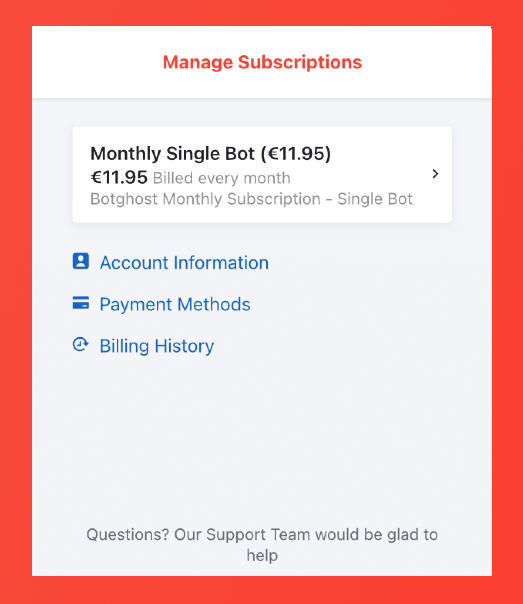
4\. Click on the white area with your current subscription.

<figure><img src="https://1937909199-files.gitbook.io/~/files/v0/b/gitbook-x-prod.appspot.com/o/spaces%2F-Lm_hW5MApY3J0lRhi0M%2Fuploads%2Fotj6snPgpIyy1YsZ9exq%2FA3AF8FE4-351F-41CC-AA19-3E59E4B941D6.png?alt=media&#x26;token=1c4b501e-4722-4a72-b233-aafbc88d5f20" alt=""><figcaption></figcaption></figure>

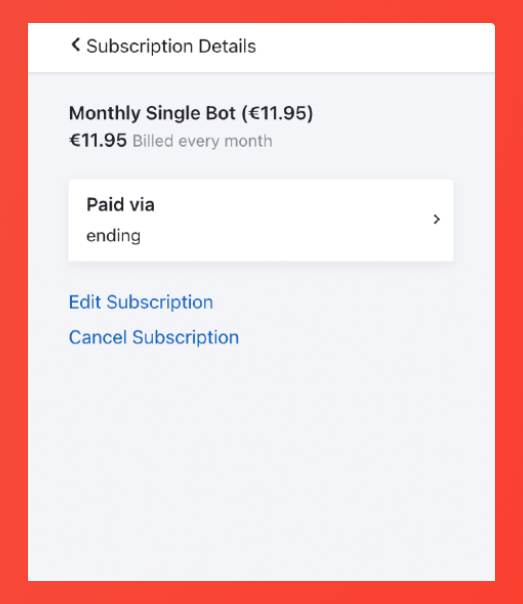
5\. Click on the blue 'edit subscription' button.

<figure><img src="https://1937909199-files.gitbook.io/~/files/v0/b/gitbook-x-prod.appspot.com/o/spaces%2F-Lm_hW5MApY3J0lRhi0M%2Fuploads%2FHnmPUDdxvVNxirqKIMmU%2F61E9BAE0-4B8B-4E6B-9F7F-E9A7E46FDF40.png?alt=media&#x26;token=610fb30c-a8c5-4a19-95f2-a5f6720b7728" alt=""><figcaption></figcaption></figure>

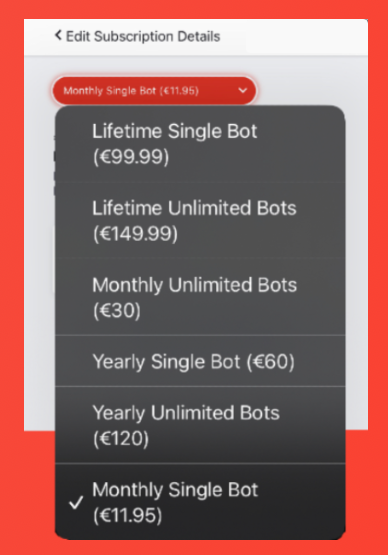
6\. Choose your new subscription from the list. The new subscription will be deducted from your current payment method. You can change it as shown in step 4.

{% hint style="warning" %}
The payment platform will determine the final price. If you have an annual subscription of 100$, it will be worth 50$ after 6 months!
{% endhint %}

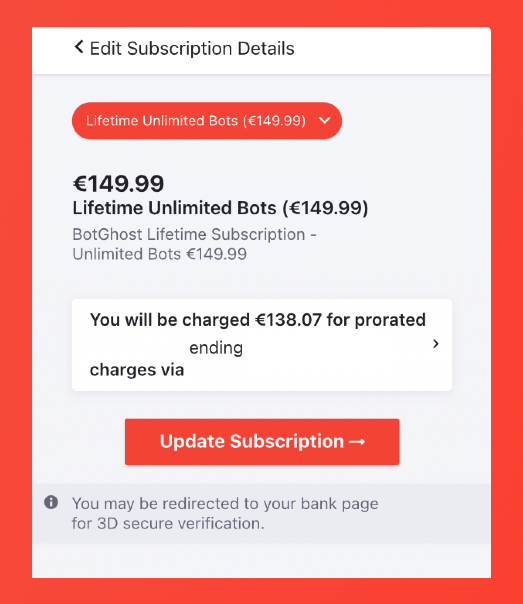
<figure><img src="https://1937909199-files.gitbook.io/~/files/v0/b/gitbook-x-prod.appspot.com/o/spaces%2F-Lm_hW5MApY3J0lRhi0M%2Fuploads%2FBiW8X2XyHyDhJWcDUA7J%2FB21D1E15-F936-4435-AB15-2E9F54F6709E.png?alt=media&#x26;token=6f94661c-0714-4346-a082-1185aa823d4c" alt=""><figcaption></figcaption></figure>

7\. Click on 'update subscription'. You will now be redirected to your dashboard, if not, refresh your page. You can upgrade your bot(s) using your premium tokens in your BotGhost settings menu.

<figure><img src="https://1937909199-files.gitbook.io/~/files/v0/b/gitbook-x-prod.appspot.com/o/spaces%2F-Lm_hW5MApY3J0lRhi0M%2Fuploads%2FvqEG7zHpohsjWScFGAHS%2F347382A6-C1A5-4CF2-97C1-168F94CFC775.png?alt=media&#x26;token=5d6db57f-da54-46b9-9384-36aca4ac1792" alt=""><figcaption></figcaption></figure>

{% hint style="info" %}
Your current premium bot(s) will be changed back to basic when you change your subscription. You can upgrade them again through your settings menu.
{% endhint %}

{% hint style="info" %}
Do you have any issues or questions with your subscription? Head over to the [<mark style="color:blue;">**Billing & Subscription**</mark>](https://botghost.com/docs/~/changes/zT1fjHAwQ21lXOKdCcfT/support/billing-and-subscription) page.
{% endhint %}