# Advanced Practices

## How can I get a channel ID?

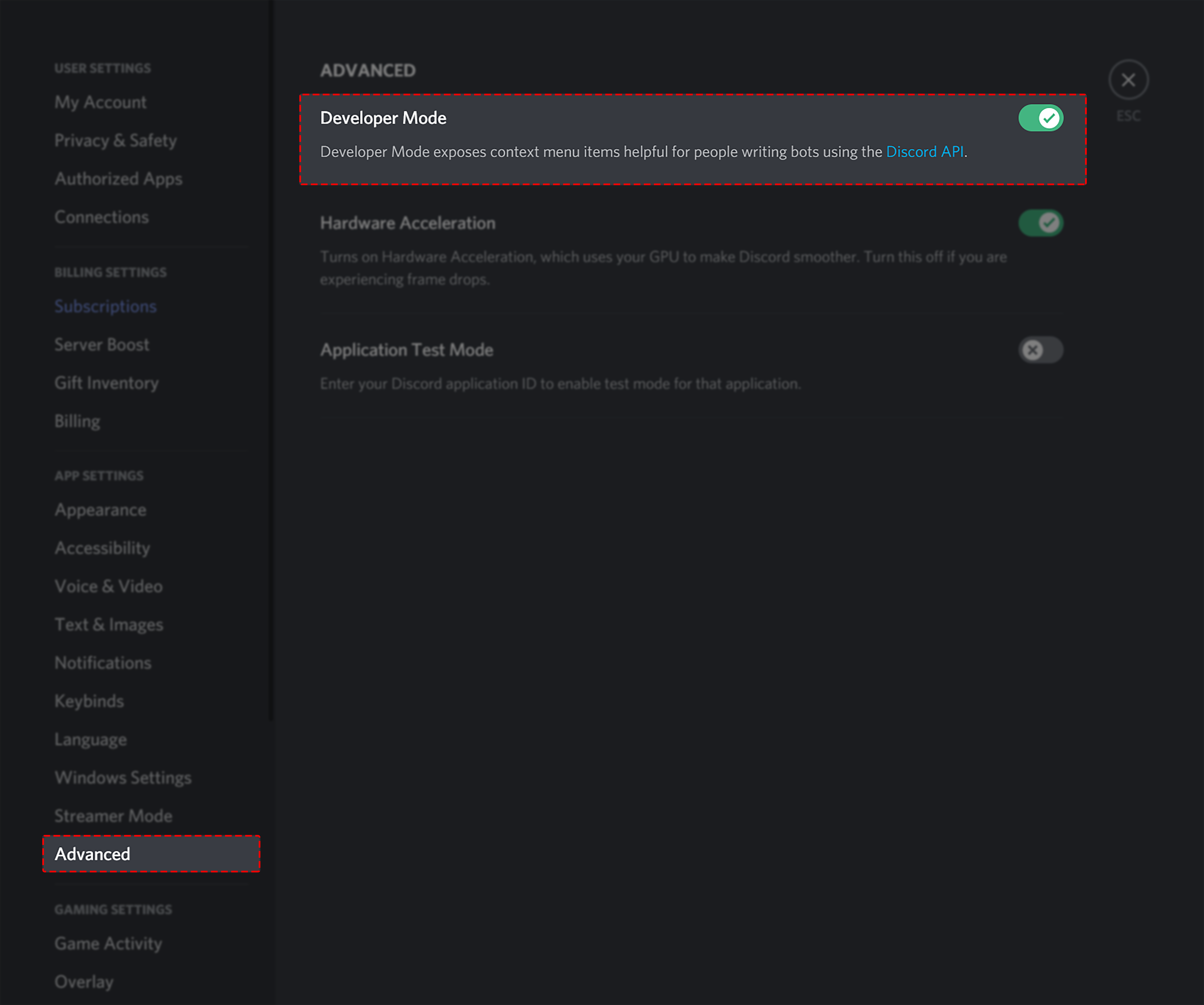
Firstly, head over to your settings page in the discord app/site. Here you will want to locate the developer mod setting which can be found via **User Settings > Advanced.**

<figure><img src="https://1937909199-files.gitbook.io/~/files/v0/b/gitbook-x-prod.appspot.com/o/spaces%2F-Lm_hW5MApY3J0lRhi0M%2Fuploads%2Fcn9JY3x3hfBdkm1ah2bi%2Fimage.png?alt=media&#x26;token=e60f828a-ea0b-40f9-a9fe-eee72cce83e9" alt=""><figcaption></figcaption></figure>

Next, head into your server and find the channel in which ID you would like to retrieve. From here simply right click on the channel **(PC)** to open the action menu. For mobile press and hold on the channel **(Mobile)**.

**PC/Desktop**

![PC/Desktop](https://1937909199-files.gitbook.io/~/files/v0/b/gitbook-x-prod.appspot.com/o/spaces%2F-Lm_hW5MApY3J0lRhi0M%2Fuploads%2FDmWDKIgfI9SQwOilfd5w%2Fimage.png?alt=media\&token=971c4a91-0a6e-4762-b8bf-281bcf56f9b6)

**Mobile Users**

![Mobile](https://1937909199-files.gitbook.io/~/files/v0/b/gitbook-x-prod.appspot.com/o/spaces%2F-Lm_hW5MApY3J0lRhi0M%2Fuploads%2FM2dy2deN0fQqcWNbjOjm%2Fimage.png?alt=media\&token=2672d1ff-2516-497b-8a23-ddfc9db1dce4)

Simply press '**Copy Channel ID**' and you will now have the channels ID saved to your clipboard, you can paste this ID anywhere!

## How can I get my bots ID/a user ID?

Firstly, head over to your settings page in the discord app/site. Here you will want to locate the developer mod setting which can be found via **User Settings > Advanced.**

<figure><img src="https://1937909199-files.gitbook.io/~/files/v0/b/gitbook-x-prod.appspot.com/o/spaces%2F-Lm_hW5MApY3J0lRhi0M%2Fuploads%2FIkpigvA6EC1y86K6DQdt%2Fimage.png?alt=media&#x26;token=2d2cb85d-fa98-4447-9214-cc04404d24d8" alt=""><figcaption></figcaption></figure>

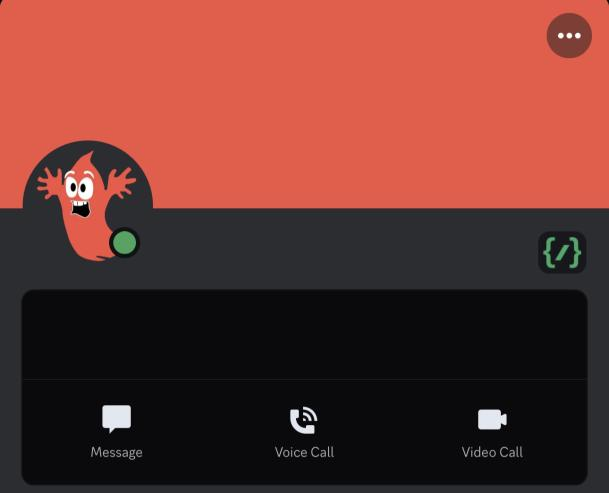
Next, find the user/bot who's ID you wish to get and right click on their username **(pc)** or press on their username and hit the 3 dots in the users profile **(mobile)**.

**PC/Desktop Users**

![](https://1937909199-files.gitbook.io/~/files/v0/b/gitbook-x-prod.appspot.com/o/spaces%2F-Lm_hW5MApY3J0lRhi0M%2Fuploads%2F9qg83vaijK2qmYHU86iM%2Fimage.png?alt=media\&token=bffd2b79-74d6-4924-b814-37bbba64ab47)![](https://1937909199-files.gitbook.io/~/files/v0/b/gitbook-x-prod.appspot.com/o/spaces%2F-Lm_hW5MApY3J0lRhi0M%2Fuploads%2FfHQfA3yEo01dliDIDXd5%2Fimage.png?alt=media\&token=6a98c7ea-d252-42a5-81ce-a7df0cd6b2f9)

\
**Mobile Users**

<img src="https://1937909199-files.gitbook.io/~/files/v0/b/gitbook-x-prod.appspot.com/o/spaces%2F-Lm_hW5MApY3J0lRhi0M%2Fuploads%2F9BHiI4cLlFN4KoUzHH4o%2Fimage.png?alt=media&#x26;token=18d077ac-ec62-4a1e-81bd-6439ed1ff6f6" alt="" data-size="original">![](https://1937909199-files.gitbook.io/~/files/v0/b/gitbook-x-prod.appspot.com/o/spaces%2F-Lm_hW5MApY3J0lRhi0M%2Fuploads%2FoxoS8Cy2LvKhpFAG1PeR%2Fimage.png?alt=media\&token=9b164a89-d642-4a44-afe4-7bb31d00a07f)

Next, find the user/bot who's ID you wish to get and right click on their username (pc) or press on their username and hit the 3 dots in the users profile (mobile).

Finally, select '**Copy User ID'**. Now you can paste the users/bots ID anywhere you need!

## How can I get a custom emoji's ID?

* Firstly, add the custom emoji you want to use into your message bar
* Move your cursor behind the selected emoji
* Add a backslash **\\** behind the emoji
* Send the message
* Copy the **numbers** from the returned format<br>

<figure><img src="https://i.imgur.com/6fg3QQF.gif" alt=""><figcaption><p>How to copy an emoji ID</p></figcaption></figure>
