# Direct Message a User

Send either a plain text or embed direct message to a server member.

{% hint style="warning" %}
To receive a direct message, the user must have Direct Messages enabled.
{% endhint %}

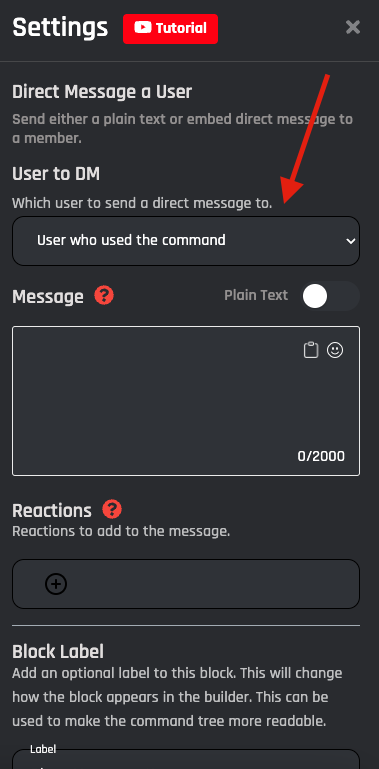
## User to DM

Which user to send a direct message to.

| Action                      | Response                                                                                |
| --------------------------- | --------------------------------------------------------------------------------------- |
| Member who used the command | DM the executor of the command.                                                         |
| Member Option               | The member option you want to DM. You need to have a user option added to this command. |
| Member ID                   | The Discord user ID of the user that you want to DM                                     |

<figure><img src="https://1937909199-files.gitbook.io/~/files/v0/b/gitbook-x-prod.appspot.com/o/spaces%2F-Lm_hW5MApY3J0lRhi0M%2Fuploads%2FQ2rb77lhB1yggob57l9x%2FScreenshot%202023-02-08%20at%209.18.56%20AM.png?alt=media&#x26;token=5761b14d-df01-40d3-b214-55377f7d2151" alt=""><figcaption></figcaption></figure>

## Message

The message you'd like to DM to the user.&#x20;

## Plain Text Reply

### Content

The content of the action is the actual message that the bot should reply with when the action is triggered. You can use any variable or option in the content of this reply. These can be easily added through the variable selector by clicking the **Clipboard** button.

<figure><img src="https://1937909199-files.gitbook.io/~/files/v0/b/gitbook-x-prod.appspot.com/o/spaces%2F-Lm_hW5MApY3J0lRhi0M%2Fuploads%2F9rfExVsXgN1YIZgYNFxk%2FScreenshot%202023-02-08%20at%209.19.14%20AM.png?alt=media&#x26;token=c217b5d0-73d5-44ae-a849-a9ad20daa2d3" alt=""><figcaption></figcaption></figure>

## Embed Reply

When triggered, the action responds with an embedded plain text message. All variables and options can be used in the content of the reply.

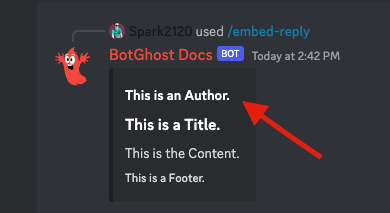
### Author

The author is displayed in the top left of the embed. This can be the author who used the command or any information you wish to display.

<figure><img src="https://1937909199-files.gitbook.io/~/files/v0/b/gitbook-x-prod.appspot.com/o/spaces%2F-Lm_hW5MApY3J0lRhi0M%2Fuploads%2F8tHMF7eef0Vh87BU4SQi%2Fimage.png?alt=media&#x26;token=7b867685-e8a4-48af-9f69-a8a12051d142" alt=""><figcaption></figcaption></figure>

### Thumbnail URL

You can include a thumbnail embedded into the Embed Reply. This will display in the top right of the Embed.&#x20;

<figure><img src="https://1937909199-files.gitbook.io/~/files/v0/b/gitbook-x-prod.appspot.com/o/spaces%2F-Lm_hW5MApY3J0lRhi0M%2Fuploads%2FHfr7inarKoo1H4DVCBnk%2Fimage.png?alt=media&#x26;token=354eb767-d154-4c1d-97ea-b2091808a0ac" alt=""><figcaption></figcaption></figure>

### Title

This is the title you wish to display in your Embed Reply. This will be centered above your Content Block.

<figure><img src="https://1937909199-files.gitbook.io/~/files/v0/b/gitbook-x-prod.appspot.com/o/spaces%2F-Lm_hW5MApY3J0lRhi0M%2Fuploads%2FI3XsONO4M1vrq6V13vlX%2Fimage.png?alt=media&#x26;token=fb522210-e05f-4367-8bb8-8a07ec6bf80f" alt=""><figcaption></figcaption></figure>

### Content

The content of the action is the actual message that the bot should reply with when the action is triggered. You can use any variable or option in the content of this reply. These can be easily added through the variable selector by clicking the **Clipboard** button.

<figure><img src="https://1937909199-files.gitbook.io/~/files/v0/b/gitbook-x-prod.appspot.com/o/spaces%2F-Lm_hW5MApY3J0lRhi0M%2Fuploads%2Fuq3hZKn3ibrQW2eWFvh8%2Fimage.png?alt=media&#x26;token=2a29a77b-b76b-49b8-ac7f-2572373cd7f7" alt=""><figcaption></figcaption></figure>

### Image URL

This will display an image in full view under the Content Block.

<figure><img src="https://1937909199-files.gitbook.io/~/files/v0/b/gitbook-x-prod.appspot.com/o/spaces%2F-Lm_hW5MApY3J0lRhi0M%2Fuploads%2FkAq2iBYIGxbypuIJwLMg%2Fimage.png?alt=media&#x26;token=77f5a325-a433-4fa8-857f-d9bbb43572f4" alt=""><figcaption></figcaption></figure>

### Footer

This is the small text at the bottom left of the embed.

<figure><img src="https://1937909199-files.gitbook.io/~/files/v0/b/gitbook-x-prod.appspot.com/o/spaces%2F-Lm_hW5MApY3J0lRhi0M%2Fuploads%2FKMuLJWScDGzJFnXkKENH%2Fimage.png?alt=media&#x26;token=c676807c-7e67-4f3f-a607-6f7048ee25a8" alt=""><figcaption></figcaption></figure>

### Embed URL

This will display the Title of the embed in blue text, you can click this to open an external page or image.

<figure><img src="https://1937909199-files.gitbook.io/~/files/v0/b/gitbook-x-prod.appspot.com/o/spaces%2F-Lm_hW5MApY3J0lRhi0M%2Fuploads%2Fs2mnTUq138Mxu2qqabuT%2Fimage.png?alt=media&#x26;token=c833a511-110d-4816-888e-48fb67038213" alt=""><figcaption></figcaption></figure>

### Color

This is the color shown on the Left Side of the Embed Reply.![](https://1937909199-files.gitbook.io/~/files/v0/b/gitbook-x-prod.appspot.com/o/spaces%2F-Lm_hW5MApY3J0lRhi0M%2Fuploads%2Fv14qG5jIj1jOFGDV3Nnx%2Fimage.png?alt=media\&token=74aa2371-fb27-4456-bb8a-c56a295a0b10)

## Reactions

Reactions can also be added to the Direct Message a user action. These can be added by clicking the reactions dropdown and selecting emojis.&#x20;

<figure><img src="https://1937909199-files.gitbook.io/~/files/v0/b/gitbook-x-prod.appspot.com/o/spaces%2F-Lm_hW5MApY3J0lRhi0M%2Fuploads%2FaNPFKBDvjXYRfTpTrmTW%2FScreenshot%202023-02-08%20at%209.30.19%20AM.png?alt=media&#x26;token=eef72989-242d-4fb4-aed1-2d78125edf7b" alt=""><figcaption></figcaption></figure>

<figure><img src="https://1937909199-files.gitbook.io/~/files/v0/b/gitbook-x-prod.appspot.com/o/spaces%2F-Lm_hW5MApY3J0lRhi0M%2Fuploads%2FPeTuNGOTL8Yo2d1fv3LI%2FScreenshot%202023-02-01%20at%202.10.43%20PM.png?alt=media&#x26;token=2bfde49d-88dd-4cad-b77b-734c77bdba26" alt=""><figcaption></figcaption></figure>

{% hint style="warning" %}
To receive a direct message, the user must have Direct Messages enabled.
{% endhint %}