# Delete Variable

Deletes the value of a variable. This will not incur a data storage call.

## Custom Variable

The Custom Variable to run the equation on.

From the drop-down menu, you can choose the variable you want to set the value of. Want to create a custom variable? See [data-storage](https://botghost.com/docs/~/changes/zT1fjHAwQ21lXOKdCcfT/data-storage "mention").

<figure><img src="https://1937909199-files.gitbook.io/~/files/v0/b/gitbook-x-prod.appspot.com/o/spaces%2F-Lm_hW5MApY3J0lRhi0M%2Fuploads%2FvPAW9f8YcN7oz0v971Fu%2F64165C96-5C8C-433F-8DA1-CF8F505AD4CD.jpeg?alt=media&#x26;token=84066c31-e38a-4241-baf1-c1d1070c68ce" alt=""><figcaption></figcaption></figure>

### User Target

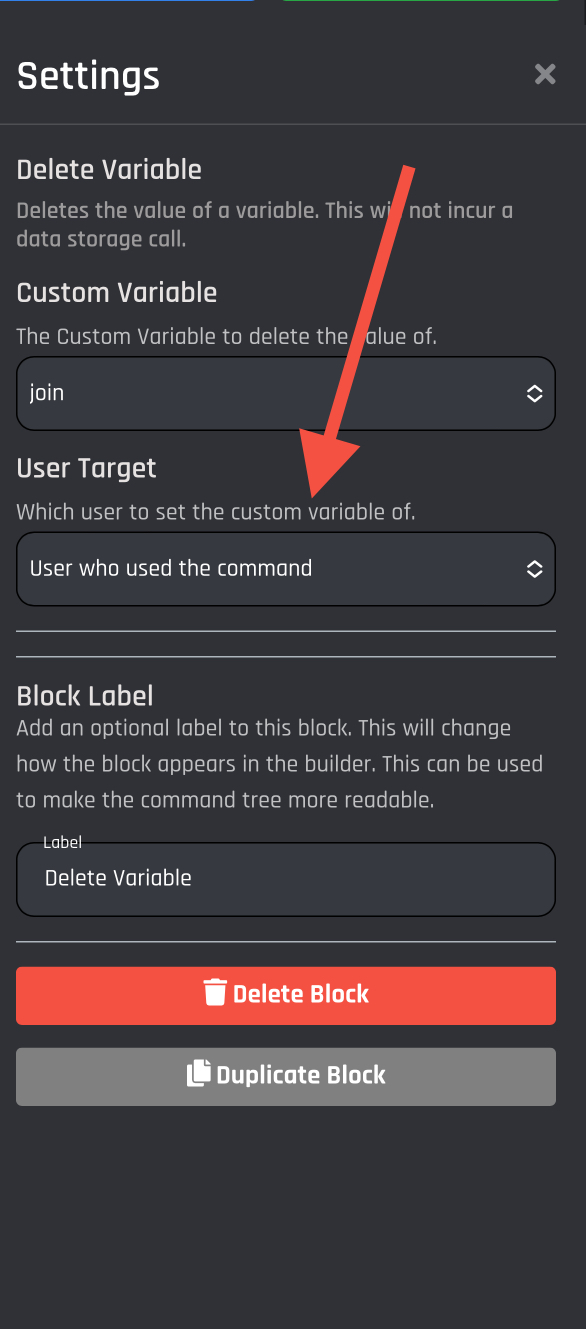
If it‘s a User defined variable, you will select a User Target.

<table><thead><tr><th>Action</th><th>Response</th><th data-hidden>fd</th></tr></thead><tbody><tr><td>User who used the command</td><td>Applies the value of the Set Variable action to the executor of the command.</td><td></td></tr><tr><td>User option</td><td>Applies the value of the Set Variable action to the User Option within the command. You can use option variables, but also normal variables for this. </td><td></td></tr><tr><td>User ID</td><td>Applies the value of the Set Variable action to the user by using the User's Discord ID.</td><td></td></tr></tbody></table>

<figure><img src="https://1937909199-files.gitbook.io/~/files/v0/b/gitbook-x-prod.appspot.com/o/spaces%2F-Lm_hW5MApY3J0lRhi0M%2Fuploads%2Fvj3ElQUkFSxQtmWpq7eK%2FD9D30F61-6182-4147-BB6E-36B26EFE3E5D.jpeg?alt=media&#x26;token=105a8162-3566-437d-951a-e479c29a5221" alt=""><figcaption></figcaption></figure>

Attaching this block to the Command Tree will delete the value of the variable upon executing the slash command. Want to delete the variable itself? See [data-storage](https://botghost.com/docs/~/changes/zT1fjHAwQ21lXOKdCcfT/data-storage/data-storage "mention").

<figure><img src="https://1937909199-files.gitbook.io/~/files/v0/b/gitbook-x-prod.appspot.com/o/spaces%2F-Lm_hW5MApY3J0lRhi0M%2Fuploads%2FO9XD9BJQHF667etMk1gu%2F137A2B52-4CD3-40A6-AB28-5029777D4FB4.jpeg?alt=media&#x26;token=5c76d314-443e-45fd-b5cb-404e56ac870d" alt=""><figcaption></figcaption></figure>

**Delete All values for Delete Variable:** The delete all option lets you clear all values of user and channel variables.