# Add Roles

## Add Roles to a Member

Add one or more roles to a server member. You can use a set role or Role Option. The member can be set or a User option.

## Member

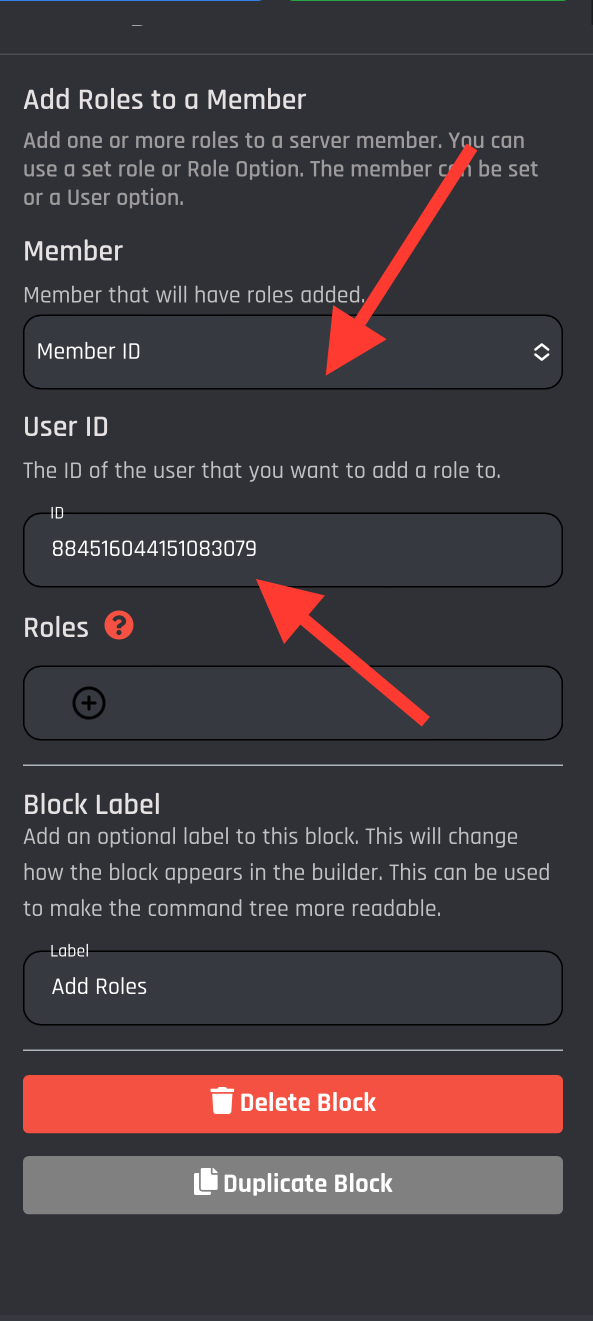
Member that will have roles added. This can be one of the following:

| Action                      | Response                                                                                          |
| --------------------------- | ------------------------------------------------------------------------------------------------- |
| Member who used the command | Apply the role to the executor of the command.                                                    |
| Member Option               | The member option you want to add roles to. You need to have a user option added to this command. |
| Member ID                   | The Discord ID of the user that you want to add a role to.                                        |

### Member who used the command

<figure><img src="https://1937909199-files.gitbook.io/~/files/v0/b/gitbook-x-prod.appspot.com/o/spaces%2F-Lm_hW5MApY3J0lRhi0M%2Fuploads%2FbLMIjEa3fdfWuGdqfIv6%2FCF88D638-890C-483A-9758-FBA3894A56CB.jpeg?alt=media&#x26;token=05b2e6e0-f036-4322-9cbb-0328efce0ffa" alt=""><figcaption></figcaption></figure>

### Member Option

<figure><img src="https://1937909199-files.gitbook.io/~/files/v0/b/gitbook-x-prod.appspot.com/o/spaces%2F-Lm_hW5MApY3J0lRhi0M%2Fuploads%2FTS9KRdE8HNrffse4fGRU%2F386ED72C-EC69-474C-82F8-8CC48873065C.jpeg?alt=media&#x26;token=4716be61-5253-4b0a-b4a2-950ef8f470dc" alt=""><figcaption></figcaption></figure>

### Member ID

<figure><img src="https://1937909199-files.gitbook.io/~/files/v0/b/gitbook-x-prod.appspot.com/o/spaces%2F-Lm_hW5MApY3J0lRhi0M%2Fuploads%2F0VJZjgmEXmmnI1Eaza0a%2F770173E9-D601-430C-BF35-38526D1B39B7.jpeg?alt=media&#x26;token=40d5d3d1-f803-4a31-82d8-f4a66de8f037" alt=""><figcaption></figcaption></figure>

## Roles

Use this to select the server roles you want to remove from the user. Not seeing roles? Click the refresh button shown below:

<figure><img src="https://1937909199-files.gitbook.io/~/files/v0/b/gitbook-x-prod.appspot.com/o/spaces%2F-Lm_hW5MApY3J0lRhi0M%2Fuploads%2FEm8N9Wy7fO6Rm9u7DRN4%2F718EBB6E-332D-4891-84D8-AEF3A74D04A2.jpeg?alt=media&#x26;token=a391d3ab-37b8-4c0c-9d0e-2f1955561147" alt=""><figcaption></figcaption></figure>

Select from the list the roles you would like to add to the user.

<figure><img src="https://1937909199-files.gitbook.io/~/files/v0/b/gitbook-x-prod.appspot.com/o/spaces%2F-Lm_hW5MApY3J0lRhi0M%2Fuploads%2FMRs8n5kpmhfddHE3lb0k%2FABA944EA-A1EF-4EA6-A5A7-D6DA870904F5.jpeg?alt=media&#x26;token=b5932f71-cd22-43f0-b01c-f0ce1cd78107" alt=""><figcaption></figcaption></figure>

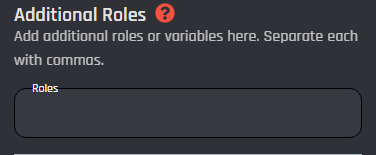
### **Additional Roles**

Here you can Add additional roles or variables here. Separate each with commas. (ex. {BGVAR\_example}, {BGVAR\_example}, 890451406539092019)

<figure><img src="https://1937909199-files.gitbook.io/~/files/v0/b/gitbook-x-prod.appspot.com/o/spaces%2F-Lm_hW5MApY3J0lRhi0M%2Fuploads%2FadYFW4TnX8SuRdRfHBan%2Fimage.png?alt=media&#x26;token=fc05a9e0-0149-46ea-86d6-9b0fac2ff0c8" alt=""><figcaption></figcaption></figure>

{% hint style="warning" %}
The bot must have the Manage Roles permission and a higher position than the role your trying to assign via the bot.
{% endhint %}