# Image Generation
The image generation module allows users to trigger a command to send a request to the Dall-E API to generate a imaged based off of the prompts the user inputs while using the command. You can configure the module on the dashboard by heading to the modules section and finding the '[Image Generation](https://dashboard.botghost.com/dashboard/module/fab3a781-88c6-4bd6-9db0-6c2f68b36931/imagegeneration)' module.
### Settings
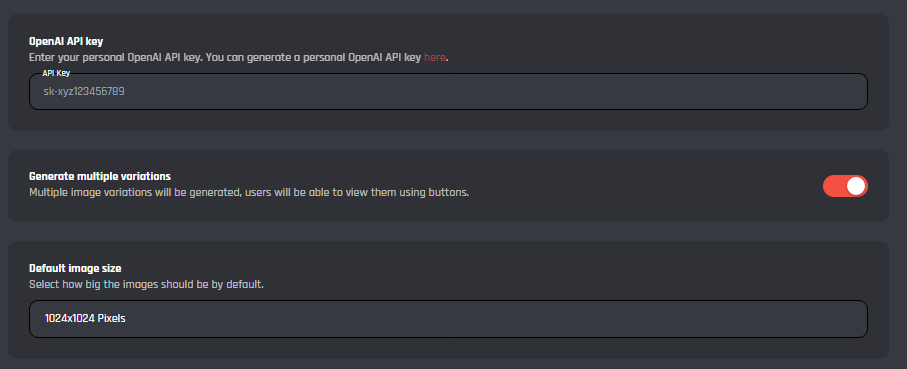
Here you can configure the main settings for the image generation module.
**OpenAI API Key:** Here you will need to enter your OpenAI API key to be able to use the module, you can follow this guide [here](https://platform.openai.com/docs/api-reference/authentication). To generate your own API key.
**Generate Multiple Variations:** Here you can enable/disable the option for the bot to generate multiple variations of the image, this will allow you to see multiple versions with one trigger.
Default Image Size: Here you can change the default image size the bot generates, the default size is set at **1024x1024 Pixels** but can be changed to the following:
* 1024x1024 Pixels
* 512x512 Pixels
* 256x256 Pixels
### Commands
Here you can configure the command that sends the trigger to the Dall-E API to generate the images.
**/Imagine:** Upon being triggered this command generates the image/images based upon the prompts you submit, here you can edit the command to add additional features or expand on the base module.
{% hint style="danger" %}
**Warning:** it's advised that you do not edit the command unless you have a good understanding of BotGhost and the Custom Command Builder. You can always reset the module to default if you should happen to make a mistake while editing the command.

{% endhint %}